Wallets / Wallet trackers
KeySmart SmartCard Review: A Card-Thin Apple Find My Tracker for Your Wallet, What It Does Well and the Claims to Ignore
A rechargeable card-sized tracker that shows up in Apple's Find My app, with no subscription. It works well for iPhone owners, but it is iPhone-only and the return terms are strict.

By Alex Carter, Senior Tech Reviewer at Top10Gadgets
Updated 26 min readHow we test
Quick answer
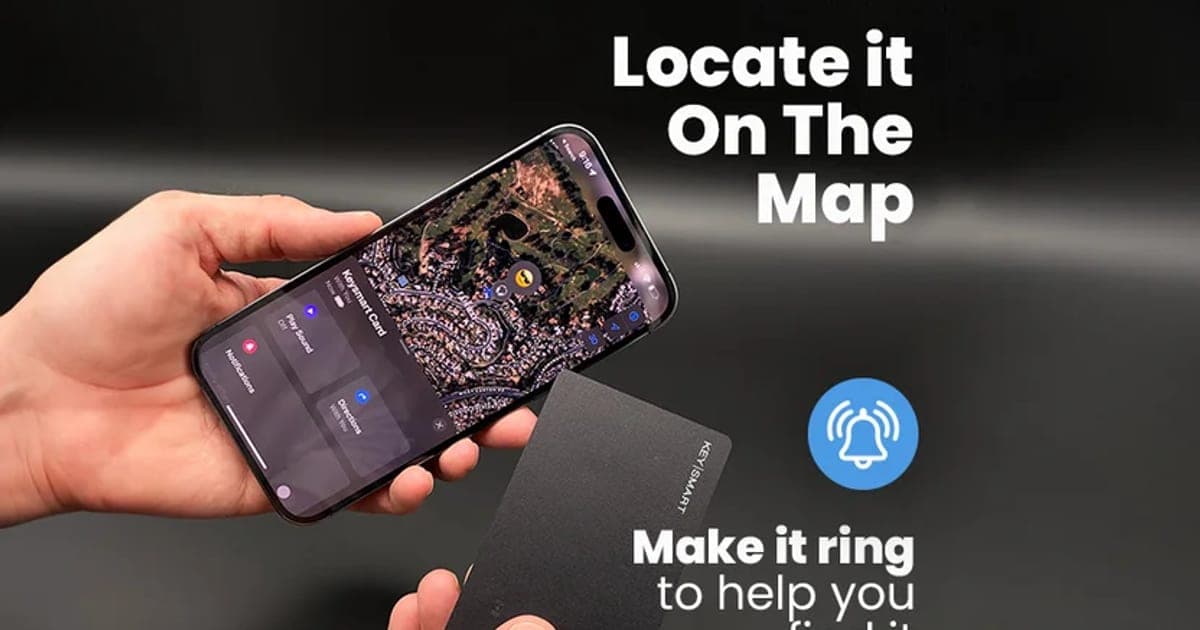
Yes, if you carry an iPhone and want a tracker that disappears into your wallet. The KeySmart SmartCard is a genuine Apple Find My accessory about 2 mm thin, with left-behind alerts, a ring-to-find speaker, waterproofing and a battery you recharge on a wireless charger every few months.
Score 5.3/10$34.95 at KeySmart
Check price at KeySmart (opens KeySmart in a new tab)We may earn a commission if you buy through our links.
- Best for
- iPhone owners who want to find a lost wallet, bag or passport
- Not for
- Android phone users
$34.95 at KeySmart
Check price at KeySmart (opens KeySmart in a new tab)We may earn a commission if you buy through our links.
On this page · 12 sections
- 01Our verdict
- 02The short version
- 03Pros & cons
- 04How it works
- 05Who it's for
- 06Are SmartCard's claims accurate?
- 07How much does SmartCard cost, and where is it cheaper?
- 08Is SmartCard better than an AirTag or a Tile Slim?
- 09Is SmartCard legit, and what should you check before buying?
- 10How did we score SmartCard?
- 11How to use SmartCard for the best results
- 12Frequently asked questions
Our verdict
Yes, if you carry an iPhone and want a tracker that disappears into your wallet. The KeySmart SmartCard is a genuine Apple Find My accessory about 2 mm thin, with left-behind alerts, a ring-to-find speaker, waterproofing and a battery you recharge on a wireless charger every few months. It is a sensible buy for iPhone owners. Android users cannot use this version, the FAQ's "jet engine" loudness and "no questions asked" refund are both exaggerated, and you pay return postage. SmartCard scores 5.3 out of 10, held back by those caveats.
The short version
- What it is: a credit-card-sized Bluetooth tracker that works inside Apple's Find My app.
- Price: $34.95 plus shipping for one on 4 October 2026, with multi-packs from $89.90 for three.
- Best trait: AirTag-style tracking in a shape that actually fits a wallet.
- Biggest drawback: iPhone-only, and some page claims overstate what it does.
- Our score: 5.3 out of 10.
Pros & cons
The pros come from Apple's Find My network and the card design. The cons are about compatibility, exaggerated claims and the return terms.
What we like
- Works with Apple's Find My network, so nearby iPhones can report its location almost anywhere
- About 2 mm thin, so it fits in a wallet card slot
- Rechargeable by Qi wireless charger, lasting up to five months per charge, according to KeySmart
- Waterproof, surviving an hour in 1 metre of water, according to the page
- No subscription, app download or account beyond your Apple ID
What we don't
- This offer works only with Apple devices; Android users cannot track it
- The FAQ calls the alarm 'almost as loud as a jet engine', but the spec graphic lists a 75 dB speaker
- The FAQ says 'no questions asked', but the return policy has you pay return postage and refunds only the product value
- Shipping is extra on a single card, and the same card has been sold for $31.99 on deal sites
- Card trackers can be found and removed by a thief, like any tracker
Sold by KeySmart
SmartCard by KeySmart$34.95
How it works
The SmartCard is a thin Bluetooth beacon. It does not have GPS or a mobile connection. Instead, it sends out a small, encrypted Bluetooth signal. Any iPhone, iPad or Mac nearby that uses Apple's Find My network can pick up that signal and report the card's location anonymously to Apple, which shows it to you on a map. Because there are hundreds of millions of Apple devices, a card in a busy area can often be located even when you are far away.
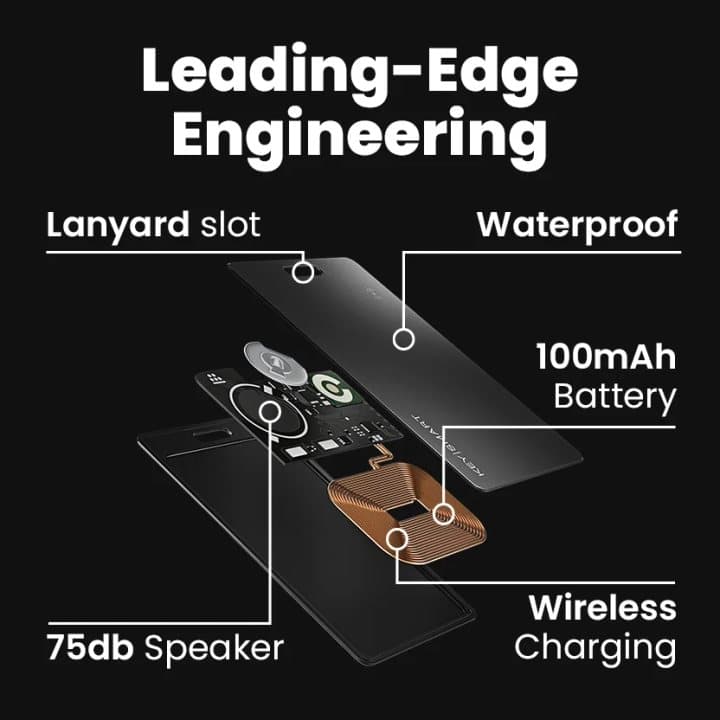
KeySmart's spec graphic shows what is inside: a 100 mAh rechargeable battery, a 75 dB speaker, a wireless charging coil, a waterproof shell and a lanyard slot. The page says it is thinner than two credit cards stacked together.
Add it to Find My
Step 1: Charge the card on a Qi wireless charger, then open the Find My app on your iPhone, tap to add an item and follow the prompts. No separate app or account is needed.
Slip it into your wallet or bag
Step 2: Put the card in a wallet slot, passport holder, bag pocket or luggage tag. It sends a secure Bluetooth signal that your iPhone and other Apple devices can detect.
Find it, ring it or get alerted
Step 3: See it on the Find My map, make it play a sound when it is nearby, turn on alerts for when you leave it behind, or switch on Lost Mode with your contact details.
Why a card shape matters
Wallets are designed around cards. Anything thicker or round pushes the leather out of shape, rubs through linings and makes the wallet uncomfortable in a back pocket. A card-shaped tracker sits in the same space as a bank card, so most people forget it is there. That is the main reason to choose SmartCard over an AirTag for a wallet.
Find My network, explained
Apple opened its Find My network to other companies through its accessory programme. Approved accessories, like SmartCard, appear in the Items tab of the Find My app beside AirTags. Location reports are encrypted end to end, so Apple says it cannot see where your items are. This is the same network that makes AirTags useful.
Left-behind alerts
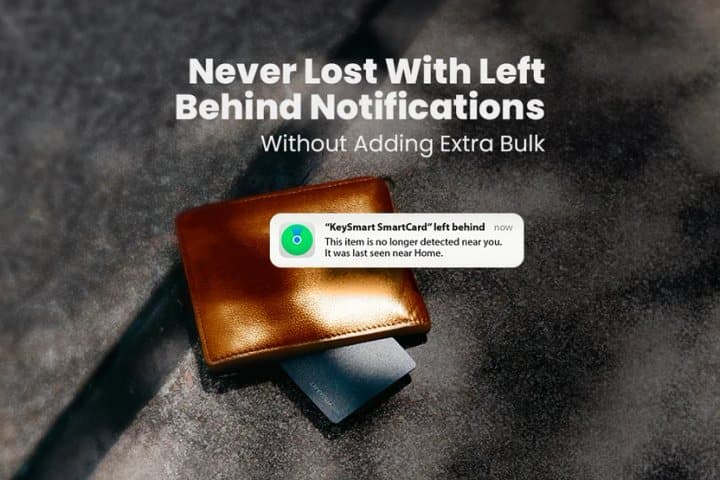
Find My can notify you on your iPhone, Apple Watch or AirPods when you leave an item behind, and you can set trusted locations, such as home, where you do not want alerts. The page says SmartCard supports these notifications. This feature is what stops many wallets being lost in the first place.
Lost Mode
If the card goes missing, Lost Mode lets you add a message and phone number, and the page says it shares that contact information with anyone who finds your card. You get a notification when the card is next located.
Wireless charging
Most card trackers have a sealed battery that dies after a year or three, after which you throw the card away. SmartCard charges on any Qi wireless charger, the same type built into many phone stands and car mounts. KeySmart says a charge lasts up to five months.
Who it's for
SmartCard suits iPhone owners who misplace wallets, bags or passports and want a tracker that does not create a lump. It suits travellers who want something in luggage and document wallets. It does not suit Android users, anyone hoping it will reliably recover a stolen wallet, or people who would rather never charge a tracker.
- iPhone owners who want to find a lost wallet, bag or passport
- People who prefer a flat card to a round AirTag
- Travellers who want a tracker in luggage and documents
Why SmartCard appeals
AirTags made item tracking mainstream, but they are round and about 8 mm thick, which is awkward in a slim wallet. A tracker the shape of a credit card solves that. SmartCard also adds wireless charging, which suits people who dislike replacing coin batteries, and it uses Apple's own app, so setup takes seconds.
iPhone owners who lose their wallet
The most common lost-wallet scenario is leaving it on a café table, in a taxi or at a friend's house. A left-behind alert on your phone or watch often catches that within a minute or two. If you do not notice, the Find My map shows where it was last reported.
Travellers
A card in a passport wallet or the inside pocket of a suitcase lets you see whether your bag made it onto the plane or is still at the hotel. Airlines generally allow small tracker devices in checked and carry-on luggage. A thin card is easier to tuck into a document folder than an AirTag.
Commuters
Commuters juggle transit cards, keys and phones on crowded trains and buses. A left-behind alert as you step off can save a wallet. Pair the alert with your Apple Watch if you have one, since a tap on the wrist is harder to miss than a phone notification in a bag.
Business travellers
Business travellers often carry a separate wallet for corporate cards or a passport holder. A card tracker in each, with clear names in Find My, makes it easy to see that everything is with you before you leave a hotel room.
Families
Find My supports item sharing, so up to five people can see the same item's location, according to Apple. The page shows shared tracking for groups. That suits families sharing a car key wallet or a child's school bag. Note that very young children should not carry trackers they can lose or misuse.
Minimalist wallet users
Slim card holders and aluminium wallets have little spare space. A card-thin tracker is often the only kind that fits. One of the page's photos shows SmartCard in an RFID card wallet, which matters because some metal wallets can weaken Bluetooth signals.
Runners and cyclists
People who carry a key card, ID or bank card on runs and rides can slip a SmartCard into a phone case pocket or running belt. If you run with your phone, it also helps you find the belt or bag you left at the gym. Our RUNNR Active review covers running shorts built to carry a phone and essentials.
Gift buyers
SmartCard makes a practical gift for an iPhone owner who loses things, and it needs no subscription. Check the person uses an iPhone first. For a more personal gift, our Artkive review looks at a service that turns children's artwork into books.
Students
Students often carry ID cards, bank cards and transit passes in one wallet, and losing it is disruptive. A SmartCard in that wallet, with a left-behind alert, helps on busy campuses. Shared tracking can also let a parent see the wallet's location if the student agrees.
People with older iPhones
Find My items need a reasonably recent version of iOS. Very old iPhones that cannot update may not support third-party Find My accessories or left-behind alerts. Check your iOS version before buying.
Who should skip it
Skip SmartCard if you use an Android phone, since this version only works with Apple devices. Skip it if you mainly want to recover stolen property, because trackers are easy for a thief to remove. Skip it if you will forget to charge it every few months. And skip it if price is your priority, since the same card has been sold for less on deal sites.
- Android phone users
- Anyone hoping to recover a stolen wallet reliably
- People who would rather never recharge a tracker
- Buyers who want the lowest price, since deals elsewhere have been lower
Are SmartCard's claims accurate?
Mostly, apart from a few exaggerations in the FAQ. The core claims, Apple Find My compatibility, a card-thin shape, wireless charging, five-month battery life and waterproofing, match KeySmart's own spec graphics and independent deal listings. But the FAQ calls the alarm "almost as loud as a jet engine" while the spec graphic lists 75 dB, and says the card is "the #1 foolproof way" to never lose a wallet, which no tracker can promise.
"The World's Thinnest Tracker"
The page and graphics describe it as thinner than two credit cards, about 2 mm. That is very thin for a rechargeable tracker. Whether it is the thinnest in the world is hard to verify, since several card trackers are similarly slim.
"Almost as loud as a jet engine"
A jet engine at close range is well over 120 dB. KeySmart's own diagram labels the speaker at 75 dB, which is roughly the level of a vacuum cleaner. That is loud enough to hear in a quiet room or under a sofa cushion, but not in a noisy street, and nothing like a jet engine.
What this means for you: expect a clear chirp for finding the card nearby, not an alarm that will stop a thief.
"Lasts up to 5 months on a single charge"
Battery life depends on how often the card is detected and how often you ring it. Five months is plausible for a 100 mAh battery in a Bluetooth beacon. Find My shows a low-battery warning, so you get notice before it dies. Some deal listings for newer versions mention up to eight months.
"Waterproof & Ready for Adventure"
The page says it survives an hour in 1 metre of water, which matches what is often described as an IPX8 rating. That covers spills, rain and a fall into a pool. It is not designed for diving, and the charging coil and battery are sealed inside, so there are no ports to dry.
"Thinner than 2 credit cards" and wallet fit
At around 2 mm, it is thicker than one bank card, so very tight card slots may stretch. A slim wallet's main compartment or a dedicated slot usually works best.
"Lost Mode helps you get it back"
Lost Mode is a Find My feature that marks an item as lost, notifies you when it is located and lets you share contact details. It helps honest finders return items. It does not lock or disable anything, and a dishonest finder can simply discard the card.
"No monthly subscriptions required"
True. Find My is free for Apple users, and no KeySmart app or account is needed.
"Can the SmartCard really prevent me from losing my wallet?"
The FAQ answers yes, calling it "the #1 foolproof way". Left-behind alerts help a great deal, but they depend on your phone's settings, location permissions and Bluetooth being on, and they do not trigger instantly. A tracker reduces the chance of losing a wallet; it does not remove it.
"Shared tracking for groups"
The page shows two phones tracking the same card. Apple's item sharing lets the owner share an item with up to five people, who can then see it and play its sound. It is useful for families, but every sharer must use an Apple device.
"Works with RFID wallets"
A photo shows SmartCard in an RFID card wallet. RFID-blocking layers are designed to stop the short-range signals used by contactless cards, not Bluetooth, but thick metal can still weaken Bluetooth range. Test it in your wallet before relying on it.
"70,000+ people trust SmartCard"
The page claims more than 70,000 customers, 2,000-plus five-star reviews and a 97.2% satisfaction rating. We could not check these figures, and the reviews shown are collected by the seller.
Android support
The page's FAQ is clear that this SmartCard works only with Apple devices. Deal sites have described a third-generation KeySmart SmartCard that also works with Google's Find Hub for Android. The offer page does not say which generation it sells.
What to do: if you have an Android phone, do not buy from this page unless support confirms in writing that the card supports Google's Find Hub.
How much does SmartCard cost, and where is it cheaper?
On 4 October 2026, one SmartCard cost $34.95 plus shipping on the offer page, three cost $89.90, five cost $134.85 and seven cost $179.80, with free shipping on the multi-packs and the five-pack preselected. Deal sites have listed a single SmartCard at $31.99, and a three-pack between $69.97 and $89.99. There is no subscription, and the card is rechargeable, so there are no battery costs.
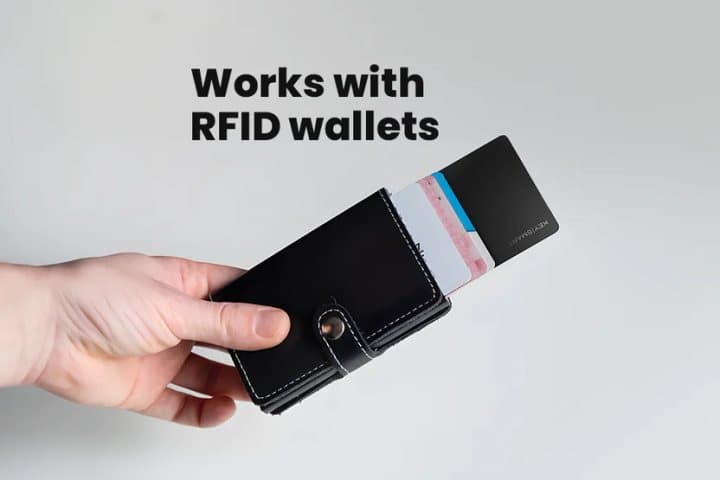
SmartCard in a slim card wallet
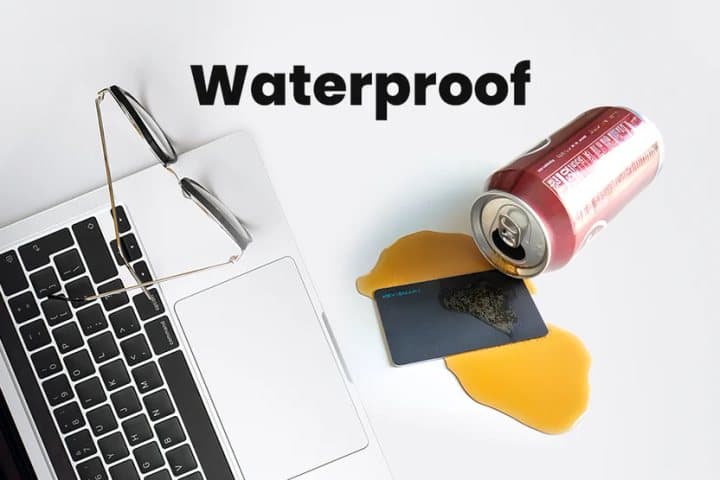
The waterproofing claim illustrated
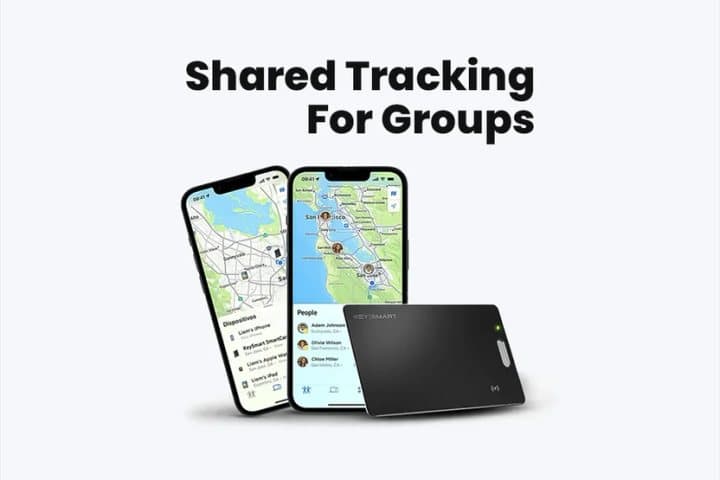
Shared tracking in Find My
SmartCard price and bundles
| Bundle | Price | Per card |
|---|---|---|
| 1 SmartCard | $34.95 plus shipping | $34.95 |
| 3 (buy 2, get 1 free) | $89.90 | About $29.97 |
| 5 (buy 3, get 2 free) | $134.85 | $26.97 |
| 7 (buy 4, get 3 free) | $179.80 | About $25.69 |
The page shows a crossed-out price of $44.95 for a single card. KeySmart's suggested price on deal sites has been $39.99 per card.
What the bundle images show
The bundle images on the page show stacks of identical black cards. The page offers no colour choice. The cards have a lanyard slot, so they can also hang from a keyring or zip pull if needed.
Deals elsewhere
Deal stores run by Macworld, Cult of Mac and other publishers have listed a single SmartCard at $31.99 and a three-pack at $69.97 to $89.99. Those deals change often, and some listings are for newer generations with Google Find Hub support.
What to do: compare the current price and generation on KeySmart's own site and deal sites before buying.
What competing trackers cost
Apple's AirTag lists at $29 each, or $99 for four, and needs a holder to attach to anything. Tile's Slim card tracker has a listed retail price of $33.99 and works on Tile's network with iPhone and Android. Several other brands sell Find My card trackers around $20 to $35.
Value for families
A family of four with iPhones could buy the five-pack for $134.85, giving each person a card for a wallet plus a spare for a passport or laptop bag. At about $27 per card, that is cheaper than four AirTags plus wallet holders, and every card sits flat.
Cost over time
A rechargeable card avoids replacement costs. Tile Slim's battery is sealed and lasts about three years, after which you replace the card. An AirTag needs a new CR2032 coin cell roughly once a year, which costs very little.
Shipping costs
The single card adds shipping at checkout, while multi-packs ship free. If the shipping charge is significant, a three-pack shared with family members may work out cheaper per card than buying one.
Multi-pack logic
Three cards cost $89.90, about $30 each. That suits a household tracking a wallet, a passport holder and a laptop bag, or a family where each person carries one. Beyond that, most people run out of flat things to track, and an AirTag may suit keys and bags better.
Who sells it
Returns on the offer page go to KeySmart at 860 Bonnie Lane, Elk Grove Village, Illinois 60007, with order support by email at Orders@MyKeySmart.com. KeySmart is an established brand known for its key organisers; our KeySmart review covers the original key holder.

SmartCard by KeySmartScore 5.3/10
Best for: iPhone owners who want to find a lost wallet, bag or passport
$34.95 at KeySmart · Price checked October 4, 2026
Check price at KeySmart (opens KeySmart in a new tab)We may earn a commission if you buy through our links.
Is SmartCard better than an AirTag or a Tile Slim?
For iPhone owners who want a tracker in a wallet, SmartCard is the better fit than an AirTag; for Android users, Tile Slim wins. SmartCard and AirTag share Apple's Find My network, but SmartCard is flat and rechargeable while an AirTag is round with a coin battery and adds Precision Finding on recent iPhones. Tile Slim works on both iPhone and Android, though Tile's network is smaller than Apple's.
| SmartCard | AirTag | Tile Slim | Louis Blanc Smart-Wallet | |
|---|---|---|---|---|
| Price seen | $34.95 plus shipping | $29 | $33.99 list | $89 |
| Network | Apple Find My | Apple Find My | Tile | Bluetooth only |
| Phones | iPhone only | iPhone only | iPhone and Android | iPhone and Android app |
| Shape | Card, about 2 mm | Disc, about 8 mm | Card, about 2.3 mm | Wallet with module |
| Battery | Rechargeable, up to 5 months | Coin cell, about 1 year | Sealed, about 3 years | Rechargeable, about 1 month |
| Precision Finding | No | Yes, on supported iPhones | No | No |
SmartCard vs AirTag
AirTags are Apple's own trackers. They are excellent on keys and bags, and Precision Finding uses ultra-wideband to point you to the exact spot. In a wallet, though, an AirTag adds a noticeable bulge unless you buy a special wallet. SmartCard's shape is the reason to choose it for wallets. For keys and bags, an AirTag is just as good and slightly cheaper.
SmartCard vs Tile Slim
Tile Slim is a card tracker on Tile's own network, which works with iPhone and Android through the Tile app and Life360. Tile's network has far fewer devices than Apple's, so finding a lost item far away is less likely. For Android users, Tile is the obvious choice of the two.
SmartCard vs Apple's own wallet accessories
Apple's MagSafe wallets for iPhone can show their last location in Find My when detached from the phone, but only the location where they came off. They do not report location afterwards the way a tracker does. SmartCard works in any wallet and keeps reporting.
SmartCard vs a smart wallet
Our Louis Blanc Smart-Wallet review covers a leather wallet with a built-in Bluetooth module that only tracks within range of your own phone. SmartCard does more for less money and works with any wallet, which is why we would choose a tracker card over a tracker wallet.
SmartCard vs a wallet with a built-in Find My card
Some wallets now include a Find My tracker built into the leather. They save a slot but tie you to that wallet. A separate card moves with you when you change wallets, which most people do every few years.
SmartCard vs a GPS tracker
GPS trackers with a SIM card report their position anywhere with a mobile signal, but need monthly plans and frequent charging. They suit cars and bikes more than wallets.
SmartCard vs other Find My card trackers
Several brands now sell Find My-compatible card trackers. When comparing, look at thickness, whether the battery is rechargeable or sealed, how long a charge lasts, water resistance and whether it supports both Apple and Google networks. SmartCard's strengths are its slim build, Qi charging and the KeySmart name.
Using a SmartCard and an AirTag together
Many people use an AirTag on keys and a card tracker in a wallet. Both appear in the same Find My Items list, so you can see everything in one app.
When something else wins
Choose an AirTag for keys and bags, Tile Slim if you use Android, and a GPS tracker for vehicles. Choose SmartCard for an iPhone owner's wallet, passport holder or anything flat.
SmartCard by KeySmartScore 5.3/10
Why people buy it: Works with Apple's Find My network, so nearby iPhones can report its location almost anywhere
$34.95 at KeySmart · Price checked October 4, 2026
Check price at KeySmart (opens KeySmart in a new tab)We may earn a commission if you buy through our links.
Is SmartCard legit, and what should you check before buying?
SmartCard is a legitimate KeySmart product that works with Apple's Find My network, and the return address is KeySmart's own in Illinois. The checks are about fit and fine print: confirm you use an iPhone, compare the price with deal sites, and read the real return policy. The FAQ promises a "30-day, 100% money back guarantee, no questions asked", but the policy says you pay return postage and only the product value is refunded.
The return policy in full
According to the return and refund policy on the offer page, you can cancel an unfulfilled order within 12 hours by emailing Orders@MyKeySmart.com. Returns for a change of mind must be made within 30 days of receipt, items must be undamaged, and you must email before sending the item back to the Elk Grove Village address. Return shipping is at your expense, and shipping costs are not refunded. Items sent back unannounced are not refunded.
What to do: email Orders@MyKeySmart.com before posting anything back, and send it tracked.
Order cancellations
You can cancel within 12 hours of ordering, before fulfilment, by emailing the orders address. After the order ships, you can refuse the package so it returns, but the policy says shipping costs are still not refunded.
Restocking fees
The policy mentions a 15% restocking fee for KeySmart Max and Pro trackers returned after being linked to a phone, because a synced unit cannot be resold. It does not say whether this applies to SmartCard. Ask support before pairing the card if you think you might return it.
Keep proof of delivery
The 30-day return window starts on receipt. Keep the delivery confirmation and your order number, and note the date you received it in case you need to return it.
Check your phone
What to do: make sure your iPhone runs a recent version of iOS that supports Find My items and left-behind notifications. Android users should not buy this version.
Check the generation
KeySmart has sold more than one generation of SmartCard. Newer versions are described on deal sites as also supporting Google's Find Hub and longer battery life. Ask support which generation this page ships if those features matter.
Check the bundle
The five-pack is preselected. If you only need one or two, change the selection. Multi-packs make sense for families or for tracking several bags.
Battery safety
The card contains a small lithium battery. Do not bend it, puncture it or leave it on a hot car dashboard. If it swells or becomes warm when not charging, stop using it and contact support.
Anti-stalking alerts
Apple and Google both alert people when an unknown tracker seems to be travelling with them. That protects against misuse, but also means a thief carrying your wallet may be warned that a tracker is inside. Never use a tracker to follow another person without consent.
Check your wallet
What to do: look at your wallet before ordering. A 2 mm card needs a slot with some give, or a main compartment. Very tight leather slots may stretch, and metal wallets may weaken the signal.
Keep packaging until tested
Returns must be undamaged and are subject to the policy above. Keep the packaging until you have paired the card, tested alerts and checked it fits your wallet.
How to buy SmartCard the smart way
- Confirm you use an iPhone, or that the version supports Android if you do not.
- Compare the price on KeySmart's own site and deal sites.
- Open the SmartCard order page (opens KeySmart in a new tab) and choose the number of cards you need.
- Note that a single card adds shipping and multi-packs ship free.
- Charge it, add it to Find My and test the left-behind alert on day one.
- Keep your order email in case you need to arrange a return.
How did we score SmartCard?
SmartCard scores 5.3 out of 10: claim accuracy 1.0, build durability 1.2, price competitiveness 1.1, usability 1.4 and owner satisfaction 0.6, each out of 2. It is a genuine Find My accessory with a useful shape, waterproofing and a rechargeable battery, and setup is simple. Points come off for an exaggerated FAQ, Apple-only support on this offer, a price above some deals, return terms stricter than advertised, and no independent rating data we could check.
What owners say
Trustpilot had no page for KeySmart when we checked. Reviews shown on the offer page and deal sites praise the thin shape, easy setup and long battery life. Reviewers of card trackers in general report that metal wallets can weaken signals and that left-behind alerts sometimes arrive late.
How the score breaks down
We use the five criteria on our how we test page, each out of 2.
| Criterion | Score | Why |
|---|---|---|
| Claim accuracy | 1.0 / 2 | Core specs check out; "jet engine" and "foolproof" overstate |
| Build durability | 1.2 / 2 | Waterproof, rechargeable, from an established brand |
| Price competitiveness | 1.1 / 2 | Fair, but deal sites have been cheaper |
| Usability | 1.4 / 2 | Native Find My setup, alerts and Lost Mode |
| Owner satisfaction | 0.6 / 2 | No independent ratings found |
| Total | 5.3 / 10 |
What we did, and did not, do
Nobody on our team has used SmartCard. We read the offer page, its FAQ and its return policy on 4 October 2026, checked Trustpilot, and compared prices on deal sites and for rival trackers. Our wallets hub lists the other wallet products we have reviewed.
How to use SmartCard for the best results
Charge SmartCard fully on a Qi wireless charger, add it in the Find My app's Items tab, turn on Notify When Left Behind with home as a trusted place, and slip it into a slot where metal does not block the signal. Name it clearly, test the sound, and set a reminder to recharge when Find My warns of low battery. Turn on Lost Mode straight away if the card goes missing.
- Charge it first. Place it on a Qi charger until full.
- Add it in Find My. Items tab, then Add Item.
- Name it. "Wallet" or "Passport" makes alerts clear.
- Turn on left-behind alerts. Add home and work as trusted places.
- Test the sound. Play a sound from the app with it in your wallet.
- Avoid thick metal. Metal cases can weaken the signal.
- Recharge on warning. Find My tells you when the battery is low.
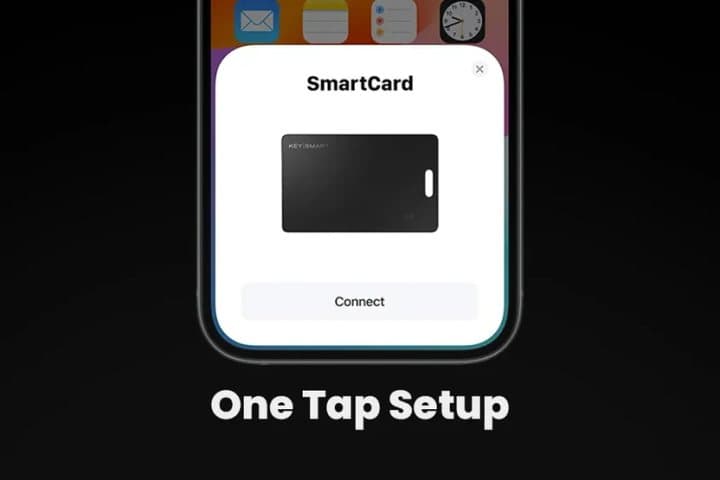
Setting trusted places
In Find My, you can add places where you do not need left-behind alerts, such as home or work. Without them, you may get alerts every time you leave the wallet in another room. With too many, you may miss a real alert.
Checking battery
Find My shows a low-battery notice for items when the battery runs down. Charge it then, or set a calendar reminder every four months so you never discover a flat card after losing your wallet.
Charging tips
Any Qi pad works, including many phone chargers. Centre the card on the pad, since small coils need good alignment. Remove it from metal wallets before charging.
Playing a sound
Open Find My, choose the card and tap Play Sound. Do it once at home so you know what the chirp sounds like through your wallet's leather. If it is hard to hear, put the card in an outer slot.
Checking it is updating
Every so often, open Find My away from home and check the card's location updates. That confirms it is still working before you need it in an emergency.
Placing it in a wallet
A middle slot, surrounded by cards rather than coins or metal, gives a good signal and protects the card. If your wallet has RFID-blocking lining, test the sound and location before relying on it, since some linings reduce Bluetooth range.
Choosing a name and emoji
Find My lets you name each item and pick an emoji. Clear names such as "Black wallet" or "Passport" help when you have several cards and an alert pops up while you are rushing.
Using Lost Mode
If you lose the wallet, open Find My, select the card, and turn on Lost Mode with a phone number. Anyone who finds it can be shown your message and number, according to the page. You will also be notified when it is next located.
Using it in luggage
For checked bags, put the card in an inside pocket rather than an outside one, so it is less likely to be removed. Find My will show the bag's location when it is near Apple devices, which in airports is most of the time.
Notifications on the go
If left-behind alerts are not arriving, check that Find My has permission to use your location "Always" and that notifications are on in Settings. Low Power Mode can also delay background updates on some iPhones.
Sharing with family
In Find My, you can share an item with up to five people, according to Apple. Use this for family bags or shared car documents.
Cleaning it
Wipe it with a soft, damp cloth. It is waterproof, so a quick rinse is fine, but dry it before putting it on a charger.
If it stops updating
Check Bluetooth and location permissions for Find My, and that the card is charged. If problems continue, remove and re-add it in the app.
Privacy and unknown-tracker alerts
If someone else's card travels with you, your phone may warn you. If you lend your wallet with the card inside, the borrower may get that warning too. That is normal and part of Apple's anti-stalking protections.
When you replace your phone
Find My items stay linked to your Apple ID, so they appear on a new iPhone when you sign in. You do not need to pair the card again.
Other questions about card trackers
Does SmartCard work in other countries? Find My works wherever Apple devices are common, which covers most travel destinations.
Can I use it on a keyring? Yes, through the lanyard slot shown in the diagram, though an AirTag suits keys better.
Will it set off airport security? It is a small electronic device, like a phone, and goes through scanners normally.
Does it work with an Apple Watch? Left-behind alerts can appear on a paired Apple Watch, according to the page.
More questions about SmartCard
Can I turn off the sound? Find My lets you play a sound on demand. Unwanted-tracker alerts may also make an unpaired card beep, which is an Apple safety feature.
How accurate is the location? It depends on how recently an Apple device passed by. In busy places, updates can be frequent and accurate to a few metres; in quiet places, the last report may be old.
Does it work with iPad or Mac? Yes. Find My on an iPad or Mac signed in to the same Apple ID shows your items.
Can I give it away later? Remove it from your Apple ID in Find My first. A card still linked to your account cannot be added by someone else.
SmartCard by KeySmartScore 5.3/10
Before you buy: Check the final price, shipping and return terms at checkout.
$34.95 at KeySmart · Price checked October 4, 2026
Check price at KeySmart (opens KeySmart in a new tab)We may earn a commission if you buy through our links.
Frequently asked questions
Does SmartCard work with Android?
Not this version. The offer page's FAQ says SmartCard works only with Apple devices, through the Find My app and network. Some newer KeySmart cards sold elsewhere are described as also working with Google's Find Hub, so check which version you are buying if you use Android.
How long does the SmartCard battery last?
Up to five months per charge, according to the page. It recharges on any Qi wireless charger, the same kind many phones use, so you do not need to replace the card when the battery runs low.
How much does SmartCard cost?
On 4 October 2026, one SmartCard cost $34.95 plus shipping. Three cost $89.90, five cost $134.85 and seven cost $179.80, all with free shipping. The five-pack was preselected, and the page lists a 30-day money-back guarantee.
Is SmartCard better than an AirTag?
It uses the same Find My network, so tracking works much the same. SmartCard is flat and rechargeable, which suits wallets. An AirTag uses a replaceable coin battery that lasts about a year, is thicker, and has Precision Finding on recent iPhones, which card trackers usually lack.
Can SmartCard find a stolen wallet?
It can show where the wallet was last detected by nearby Apple devices, which sometimes helps. A thief may find and remove the card, and Apple alerts people when an unknown tracker travels with them. Report thefts to the police rather than trying to recover property yourself.
Is SmartCard waterproof?
The page says it survives up to one hour in 3.3 feet of water, the standard description of an IPX8-style rating. That covers spills, rain and an accidental drop in a pool. Let it dry before charging.
Is SmartCard legit?
Yes. SmartCard is a KeySmart product that genuinely works with Apple's Find My network, and returns go to KeySmart in Illinois. The cautions are that it is Apple-only, some FAQ claims are exaggerated, and returns cost you postage.
We may earn a commission if you buy through our links.
Prices accurate as of October 4, 2026. Check the seller's checkout for current pricing, promotions and terms.
What we checked: No hands-on use. Features, photos, bundle prices and FAQ answers from the SmartCard offer page our link opens on 2026-10-04, plus the return and refund policy shown on that page (KeySmart, Elk Grove Village, Illinois) the same day. Trustpilot had no page for keysmart.com. Deal listings for the KeySmart SmartCard on Macworld, Cult of Mac and other deal sites were read for prices and newer versions.

About the author
Alex Carter, Senior Tech Reviewer
Alex Carter is the senior tech reviewer at Top10Gadgets, covering the everyday gadgets, home and kitchen devices, smart home products and accessories most people actually buy. Alex judges a product the way a normal buyer…
- Everyday gadgets and accessories
- Smart home devices
- Home and kitchen gadgets
- Value for money
- Long-term reliability
Writing for Top10Gadgets since 2026Full profile