Auto Gadgets / GPS car trackers
iTrack Review: A $99 Plug-In Car Tracker, and the SIM Card and Data Plan the Page Leaves Out
A GPS tracker that plugs into your car's diagnostic port and reports its location to an app. No battery to charge, but it needs its own SIM and data plan, which the page never mentions.

By Ethan Walker, Hardware & Gadget Tester at Top10Gadgets
Updated 26 min readHow we test
Quick answer
Only if you are happy to sort out a SIM card and data plan yourself. iTrack is a plug-in GPS tracker for your car's diagnostic port, promising live location, speed and route history in an app. That can help with a stolen car or a new driver in the family.
Score 3.5/10$99.00 at G Com Pte Ltd
Check price at G Com Pte Ltd (opens G Com Pte Ltd in a new tab)We may earn a commission if you buy through our links.
- Best for
- Car owners who want to track their own vehicle and are comfortable buying and setting up a SIM data plan
- Not for
- Anyone who wants to track a partner, ex-partner or anyone else without their consent, which is illegal in many places
$99.00 at G Com Pte Ltd
Check price at G Com Pte Ltd (opens G Com Pte Ltd in a new tab)We may earn a commission if you buy through our links.
On this page · 14 sections
- 01Our verdict
- 02The short version
- 03Pros & cons
- 04How it works
- 05Who it's for
- 06How does iTrack track your car, and what does it need to work?
- 07What does iTrack really cost once you add a SIM and data plan?
- 08Is iTrack better than an AirTag, Bouncie or your car's own app?
- 09Is it legal to track a car with iTrack?
- 10Is iTrack legit, and what should you check before buying?
- 11How did we score iTrack?
- 12How to use iTrack: SIM setup, placement and alerts
- 13What else do drivers ask about car GPS trackers?
- 14Frequently asked questions
Our verdict
Only if you are happy to sort out a SIM card and data plan yourself. iTrack is a plug-in GPS tracker for your car's diagnostic port, promising live location, speed and route history in an app. That can help with a stolen car or a new driver in the family. But trackers like this need their own SIM and mobile data to report in real time, and the page mentions neither, nor the app or any running cost. At $99 before data, it costs more than established trackers. iTrack scores 3.5 out of 10, held back by hidden setup costs, missing details and refund terms.
The short version
- What it is: a GPS tracker that plugs into the OBD2 port under your dashboard and reports to a phone app.
- Price: $99 for one on 4 October 2026, with a five-pack for $285 preselected. Delivery was listed as free.
- Best trait: powered by the car, so no battery to charge.
- Biggest drawback: it almost certainly needs a SIM and data plan that the page never mentions.
- Our score: 3.5 out of 10.
Pros & cons
The pros are what any OBD2 tracker offers. The cons are about everything the page leaves you to find out after paying.
What we like
- Plugs into the car's OBD2 port for power, so there is no battery to charge
- Promises live location, speed and route history in a phone app for Android and iPhone
- Fits most cars from 1996 onwards, according to the page
- A tracker can help recover a stolen car or keep an eye on a teenage driver, with their knowledge
- Free delivery, and the seller names a registered company with a Singapore address
What we don't
- Real-time trackers of this type need a SIM card and mobile data plan, which the page does not mention or include
- At $99 before any data costs, it costs more than established trackers such as Bouncie
- A tracker in the OBD2 port is easy for a thief to find and unplug
- No app name, update interval, SIM type, network bands or data costs stated
- Refunds need a returns number first, and you pay return postage to an overseas seller
Sold by G Com Pte Ltd
iTrack$99.00
How it works
A GPS tracker does two jobs. It works out where it is from satellite signals, and it sends that position somewhere you can see it. iTrack takes power from your car's OBD2 diagnostic port, and trackers of this design send their position over the mobile phone network.
Fit a SIM card and plug it in
Step 1: Trackers of this type take a SIM card with a mobile data plan. Insert it as the instructions describe, then plug the tracker into the OBD2 port under the dashboard.
Link it to the app
Step 2: Install the tracking app, register the tracker's ID and set it up, often by sending a text message to the tracker's number to configure the server and network settings.
Watch your car on the map
Step 3: The tracker reads its position from GPS satellites and sends it over the mobile network, so the app can show where the car is, how fast it is moving and where it has been.
Who it's for
iTrack suits a car owner who wants to keep an eye on their own vehicle and is comfortable setting up a prepaid SIM with data. It also suits parents tracking a young driver who knows about it, or a small business tracking a work van with the driver informed.
- Car owners who want to track their own vehicle and are comfortable buying and setting up a SIM data plan
- Parents who want to see where a teenage driver is, with the teen's knowledge
- Small business owners tracking a company vehicle, with the driver informed
Why iTrack appeals
The headline speaks to a real worry: "sleep easy at night knowing that your car is exactly where you left it". Car theft is common, and a tracker raises the chance of finding a stolen car. The page promises real-time location, speed monitoring and route history on Android and iPhone, for cars from 1996 onwards.
Plug-in power is genuinely convenient. Battery trackers need charging every few weeks, and a forgotten charge means no tracking. An OBD2 tracker just stays plugged in.
Who gets the most value
Families with a new driver often like knowing where the car is and how fast it is being driven, and many teens accept it as a condition of borrowing the car. Small businesses use trackers to plan routes, log mileage and check vans are where they should be.
People who lend a car to relatives, or who park in risky areas, also find peace of mind in seeing the car on a map.
For a stolen car
A tracker can help police recover a stolen vehicle if it is still connected and reporting. But a tracker in the OBD2 port is the first place an informed thief looks. Treat it as one layer, alongside locking the car, a steering lock and parking in lit areas.
Who should skip it
Skip iTrack if you want to track another adult without their knowledge, if you want something that works out of the box without a SIM, or if your main goal is preventing theft rather than tracking after the fact.
- Anyone who wants to track a partner, ex-partner or anyone else without their consent, which is illegal in many places
- Buyers who want a tracker that works out of the box with a known app and data plan
- People hoping a tracker will stop theft; a visible OBD2 tracker is easy to unplug
- Price-conscious buyers who could use an AirTag-style tag or an established subscription tracker
How does iTrack track your car, and what does it need to work?
iTrack finds its position from GPS satellites and, like other real-time OBD2 trackers, needs a SIM card with mobile data to send that position to your phone. The offer page does not mention a SIM, data plan, network or app, so you should expect to buy and configure a SIM yourself. Without one, a tracker of this type can know where it is but cannot tell you.
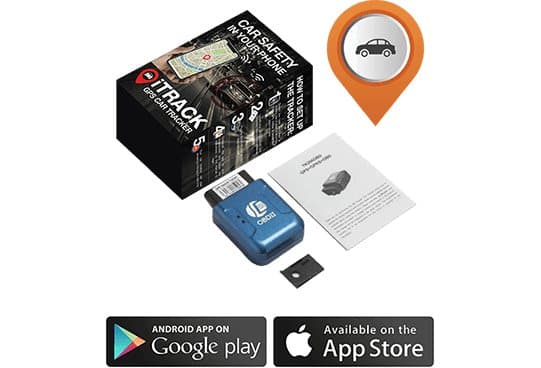
What the offer page claims
The page's headline is "Sleep easy at night knowing that your car is exactly where you left it with this simple and effective tracking technology". The six bullets are: location tracking in real time, speed monitoring, highly advanced GPS car tracker, consult history of route and itinerary tracking, works with Android and iPhone, and works for all cars from 1996 onwards.
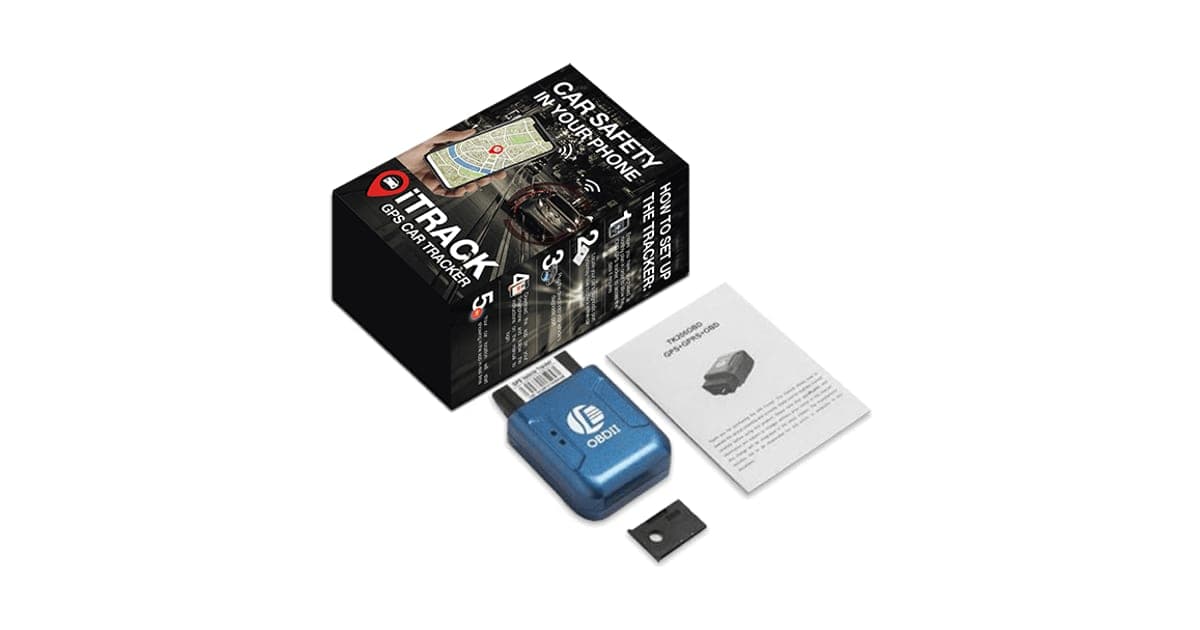
The photo shows a box labelled iTrack GPS car tracker, "car safety in your phone", a blue plug-in device marked OBD-II, a leaflet and a small black card.
Why a tracker needs a SIM
A guide on whether GPS trackers need a SIM explains that the GPS chip receives satellite signals without any SIM or internet, but the position stays inside the device until something sends it out. Real-time trackers usually use a SIM to send their location over the mobile network to an app or platform.
That is why the SIM matters so much. A tracker without a working SIM and data plan cannot update your phone.
A common OBD2 tracker design
The blue OBD-II device in the photos resembles widely sold OBD2 trackers such as the TK306 type. Users on the open-source Traccar forum discuss TK306 OBD trackers that are configured by text message and send data over GPRS mobile data. We cannot confirm the exact model inside the iTrack box. If it is this type, expect to fit a SIM, set its network settings by text and register it in an app.
What happens when the ignition is off
Some cars cut power to the OBD2 port when the ignition is off, and others keep it live. If yours cuts power, a plug-in tracker with no backup battery will stop reporting while the car is parked, which is exactly when theft happens. Some trackers include a small backup battery for this. The page does not say whether iTrack has one. What to do: ask support, and test it by checking the app an hour after parking.
Network compatibility
Many older budget trackers use 2G or 3G networks. In the US, major carriers have shut down their 3G networks and 2G is largely gone, and other countries are following. A tracker that only supports older networks may not connect at all. The page does not say which networks iTrack supports. What to do: ask support whether it supports 4G LTE on your carrier before you order.
What "real time" means in practice
Trackers send updates at intervals: every few seconds, every minute, or when the car turns or moves a set distance. More frequent updates use more data and give a smoother trail. The page gives no update interval. Expect location to lag slightly, and a gap whenever the car is in an underground car park or out of mobile coverage.
How accurate is GPS in a car?
Consumer GPS is usually accurate to within several metres under open sky. Accuracy drops among tall buildings, under trees and inside multi-storey car parks, and a tracker plugged in under a metal dashboard may see the sky less clearly than a phone on the windscreen. When GPS is weak, some trackers fall back to estimating position from nearby mobile masts, which can be hundreds of metres out.
For finding a car in a street, that accuracy is fine. For finding which bay it is in on a busy car park level, it may not be. Expect the map to show the right area rather than the exact spot every time.
When the car is underground or out of signal
A tracker needs both satellite reception and mobile signal. In an underground car park, a ferry hold or a remote valley, it may lose one or both. Many trackers store positions while out of signal and upload them later, but the page does not say whether iTrack does. A stolen car taken into a garage or a shipping container may simply disappear from the map.
Speed monitoring and route history
The page promises speed alerts and route history. Most tracking apps can show past trips and send an alert when a set speed is exceeded or the car leaves an area, called a geofence. These features depend on the app, which the page does not name.
"Works for all cars from 1996 onwards"
The OBD2 port has been required on petrol cars and light trucks sold in the US since the 1996 model year. Most cars sold in Europe since the early 2000s also have it. For a tracker, the port is mainly a power source, so compatibility is rarely a problem. Some vehicles cut power to the port when the ignition is off, which can stop the tracker reporting when parked.
Is iTrack the same as other iTrack trackers?
Searching "iTrack GPS tracker" brings up other products, including battery-powered trackers sold by a different company with their own Trustpilot reviews. Those are not the product on this offer page. Reviews of other iTrack devices tell you nothing about this one.
What does iTrack really cost once you add a SIM and data plan?
On 4 October 2026, with the United States selected, one iTrack cost $99, shown as half of $198, with free delivery. The five-pack for $285 was preselected. That price does not include a SIM card or mobile data, which a tracker like this needs, so add a monthly data cost from your carrier. Some trackers also charge for their tracking platform. The page states no running costs at all.
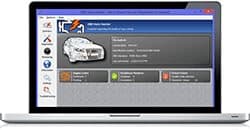
The $9 Computer Compatibility Upgrade add-on
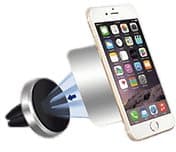
The $19 Magic Car Phone Holder add-on
iTrack price and bundles
| Package | Total | Per tracker |
|---|---|---|
| 1 iTrack | $99 | $99.00 |
| 2 iTrack | $144 | $72.00 |
| Buy 2, get 1 free (3) | $192 | $64.00 |
| 4 iTrack | $236 | $59.00 |
| Buy 3, get 2 free (5), preselected | $285 | $57.00 |
One tracker per car is enough. Every extra tracker needs its own SIM and plan, so a five-pack multiplies the running costs. You can check today's packages on the iTrack order page (opens G Com Pte Ltd in a new tab).
The data plan
Trackers use little data compared with a phone, so a low-cost data-only SIM is usually enough. But it is still a monthly cost, and you need a SIM from a carrier and network the tracker supports. Some prepaid SIMs expire if not topped up, which would silently stop the tracker. What to do: budget for a data SIM, and set a reminder to keep it active.
The add-ons
The page code lists the same three add-ons as the seller's SmartCar scanner:
- Computer Compatibility Upgrade: $9 (from $29). The image shows car diagnostic software on a laptop, which has nothing obvious to do with a tracker.
- Magic Car Phone Holder: $19 (from $39). A magnetic air vent phone mount.
- Dual Fast Car Charger: $14 (from $29). A two-port USB car charger.
A 3-year warranty cost $24, unchecked when the page loaded.
The "regular price"
The page shows $198 crossed out next to $99 and a countdown timer. We found no evidence of iTrack selling at $198. Judge it against what trackers with clear apps and data plans cost.
Who sells it
The order page and impressum name G Com Pte Ltd, at 137 Market Street in Singapore, with a company registration number, email and phone number. The footer says "G Com Pte Ltd - Hong Kong". We found no independent rating profile for the store. With the United States selected, the order page said charges would appear as panameedia.

iTrackScore 3.5/10
Best for: Car owners who want to track their own vehicle and are comfortable buying and setting up a SIM data plan
$99.00 at G Com Pte Ltd · Price checked October 4, 2026
Check price at G Com Pte Ltd (opens G Com Pte Ltd in a new tab)We may earn a commission if you buy through our links.
Is iTrack better than an AirTag, Bouncie or your car's own app?
For most people, no. A Bluetooth tag such as an AirTag is cheap, has no monthly fee and is easy to hide, though it depends on nearby phones. Bouncie, a plug-in OBD2 tracker with its own app, costs about $67 to $90 plus around $8 to $10 a month, with data included. Many newer cars already offer location tracking in the maker's app. iTrack costs more upfront and leaves the data plan to you.
| Option | Upfront | Monthly | Real-time | Easy to hide | Setup |
|---|---|---|---|---|---|
| iTrack | $99 | Your own SIM data (not stated) | Yes, with SIM | No, in the OBD2 port | SIM and app setup |
| Bouncie | About $67-90 | About $8-10, data included | Yes, 15-second updates | No, in the OBD2 port | Plug in, app |
| AirTag or similar tag | Low | None | No, needs nearby phones | Yes | Pair with phone |
| Car maker's app | Often included | Often free or a subscription | Yes, on supported cars | Built in | App login |
| Hidden battery tracker | Varies | Usually a plan | Yes | Yes | Charge regularly |
iTrack vs Bouncie
Bouncie is the closest rival: a plug-in OBD2 tracker with an established app. A comparison of Bouncie and other car trackers lists 15-second updates, trip reports, geofencing and accident detection, with data included in the monthly fee. You know exactly what you pay and which app you use. For most families, Bouncie is the clearer choice, and this is a case where the rival plainly wins.
iTrack vs an AirTag or Bluetooth tag
A Bluetooth tag hidden in the car reports its location when a nearby phone on the same network passes. In cities, that can be often; in the countryside, rarely. There is no monthly fee and nothing to plug in. Tags also include anti-stalking alerts that tell people when an unknown tag is travelling with them, which can alert a thief, but also protects against misuse.
iTrack vs your car's own app
Many cars from the last few years have built-in connectivity with location tracking in the maker's app, sometimes free for a period and then by subscription. Check your car's app before buying any tracker. It may already do what you need.
iTrack vs a hidden battery tracker
A battery tracker can be hidden under a seat or in the boot, where thieves are less likely to find it quickly. It needs charging every few weeks or months. For theft recovery, hidden placement is a real advantage over any OBD2 tracker.
Choosing the right option for your situation
If your main worry is theft recovery, a hidden tracker that is hard to find matters more than anything else, and an OBD2 tracker is a weak choice on its own. If you want to see where a family car is and how it is driven, a plug-in tracker with a clear app and included data, such as Bouncie, is the simplest route. If you only want to find where you parked, a Bluetooth tag or your phone's parking reminder costs little or nothing.
iTrack sits awkwardly between these. It has the visibility weakness of every OBD2 tracker, without the clear app and data plan of established rivals. In our view, it only makes sense if you already have a spare data SIM and enjoy setting devices up yourself.
Other car gadgets we have reviewed
The same seller's OBD2 code reader is covered in our SmartCar review. Our React ChargeHub review looks at a car charger with a built-in escape tool, and our CupStation review covers a cup holder expander.
If you still prefer iTrack, check today's packages on the iTrack offer page (opens G Com Pte Ltd in a new tab) and choose one tracker.
iTrackScore 3.5/10
Why people buy it: Plugs into the car's OBD2 port for power, so there is no battery to charge
$99.00 at G Com Pte Ltd · Price checked October 4, 2026
Check price at G Com Pte Ltd (opens G Com Pte Ltd in a new tab)We may earn a commission if you buy through our links.
Is it legal to track a car with iTrack?
Tracking a car you own and drive yourself is legal nearly everywhere, but tracking another person's car or movements without their consent is illegal in many places and can count as stalking. In the US, there is no single federal rule for private individuals, and state laws vary. Tell anyone who drives a tracked car, and check your local law before installing iTrack on a car someone else uses.
What the law says in the US
A US Senate press release from Senator Schumer argued that covert GPS tracking of another person's car was legal under federal law, and introduced legislation to change that. Many states have their own laws making it a crime to attach a tracker to a vehicle without the owner's consent or to track a person without consent.
Family cars and young drivers
Parents tracking a car driven by their own minor child are generally on firm ground, but laws and household circumstances vary. Telling your teenager about the tracker is fairer and avoids damaging trust if they find it.
Shared and co-owned cars
If a partner or spouse also drives the car, track it only with their knowledge and agreement. Co-ownership does not always make covert tracking of another adult legal.
Setting rules with a young driver
Trackers work best with young drivers when they are part of an agreement rather than a secret. Agree in advance what you will check, such as speed alerts and arrival at destinations, and what you will not, such as reading every trip. Many parents find that the conversation about safe driving does more than the tracker itself, and that relaxing the monitoring as the driver gains experience builds trust.
Work vehicles
Businesses usually track company vehicles with notice to employees, often written into employment policies. Check employment law where you operate.
If you think you are being tracked
If you are worried someone has put a tracker on your car, check the OBD2 port, under the seats, in the boot and wheel arches, and contact the police or a domestic abuse support service. Do not remove the device yourself if you think doing so could put you at risk.
Is iTrack legit, and what should you check before buying?
iTrack is a real product from a named seller, and a tracker should arrive if you order. Before buying, ask support about the SIM, network, app and any platform fees, check the preselected five-pack, and know that refunds need a returns number and you pay return postage. Those answers decide what iTrack actually costs and whether it works where you live.
Ask about the SIM, network and app
What to do: email support and ask which SIM size and networks iTrack supports, which app it uses, whether the app or platform has any fees, and how often it updates. Keep the replies.
Check the selected bundle
The five-pack for $285 was preselected. What to do: choose a single tracker before entering your details.
Membership offers
The page code contains text for a "Gadget Discount Club" membership, free for 30 days and then "a small fee of $9 may apply". We did not see it on the order page with the United States selected. What to do: read every checkbox and post-purchase page.
Refunds and returns
The page code promises a 30-day guarantee with a full refund or replacement, less shipping and handling. The terms focus on defective or damaged products, which may be returned within two years once you have a returns number. Return postage is at your cost and is not reimbursed.
What to do: set the tracker up as soon as it arrives. If it will not report location, contact support at once and ask for a returns number in writing.
Privacy of your location data
Your car's location history is sensitive. The page does not say where the tracking platform stores data or who can access it. What to do: use a strong, unique password for the app, and ask support where data is stored and how to delete it.
Selling or lending the car
A tracker keeps reporting wherever the car goes. What to do: remove iTrack and cancel its SIM before you sell the car, and tell anyone who borrows it that a tracker is fitted.
Insurance
Some insurers offer discounts for their own telematics boxes or apps, which score your driving. A third-party tracker like iTrack is unlikely to qualify, and some insurers ask whether a tracker is fitted for theft cover. What to do: ask your insurer before assuming any discount.
How to buy iTrack the smart way
- Ask support about the SIM, network, app and any fees, in writing.
- Open the iTrack order page (opens G Com Pte Ltd in a new tab) and select your country.
- Change the preselected five-pack to one tracker.
- Skip the computer upgrade, which has no clear use for a tracker.
- Note the card statement name, panameedia, and save your order email.
- Buy a compatible data SIM before the tracker arrives so you can test it straight away.
How did we score iTrack?
iTrack scores 3.5 out of 10: claim accuracy 0.6, build durability 1.0, price competitiveness 0.6, usability 0.8 and owner satisfaction 0.5, each out of 2. OBD2 trackers can work well, but this page leaves out the SIM, data plan, app and network details that decide whether it works for you, and it costs more than an established tracker with data included. We found no independent owner ratings for this iTrack.
What owners say
We found no Trustpilot profile for the gadgetxaura.com store and no independent reviews for this iTrack. Reviews online for "iTrack" mostly concern other companies' trackers. Owners of generic OBD2 trackers commonly report setup difficulties with SIM and network settings, apps in poor English, and devices that stopped reporting when older mobile networks shut down. Those who get them running often find them useful for seeing where a car is.
How the score breaks down
We use the five criteria on our how we test page, each out of 2.
| Criterion | Score | Why |
|---|---|---|
| Claim accuracy | 0.6 / 2 | "Real time" depends on a SIM and data plan the page never mentions; no app or network named |
| Build durability | 1.0 / 2 | Simple plug-in hardware with no battery to wear out |
| Price competitiveness | 0.6 / 2 | $99 before data, more than an established tracker with data included |
| Usability | 0.8 / 2 | SIM and network setup likely needed; no app named |
| Owner satisfaction | 0.5 / 2 | No independent ratings for this product |
| Total | 3.5 / 10 |
What we did, and did not, do
Nobody on our team has used iTrack. We read the offer page our link opens with the United States selected, its code and the seller's terms on 4 October 2026, along with a guide to SIM requirements for trackers, user discussion of OBD trackers of this design, a car tracker pricing comparison, a US Senate press release on covert tracking and the top-ranking iTrack pages.
How to use iTrack: SIM setup, placement and alerts
Fit a compatible data SIM, plug iTrack into the OBD2 port, register it in the app and test it on a short drive. Then set up speed and area alerts, check the battery draw on a car that sits for long periods, and tell anyone else who drives the car. Keep the SIM topped up, or the tracker will silently stop reporting.
- Get the right SIM. Choose a data plan on a network iTrack supports, ideally 4G. Disable the SIM PIN in a phone first if the instructions say so.
- Insert the SIM. Follow the leaflet. Many OBD2 trackers have a SIM slot under a cover.
- Plug in. Push the tracker firmly into the OBD2 port with the ignition off.
- Configure by text if required. Some trackers need text messages to set the network APN and server. The leaflet should list the commands.
- Register in the app. Enter the tracker ID and confirm it appears on the map.
- Test on a drive. Drive around the block and check the trail in the app.
- Set alerts. Add a speed limit alert and a geofence around home or school, and tell other drivers.
Making it harder to remove
Some trackers come with an OBD2 extension cable so the device can sit hidden behind a panel rather than in the visible port. If you use one, make sure it is secure and does not interfere with pedals.
If the car battery goes flat
Unplug the tracker on cars that sit unused for more than a week or two, or use a car with a battery maintainer. Ask support for the tracker's standby power draw.
Understanding geofences
A geofence is a virtual boundary drawn on the map, such as a circle around your home, a school or a workplace. The app alerts you when the car enters or leaves it. Geofences are useful for knowing a young driver has arrived, or that a work van has left the depot. Keep them generous, because GPS drift near the edge can trigger false alerts.
Reading trip history
Route history shows each journey as a line on the map, often with speed colours. Use it to check mileage for expenses or to spot a habit of speeding on one road. Remember that small gaps or jumps usually mean poor signal, not a hidden detour.
If your car is stolen
Report the theft to the police straight away and give them the tracker's latest location. Do not try to recover the car yourself or confront anyone. Share screenshots of the map and trip history with the police and your insurer.
Data use and SIM credit
Trackers send small amounts of data, but frequent updates add up over a month. Check your plan's allowance against the update interval you choose. A prepaid SIM that runs out of credit stops the tracker without warning, so set a reminder to top up or choose a plan that renews automatically.
If it stops reporting
Check the SIM has credit and data, that the network is still supported, that the tracker is firmly plugged in and that the app shows its last contact. Older 2G and 3G trackers stop working when those networks close.
iTrackScore 3.5/10
Before you buy: Check the final price, shipping and return terms at checkout.
$99.00 at G Com Pte Ltd · Price checked October 4, 2026
Check price at G Com Pte Ltd (opens G Com Pte Ltd in a new tab)We may earn a commission if you buy through our links.
You can browse more car gadgets in our auto gadget reviews.
What else do drivers ask about car GPS trackers?
Most questions are about running costs, hiding the tracker, battery drain and whether trackers stop theft. Real-time trackers usually need a data plan, plug-in models are easy to find, power draw is small but real, and trackers help recovery more than they prevent theft. The answers below cover the questions that come up most when people compare plug-in, battery and Bluetooth trackers for a car.
Do car trackers stop theft?
Not on their own. A tracker helps find a car after it is stolen, provided it is still connected. Visible deterrents such as a steering lock, a car alarm and parking in well-lit places do more to prevent theft in the first place. A tracker is one layer among several.
Where is the best place to hide a car tracker?
For a battery tracker, places such as under a seat, inside a door pocket lining or in the boot are common. A plug-in tracker has to sit at the OBD2 port or on an extension cable. Avoid places that get very hot, block GPS reception with metal, or could interfere with airbags or pedals.
How long do battery trackers last between charges?
It depends on update frequency and the battery size. Trackers that report every few seconds may need charging weekly, while ones that wake up only when moving can last for months. Plug-in trackers avoid this problem but are easier to find.
Can I use an old phone as a car tracker?
Yes, some people leave an old phone with a SIM and a location-sharing app hidden in the car, connected to a USB charger. It works but is fiddly, phones overheat in hot cars, and batteries can swell over time. A purpose-made tracker is usually more reliable.
Do trackers work abroad?
Only if the SIM supports roaming in that country and the tracker supports the local network bands. Roaming data can be expensive. Check your SIM's roaming terms before driving abroad with a tracker fitted.
Can I track a motorbike or caravan?
Motorbikes rarely have a standard OBD2 port, and caravans have none, so a plug-in tracker like iTrack does not suit them. Battery trackers or hard-wired trackers designed for those vehicles are the better option.
Can a tracker read my car's fault codes too?
Some OBD2 trackers of this design can read basic engine data, such as speed, revs and the check engine status, because they sit in the diagnostic port. The iTrack page does not mention this, so do not rely on it. If you want fault codes, a dedicated scanner such as the one in our SmartCar review is designed for that job.
What happens to my location data if the company stops trading?
If a tracking platform shuts down, trackers that depend on it can stop working, and it may be unclear what happens to stored location history. Established brands are less likely to vanish suddenly, and some trackers can be pointed at other platforms, including open-source ones such as Traccar. Ask support which platform iTrack uses before relying on it for anything important.
Is a tracker worth it on an old, cheap car?
For an older car with a low resale value, the running cost of a data SIM and the price of the tracker can add up to a meaningful share of the car's worth. Simple measures, such as a steering lock and parking somewhere visible, may be better value. A tracker makes more sense for cars that are expensive, frequently targeted or hard to replace.
It can also make sense where the main value is peace of mind for a family, rather than the car's price, such as a first car shared by a new driver.
Will a tracker affect my car's warranty?
Plugging a device into the OBD2 port does not normally affect a warranty, but a faulty device that damages the car's electrics could cause disputes. Unplug it before taking the car in for service, and keep the receipt.
Frequently asked questions
Does iTrack need a SIM card?
The offer page does not say, but plug-in GPS trackers that report location in real time use the mobile network, which needs a SIM card with a data plan. The GPS chip finds the position, and the SIM sends it to the app. Ask support which SIM and network it supports before ordering.
Is there a monthly fee for iTrack?
The page does not mention one. Even if the app is free, a SIM card with mobile data usually costs money each month. Some trackers also charge for their tracking platform. Ask support about both costs before you buy, so the $99 is not the only number you consider.
How much does iTrack cost?
With the United States selected on 4 October 2026, the offer page listed one iTrack for $99, two for $144, three for $192, four for $236 and five for $285. The five-pack was preselected. Delivery was listed as free, and a 3-year warranty add-on cost $24.
Is it legal to put a GPS tracker on a car?
Tracking your own car is legal nearly everywhere. Tracking someone else's car without their consent is illegal in many US states and other countries, and can lead to stalking or harassment charges. Laws differ, so check where you live and always tell other drivers.
Is iTrack the same as iTrack GPS trackers sold elsewhere?
Not necessarily. Searching the name brings up other trackers sold as iTrack by different companies, including battery-powered models with their own reviews. The iTrack on this offer page is a plug-in OBD2 tracker sold by G Com Pte Ltd, so reviews of other iTrack products may not apply.
Will iTrack drain my car battery?
Plug-in trackers draw a small current from the OBD2 port, often even when the car is off. On a car used daily, that is rarely a problem. On a car left for weeks, it can drain the battery. The page gives no power draw, so unplug it if the car will sit for long.
Can a thief disable iTrack?
Yes, easily. The OBD2 port is in a standard place under the dashboard, and thieves who know about trackers check there first. A hidden, battery-powered tracker or a tag tucked elsewhere is harder to find.
We may earn a commission if you buy through our links.
Prices accurate as of October 4, 2026. Check the seller's checkout for current pricing, promotions and terms.
What we checked: No hands-on use. Features, photos, prices with the United States selected, the preselected bundle, add-ons, warranty and card statement name from the iTrack offer page our link opens (gadgetxaura.com) on 2026-10-04, plus the bundle and add-on data in the page's own code. Refund and cancellation terms from the same site's terms page that day. A guide to SIM requirements for GPS trackers, user discussion of OBD trackers of this design, a Bouncie pricing comparison, a US Senate press release on covert GPS tracking and the top-ranking iTrack pages were read the same day.

About the author
Ethan Walker, Hardware & Gadget Tester
Ethan Walker covers hardware for Top10Gadgets: audio, computing, phone accessories, chargers, tools, car gadgets and sports equipment. Ethan believes a product should be judged on what happens when people actually use it…
- Headphones and speakers
- Chargers and phone accessories
- Tools and emergency gear
- Car accessories
- Durability and real-world performance
Writing for Top10Gadgets since 2026Full profile