Auto Gadgets / OBD2 scanners
SmartCar Review: A $74 Plug-In Car Scanner That Looks Like a Common ELM327 Adapter
A Bluetooth adapter for your car's diagnostic port that shows fault codes on your phone. Useful, but it appears to be a generic ELM327 adapter, and similar ones cost a fraction of the price.

By Ethan Walker, Hardware & Gadget Tester at Top10Gadgets
Updated 26 min readHow we test
Quick answer
It depends on your phone and how much you want to pay. SmartCar does the useful basics of any OBD2 adapter: it reads and clears check engine codes and shows live engine data, which can save you a diagnostic fee and help you talk to a mechanic.
Score 3.6/10$74.00 at G Com Pte Ltd
Check price at G Com Pte Ltd (opens G Com Pte Ltd in a new tab)We may earn a commission if you buy through our links.
- Best for
- Drivers who want to know what a check engine light means before visiting a garage
- Not for
- iPhone owners, unless support confirms the adapter is a Wi-Fi or Bluetooth Low Energy version
$74.00 at G Com Pte Ltd
Check price at G Com Pte Ltd (opens G Com Pte Ltd in a new tab)We may earn a commission if you buy through our links.
On this page · 13 sections
- 01Our verdict
- 02The short version
- 03Pros & cons
- 04How it works
- 05Who it's for
- 06What can SmartCar actually tell you about your car?
- 07Will SmartCar work with your phone, laptop and car?
- 08How much does SmartCar cost, and is it good value?
- 09Is SmartCar better than FIXD, BlueDriver or a cheap adapter?
- 10Is SmartCar legit, and what should you check before buying?
- 11How did we score SmartCar?
- 12How to use SmartCar: plugging in, reading codes and what to do next
- 13Frequently asked questions
Our verdict
It depends on your phone and how much you want to pay. SmartCar does the useful basics of any OBD2 adapter: it reads and clears check engine codes and shows live engine data, which can save you a diagnostic fee and help you talk to a mechanic. But its own photos show a generic ELM327 adapter and the third-party Torque app, classic Bluetooth versions of which do not work with iPhones, and $74 is far more than similar adapters cost. SmartCar scores 3.6 out of 10, held back by price, vague compatibility and refund terms.
The short version
- What it is: a plug-in OBD2 adapter that sends engine fault codes and live data to a phone app.
- Price: $74 for one on 4 October 2026, with a five-pack for $198 preselected. Delivery was listed as free.
- Best trait: it turns a mysterious warning light into a fault code you can look up.
- Biggest drawback: the photos show a widely sold ELM327 adapter that costs far less elsewhere, with unclear iPhone support.
- Our score: 3.6 out of 10.
Pros & cons
The pros come from OBD2 itself, which every modern car has. The cons are about what this listing charges for it and what it leaves unclear.
What we like
- Reads and clears check engine fault codes on almost any petrol car sold in the US since 1996
- Shows live engine data such as speed, revs and coolant temperature on your phone
- Small enough to leave in the car, with no batteries to change
- Knowing the fault code before you visit a garage helps you ask better questions
- Free delivery, and the seller names a registered company with a Singapore address
What we don't
- The photos show a generic ELM327 adapter and the third-party Torque app, which you can buy separately for far less
- At $74 it costs more than branded scanners such as FIXD, which come with their own app and support
- Classic Bluetooth ELM327 adapters do not work with iPhones, and the page gives no Bluetooth version
- Computer use is sold as a $9 'compatibility upgrade' despite the page listing Windows and Mac
- Generic code readers usually cannot read ABS, airbag or transmission codes
- Refunds need a returns number first, and you pay return postage to an overseas seller
Sold by G Com Pte Ltd
SmartCar$74.00
How it works
Since the mid-1990s, cars have had an on-board diagnostic system that watches the engine and emissions parts and stores a fault code when something goes wrong. SmartCar plugs into the standard socket for that system and passes the codes and sensor readings to an app on your phone.
Plug it into the OBD2 port
Step 1: Find the 16-pin diagnostic port under the dashboard, usually near the steering column, and push the adapter in firmly with the ignition off.
Pair it with your phone
Step 2: Turn the ignition on, pair the adapter in your phone's Bluetooth settings and open a compatible app, which connects to the adapter and asks the car's computer for data.
Read codes and live data
Step 3: The app shows any stored fault codes with a short description, lets you clear them, and displays live readings such as speed, revs, coolant temperature and fuel trims.
Who it's for
SmartCar suits a driver with an Android phone who wants to understand warning lights and keep an eye on engine data, and who prefers ordering from an offer page with free delivery. If you have an iPhone, or want the best value, read the compatibility and price sections first.
- Drivers who want to know what a check engine light means before visiting a garage
- Android phone owners who are happy to use a third-party app for engine data
- Buyers who value one order with free delivery over finding the cheapest adapter
Why SmartCar appeals
A check engine light is stressful. It might mean a loose fuel cap or a failing catalytic converter, and you cannot tell which from the dashboard. The SmartCar page promises to protect you from "car repair scams" and help you "instantly find the problem". Being able to see the code yourself does take some of the fear and guesswork out of the situation.
It is also a small, tidy gadget. Once plugged in, it can stay under the dash, ready whenever a light appears or you want to watch your engine temperature on a long drive. For people who like data, live readings of speed, revs and fuel trims are interesting in their own right.
Who gets the most value
You get the most from any OBD2 adapter if you drive an older car out of warranty, do some of your own maintenance, or simply want to be an informed customer at the garage. A code such as P0420 (catalyst efficiency below threshold) or P0171 (system too lean) gives you a starting point for research and a way to check whether a mechanic's diagnosis makes sense.
Families with several cars, or someone who helps friends with their cars, also get more use from a scanner. That is one case where more than one adapter, or one shared adapter, makes sense.
Before a used car purchase
Some buyers plug a scanner into a used car before buying it. A scanner can show stored codes and whether the emissions monitors are ready, which can reveal a recently cleared fault. It is not a full inspection, but it is a useful extra check alongside a mechanic's look.
Who should skip it
Skip SmartCar if you use an iPhone and cannot confirm the adapter type, if you need more than engine codes, or if you would rather pay a fraction of the price for the same kind of adapter.
- iPhone owners, unless support confirms the adapter is a Wi-Fi or Bluetooth Low Energy version
- Anyone who needs ABS, airbag, transmission or service resets, which generic readers rarely handle
- Price-conscious buyers, since similar ELM327 adapters and branded scanners cost less
- Owners of cars built before 1996 in the US, or diesel and older cars in other countries, without checking compatibility
What can SmartCar actually tell you about your car?
SmartCar can read and clear the fault codes stored by your car's engine and emissions system, and show live sensor data such as speed, revs and coolant temperature. It cannot fix anything, and a generic adapter usually cannot read airbag, ABS or transmission modules. A fault code tells you which system reported a problem, not always which part has failed, so it is a starting point, not a final diagnosis.
What the offer page claims
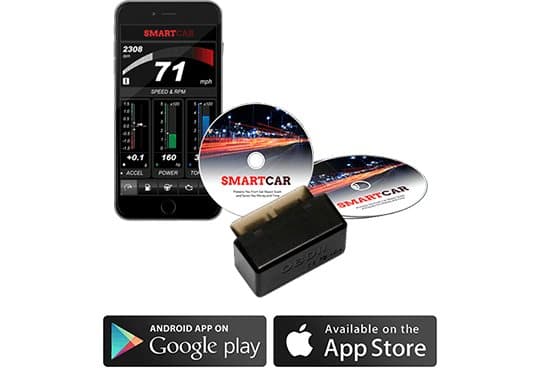
The page's headline says SmartCar "protects you from car repair scam and saves you money and time". The six bullets are: instantly find the problem with your car, real-time updates on car performance, compatible with iOS, Android, Windows and Mac, next generation car to smartphone technology, a free, easy-to-use app, and a 50% discount.
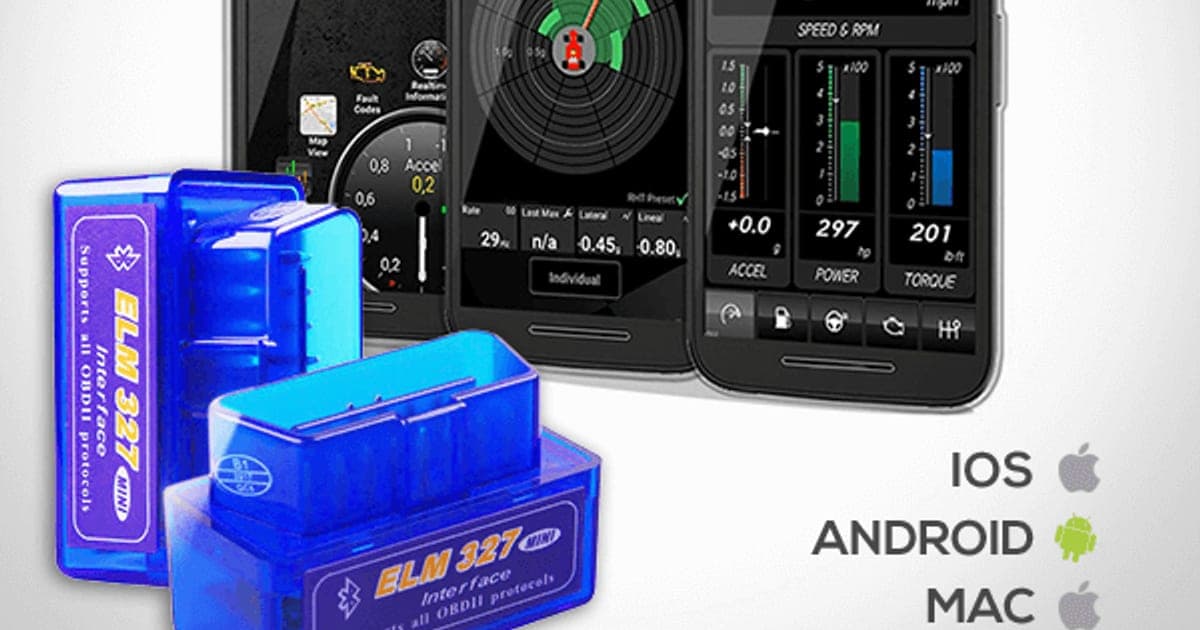
The main image shows two blue adapters printed "ELM 327", phones displaying dashboard-style apps, one of them labelled "Torque", and the SmartCar name. A second image shows a black adapter, two discs printed "SmartCar" and a phone app.
What OBD2 is, and why every car has it
According to the California Air Resources Board's OBD II fact sheet, all 1996 and newer petrol passenger cars and light trucks sold in the US must have OBD II systems, with a standard connector and standard signals. That standardisation is what lets one cheap adapter talk to most cars.
When the system detects a problem, it turns on the check engine light and stores a code. The codes follow a standard format. Codes starting with P relate to the powertrain, and the generic ones mean the same thing on every car.
What a fault code tells you, and what it does not
A code such as P0301 means the engine computer detected a misfire in cylinder one. It does not say why. The cause could be a spark plug, an ignition coil, a fuel injector or a vacuum leak. A mechanic would test further before replacing parts.
This is the limit of the "repair scam" claim. Knowing the code makes you a better-informed customer, and you can compare quotes. But a code alone will not tell you whether a garage's recommended repair is necessary. You still need to trust, or check, the person diagnosing the fault.
Live data
The real-time readings are one of the more interesting features of OBD2 adapters. Depending on the app and car, you can watch speed, engine revs, coolant temperature, intake air temperature, throttle position, fuel trims and oxygen sensor readings. Enthusiasts use this to spot an engine running hot or lean before a light appears.
Freeze-frame data
When the engine computer stores a fault code, it usually also saves a snapshot of conditions at that moment: engine speed, load, coolant temperature, vehicle speed and fuel trims. This freeze-frame data is one of the most useful things a scanner shows. A misfire that happened at full throttle on a cold morning points to different causes than one at idle on a hot afternoon.
Most OBD2 apps can display freeze-frame data alongside the code. Write it down or take a screenshot before clearing anything, because clearing the code usually erases the snapshot too.
Readiness monitors and emissions tests
Your car runs self-tests on parts such as the catalytic converter, oxygen sensors and evaporative system. Each test has a readiness monitor that shows whether it has completed since the codes were last cleared. Many emissions inspections check these monitors, and a car with several "not ready" monitors can fail even with no warning light.
An OBD2 adapter can show the monitor status. If you have just fixed a fault and cleared the code, it may take several days of normal driving before all monitors are ready again. Checking them before an inspection saves a wasted trip.
Fuel economy and driving style
Some apps calculate fuel economy from live sensor data, and some show how hard you accelerate or brake. These figures are estimates, but they can help you notice how driving style affects consumption. If your car already shows fuel economy on the dashboard, the app adds little.
Hybrids and electric cars
Hybrids have OBD2 ports and generic engine data, but much of their battery and motor information sits in manufacturer-specific modules. Fully electric cars may have a port but share very little useful data through generic apps. If you drive an EV, a generic adapter like this is unlikely to tell you much.
What a generic adapter usually cannot do
Cars have several computers: engine, transmission, ABS brakes, airbags, body electronics. The standard OBD2 protocol guarantees access to emissions-related data. Reading ABS or airbag codes, resetting service lights or coding new parts usually needs manufacturer-specific software. Generic ELM327 adapters with general apps rarely do these things reliably.
"Instantly find the problem"
The adapter reads codes in seconds. But "finding the problem" often takes more than that. In our view, the claim overstates what any code reader does. It tells you where to look.
Is SmartCar an ELM327 adapter?
The page's own image shows adapters printed "ELM 327". ELM327 was originally a chip from ELM Electronics that translates OBD2 signals into simple commands. It has been widely copied, and cheap ELM327 adapters are sold everywhere under many names. We cannot confirm what is inside the SmartCar adapter you would receive, but the photos point to this common type.
That matters for two reasons: price, since these adapters are cheap to buy elsewhere, and quality, since cloned chips vary. Some clones support only part of the command set, which can make apps misbehave.
Will SmartCar work with your phone, laptop and car?
SmartCar should work with most petrol cars from 1996 onwards and with Android phones, but iPhone and computer support are less certain. Classic Bluetooth ELM327 adapters do not work with iPhones, and the page does not say which Bluetooth version it uses. Computer use is sold as a separate $9 "compatibility upgrade", even though the page lists Windows and Mac. Confirm both with support before ordering.
iPhone compatibility
OBD Auto Doctor, an app maker that supports many adapters, explains in its guide to supported OBD adapters that iPhones and iPads cannot use classic Bluetooth adapters, and need Wi-Fi or Bluetooth Low Energy versions instead. Android works with all three types.
The SmartCar page lists iOS compatibility and shows App Store badges, but gives no Bluetooth version. The Torque app shown in the main image is an Android app. What to do: if you use an iPhone, email support and ask whether the adapter is Wi-Fi or Bluetooth Low Energy, and get the answer in writing.
Android compatibility
Android phones work with classic Bluetooth adapters. Pair the adapter in Bluetooth settings, usually with a code such as 1234 or 0000, and choose it in the app. Apps such as Torque Lite and Car Scanner are popular with Android users and offer free versions.
The "free app"
The page promises a free, easy-to-use app but does not name it. The image shows Torque, a third-party app whose full version is paid, and discs labelled SmartCar. You may end up using any of several free or paid apps. Ask support which app they recommend before you buy.
Computer compatibility, sold separately
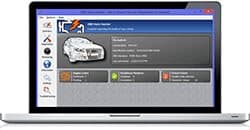
The page says SmartCar is compatible with Windows and Mac, but the page code offers a "Computer Compatibility Upgrade" for $9, shown reduced from $29, with a picture of diagnostic software on a laptop. In practice, using an ELM327 adapter with a computer usually needs software and, for Bluetooth, a paired computer. What to do: if you want laptop use, ask what the $9 upgrade includes before paying.
Bluetooth pairing problems
Adapters of this type sometimes refuse to connect even on Android. The usual causes are pairing the adapter in the phone's Bluetooth settings but not selecting it inside the app, the phone connecting to the car's own Bluetooth system instead, or the ignition being off. Removing the pairing, turning the ignition on and pairing again usually helps. If the adapter's light never comes on, the port or adapter may have no power.
Apps you might use
The page promises a free app but does not name it. Popular OBD2 apps include Torque on Android and Car Scanner on Android and iPhone, each with free and paid versions. Paid versions add features such as more data, custom dashboards and manufacturer-specific codes. Budget for a few dollars if the free version does not show what you need.
Car compatibility
In the US, petrol cars and light trucks from the 1996 model year onwards should have OBD2. In Europe, most petrol cars from about 2001 and diesels from about 2004 have the equivalent EOBD. Some older Asian and European cars, some heavy trucks and some electric vehicles may not respond fully. Check your car's manual or search your make and model before ordering.
Where to find the port
The OBD2 port is a 16-pin, trapezoid-shaped socket, usually under the dashboard on the driver's side, near the steering column. Sometimes it sits behind a small cover or in the centre console. Your owner's manual will show where it is.
How much does SmartCar cost, and is it good value?
On 4 October 2026, with the United States selected, one SmartCar cost $74, shown as half of $148, with free delivery. The five-pack for $198 was preselected. Similar ELM327 adapters are widely sold for a fraction of that, and branded scanners such as FIXD have been sold for around $40 to $60. At $74, you pay a large premium for a common adapter type.
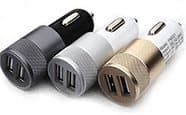
The $14 Dual Fast Car Charger add-on
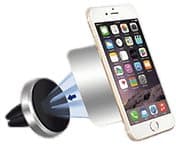
The $19 Magic Car Phone Holder add-on
SmartCar price and bundles
| Package | Total | Per adapter |
|---|---|---|
| 1 SmartCar | $74 | $74.00 |
| 2 SmartCar | $129 | $64.50 |
| Buy 2, get 1 free (3) | $159 | $53.00 |
| 4 SmartCar | $179 | $44.75 |
| Buy 3, get 2 free (5), preselected | $198 | $39.60 |
One adapter is enough for most households, because it can be moved between cars in seconds. You can check today's packages on the SmartCar order page (opens G Com Pte Ltd in a new tab).
The "regular price"
The page shows $148 crossed out next to $74 and a countdown timer. We found no evidence of SmartCar selling at $148. A permanent 50% off is a pricing style. Compare the $74 with what similar adapters cost.
The add-ons
The page code lists three add-ons:
- Computer Compatibility Upgrade: $9 (from $29). Presumably software for a laptop. See the compatibility section above.
- Magic Car Phone Holder: $19 (from $39). A magnetic air vent phone mount.
- Dual Fast Car Charger: $14 (from $29). A two-port USB car charger.
A 3-year warranty was offered for $24, unchecked when the page loaded. Phone holders and car chargers are useful, but both are widely available for less in supermarkets and electronics shops.
Who sells it
The order page and impressum name G Com Pte Ltd, at 137 Market Street in Singapore, with a company registration number, support email and phone number. The footer says "G Com Pte Ltd - Hong Kong". We found no independent rating profile for the store. With the United States selected, the order page said charges would appear as perfectchoicebase.com, shown in capitals.

SmartCarScore 3.6/10
Best for: Drivers who want to know what a check engine light means before visiting a garage
$74.00 at G Com Pte Ltd · Price checked October 4, 2026
Check price at G Com Pte Ltd (opens G Com Pte Ltd in a new tab)We may earn a commission if you buy through our links.
Is SmartCar better than FIXD, BlueDriver or a cheap adapter?
No, not on value or features. FIXD has been sold for around $40 to $60 with its own app and support, though its premium features cost extra each year. BlueDriver costs about $90 to $120 once and adds ABS and airbag codes on many cars. A generic ELM327 adapter costs far less than SmartCar and does the same basic job. SmartCar's only edge is the convenience of its offer page.
| Scanner | Upfront price | App | ABS and airbag codes | iPhone |
|---|---|---|---|---|
| SmartCar | $74 | Not named; photos show Torque | Not stated | Unclear |
| Generic ELM327 adapter | Usually much less | Third-party apps | Rarely | Only Wi-Fi or Bluetooth LE versions |
| FIXD | About $40-60 | Own app; premium extra | No | Yes |
| BlueDriver Pro | About $90-120 | Own app, no subscription | Yes, on many cars | Yes |
SmartCar vs a generic ELM327 adapter
If SmartCar is an ELM327 adapter, as the photos suggest, a generic one from a major retailer does the same job for much less. Quality varies between clones, so choose one from a seller with easy returns, and buy a Bluetooth Low Energy or Wi-Fi version if you use an iPhone.
SmartCar vs FIXD
FIXD makes its own sensor and app, with plain-English explanations of codes, maintenance reminders and estimated repair costs. According to an OBD Advisor comparison of FIXD and BlueDriver, FIXD costs about $60 upfront, but its premium subscription brings the first-year cost to about $160, and it cannot read ABS or airbag codes. It works with iPhone and Android.
SmartCar vs BlueDriver
BlueDriver Pro costs more upfront, about $90 to $120 according to the same comparison, with no subscription. It reads ABS, airbag and some other module codes on many makes, and includes repair reports. For someone who does their own maintenance, it is the more capable tool. This is where a rival clearly wins.
SmartCar vs a handheld code reader
A wired handheld reader with its own screen needs no phone or app, works on any car and can live in the glovebox. Basic models from auto parts shops are inexpensive and simple. They do not show as much live data, but for reading and clearing codes they are reliable.
SmartCar vs free code reading at parts stores
Many auto parts stores in the US will read your check engine code for free. If you only see a warning light once a year, that may be all you need.
Which should you choose?
Choose a generic ELM327 adapter if you have an Android phone, like to tinker and want the lowest cost. Choose FIXD if you want a simple app with plain-English explanations and maintenance reminders on iPhone or Android, and you are comfortable with a subscription for extras. Choose BlueDriver if you do your own repairs and want ABS and airbag codes without a subscription.
Choose SmartCar only if you specifically value buying from this offer page, and you have confirmed it works with your phone. Even then, the price is hard to justify when the photos show such a common adapter.
Other car gadgets we have reviewed
Our React ChargeHub review covers a car charger with an escape tool, and our CupStation review looks at a cup holder expander. If you want to keep track of where your car is, rather than how it is running, our iTrack review covers another OBD-port gadget from the same seller.
If you prefer SmartCar after comparing, check the current packages on the SmartCar offer page (opens G Com Pte Ltd in a new tab) and choose a single adapter.
SmartCarScore 3.6/10
Why people buy it: Reads and clears check engine fault codes on almost any petrol car sold in the US since 1996
$74.00 at G Com Pte Ltd · Price checked October 4, 2026
Check price at G Com Pte Ltd (opens G Com Pte Ltd in a new tab)We may earn a commission if you buy through our links.
Is SmartCar legit, and what should you check before buying?
SmartCar is a real product from a named seller, and an adapter should arrive if you order. Before buying, check the preselected five-pack, confirm iPhone and computer support in writing, know that refunds need a returns number and that you pay return postage, and decide whether the add-ons are worth it. None of these stops it reading codes, but each can cost you money if missed.
Confirm compatibility first
What to do: email support with your phone model and car make, model and year, and ask whether SmartCar works with both. Keep the reply.
Check the selected bundle
The five-pack for $198 was preselected. What to do: choose the single adapter before entering your details.
Membership offers
The page code contains text for a "Gadget Discount Club" membership, free for 30 days, after which "a small fee of $9 may apply". We did not see it on the order page with the United States selected. What to do: read every checkbox and post-purchase page and decline anything you do not want.
Refunds and returns
The page code promises a 30-day guarantee, with a full refund or replacement, less shipping and handling. The terms focus on defective or damaged products, which may be returned within two years once you have a returns number. Return postage is at your cost, and packages with insufficient postage are refused.
What to do: test the adapter in your car the day it arrives, and if it will not connect, email support straight away for a returns number.
Leaving it plugged in
Some adapters draw a small current all the time. On cars driven rarely, that can drain the battery over weeks. What to do: unplug the adapter if the car will sit unused for more than a few days.
Do not clear codes blindly
What to do: look up any code before clearing it, and never clear a flashing check engine light, which usually means a serious misfire that can damage the catalytic converter.
Security
OBD2 adapters can talk to your car's systems. Cheap adapters with default pairing codes could, in theory, be accessed by someone nearby. What to do: unplug the adapter when you are not using it, particularly when parked in public places.
Driving data and privacy
OBD2 apps can record where and how you drive. Some third-party apps collect usage data or ask for location permission. What to do: check the app's privacy settings, turn off location access if you do not need trip logging, and avoid apps that ask for permissions unrelated to car data.
The warranty add-on
The $24 3-year warranty is optional and was unchecked when the page loaded. What to do: given that similar adapters cost far less, a replacement adapter is likely cheaper than the warranty. Skip it unless you value the convenience.
How to buy SmartCar the smart way
- Email support to confirm iPhone or computer compatibility if you need it.
- Open the SmartCar order page (opens G Com Pte Ltd in a new tab) and select your country.
- Change the preselected five-pack to a single adapter.
- Skip the add-ons unless you want a phone holder or charger at that price.
- Note the card statement name, perfectchoicebase.com, and save your order email.
- Test it in your car on the day it arrives, and contact support immediately if it does not connect.
How did we score SmartCar?
SmartCar scores 3.6 out of 10: claim accuracy 0.7, build durability 1.0, price competitiveness 0.4, usability 1.0 and owner satisfaction 0.5, each out of 2. OBD2 adapters do a useful job, but the page overstates what a code reader does, leaves iPhone support unclear and charges far more than similar adapters. We found no independent owner ratings for SmartCar.
What owners say
We found no Trustpilot profile for the gadgetxaura.com store and no independent retailer reviews for SmartCar. Top-ranking pages for the name are mostly about other products, including different scanners and the Smart car brand. Owners of generic ELM327 adapters commonly report that they work well with Android apps for reading codes, but that some clones drop connection, fail with certain cars or apps, and do not work with iPhones.
How the score breaks down
We use the five criteria on our how we test page, each out of 2.
| Criterion | Score | Why |
|---|---|---|
| Claim accuracy | 0.7 / 2 | "Instantly find the problem" and "protects you from car repair scam" overstate a code reader; iOS and computer support unclear |
| Build durability | 1.0 / 2 | A simple plug-in device; clone quality varies |
| Price competitiveness | 0.4 / 2 | $74 for what the photos show is a common, low-cost adapter type |
| Usability | 1.0 / 2 | Easy on Android; unclear app and iPhone support |
| Owner satisfaction | 0.5 / 2 | No independent ratings for SmartCar |
| Total | 3.6 / 10 |
What we did, and did not, do
Nobody on our team has used SmartCar. We read the offer page our link opens with the United States selected, its code and the seller's terms on 4 October 2026, along with the California Air Resources Board's OBD II fact sheet, an adapter compatibility guide, a comparison of FIXD and BlueDriver and the top-ranking pages for the product.
How to use SmartCar: plugging in, reading codes and what to do next
Plug SmartCar into the OBD2 port with the ignition off, turn the ignition on, pair it with your phone and open the app to read codes. Look up each code before clearing it, note the freeze-frame data, and use what you learn to ask a mechanic better questions. Unplug the adapter if the car will sit unused.
- Find the port. Look under the dashboard on the driver's side, near the steering column. Check your manual if you cannot find it.
- Plug in with the ignition off. Push the adapter in firmly. A light on the adapter usually shows it has power.
- Turn the ignition on. You do not need to start the engine to read codes, but live data needs the engine running.
- Pair and connect. Pair in your phone's Bluetooth settings, then select the adapter inside the app.
- Read and write down codes. Note each code, its description and any freeze-frame data, which records conditions when the fault happened.
- Research before clearing. Search the code with your car's make and model. Owner forums often list the most common causes.
- Clear and watch. If you fix a simple cause, such as a loose fuel cap, clear the code and see whether it returns over the next few drives.
Reading the most common codes
P0455 or P0457 often point to a loose or faulty fuel cap. P0420 can mean a worn catalytic converter or a faulty oxygen sensor. P0171 suggests the engine is running lean, often from a vacuum leak or a dirty air flow sensor. P030X codes point to misfires in specific cylinders. These are starting points, not diagnoses.
Using live data on a drive
With a passenger watching the phone, or a phone mount, you can monitor coolant temperature on a long climb, or see how fuel trims change. Never watch the phone yourself while driving.
Codes that are often simple fixes
Some codes have common, cheap causes worth checking first. An evaporative leak code often follows a fuel cap that was not tightened until it clicked. A lean code on an older car can come from a split vacuum hose you can see and feel. A thermostat code can explain a heater that takes ages to warm up. Checking the obvious before booking a garage visit is where a scanner most often saves money.
Codes that need professional help
Codes involving the transmission, airbags, ABS, timing, or repeated misfires usually need professional diagnosis and tools. So do codes that return straight after clearing. A scanner tells you these are not quick fixes, which is still useful: you can book the right specialist and explain what you have seen.
Using it in winter and summer
Extreme temperatures stress batteries, cooling systems and sensors. In winter, watching coolant temperature can show whether a thermostat is stuck open. In summer, a temperature that climbs in traffic can warn of a failing fan before the engine overheats. Glance at the data occasionally rather than relying on it all the time.
When to see a mechanic straight away
A flashing check engine light, a red oil or temperature warning, a burning smell, smoke or loss of power all mean stop safely and get help. No scanner replaces that judgement.
Keeping a log of codes
A simple note on your phone with the date, mileage, code, freeze-frame data and what you did about it builds a useful history. If a code returns months later, you can see whether the same part is failing, and a mechanic can use your log to narrow down intermittent faults.
Talking to your mechanic
Tell the garage the code, when the light came on and what you noticed, such as rough running or a smell. Ask what tests they will do before replacing parts and what each test costs. A good mechanic will welcome the information. If a quote seems high, the code gives you something specific to compare at a second garage.
Checking a repair worked
After a repair, clear the code if the garage has not, then drive normally for several days. Check that the code has not returned and that the readiness monitors complete. If the same code comes back quickly, return to the garage with your notes.
If the adapter will not connect
Check the ignition is on, that the adapter's light is on, that it is paired in Bluetooth settings and selected in the app, and that you are using an Android phone or a compatible adapter type for iPhone. Try a different app. If it still will not connect, contact support within the guarantee period.
Sharing one adapter between cars
Because the OBD2 port is standard, one adapter can move between all the petrol cars in a household. Keep it in a small pouch in the glovebox of the car you drive most, and remember to unplug it from cars that sit unused. Some apps let you save a profile for each car, which keeps their code histories separate. This is a better use of money than buying the preselected five-pack.
Updating the app
OBD2 apps receive updates that add car support and fix connection bugs. Keep the app updated, and if a connection problem starts after an update, check the app's support page or reviews before assuming the adapter has failed.
Rental and borrowed cars
Plugging a scanner into a rental or borrowed car is usually harmless for reading codes, but do not clear codes on a car that is not yours. Report any warning light to the owner or rental company instead, and keep a photo of the dashboard as a record.
Before a used car check
Ask the seller's permission, plug in the adapter, and look for stored codes and the readiness monitors. Monitors that show "not ready" can mean codes were cleared recently. Ask why before you buy.
SmartCarScore 3.6/10
Before you buy: Check the final price, shipping and return terms at checkout.
$74.00 at G Com Pte Ltd · Price checked October 4, 2026
Check price at G Com Pte Ltd (opens G Com Pte Ltd in a new tab)We may earn a commission if you buy through our links.
You can browse more car gadgets in our auto gadget reviews.
Frequently asked questions
What is SmartCar?
SmartCar is a small OBD2 adapter that plugs into your car's diagnostic port and sends engine data to a phone app over Bluetooth. The offer page's photos show it labelled ELM 327, a widely copied adapter type, alongside the third-party Torque app. It reads and clears fault codes and shows live engine data.
Does SmartCar work with iPhone?
Possibly not. Classic Bluetooth ELM327 adapters only work with Android, because iOS supports Bluetooth Low Energy or Wi-Fi adapters for this use. The SmartCar page lists iOS but does not say which Bluetooth version the adapter uses. Ask support to confirm before ordering if you use an iPhone.
Can SmartCar stop me being overcharged by a mechanic?
It can help. Knowing the fault code and what it usually means lets you ask informed questions and compare quotes. But a code points to a symptom, not always the faulty part, so a mechanic may still need to test further. It does not prevent a dishonest garage from overcharging on its own.
How much does SmartCar cost?
With the United States selected on 4 October 2026, the offer page listed one SmartCar for $74, two for $129, three for $159, four for $179 and five for $198. The five-pack was preselected. Delivery was listed as free, and a 3-year warranty add-on cost $24.
Will SmartCar work on my car?
OBD2 has been required on all petrol cars and light trucks sold in the US since the 1996 model year, according to the California Air Resources Board. Most cars sold in Europe since the early 2000s also have it. Very old, some diesel and some electric vehicles may not work fully with a generic adapter.
Can SmartCar read ABS and airbag codes?
The page does not say it can, and generic ELM327 adapters with general apps usually read engine and emissions codes only. Branded tools such as BlueDriver advertise ABS and airbag reading for many cars. If you need those, buy a tool that lists them for your make and model.
Should I clear a check engine code myself?
Only after you understand it. Clearing a code turns the light off but does not fix the fault, and the light will return if the problem remains. A flashing check engine light usually means a severe misfire, so stop driving and get help rather than clearing it.
We may earn a commission if you buy through our links.
Prices accurate as of October 4, 2026. Check the seller's checkout for current pricing, promotions and terms.
What we checked: No hands-on use. Features, photos, prices with the United States selected, the preselected bundle, add-ons, warranty and card statement name from the SmartCar offer page our link opens (gadgetxaura.com) on 2026-10-04, plus the bundle and add-on data in the page's own code. Refund and cancellation terms from the same site's terms page that day. The California Air Resources Board's OBD II fact sheet, OBD Auto Doctor's adapter compatibility guide, a FIXD and BlueDriver comparison and the top-ranking SmartCar pages were read the same day.

About the author
Ethan Walker, Hardware & Gadget Tester
Ethan Walker covers hardware for Top10Gadgets: audio, computing, phone accessories, chargers, tools, car gadgets and sports equipment. Ethan believes a product should be judged on what happens when people actually use it…
- Headphones and speakers
- Chargers and phone accessories
- Tools and emergency gear
- Car accessories
- Durability and real-world performance
Writing for Top10Gadgets since 2026Full profile