WiFi Gadgets / Wi-Fi repeaters
Wifi ExtraBoost Review: A $59 Two-Antenna Repeater and the Bandwidth Catch
A plug-in Wi-Fi repeater with two antennas for weak rooms. It can carry a signal further, but single-radio repeaters usually cut speed, and a $7 'processor upgrade' makes little sense.

By Ryan Mitchell, Consumer Technology Writer at Top10Gadgets
Updated 12 min readHow we test
Quick answer
Worth it only for one weak room, and even then not at this price. Wifi ExtraBoost is a plug-in repeater with two antennas that can carry your router's signal into a room just beyond its reach.
Score 3.4/10$59.00 at G Com Pte Ltd
Check price at G Com Pte Ltd (opens G Com Pte Ltd in a new tab)We may earn a commission if you buy through our links.
- Best for
- Homes with one room just out of the router's reach
- Not for
- Anyone whose internet is slow everywhere, including next to the router
$59.00 at G Com Pte Ltd
Check price at G Com Pte Ltd (opens G Com Pte Ltd in a new tab)We may earn a commission if you buy through our links.
On this page · 13 sections
- 01Our verdict
- 02The short version
- 03Pros & cons
- 04How it works
- 05Who it's for
- 06Does Wifi ExtraBoost really boost speed without costing bandwidth?
- 07How much does Wifi ExtraBoost cost, and what do the add-ons add?
- 08Is Wifi ExtraBoost better than a TP-Link extender or a mesh system?
- 09Is Wifi ExtraBoost legit, and what should you check before buying?
- 10How did we score Wifi ExtraBoost?
- 11How to use Wifi ExtraBoost for the best signal
- 12What else do people ask about Wi-Fi repeaters?
- 13Frequently asked questions
Our verdict
Worth it only for one weak room, and even then not at this price. Wifi ExtraBoost is a plug-in repeater with two antennas that can carry your router's signal into a room just beyond its reach. That can turn an unusable spot into a usable one. But the page says you can connect devices "without costing bandwidth", which a single-radio repeater cannot do, gives no Wi-Fi standard or speed, and sells a "processor upgrade" for $7. Wifi ExtraBoost scores 3.4 out of 10, held back by missing specs and price.
The short version
- What it is: a wall-plug Wi-Fi repeater with two antennas and status lights.
- Price: $59 for one on 6 October 2026, with a five-pack for $149 flagged as the best seller.
- Best trait: a quick, cable-free fix for one dead zone.
- Biggest drawback: speed loss through the repeater, no specs, and branded rivals for less.
- Our score: 3.4 out of 10.
Pros & cons
Plug-in repeaters are a legitimate, cheap fix for one weak room. The pros reflect that. The cons are about speed, specs and price.
What we like
- Plugs into a wall socket, with no cables to run
- Two external antennas you can angle towards the router and the weak room
- Can bring a usable signal to one room just beyond the router's reach
- Front status lights help you find a good spot
- The seller names a registered company with an address, email and phone number
What we don't
- 'Without costing bandwidth' is unlikely: single-radio repeaters typically halve throughput
- No Wi-Fi standard, band or speed rating on the page
- A $7 'Qualcomm/MediaTek processor' upgrade is an odd thing to sell after the fact
- It cannot raise your internet plan's speed
- Branded extenders such as TP-Link's RE315 have sold for about half the price
- Return postage to an overseas seller is yours to pay
Sold by G Com Pte Ltd
Wifi ExtraBoost$59.00
How it works
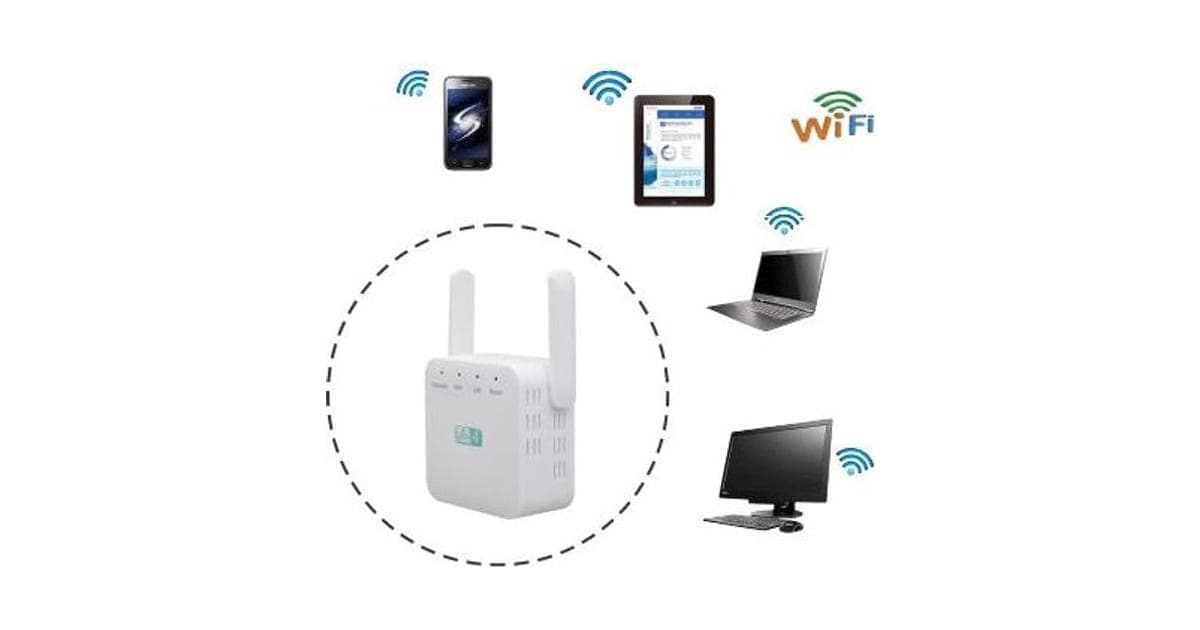
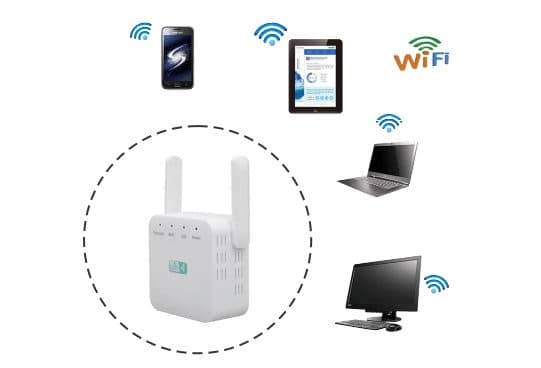
Wifi ExtraBoost plugs into a wall socket somewhere between your router and the room with poor Wi-Fi. It connects to your router like any device, then rebroadcasts that signal as its own network for devices further away. The two antennas can be angled. Lights on the front show power, the link to your router and its signal strength, which helps you find the best socket.
Plug it in halfway
Step 1: Plug it into a socket about halfway between your router and the room with weak Wi-Fi, where the router signal is still good.
Connect it to your router
Step 2: Press WPS on the router and the repeater, or join its setup network and enter your Wi-Fi password in a browser.
Join the extended network
Step 3: Connect your devices to the repeater's network, then move it closer or further if the lights show a weak link.
The page title calls it a "wireless connection booster" that will "improve internet speed" and "extend internet coverage to whole home". The six bullets promise "powerful signal [in] every corner", connecting "multiple devices without costing bandwidth to each other", use in homes, offices, warehouses and restaurants, "no internet lag on multiple devices", streaming "with no interruptions", and plug-and-play setup.
What the page leaves out
There is no Wi-Fi standard (such as Wi-Fi 4, 5 or 6), no band (2.4 GHz, 5 GHz or both), no speed rating, no Ethernet port mention and no range figure. Two-antenna repeaters of this shape are commonly 2.4 GHz, 300 Mbps Wi-Fi 4 models, but the page does not say.
Repeater versus mesh
A repeater is one extra radio point. Mesh systems use several units that coordinate, often with a dedicated link between them. For one room, a repeater can be enough.
Who it's for
Wifi ExtraBoost suits homes with one room just beyond the router's reach, renters who cannot run cables, and light users who browse and stream in that room. It does not suit anyone whose internet is slow everywhere, gamers, or large homes. Our WIFI UltraBoost review covers another plug-in repeater from the same checkout.
- Homes with one room just out of the router's reach
- Renters who cannot run cables or replace the router
- Light users who browse, message and stream in standard definition in that room
One dead room
A bedroom, garden office or kitchen at the far end of the house is the classic case.
Renters
No drilling or cable runs. Unplug it when you move.
Light users
Messaging, browsing and video streaming at modest quality work well over a repeater.
Who should skip it
Skip Wifi ExtraBoost if your internet is slow even next to the router, if you game or make frequent video calls in the weak room, or if your home is large enough to need several units.
- Anyone whose internet is slow everywhere, including next to the router
- Gamers and video callers who need low lag and full speed
- Large homes, which suit a mesh Wi-Fi system better
Does Wifi ExtraBoost really boost speed without costing bandwidth?
No. It extends coverage, but it cannot make your internet faster, and single-radio repeaters typically cut throughput roughly in half. A repeater that receives and retransmits on the same radio has to take turns, so devices connected to it share less airtime. The page's "without costing bandwidth" and "no internet lag" claims do not fit how repeaters work.
Why repeaters cost speed
Coolblue's guide to Wi-Fi repeaters explains that a repeater passes data back and forth with the router, so speeds behind it are lower than near the router, and that dual-band and mesh designs reduce the loss. The page gives no band information to judge this one.
What this means for you: expect a usable connection in the weak room, not a fast one.
"Improve internet speed"
Your internet speed is set by your plan and line. A repeater can help a device reach more of that speed in a weak room by improving the signal, but it cannot exceed what the router gets.
"Cover with powerful signal every corner"
One repeater covers one area. Large homes, thick walls or several floors need more units or mesh.
Security
Any device on your network should be updated and use a strong password. CISA's home network security guidance advises changing default passwords and keeping firmware updated.
What to do: change the repeater's admin password during setup.
How much does Wifi ExtraBoost cost, and what do the add-ons add?
On 6 October 2026, one Wifi ExtraBoost cost $59, with the five-pack at $149 flagged as the best seller. The checkout offered a "Qualcomm/MediaTek processor" upgrade for $7, an international plug adapter for $9, a car USB charger for $4 and a 3-year warranty for $9. TP-Link's RE315 dual-band extender has sold for about $20 to $30.
Wifi ExtraBoost price and bundles
| Package | Total | Per repeater |
|---|---|---|
| 1 Wifi ExtraBoost | $59 | $59.00 |
| 2 Wifi ExtraBoost | $89 | $44.50 |
| 3 (buy 2, get 1 free) | $109 | $36.33 |
| 4 Wifi ExtraBoost | $129 | $32.25 |
| 5 (buy 3, get 2 free), best seller | $149 | $29.80 |
Prices are in US dollars as listed on 6 October 2026. Chaining several repeaters compounds the speed loss, so more than two rarely helps. You can check today's packages on the Wifi ExtraBoost order page (opens G Com Pte Ltd in a new tab).
Processor upgrade
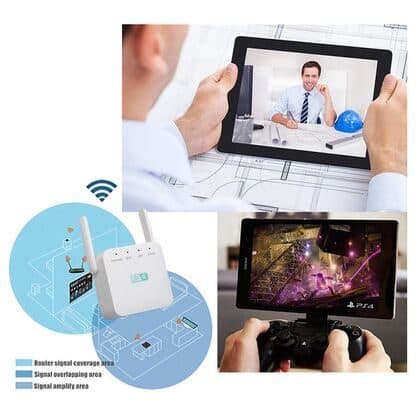
For $7, "upgrade to world leader processor in routing and WiFi devices for even more operational speed". A repeater's chip is soldered in at the factory. This would have to mean a different model, and the page does not say which chip the standard version uses. The image shows a coverage diagram rather than any hardware.
International adapter
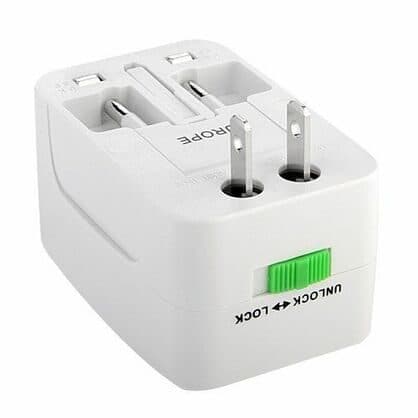
For $9, a universal travel adapter for US, EU, AU and UK sockets. Useful only if the repeater ships with the wrong plug for your country.
Car charger and warranty
A $4 car USB charger has no use with a mains-powered repeater; skip it. The 3-year warranty costs $9.
Who sells it
The order page names G Com Pte Ltd at 137 Market Street in Singapore, with the email support@g63com.com and a phone number. The footer gives the country as Hong Kong. The page code says charges appear on your card statement as drone720x.com.

Wifi ExtraBoostScore 3.4/10
Best for: Homes with one room just out of the router's reach
$59.00 at G Com Pte Ltd · Price checked October 6, 2026
Check price at G Com Pte Ltd (opens G Com Pte Ltd in a new tab)We may earn a commission if you buy through our links.
Is Wifi ExtraBoost better than a TP-Link extender or a mesh system?
No. Branded extenders state their band, speed and standard, and often cost less. TP-Link's RE315, a dual-band AC1200 extender named a budget pick by Engadget, has sold for about $20 to $30. A mesh system costs more but suits larger homes and several weak rooms far better.
| Option | Bands stated | Speed rating | Best for | Price |
|---|---|---|---|---|
| Wifi ExtraBoost | No | No | One weak room | $59 |
| TP-Link RE315 | Dual-band | AC1200 | One weak room | About $20 to $30 |
| Mesh Wi-Fi system | Usually tri or dual | Yes | Whole home | Higher |
| Powerline adapter with Wi-Fi | Varies | Yes | Rooms through thick walls | Mid |
Wifi ExtraBoost vs TP-Link RE315
A Slickdeals post on the RE315 shows it at $20 for Prime members, with a typical price around $30. Stated dual-band speeds and a known app make it the safer buy. That is where a rival wins.
Wifi ExtraBoost vs mesh
Mesh units manage handoffs as you move around and lose less speed. For homes with several weak spots, mesh is worth the extra.
Other connectivity gadgets we have reviewed
Our Ryoko PRO review covers a portable mobile hotspot, our TVShareMax review a screen-mirroring dongle, and our Keyless PRO review a folding Bluetooth keyboard.
If you want a quick plug-in fix and accept the trade-offs, you can see today's bundles on the Wifi ExtraBoost offer page (opens G Com Pte Ltd in a new tab).
Wifi ExtraBoostScore 3.4/10
Why people buy it: Plugs into a wall socket, with no cables to run
$59.00 at G Com Pte Ltd · Price checked October 6, 2026
Check price at G Com Pte Ltd (opens G Com Pte Ltd in a new tab)We may earn a commission if you buy through our links.
Is Wifi ExtraBoost legit, and what should you check before buying?
Wifi ExtraBoost is a real product from a named seller, and a repeater should arrive if you order. Before buying, test your speed next to the router, ask for the band and speed rating, switch from the five-pack, skip the processor upgrade and car charger, and note the card statement name.
Test your internet first
What to do: run a speed test next to the router. If it is slow there, a repeater will not help; call your provider instead.
Ask for the specs
What to do: email support@g63com.com and ask for the Wi-Fi standard, bands, speed rating, chip in each version and plug type. Keep the reply.
Check the selected bundle
The five-pack for $149 is flagged as the best seller in the page code. What to do: change the order to one repeater.
Card statement name and memberships
The charge appears as drone720x.com, a name unrelated to the product. Pages on this checkout have also carried text for a "Gadget Discount Club" membership that is free for 30 days and then billed. What to do: read every checkbox and post-payment page.
Refunds and returns
The page code offers a 30-day guarantee for a full refund or replacement, less shipping and handling. The terms we recorded on 4 October 2026 focus on defective goods, which can be returned within two years once you have a returns number, with return postage at your cost.
How to buy Wifi ExtraBoost the smart way
- Run a speed test next to your router.
- Open the Wifi ExtraBoost order page (opens G Com Pte Ltd in a new tab) and select your country.
- Change the five-pack to one repeater.
- Leave the processor upgrade and car charger unticked; add the adapter only if needed.
- Note the card statement name, drone720x.com.
How did we score Wifi ExtraBoost?
Wifi ExtraBoost scores 3.4 out of 10: claim accuracy 0.4, build durability 0.9, price competitiveness 0.5, usability 1.2 and owner satisfaction 0.4, each out of 2. A plug-in repeater can rescue one weak room, and setup is simple. The score falls on "no bandwidth cost", "improve internet speed" and "every corner" claims, no stated band or speed, a puzzling processor upsell and a price about double a well-reviewed branded extender.
How the score breaks down
We use the five criteria on our how we test page, each out of 2.
| Criterion | Score | Why |
|---|---|---|
| Claim accuracy | 0.4 / 2 | "No bandwidth cost" and "improve speed" misleading |
| Build durability | 0.9 / 2 | Simple plug-in hardware; chip unknown |
| Price competitiveness | 0.5 / 2 | About double TP-Link's RE315 |
| Usability | 1.2 / 2 | WPS and status lights make setup easy |
| Owner satisfaction | 0.4 / 2 | No independent ratings for this listing |
| Total | 3.4 / 10 |
What owners say
We found no Trustpilot profile for the gadgetxaura.com store and no retailer reviews for Wifi ExtraBoost by that name. Owners of similar two-antenna plug-in repeaters on large retail sites tend to like the easy setup and better signal in one room, and complain about slower speeds behind the repeater, connections that drop and need a restart, and devices that cling to the weaker network.
What we did, and did not, do
Nobody on our team has used Wifi ExtraBoost. We read the offer page our link opens and its page code on 6 October 2026, along with Coolblue's repeater guide, CISA's home network guidance, a TP-Link RE315 deal post and the pages that rank for Wifi ExtraBoost. The refund and returns terms are as we recorded them from the site's terms page on 4 October 2026.
How to use Wifi ExtraBoost for the best signal
Plug it in about halfway between the router and the weak room, where your phone still shows strong Wi-Fi, then connect it with WPS or the setup page and change its admin password. Use the same network name if it offers that, angle the antennas, and test speeds before and after so you know it helped.
- Test before. Speed in the weak room without it.
- Find the halfway point. Strong router signal still.
- Connect with WPS or a browser. Follow the leaflet.
- Change the admin password. Never leave the default.
- Angle the antennas. One towards the router, one towards the room.
- Check the lights. Move it if the link is weak.
- Test after. Keep it only if it helps.
Avoid interference
Keep it away from microwaves, cordless phone bases, metal cabinets and fish tanks.
If devices stick to the wrong network
Turn Wi-Fi off and on in that room, or give the repeater a different network name so you can choose.
Wifi ExtraBoostScore 3.4/10
Before you buy: Check the final price, shipping and return terms at checkout.
$59.00 at G Com Pte Ltd · Price checked October 6, 2026
Check price at G Com Pte Ltd (opens G Com Pte Ltd in a new tab)We may earn a commission if you buy through our links.
What else do people ask about Wi-Fi repeaters?
Most questions are about gaming, Ethernet ports and how many devices they handle. Repeaters add lag, Ethernet back-haul helps if available, and device counts depend on the chip. Browse our Wi-Fi gadget reviews for other options.
Is a repeater good for gaming?
Repeaters add delay. Use a cable or powerline adapter for consoles where possible.
Can I plug a TV into it?
Some repeaters have an Ethernet port. The page does not mention one.
How many devices can connect?
The page does not say. Budget repeaters handle a handful of active devices well.
Will it work with any router?
Repeaters generally work with any router using standard Wi-Fi. Very new Wi-Fi 6E or 7 networks may need a matching extender for full speed.
Frequently asked questions
Does Wifi ExtraBoost increase internet speed?
No. It can only pass on what your router receives. In a weak room it may make the connection usable, but a single-radio repeater typically halves throughput because it listens and repeats on the same channel. Your internet plan's speed stays the same.
How much does Wifi ExtraBoost cost?
On 6 October 2026, the offer page listed one Wifi ExtraBoost for $59, two for $89, three (two plus one free) for $109, four for $129 and five (three plus two free) for $149, with the five-pack flagged as the best seller. A processor upgrade cost $7, a travel adapter $9 and a 3-year warranty $9.
What is the Qualcomm/MediaTek processor upgrade?
The checkout offers it for $7 to 'upgrade to world leader processor'. A repeater's chip is fixed at manufacture, so this would mean a different hardware model. Ask support which chip, Wi-Fi standard and speed each version has.
Is Wifi ExtraBoost the same as WIFI UltraBoost?
They are different listings from this checkout. Our WIFI UltraBoost review covers a black plug-in repeater at $49. Both share the same limits: no stated band or speed, and branded extenders for less.
Where should I put a Wi-Fi repeater?
About halfway between the router and the weak area, where the router signal is still strong. Too close to the weak area and it repeats a poor signal. Avoid placing it behind furniture, near microwaves or behind thick walls.
Is a mesh system better?
For larger homes or several weak rooms, yes. Mesh systems use dedicated links between units and manage roaming, so speeds and handoffs are better than a single repeater.
Is Wifi ExtraBoost legit?
It is a real product sold by G Com Pte Ltd, which lists a Singapore address, email and phone number. The concerns are unsupported bandwidth claims, no specs, an odd processor upsell, a price above branded extenders and return postage at your cost.
We may earn a commission if you buy through our links.
Prices accurate as of October 6, 2026. Check the seller's checkout for current pricing, promotions and terms.
What we checked: No hands-on use. Claims, product title, feature bullets, photos, US dollar prices, bundles, add-ons and their images, warranty price, seller details and card statement name from the Wifi ExtraBoost offer page our link opens (gadgetxaura.com) and the data in the page's own code on 2026-10-06. The 30-day guarantee text was read in the same page code that day; the fuller refund and returns terms are as recorded from the site's terms page on 2026-10-04. Coolblue's guide to Wi-Fi repeaters, CISA's home network security guidance, a Slickdeals post on the TP-Link RE315 and the top-ranking Wifi ExtraBoost pages were read on 2026-10-06.

About the author
Ryan Mitchell, Consumer Technology Writer
Ryan Mitchell covers new and innovative gadgets for Top10Gadgets: AI devices, wearables, smart accessories, digital services and the beauty tech sold through viral adverts. Ryan likes to find a gadget before it goes main…
- New and innovative gadgets
- AI devices and wearables
- Smart accessories
- Beauty tech
- App and subscription terms
Writing for Top10Gadgets since 2026Full profile