Computing / Portable keyboards
Keyless PRO Review: Can You Really Type on a Laser Keyboard?
A pocket Bluetooth device that projects a red keyboard onto a table and senses your fingers. A great party trick, but independent tests of laser keyboards found frequent misclicks and dim projection.

By Ethan Walker, Hardware & Gadget Tester at Top10Gadgets
Updated 19 min readHow we test
Quick answer
Fun to show off, frustrating to type on. Keyless PRO is a pocket Bluetooth unit that projects a red keyboard onto any flat surface and senses where your fingers touch, and the first time you see it, it feels like the future.
Score 3.3/10$99.00 at G Com Pte Ltd
Check price at G Com Pte Ltd (opens G Com Pte Ltd in a new tab)We may earn a commission if you buy through our links.
- Best for
- Gadget fans who want a talking point and accept slow, error-prone typing
- Not for
- Anyone who types more than a few sentences at a time
$99.00 at G Com Pte Ltd
Check price at G Com Pte Ltd (opens G Com Pte Ltd in a new tab)We may earn a commission if you buy through our links.
On this page · 13 sections
- 01Our verdict
- 02The short version
- 03Pros & cons
- 04How it works
- 05Who it's for
- 06Can you really type well on Keyless PRO?
- 07How much does Keyless PRO cost, and what do the add-ons add?
- 08Is Keyless PRO better than a folding Bluetooth keyboard?
- 09Is Keyless PRO legit, and what should you check before buying?
- 10How did we score Keyless PRO?
- 11How to use Keyless PRO for the best results
- 12What else do people ask about laser keyboards?
- 13Frequently asked questions
Our verdict
Fun to show off, frustrating to type on. Keyless PRO is a pocket Bluetooth unit that projects a red keyboard onto any flat surface and senses where your fingers touch, and the first time you see it, it feels like the future. For anything beyond a short message, though, laser keyboards fall down: an independent tester of a budget model logged 18 misclicks in a 50-word text, the projection is dim in bright light, and there is no key feel. A folding Bluetooth keyboard costs less and types properly. Keyless PRO scores 3.3 out of 10, held back by accuracy and price.
The short version
- What it is: a small Bluetooth device that projects a keyboard layout with a laser and reads your finger presses with a sensor.
- Price: $99 for one on 6 October 2026, with a five-pack for $297 flagged as the best seller.
- Best trait: tiny, keyless and genuinely futuristic to watch.
- Biggest drawback: slow, error-prone typing with no tactile feedback, as independent tests of this technology found.
- Our score: 3.3 out of 10.
Pros & cons
Laser keyboards solve a real wish: a full keyboard that fits in a pocket. The pros are about portability and novelty. The cons come down to the experience of typing on a flat table with light, which is where the idea struggles.
What we like
- Pocket-sized: smaller than a deck of cards, with no keys to break
- Projects a full keyboard layout onto any flat, opaque surface
- Pairs over Bluetooth with phones, tablets and computers
- Built-in rechargeable battery and one-button operation
- Genuinely eye-catching, which makes it a fun gift for gadget fans
What we don't
- An independent month-long test of a budget laser keyboard logged 18 misclicks in a 50-word text
- No key travel or feedback, so touch typing is slow and tiring
- The red projection is dim and hard to see in bright light or sunshine
- 'Full size keyboard' overstates a projected layout with cramped keys
- Virtual mouse input is a $9 add-on, illustrated with a generic icon
- At $99, it costs more than folding Bluetooth keyboards with real keys
Sold by G Com Pte Ltd
Keyless PRO$99.00
How it works
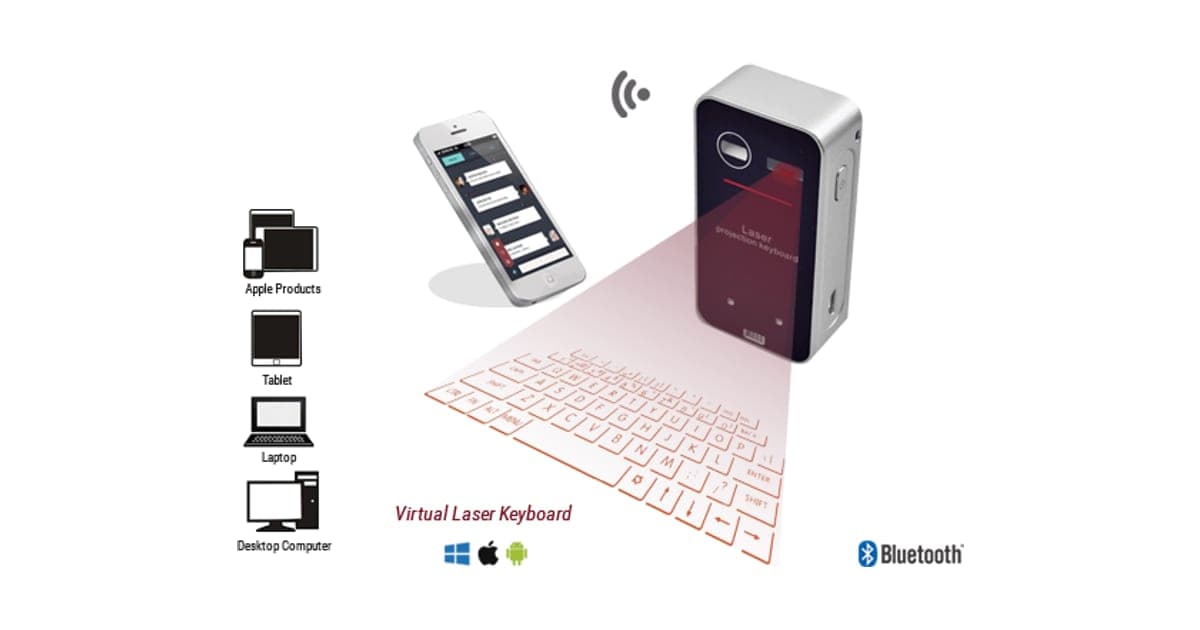
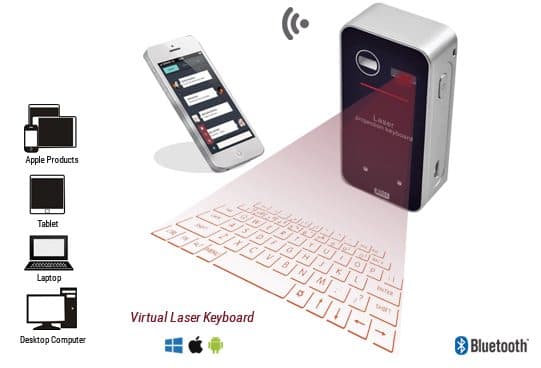
Keyless PRO has three parts in one small block. A red laser and a patterned lens project the outline of a keyboard onto the surface in front of it. An infrared light spreads a thin invisible layer just above the surface. A small sensor camera watches that layer, and when your fingertip breaks it over a key's outline, the unit works out which key you meant and sends it to your device over Bluetooth.
Stand it on a flat surface
Step 1: Place the small unit upright on a table or desk. A red laser projects the outline of a keyboard onto the surface in front of it.
Pair it with your device
Step 2: Switch it on with the single button and pair it over Bluetooth with your phone, tablet or computer, as you would any wireless keyboard.
Type on the projection
Step 3: An infrared sensor watches the projected area. When your fingertip touches a key's outline, the unit registers the key press and sends it to your device.
The page title lists "virtual keyboard, light keyboard, laser virtual keyboard, simulation keyboard, Bluetooth input keyboard for smartphone". The six bullets promise a full-size keyboard, Android and iOS compatibility, superbly defined resolution, one-button operation, a stable Bluetooth connection and a built-in battery. The page gives no battery life, typing speed, keyboard size in millimetres, languages supported or recognition accuracy.
What the photos show
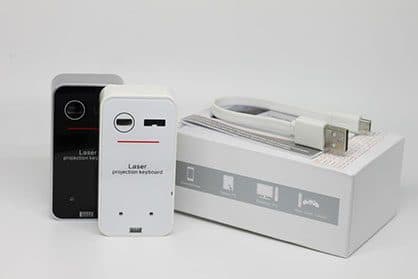
The main photo shows a silver and black unit marked "Laser projection keyboard" casting a red keyboard layout, with icons for Apple products, tablets, laptops and desktop computers and the Windows, Apple and Android logos. The cable add-on image shows black and white versions of the same unit standing on a white box with a flat white charging cable. The box and units carry no Keyless branding, which suggests a generic design sold under a new name.
Why the surface matters
The sensor needs to see your fingertip against a flat, matte, light-coloured surface. Glass, glossy wood, dark tables and soft surfaces such as a sofa arm all make the projection harder to see and the touches harder to read. A sheet of white paper under the projection often helps.
Who it's for
Keyless PRO suits a gadget fan who wants a conversation piece and only types a few lines at a time, such as a quick reply on a phone at a café table. It is also a fun gift. For anyone who types for work or study, a real keyboard is the better tool.
- Gadget fans who want a talking point and accept slow, error-prone typing
- People who need to type a short note on a phone occasionally without carrying a keyboard
- Gift buyers looking for something futuristic
Gadget fans
Watching a keyboard appear on a table and typing on light is genuinely fun. If you want it for that reason, it delivers the moment. Expect the novelty to fade the first time you try to write an email.
Occasional phone typists
If you sometimes want to type a longer message on your phone than thumbs allow, a projected keyboard can help in a pinch, as long as the table is suitable and the light is dim. You will still type slowly.
Travellers who pack light
The unit is smaller than a deck of cards. That is its strongest argument. But slim folding keyboards are not much bigger and type far better, which makes the trade-off hard to justify.
People with sticky or dirty environments
Some buyers like the idea of a keyboard that cannot get crumbs in it. A projection has no keys to clog. In a kitchen or workshop, though, the surface itself needs to be clean and flat for it to work.
Gift buyers
As a gift for someone who loves gadgets, it has real appeal. Explain that it is a fun toy rather than a replacement keyboard, so it does not disappoint.
Students
Lecture notes need speed and accuracy, which is where projected keyboards struggle most. A cheap folding keyboard paired with a tablet or phone is a much better note-taking setup. The laser keyboard is better kept for the occasional fun demo in the common room.
People with limited hand strength
Some buyers hope a keyboard with no keys will be easier on stiff or painful fingers. You still need to tap firmly and precisely on a hard surface, with no give at all, which can be harder on the hands than soft, low-travel real keys. An ergonomic keyboard or voice typing may suit better.
Who should skip it
Skip Keyless PRO if you type more than a few sentences at once, touch type, work in bright places or need a layout other than English.
- Anyone who types more than a few sentences at a time
- Touch typists who rely on feeling the keys
- Anyone working outdoors, in bright rooms or on reflective or dark surfaces
- Buyers who need non-English layouts
Can you really type well on Keyless PRO?
Not well, according to independent tests of laser projection keyboards. Hardware Busters used a budget model for over a month across Android, tablets and Windows and logged 18 misclicks in a 50-word text, unresponsive keys, caps lock problems and dropped connections. It concluded that it could not serve as a main keyboard. Without key travel, you cannot feel when a press registers, so typing is slow and error-prone.
What Hardware Busters found
In its May 2024 review of a laser projection keyboard, Hardware Busters reported many misclicks and unresponsive keys, a projection that is "not so bright" and best used in a dark environment, typing sounds that could not be turned off, caps lock issues, no language support beyond English and connectivity that required devices to stay close. Its verdict was to avoid it.
What this means for you: the technology inside Keyless PRO is the same kind. Unless the seller can show a test of this model, expect similar results.
What Neowin found
Neowin's review of the iTech Bluetooth virtual keyboard, an earlier laser keyboard, also described having to slow down and adjust typing style to get keys to register. The issues are long-standing features of the technology, not a fault of one model.
No feedback under your fingers
Real keys move and click, so your fingers know a press happened and where the next key is. On a flat table, you get neither. Touch typists drift off the home row and have to look down constantly. That alone cuts speed sharply.
"Full size keyboard"
The page calls it a full-size keyboard. The projected layout has all the keys of a basic keyboard but is usually smaller than a laptop keyboard, with cramped spacing and no number pad. Shift and space are common trouble spots, according to reviewers.
"Superbly defined resolution"
The projection is a red outline. It is sharp enough to see in dim light, but reviewers consistently describe it as dim. In a bright office, near a window or outdoors, the keys fade.
Bluetooth range and lag
Testers of laser keyboards found connections dropped unless the phone or tablet stayed close. Some also report a slight lag between a tap and the letter appearing, which makes fast typing harder. Keep your device within arm's reach of the unit.
Battery life
The page says it has a built-in battery but gives no hours. A laser, an infrared light and a sensor camera all draw power while it runs. Expect it to need charging far more often than a normal Bluetooth keyboard, which can run for weeks.
Languages and layouts
Hardware Busters noted no language support beyond English on its model. The Keyless PRO page lists no other layouts. If you type in another language or use accented characters often, check with the seller first.
Typing sounds
Many laser keyboards play a click sound when a key registers, to make up for the lack of feel. Hardware Busters found the sound could not be turned off on its model. In a quiet room or a library, that becomes a problem.
How much does Keyless PRO cost, and what do the add-ons add?
On 6 October 2026, one Keyless PRO cost $99, with the five-pack at $297 flagged as the best seller. The checkout offered virtual mouse input for $9, a fast-charge cable for $14, a car charger for $7 and a 3-year warranty for $24. The cable add-on is a flat micro USB cable, which tells you the unit charges over micro USB rather than USB-C.
Keyless PRO price and bundles
| Package | Total | Per keyboard |
|---|---|---|
| 1 Keyless PRO | $99 | $99.00 |
| 2 Keyless PRO | $159 | $79.50 |
| 3 (buy 2, get 1 free) | $197 | $65.67 |
| 4 Keyless PRO | $249 | $62.25 |
| 5 (buy 3, get 2 free), best seller | $297 | $59.40 |
Prices are in US dollars as listed on 6 October 2026. One is plenty for a gadget like this. You can check today's packages on the Keyless PRO order page (opens G Com Pte Ltd in a new tab).
Virtual mouse input for $9
The add-on "enables the device toggle to virtual mouse input", which would let you move a cursor by sliding a finger in the projected area. It is illustrated with a generic cursor icon. Some laser keyboards include a mouse mode as standard. What to do: ask support whether mouse mode is built in.
Fast-charge cable for $14
The add-on is an "original flat micro USB cable" for "charging the device faster than ordinary cables". Its image shows the units with a box and a flat cable. A cable does not make a device charge faster than its own charging circuit allows, and any good micro USB cable will do. Skip it.
Car charger and warranty
The $7 car charger is a USB car adapter; skip it if you own one. The 3-year warranty costs $24, about a quarter of the price. The seller's terms already cover defective goods for two years once you have a returns number.
Micro USB in 2026
The add-on cable is micro USB, which suggests that is the charging port. Most phones, tablets and laptops now use USB-C, so you may need to keep an extra cable just for this device.
The "regular price"
Add-ons are shown against crossed-out prices, and a countdown timer runs on the page. We found no evidence that Keyless PRO sells at a higher regular price. Laser projection keyboards of this shape are sold by many sellers under different names.
Who sells it
The order page names G Com Pte Ltd at 137 Market Street in Singapore, with the email support@g63com.com and a phone number. The footer gives the country as Hong Kong. The page code says charges appear on your card statement as Matrixfze, written in capitals.

Keyless PROScore 3.3/10
Best for: Gadget fans who want a talking point and accept slow, error-prone typing
$99.00 at G Com Pte Ltd · Price checked October 6, 2026
Check price at G Com Pte Ltd (opens G Com Pte Ltd in a new tab)We may earn a commission if you buy through our links.
Is Keyless PRO better than a folding Bluetooth keyboard?
No. A folding or slim Bluetooth keyboard with real keys types at normal speed, makes far fewer errors, works in any light and usually costs less. Keyless PRO is smaller and has no moving parts, which are its only advantages. If you plan to type more than a few lines, a real keyboard is the clear choice.
| Option | Typing | Size | Works in daylight | Price |
|---|---|---|---|---|
| Keyless PRO | Projected; slow, error-prone in tests of the technology | Smaller than a deck of cards | Poorly | $99 |
| Folding Bluetooth keyboard | Real keys | Folds to phone size | Yes | Usually less |
| Slim Bluetooth keyboard | Real keys, full spacing | Tablet width | Yes | Varies |
| Phone's on-screen keyboard | Touch, with autocorrect | Built in | Yes | Free |
Keyless PRO vs a folding keyboard
Folding keyboards with real keys pack into a pocket or a small bag, pair over Bluetooth and often run for weeks on a charge. You can touch type on them. That is the clearest case where a rival wins.
Keyless PRO vs your phone's keyboard
Modern phone keyboards with autocorrect and voice typing are fast for short messages. Dictation in particular can beat any small keyboard for speed. For a quick note, the phone you already carry is usually enough.
Keyless PRO vs a tablet keyboard case
If you type on a tablet, a keyboard case protects the screen and gives you real keys in one item.
Other computing gear
If you want a practical gadget for your phone or computer, our Omni DataSafe review covers an encrypted drive that scored well, and our Clickfree Ultra review a backup drive. Our MemorySafeX review looks at a phone backup stick from the same checkout, and our ThePhotoStick review a better-known backup stick. Browse our computing reviews for more.
If you want a laser keyboard as a gadget gift, you can see today's bundles on the Keyless PRO offer page (opens G Com Pte Ltd in a new tab).
Keyless PROScore 3.3/10
Why people buy it: Pocket-sized: smaller than a deck of cards, with no keys to break
$99.00 at G Com Pte Ltd · Price checked October 6, 2026
Check price at G Com Pte Ltd (opens G Com Pte Ltd in a new tab)We may earn a commission if you buy through our links.
Is Keyless PRO legit, and what should you check before buying?
Keyless PRO is a real product from a named seller, and a laser keyboard should arrive if you order. Before buying, set your expectations for typing speed, ask whether mouse mode and other languages are included, switch from the five-pack, note the card statement name and keep in mind that return postage is yours to pay.
Ask the right questions
What to do: email support@g63com.com and ask about battery life, supported languages and layouts, whether mouse mode is standard and whether the typing sound can be turned off. Keep the reply.
Check the selected bundle
The five-pack for $297 is flagged as the best seller in the page code. What to do: change the order to one unit before you enter your details.
Card statement name and memberships
The charge appears as Matrixfze. Pages on this checkout have also carried text for a "Gadget Discount Club" membership that is free for 30 days and then billed. What to do: note the statement name, and read every checkbox and post-payment page.
Refunds and returns
The page code offers a 30-day guarantee for a full refund or replacement, less shipping and handling. The terms we recorded on 4 October 2026 focus on defective goods, which can be returned within two years once you have a returns number, with return postage at your cost. A keyboard that works but types slowly may not count as defective.
What to do: test typing accuracy in the first week, and contact support if keys do not register reliably.
Laser safety
The unit uses a visible red laser to project the layout. Low-power projection lasers in devices like this are generally low risk, but do not stare into the emitter or let children point it at eyes. The page gives no laser class.
Delivery and support
The seller ships from overseas and gives no delivery estimate. What to do: save your order email, and if nothing arrives within three weeks, ask support for tracking.
How to buy Keyless PRO the smart way
- Decide whether you want a gadget or a keyboard; for typing, buy a real one.
- Open the Keyless PRO order page (opens G Com Pte Ltd in a new tab) and select your country.
- Change the five-pack to a single unit.
- Ask whether mouse mode is included; skip the cable and car charger.
- Note the card statement name, Matrixfze, and save your order email.
- Test typing on a matte, light surface in a dim room in the first week.
How did we score Keyless PRO?
Keyless PRO scores 3.3 out of 10: claim accuracy 0.6, build durability 1.0, price competitiveness 0.5, usability 0.7 and owner satisfaction 0.5, each out of 2. It is a striking gadget with no keys to break. The score falls because independent tests of laser keyboards found frequent misclicks, the "full size" and "superbly defined" claims overstate the experience, mouse mode is sold separately and real keyboards cost less and work better.
How the score breaks down
We use the five criteria on our how we test page, each out of 2.
| Criterion | Score | Why |
|---|---|---|
| Claim accuracy | 0.6 / 2 | "Full size" and "superbly defined" overstate a dim, cramped projection |
| Build durability | 1.0 / 2 | Solid block with no moving keys; micro USB port |
| Price competitiveness | 0.5 / 2 | $99, more than folding keyboards with real keys |
| Usability | 0.7 / 2 | Needs a dim room and matte surface; slow, error-prone typing in tests |
| Owner satisfaction | 0.5 / 2 | No independent ratings for this listing |
| Total | 3.3 / 10 |
What owners say
We found no Trustpilot profile for the gadgetxaura.com store and no retailer reviews for Keyless PRO by that name. Owners of laser projection keyboards on large retail sites commonly praise the wow factor and portability, and complain about missed keys, dim projection, Bluetooth drop-outs and slow typing.
What we did, and did not, do
Nobody on our team has used Keyless PRO. We read the offer page our link opens and its page code on 6 October 2026, along with Hardware Busters' 2024 laser keyboard review, Neowin's iTech virtual keyboard review and the pages that rank for Keyless PRO. The refund and returns terms are as we recorded them from the site's terms page on 4 October 2026.
How to use Keyless PRO for the best results
Use Keyless PRO on a flat, matte, light-coloured surface in a dim room, keep your device close, type slowly with deliberate presses and lift your fingers fully between keys. Rest your hands off the projected area, because resting fingers register as presses. Charge it fully before use and keep the lens clean.
- Choose the right surface. Flat, matte and light. A sheet of white paper works well.
- Dim the lights. The projection is easier to see and track in low light.
- Keep your phone close. Short Bluetooth range means fewer dropped keys.
- Type deliberately. A clear tap, then lift. Hovering triggers extra keys.
- Keep palms off the layout. Rest them in front of the projection.
- Check for errors often. Without feedback, mistakes slip through.
- Charge after use. A low battery dims the laser.
Calibrating your typing
Spend ten minutes typing a short paragraph slowly, then gradually speed up until errors climb. That point is your realistic speed. For most people it will be far below a real keyboard.
Cleaning the lens
Dust or fingerprints on the projection window and sensor make the layout blurry and keys harder to read. Wipe them gently with a soft, dry cloth.
If keys do not register
Check the surface is flat and the unit is level. Move to a darker spot. Re-pair Bluetooth if keys lag. If problems continue, contact support inside the 30-day window.
Shortcuts and special keys
Projected layouts usually include the basics, such as shift, enter, backspace and arrow keys, but few function keys or shortcuts. Copying, pasting and switching apps are easier on your device's touchscreen than on the projection.
Sharing it at a meeting
Laser keyboards draw attention on a conference table, which can be fun. If you need to take minutes, though, the missed keys and slow speed make it a poor choice.
Using it with a computer
Pair it like any Bluetooth keyboard in your computer's settings. On a laptop, the built-in keyboard will almost always be faster, so the laser keyboard makes most sense with a phone or tablet.
Keyless PROScore 3.3/10
Before you buy: Check the final price, shipping and return terms at checkout.
$99.00 at G Com Pte Ltd · Price checked October 6, 2026
Check price at G Com Pte Ltd (opens G Com Pte Ltd in a new tab)We may earn a commission if you buy through our links.
What else do people ask about laser keyboards?
Most questions are about whether they are worth it, whether they work outdoors and whether they are bad for your eyes. They are worth it as a novelty, not as a keyboard; they struggle outdoors in daylight; and the low-power laser is generally safe as long as you do not stare into it. Browse our computing reviews for other gear.
Are laser keyboards worth it?
As a gadget to show off, maybe. As a way to type, most reviewers say no. A folding keyboard is better for nearly every practical use.
Do laser keyboards work on any surface?
They need a flat, opaque, non-reflective surface. Glass, dark or shiny tables and soft surfaces work poorly or not at all.
Can I use it for gaming?
No. Missed and delayed key presses make it unsuitable for games.
Does it need drivers?
No. It pairs as a standard Bluetooth keyboard. Mouse mode, if available, may work differently on different devices.
Frequently asked questions
Do laser keyboards like Keyless PRO actually work?
They work, but not well enough for regular typing, according to independent testers. Hardware Busters used a budget laser projection keyboard for over a month and logged 18 misclicks in a 50-word text, plus unresponsive keys and dropped connections. It concluded that it cannot be a main keyboard.
How fast can you type on a laser keyboard?
Much slower than on real keys. Reviewers of laser projection keyboards describe having to slow down to keep accuracy, with no key travel to tell you when a press has registered. Expect a fraction of your normal speed, and more corrections.
How much does Keyless PRO cost?
On 6 October 2026, the offer page listed one Keyless PRO for $99, two for $159, three (two plus one free) for $197, four for $249 and five (three plus two free) for $297, with the five-pack flagged as the best seller. Virtual mouse input cost $9, a charging cable $14 and a 3-year warranty $24.
Does Keyless PRO work with iPhone and Android?
The page says it is compatible with Android and iOS, and the photo shows Windows, Apple and Android logos. Like any Bluetooth keyboard, it should pair with phones, tablets and computers. Language support beyond English is a known weakness of budget laser keyboards.
Can you see a laser keyboard in daylight?
Not well. Laser keyboard projections are dim, and testers recommend a fairly dark environment. In bright rooms or sunlight the red outline fades and can become almost invisible, which makes typing harder still.
What is a better portable keyboard?
A folding or slim Bluetooth keyboard with real keys. They pack almost as small, cost similar or less, last for weeks on a charge and let you type at normal speed with far fewer mistakes.
Is Keyless PRO legit?
It is a real product sold by G Com Pte Ltd, which lists a Singapore address, email and phone number. The concerns are poor typing accuracy in independent tests of this technology, a 'full size' claim that overstates the layout, a mouse mode sold as an add-on and return postage at your cost.
We may earn a commission if you buy through our links.
Prices accurate as of October 6, 2026. Check the seller's checkout for current pricing, promotions and terms.
What we checked: No hands-on use. Claims, product title, feature bullets, photos, US dollar prices, bundles, add-ons and their images, warranty price, seller details and card statement name from the Keyless PRO offer page our link opens (gadgetxaura.com) and the data in the page's own code on 2026-10-06. The 30-day guarantee text was read in the same page code that day; the fuller refund and returns terms are as recorded from the site's terms page on 2026-10-04. Hardware Busters' 2024 review of a laser projection keyboard, Neowin's review of an iTech virtual keyboard and the top-ranking Keyless PRO pages were read on 2026-10-06.

About the author
Ethan Walker, Hardware & Gadget Tester
Ethan Walker covers hardware for Top10Gadgets: audio, computing, phone accessories, chargers, tools, car gadgets and sports equipment. Ethan believes a product should be judged on what happens when people actually use it…
- Headphones and speakers
- Chargers and phone accessories
- Tools and emergency gear
- Car accessories
- Durability and real-world performance
Writing for Top10Gadgets since 2026Full profile