Tech & Gadgets / Screen mirroring dongles
TVShareMax Review: A Screen-Mirroring Dongle That Netflix Will Not Play Through
A small Wi-Fi dongle that mirrors your phone or laptop screen on a TV. Handy for photos and slides, but Netflix does not support mirroring, and Full HD is an add-on.

By Ryan Mitchell, Consumer Technology Writer at Top10Gadgets
Updated 16 min readHow we test
Quick answer
Worth it only if you want to show photos, home videos or slides from your phone on a TV, not for streaming services. TVShareMax is a small Wi-Fi dongle that plugs into a TV's HDMI port and mirrors your phone or laptop screen, and for family photos or a presentation it does a handy job.
Score 3.7/10$59.00 at G Com Pte Ltd
Check price at G Com Pte Ltd (opens G Com Pte Ltd in a new tab)We may earn a commission if you buy through our links.
- Best for
- People who want to show phone photos and home videos on a TV
- Not for
- Anyone who mainly wants Netflix or other paid streaming services on the TV
$59.00 at G Com Pte Ltd
Check price at G Com Pte Ltd (opens G Com Pte Ltd in a new tab)We may earn a commission if you buy through our links.
On this page · 14 sections
- 01Our verdict
- 02The short version
- 03Pros & cons
- 04How it works
- 05Who it's for
- 06Will Netflix and other apps work through TVShareMax?
- 07Is TVShareMax Full HD, and what does the base model output?
- 08How much does TVShareMax cost, and what do the add-ons add?
- 09Is TVShareMax better than a streaming stick or the AndroidTV box?
- 10Is TVShareMax legit, and what should you check before buying?
- 11How did we score TVShareMax?
- 12How to use TVShareMax for the best results
- 13What else do people ask about screen-mirroring dongles?
- 14Frequently asked questions
Our verdict
Worth it only if you want to show photos, home videos or slides from your phone on a TV, not for streaming services. TVShareMax is a small Wi-Fi dongle that plugs into a TV's HDMI port and mirrors your phone or laptop screen, and for family photos or a presentation it does a handy job. But Netflix says AirPlay and screen mirroring are not supported, other paid apps often block it too, and Full HD output is a $9 add-on. A streaming stick runs the apps directly for similar money. TVShareMax scores 3.7 out of 10, held back by mirroring limits and paid upgrades.
The short version
- What it is: an HDMI dongle that receives your phone's or laptop's screen over Wi-Fi and shows it on a TV.
- Price: $59 for one on 6 October 2026, with a five-pack for $149 flagged as the best seller.
- Best trait: easy big-screen sharing of your own photos, videos and slides.
- Biggest drawback: many paid streaming apps, including Netflix, do not support mirroring.
- Our score: 3.7 out of 10.
Pros & cons
Screen mirroring is useful for your own content and frustrating for paid content. TVShareMax's pros come from the first; its cons from the second, plus specs that are missing or sold as upgrades.
What we like
- Small puck that plugs into any TV or monitor with an HDMI port
- Mirrors photos, home videos, slides and browser pages from a phone or laptop
- Works with Windows, Android and iOS, according to the page
- On-screen setup instructions appear on the TV
- Portable enough to carry to a meeting room or hotel
What we don't
- Netflix says AirPlay and screen mirroring are not supported, and other paid apps often block mirroring too
- The standard version is not described as Full HD; 1080p is a $9 add-on
- AV output for older TVs is a $4 add-on
- No Wi-Fi standard, latency or resolution given for the base model
- A streaming stick that runs apps directly avoids mirroring problems and costs a similar amount
- Return postage to an overseas seller is yours to pay
Sold by G Com Pte Ltd
TVShareMax$59.00
How it works
TVShareMax is a wireless display receiver. You plug it into an HDMI port on a TV or monitor and power it from a USB port. It creates its own Wi-Fi network or joins yours. Your phone or laptop then uses its built-in mirroring feature, such as Screen Mirroring on an iPhone or Cast or Smart View on Android, to send a live copy of its screen to the dongle, which displays it on the TV.
Plug it into the TV
Step 1: Connect the dongle to a free HDMI port and to USB power, and switch the TV to that input. Setup instructions appear on the screen.
Connect your device
Step 2: Join the dongle's Wi-Fi network or connect it to your home Wi-Fi, then use your phone's or computer's screen mirroring feature to find it.
Mirror your screen
Step 3: Whatever is on your phone or laptop screen appears on the TV, with a short delay. Some paid streaming apps block this and show a black screen.
The page title lists "screen share, screen cast, share Android and iOS screen on TV, share smartphone screen on monitor and TV, HD screen sharing, WiFi screen cast". The six bullets promise high-definition output, sharing on any TV and monitor, easy setup, a small portable form, on-screen setup instructions and Windows, Android and iOS compatibility. The page gives no resolution for the standard model, no Wi-Fi standard and no latency.
What the photos show
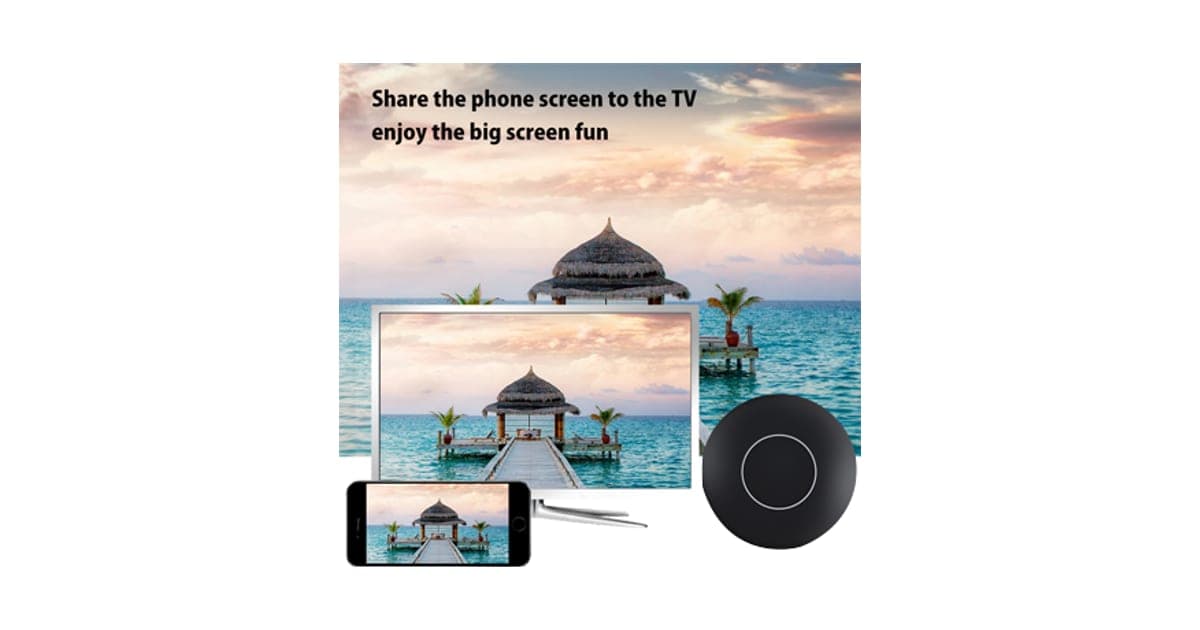
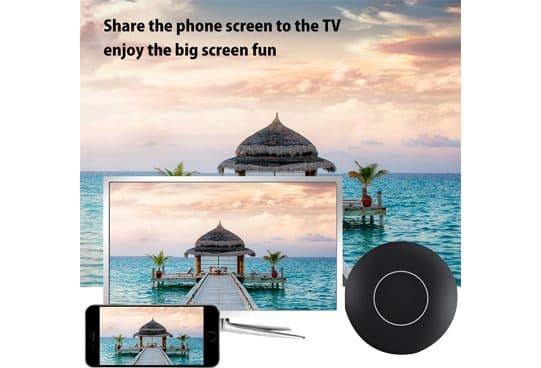
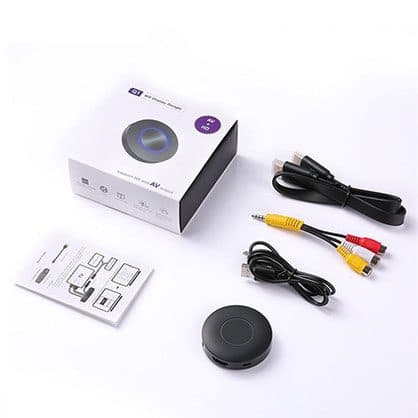
The main photo shows a round black puck beside a TV and a phone displaying the same beach photo, under the words "share the phone screen to the TV, enjoy the big screen fun". The AV add-on image shows a white box labelled "Q1 WiFi display dongle" with "HD and AV" output, the puck, an HDMI extension, a USB cable, a red, white and yellow AV cable and an instruction leaflet.
Mirroring versus casting
Mirroring copies your whole screen, so the phone has to stay on and decode the video. Casting, used by Chromecast-style devices, tells the TV device to fetch the video itself from the internet. Casting is smoother, saves phone battery and is widely supported by streaming apps. TVShareMax is a mirroring device.
Who it's for
TVShareMax suits people who want to put their own content on a TV: holiday photos for the family, a home video, a presentation in a meeting room, a web page or a video call on a bigger screen. It is a poor choice if most of what you want is Netflix and other paid streaming.
- People who want to show phone photos and home videos on a TV
- Presenters who need to mirror a laptop to a meeting room screen without a cable
- Travellers who want to put their own content on a hotel TV
Families sharing photos
Swiping through holiday photos on a TV is more fun than crowding round a phone. Mirroring does this well, and the slight delay does not matter for still images.
Presenters
Mirroring a laptop to a meeting room TV without hunting for the right cable is useful. Check that your company's laptop allows connecting to unknown wireless displays, as some IT departments block it.
Travellers
A small dongle in your bag lets you put your own videos or slides on a hotel TV that has a free HDMI port. Many hotel TVs lock their inputs, so it will not work everywhere.
Older TVs
The AV add-on, with red, white and yellow cables, suggests the dongle can connect to TVs without HDMI. That costs $4 extra.
Who should skip it
Skip TVShareMax if you mainly want Netflix or other paid streaming, play games, already have a smart TV with casting, or want 1080p without an add-on.
- Anyone who mainly wants Netflix or other paid streaming services on the TV
- Gamers, because mirroring adds delay
- Owners of a smart TV or streaming stick that already supports casting
- Anyone who wants 1080p without paying extra
Will Netflix and other apps work through TVShareMax?
Netflix will not: its help page says AirPlay and screen mirroring are no longer supported and should be turned off while Netflix plays. Many other paid streaming apps block mirroring too, to protect copyrighted content, so you may see sound with a black screen. Free content, your own photos and videos, web pages and many free apps usually mirror fine.
What Netflix says
Netflix's help page on a black screen with sound says AirPlay and Screen Mirroring are no longer supported and should be turned off while Netflix is playing. Netflix supports casting to compatible devices and its own apps on smart TVs, streaming sticks and consoles.
What this means for you: if streaming services are why you want a TV gadget, buy a streaming stick instead.
Why apps block mirroring
Paid streaming services use copy protection. A mirrored screen is harder for them to protect, so many apps either refuse to mirror or send a black picture. The page does not mention this limit.
Delay and games
Mirroring adds a delay between your phone and the TV. It is barely noticeable with photos, more noticeable with fast video and frustrating in games, where every fraction of a second counts.
Phone battery and heat
Your phone works hard to encode and send its screen. Long mirroring sessions drain the battery and warm the phone. Keep it plugged in for longer sessions.
iPhone and unofficial AirPlay
An iPhone's Screen Mirroring uses Apple's AirPlay. Cheap dongles that respond to it are not usually certified by Apple, and some stop working properly after iOS updates. The page gives no certification.
Android and Windows
Android phones and Windows laptops commonly use Miracast for mirroring. Support varies by phone maker, and some newer phones have dropped Miracast in favour of casting.
Is TVShareMax Full HD, and what does the base model output?
The page says "high definition output", but sells a "Full HD Version" with 1080p as a $9 add-on. That implies the standard dongle outputs something lower, often 720p on cheap models. On a large TV, 720p mirrored video looks soft. The page does not state the base resolution, so ask the seller before ordering.
"HD" versus "Full HD"
"HD" commonly means 720p, and "Full HD" means 1080p. Most current TVs are Full HD or 4K. Mirroring at 720p is fine for photos at a distance and noticeably soft for text and detailed video up close.
4K
The page does not mention 4K. If you have a 4K TV and want sharp output, a 4K streaming stick is the better choice.
Wi-Fi quality matters
Mirroring quality depends on your Wi-Fi. A crowded network, thick walls or distance between router, phone and dongle cause stutters and drop-outs. The page does not say whether it supports 5 GHz Wi-Fi, which helps.
What owners of this design report
We found no independent reviews of TVShareMax by that name. Owners of similar round wireless display dongles on large retail sites tend to like them for photos and presentations, and complain about lag, drop-outs, black screens on streaming apps and fiddly setup after phone updates.
How much does TVShareMax cost, and what do the add-ons add?
On 6 October 2026, one TVShareMax cost $59, with the five-pack at $149 flagged as the best seller. The checkout offered AV capability for $4, a Full HD version for $9, a USB car adapter for $5 and a 3-year warranty for $9. With Full HD and AV, one dongle comes to $72.
TVShareMax price and bundles
| Package | Total | Per dongle |
|---|---|---|
| 1 TVShareMax | $59 | $59.00 |
| 2 TVShareMax | $89 | $44.50 |
| 3 (buy 2, get 1 free) | $109 | $36.33 |
| 4 TVShareMax | $129 | $32.25 |
| 5 (buy 3, get 2 free), best seller | $149 | $29.80 |
Prices are in US dollars as listed on 6 October 2026. One dongle is enough for most homes. You can check today's packages on the TVShareMax order page (opens G Com Pte Ltd in a new tab).
AV capability
For $4, AV output adds support for older TVs with composite inputs. The image shows a box labelled "Q1 WiFi display dongle" with HD and AV support and an AV cable. If your TV has HDMI, you do not need it.
Full HD version
For $9, the "Full HD Version" promises 1080p output. It is illustrated with a generic Full HD icon. If your TV is Full HD or 4K, this is the add-on that matters, which makes the real price $68.
USB car adapter and warranty
The $5 car adapter is unrelated; skip it. The 3-year warranty costs $9. The seller's terms already cover defective goods for two years once you have a returns number.
The "regular price"
Add-ons are shown against crossed-out prices, with a countdown timer on the page. We found no evidence that TVShareMax sells at a higher regular price. Round "Q1" wireless display dongles are sold under many names.
Who sells it
The order page names G Com Pte Ltd at 137 Market Street in Singapore, with the email support@g63com.com and a phone number. The footer gives the country as Hong Kong. The page code says charges appear on your card statement as panameedia.

TVShareMaxScore 3.7/10
Best for: People who want to show phone photos and home videos on a TV
$59.00 at G Com Pte Ltd · Price checked October 6, 2026
Check price at G Com Pte Ltd (opens G Com Pte Ltd in a new tab)We may earn a commission if you buy through our links.
Is TVShareMax better than a streaming stick or the AndroidTV box?
For most people, a streaming stick from a major brand is better: it runs Netflix and other apps directly, supports official casting and costs a similar amount. TVShareMax only wins for mirroring your own phone screen on TVs without casting support. The AndroidTV box from the same checkout runs apps but on old software.
| Option | Netflix and paid apps | Mirroring | Resolution | Price |
|---|---|---|---|---|
| TVShareMax | Not supported by Netflix via mirroring | Yes | Full HD as a $9 add-on | $59 |
| Streaming stick from a major brand | Apps run directly | Casting supported | Full HD or 4K | Similar |
| AndroidTV box | See our review | See our review | See our review | See our review |
| HDMI cable to phone or laptop | Often works | Wired, no delay | Depends on device | Low |
TVShareMax vs a streaming stick
Streaming sticks from the big platforms plug into HDMI, run streaming apps themselves and accept casting from phones. Video plays smoothly without draining your phone, and Netflix is supported. That is the clearest case where a rival wins.
TVShareMax vs AndroidTV
Our AndroidTV review covers a TV box from the same checkout that runs apps but on old Android. Our is AndroidTV legit article explains what we found about that offer.
TVShareMax vs a cable
A USB-C to HDMI cable or adapter mirrors many laptops and some phones to a TV with no lag. It is cheap and reliable for presentations.
Phones from the same seller
Our Xone Phone review and ZenPhone XS review cover phones from the same checkout. Browse our tech gadget reviews for more.
If you mainly want to share photos and slides, you can see today's bundles on the TVShareMax offer page (opens G Com Pte Ltd in a new tab).
TVShareMaxScore 3.7/10
Why people buy it: Small puck that plugs into any TV or monitor with an HDMI port
$59.00 at G Com Pte Ltd · Price checked October 6, 2026
Check price at G Com Pte Ltd (opens G Com Pte Ltd in a new tab)We may earn a commission if you buy through our links.
Is TVShareMax legit, and what should you check before buying?
TVShareMax is a real product from a named seller, and a dongle should arrive if you order. Before buying, decide whether you want mirroring or streaming, ask for the base resolution, switch from the five-pack, add Full HD if your TV is modern and note the card statement name.
Ask for the base resolution
What to do: email support@g63com.com and ask what resolution the standard dongle outputs and whether it supports 5 GHz Wi-Fi. Keep the reply.
Check the selected bundle
The five-pack for $149 is flagged as the best seller in the page code. What to do: change the order to one dongle before you enter your details.
Card statement name and memberships
The charge appears as panameedia. Pages on this checkout have also carried text for a "Gadget Discount Club" membership that is free for 30 days and then billed. What to do: note the statement name, and read every checkbox and post-payment page.
Refunds and returns
The page code offers a 30-day guarantee for a full refund or replacement, less shipping and handling. The terms we recorded on 4 October 2026 focus on defective goods, which can be returned within two years once you have a returns number, with return postage at your cost. A dongle that works but cannot mirror Netflix is not defective.
Delivery and support
The seller ships from overseas and gives no delivery estimate. What to do: save your order email, and if nothing arrives within three weeks, ask support for tracking.
How to buy TVShareMax the smart way
- Decide whether you need mirroring rather than streaming.
- Ask support for the base resolution and Wi-Fi bands.
- Open the TVShareMax order page (opens G Com Pte Ltd in a new tab) and select your country.
- Change the five-pack to one dongle; add Full HD for a modern TV.
- Note the card statement name, panameedia, and save your order email.
- Test mirroring from your phone the day it arrives.
How did we score TVShareMax?
TVShareMax scores 3.7 out of 10: claim accuracy 0.6, build durability 0.9, price competitiveness 0.7, usability 1.0 and owner satisfaction 0.5, each out of 2. It mirrors your own content to a TV, which is useful. The score falls because Netflix and other paid apps block mirroring, the base model's resolution is unclear with Full HD sold separately, specs are missing, and streaming sticks do more for similar money.
How the score breaks down
We use the five criteria on our how we test page, each out of 2.
| Criterion | Score | Why |
|---|---|---|
| Claim accuracy | 0.6 / 2 | "HD" with Full HD as an add-on; "share on any TV" ignores app blocks |
| Build durability | 0.9 / 2 | Simple dongle; Wi-Fi standard and certification unknown |
| Price competitiveness | 0.7 / 2 | $59, or $68 for Full HD, against streaming sticks |
| Usability | 1.0 / 2 | On-screen setup; mirroring can lag and drop |
| Owner satisfaction | 0.5 / 2 | No independent ratings for this listing |
| Total | 3.7 / 10 |
What owners say
We found no Trustpilot profile for the gadgetxaura.com store and no retailer reviews for TVShareMax by that name. Owners of similar Q1-style dongles on large retail sites tend to like them for photos and slides, and complain about lag, black screens on streaming apps and setup problems after phone updates.
What we did, and did not, do
Nobody on our team has used TVShareMax. We read the offer page our link opens and its page code on 6 October 2026, along with Netflix's help page on mirroring and the pages that rank for TVShareMax. The refund and returns terms are as we recorded them from the site's terms page on 4 October 2026.
How to use TVShareMax for the best results
Plug TVShareMax into HDMI with good USB power, keep your phone and the dongle close to the router, use it for your own photos, videos and slides, and use casting or a streaming stick for paid services. Turn on 5 GHz Wi-Fi if supported, close other apps on your phone and keep the phone charging during long sessions.
- Use a good power source. A wall USB adapter is steadier than some TV USB ports.
- Follow the on-screen setup. Note the dongle's network name and password.
- Keep devices close. Less distance means less lag and fewer drop-outs.
- Close background apps. Gives your phone more power for mirroring.
- Turn your phone sideways. For full-screen photos and video.
- Charge during long sessions. Mirroring drains batteries.
- Use apps' own TV options for paid services. Not mirroring.
Using the HDMI extension
If the TV's HDMI ports are crowded or behind a wall mount, the short HDMI extension shown in the box image helps the dongle fit and improves Wi-Fi reception by moving it away from the TV's metal back.
For presentations
Set your laptop to duplicate the display, close notifications and test it in the room before the meeting. Have a cable as a backup.
If it will not connect
Restart the dongle and your phone, forget the network and reconnect, and check you are using the right mirroring option on your phone. After a phone update, check whether the dongle needs a firmware update.
If video stutters
Move the router closer, switch to 5 GHz if supported, reduce the resolution or pause other devices using the Wi-Fi.
TVShareMaxScore 3.7/10
Before you buy: Check the final price, shipping and return terms at checkout.
$59.00 at G Com Pte Ltd · Price checked October 6, 2026
Check price at G Com Pte Ltd (opens G Com Pte Ltd in a new tab)We may earn a commission if you buy through our links.
What else do people ask about screen-mirroring dongles?
Most questions are about Netflix, YouTube and whether a smart TV already has mirroring built in. Netflix does not support mirroring, YouTube is better cast through its own app, and many smart TVs already accept mirroring or casting without any dongle. Check your TV's settings before buying.
Does YouTube work?
Free YouTube videos usually mirror. The YouTube app on a smart TV or streaming stick, controlled from your phone, gives better quality.
Does my smart TV already do this?
Many smart TVs support screen mirroring or casting. Look in the TV's input or network settings for "Screen Mirroring", "Miracast", "AirPlay" or "Cast".
Can I use it with a projector?
Yes, if the projector has an HDMI input and you can power the dongle from USB.
Is mirroring secure?
Set a password on the dongle's network if possible, and turn mirroring off when not in use, so others nearby cannot connect.
Frequently asked questions
Can I watch Netflix with TVShareMax?
Probably not. Netflix's help pages say AirPlay and screen mirroring are no longer supported and should be turned off while Netflix plays. Mirroring Netflix often shows sound with a black screen. Netflix supports casting to compatible devices and apps on smart TVs and streaming sticks instead.
Is TVShareMax Full HD?
The page says high definition output, but sells a 'Full HD Version' with 1080p output as a $9 add-on, which suggests the standard model outputs a lower resolution such as 720p. Ask the seller for the standard resolution before buying.
How much does TVShareMax cost?
On 6 October 2026, the offer page listed one TVShareMax for $59, two for $89, three (two plus one free) for $109, four for $129 and five (three plus two free) for $149, with the five-pack flagged as the best seller. AV output cost $4, Full HD $9 and a 3-year warranty $9.
Does TVShareMax work with iPhone?
The page says iOS compatible. Dongles like this usually respond to the iPhone's Screen Mirroring, which uses Apple's AirPlay. Unofficial AirPlay receivers can be unreliable after iOS updates, and paid apps may block mirroring.
Do I need Wi-Fi to use TVShareMax?
Dongles like this create their own Wi-Fi network for your phone to join, or connect to your home Wi-Fi. For streaming web video through the phone, you generally need internet on the phone too. The page does not explain its setup modes.
What is better than a screen-mirroring dongle?
A streaming stick from a major brand that runs Netflix, YouTube and other apps directly on the TV, with official casting support. It avoids mirroring blocks, delay and phone battery drain, and costs a similar amount.
Is TVShareMax legit?
It is a real product sold by G Com Pte Ltd, which lists a Singapore address, email and phone number. The concerns are streaming apps that block mirroring, Full HD and AV sold as add-ons, missing specs, the five-pack flagged as best seller and return postage at your cost.
We may earn a commission if you buy through our links.
Prices accurate as of October 6, 2026. Check the seller's checkout for current pricing, promotions and terms.
What we checked: No hands-on use. Claims, product title, feature bullets, photos, US dollar prices, bundles, add-ons and their images, warranty price, seller details and card statement name from the TVShareMax offer page our link opens (gadgetxaura.com) and the data in the page's own code on 2026-10-06. The 30-day guarantee text was read in the same page code that day; the fuller refund and returns terms are as recorded from the site's terms page on 2026-10-04. Netflix's help page on black screens with sound and the top-ranking TVShareMax pages were read on 2026-10-06.

About the author
Ryan Mitchell, Consumer Technology Writer
Ryan Mitchell covers new and innovative gadgets for Top10Gadgets: AI devices, wearables, smart accessories, digital services and the beauty tech sold through viral adverts. Ryan likes to find a gadget before it goes main…
- New and innovative gadgets
- AI devices and wearables
- Smart accessories
- Beauty tech
- App and subscription terms
Writing for Top10Gadgets since 2026Full profile