Computing / Encrypted storage
Omni DataSafe Review: Is This PIN-Protected Encrypted USB Drive Worth It for Your Private Files?
A 32 GB USB drive with a keypad and AES-256 encryption that wipes after 10 wrong PINs. A sensible offline way to protect files, but 'unbreakable' overstates it, and one drive is no backup.

By Ethan Walker, Hardware & Gadget Tester at Top10Gadgets
Updated 29 min readHow we test
Quick answer
Yes, if you want a simple, offline, PIN-protected place for wills, medical records, financial papers and passwords, and you will keep a second copy somewhere safe. Omni DataSafe uses AES-256 hardware encryption, a keypad on the drive and a 10-attempt wipe, which is a sensible design.
Score 6.0/10$79.00 at Omni DataSafe
Check price at Omni DataSafe (opens Omni DataSafe in a new tab)We may earn a commission if you buy through our links.
- Best for
- People who want an offline, PIN-protected place for wills, medical records, financial documents and passwords
- Not for
- Businesses needing certified (FIPS 140) encrypted drives for compliance
$79.00 at Omni DataSafe
Check price at Omni DataSafe (opens Omni DataSafe in a new tab)We may earn a commission if you buy through our links.
On this page · 14 sections
- 01Our verdict
- 02The short version
- 03Pros & cons
- 04How it works
- 05Who it's for
- 06How much does Omni DataSafe cost, and what do you get?
- 07How secure is Omni DataSafe really?
- 08Are Omni DataSafe's claims true?
- 09Is Omni DataSafe better than a certified drive or a password manager?
- 10Is Omni DataSafe legit, and what should you check before buying?
- 11What do owners say, and how did we score Omni DataSafe?
- 12How to use Omni DataSafe for the best results
- 13What else do people ask about encrypted USB drives?
- 14Frequently asked questions
Our verdict
Yes, if you want a simple, offline, PIN-protected place for wills, medical records, financial papers and passwords, and you will keep a second copy somewhere safe. Omni DataSafe uses AES-256 hardware encryption, a keypad on the drive and a 10-attempt wipe, which is a sensible design. But "unbreakable", "safe from malware" and "automatic backups" overstate things, we found no FIPS certification, and $79 for 32 GB is not cheap. It scores 6.0 out of 10, held back by claims and value.
The short version
- A 32 GB USB drive with a number keypad and AES-256 hardware encryption.
- Unlock by typing a PIN on the drive; remove it to lock.
- Erases its data after 10 wrong PIN attempts.
- Works on Windows, Mac and Linux without drivers, according to the seller.
- Includes organiser software for passwords, bills, assets and estate planning.
- $79 on 4 October 2026; three for $198, five for $297, free shipping on packs.
- Made by Prairie IT, a Colorado company founded by a Silicon Valley veteran.
- No FIPS 140 validation we could find; no independent owner ratings.
- 30-day money-back guarantee.
- Best trait: offline, PIN-protected storage that is easy to use.
- Biggest drawback: overstated security claims, and one drive is not a backup.
- Our score: 6.0 out of 10.
Pros & cons
Omni DataSafe is a real, sensibly designed type of product: a keypad-encrypted USB drive aimed at people who are not tech experts. The cons are about overstated marketing, missing certification and price.
What we like
- Hardware AES-256 encryption unlocked by a PIN typed on the drive itself, so no password goes through your computer
- Works offline on Windows, Mac and Linux with no drivers, according to the seller
- Erases its data after 10 wrong PIN attempts, protecting a lost or stolen drive
- Includes organiser software for passwords, bills, assets and estate planning documents
- Metal housing and a 30-day money-back guarantee
What we don't
- "Unbreakable", "100% safe" and "impenetrable" overstate what any device can promise
- Once unlocked, files are readable by your computer, so malware on it can still reach them
- "Automatic backups" is misleading: one drive is a single copy that can be lost, broken or wiped
- No FIPS 140 validation we could find, unlike some established keypad drives
- 32 GB for $79 costs more than ordinary drives, and no independent owner ratings we could verify
Sold by Omni DataSafe
Omni DataSafe$79.00
How it works
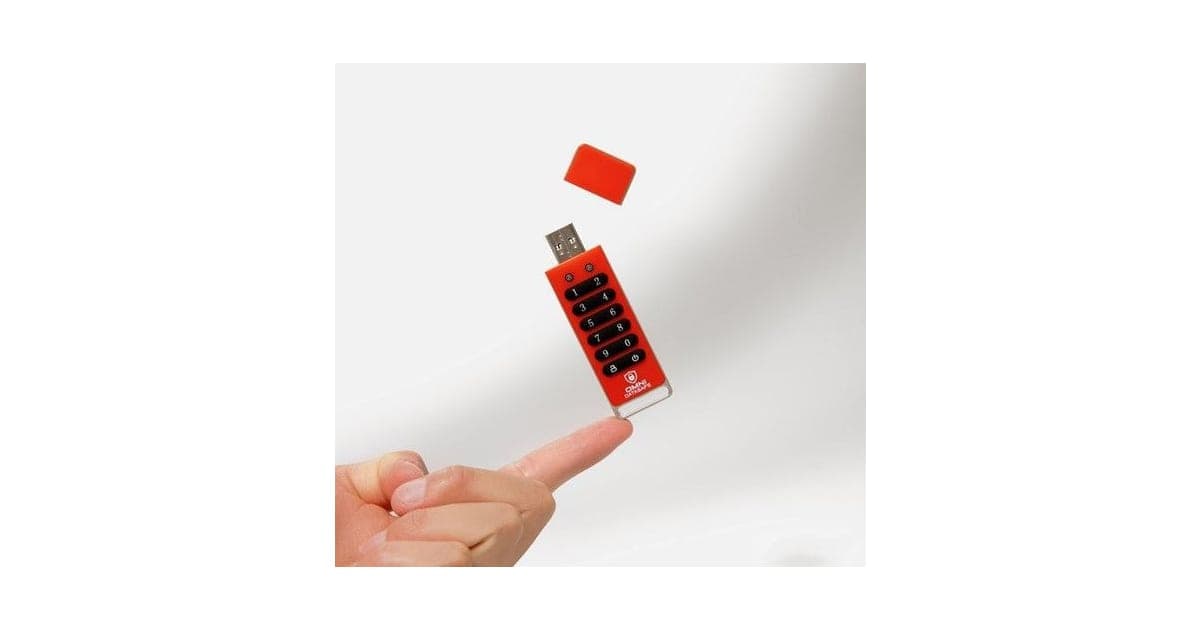
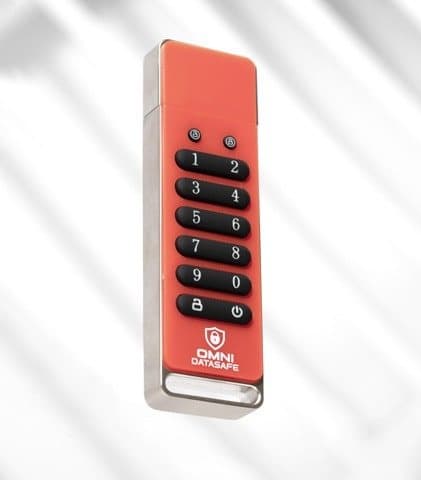
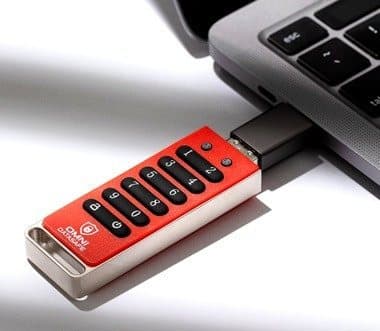
Omni DataSafe looks like a slightly chunky USB flash drive with a ten-digit keypad, an unlock key and two status lights. Inside is a hardware encryption chip that encrypts everything written to the drive using AES-256.
Unlock with your PIN
Step 1: Press the unlock key and type your PIN on the drive's own keypad. The LEDs show when it is unlocked. Then plug it into your computer.
Drag your files across
Step 2: The drive appears like a normal USB drive. Drag documents, photos or other files onto it, or use the included organiser software.
Remove it to lock
Step 3: When you eject and unplug it, the drive locks again. Without the PIN, the stored data stays encrypted and unreadable.
What hardware encryption means
On an ordinary USB drive, anyone who finds it can plug it in and read your files. On an encrypted drive, the files are scrambled using a key. Without the key, the data is unreadable.
With software encryption, your computer does the scrambling and you type a password on your keyboard. With hardware encryption, a chip on the drive does it, and on a keypad drive you type the PIN on the drive itself. That means the PIN never passes through your computer, so a keylogger on the computer cannot capture it. It also means the drive works on any operating system without special software, because the computer just sees a normal drive once it is unlocked.
AES-256
AES (the Advanced Encryption Standard) is the encryption standard used by governments, banks and most of the tech industry. The 256 refers to the key length. Breaking AES-256 by guessing keys is not feasible with any known technology. That part of the marketing is broadly fair.
What matters in practice is everything around the encryption: how the drive stores and protects the key, how it handles wrong PINs, whether its firmware has flaws, and how strong your PIN is. Those details are what independent certifications test.
Encryption at rest, not in transit
Encryption on the drive protects data "at rest", while it is stored. When you copy a file from the drive to your computer, the copy on your computer is not encrypted unless you protect it separately. People often open a document from the drive, save an edited version to the desktop by mistake, and leave an unprotected copy behind. Working directly on the drive and checking your downloads folder avoids this.
The 10-attempt wipe
According to the FAQ, if someone enters the wrong PIN 10 times in a row, the drive erases all the encrypted data. That stops a thief from simply trying PINs until one works. It is a standard and important feature on keypad drives.
The organiser software
The drive comes with built-in software that lets you organise information into categories such as passwords, bills, assets, estate planning and healthcare, according to the page and its screenshots. That is aimed at retirees and families who want one place for important information. It is a useful extra, but you can also store ordinary files and folders without it.
The status lights
The page and one testimonial mention two LEDs at the top of the drive that show what it is doing, such as locked, unlocked or waiting for a PIN. Learning what each colour means is the first thing to do when it arrives, because it tells you whether the drive is ready to plug in and whether it has locked again after you remove it.
Why the PIN is typed before plugging in
On many keypad drives, you unlock the drive with its keypad first and then plug it in within a short time, or it relocks. The page's steps simply say to plug it in and drag files across, but the product's own instructions will explain the exact order. Read them before setting your PIN.
Who it's for
Omni DataSafe suits people who want a physical, offline place for their most important documents: wills, powers of attorney, insurance policies, medical records, account lists and passwords. It also suits families who want to prepare an emergency file that trusted relatives can use if something happens, as one testimonial describes.
It is not designed for businesses with compliance requirements, for large files like video libraries, or as a backup solution.
Common reasons people buy it
From the testimonials and the founder story, buyers usually want one of a few things: a safe place for estate and medical documents, a more secure replacement for a password notebook, a gift for an older parent, or a shared emergency file for a family. All of these suit a keypad drive well, as long as there is a backup copy.
Why Omni DataSafe appeals
The appeal is simplicity and control. Many people are wary of cloud storage after data breaches, and password managers and encryption software can feel complicated. A drive you hold in your hand, unlocked by a PIN you type on it, is easy to understand. There is no account, subscription or internet connection.
The founder story also resonates. The page says Mark Oman, who founded Prairie IT after a 45-year career in Silicon Valley, created the drive after realising he needed a secure way to store his own will, medical documents and financial information. Prairie IT's launch release from 2023 matches that story.
A typical use
You sit down with your important papers and scan or save them to your computer. You plug in Omni DataSafe, unlock it with your PIN and drag the files across, perhaps using the organiser to list your accounts and passwords. When you are done, you eject it, and it locks. You put it in a safe place at home, and tell a trusted family member where it is and how to get the PIN if needed.
The emergency file
One testimonial describes a family where each sibling had a copy of their father's DataSafe, so they could deal with his doctor, lawyer and business partner while he recovered from an accident. That is the strongest use case: a portable, protected emergency file that the right people can access.
What to put in an emergency file
Families and estate planners often suggest a core set of information: a list of bank, pension and investment accounts; insurance policies; property and vehicle documents; a will and where the original is; powers of attorney; medical conditions, medications and doctors; key contacts such as a solicitor and accountant; and instructions for digital accounts and subscriptions. Gathering this takes an afternoon or two, and the drive gives it a secure home.
Replacing a password notebook
Another testimonial describes an older parent who kept passwords in a notebook. A PIN-protected drive is more secure than a notebook if it is lost, and more secure than a plain text file on a computer. But for everyday passwords that you use online, a reputable password manager with a strong master password and two-factor authentication is more practical and also secure.
As a gift for parents
The page pitches it as a gift, and adult children buying for parents is a natural fit. If you give one, help set it up: choose a PIN together, agree where it will be written down, and copy the first important documents onto it. A drive left in its box does not protect anything.
Small business owners
The page mentions business owners protecting client data. For a sole trader keeping a few contracts or tax records offline, it can work. Businesses handling regulated data, such as health or financial records, should check what their regulators or insurers require, which often includes certified encryption.
- People who want an offline, PIN-protected place for wills, medical records, financial documents and passwords
- Families preparing an emergency or estate file to share with trusted relatives
- Anyone who distrusts cloud storage and wants a simple physical option
Who should skip it
- Businesses needing certified (FIPS 140) encrypted drives for compliance
- Anyone who would rely on one drive as their only copy of important files
- People likely to forget a PIN: there is no recovery after the wipe
- Buyers who need more than 32 GB, or a USB-C plug without an adapter
How much does Omni DataSafe cost, and what do you get?
Omni DataSafe costs $79 for one 32 GB drive on the offer page on 4 October 2026, with three for $198 and five for $297 including free shipping. It is an aluminium USB drive with AES-256 hardware encryption, a PIN keypad on the drive and a wipe after 10 wrong attempts, plus organiser and password software. It works on Windows, Mac and Linux, and the page shows a 30-day guarantee.
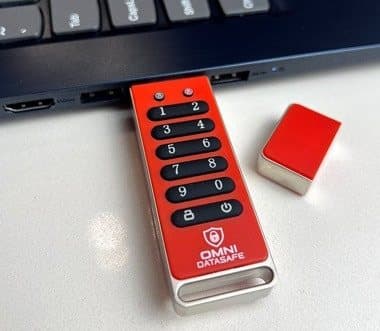
The drive and its cap
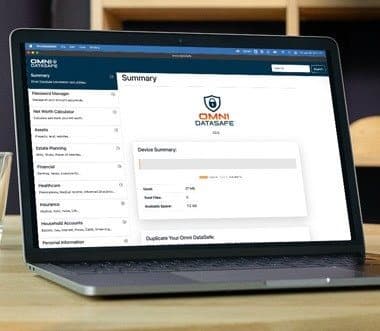
The included organiser software
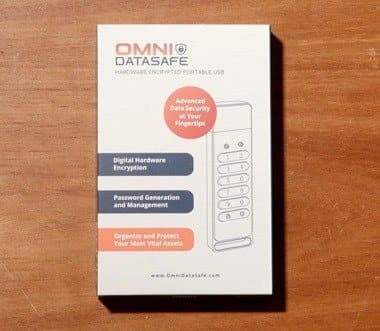
The retail box
Specifications
| Spec | Omni DataSafe (according to the seller) |
|---|---|
| Capacity | 32 GB |
| Encryption | AES-256, hardware |
| Unlock | PIN on built-in keypad |
| Brute-force protection | Erases data after 10 failed attempts |
| Compatibility | Windows, Mac, Linux; no installation needed |
| Housing | Aluminium, with cap |
| Software | Organiser for passwords, bills, assets, estate planning |
| Connector | USB-A, as shown in the product photos |
| Certification | None stated |
| Guarantee | 30 days |
How much 32 GB holds
The FAQ says 32 GB can hold more than 12,000 images, more than 600,000 pages of Word documents or more than 10 hours of video. For documents and photos of important papers, 32 GB is plenty. For family photo or video archives, it is small.
What is in the box
The box shown on the page lists hardware encryption, password generation and management, and organising your most vital assets. The product photos show the drive with a red protective cap. The page does not list a manual or accessories, but most keypad drives include a quick start guide; check for it when you unpack.
Omni DataSafe price and bundles
On 4 October 2026 the Omni DataSafe offer page (opens Omni DataSafe in a new tab) listed:
| Package | Price | Per drive | Shipping |
|---|---|---|---|
| 1 drive | $79 (retail shown as $99) | $79 | Not stated as free |
| 3 drives (buy 2, get 1 free) | $198 | $66 | Free |
| 5 drives (buy 3, get 2 free) | $297 | $59.40 | Free |
Is it good value?
An ordinary 32 GB USB drive costs a few dollars, so you are paying mainly for the keypad, encryption and software. Keypad-encrypted drives from established security brands also cost more than ordinary drives, and those with FIPS 140 validation often cost more than Omni DataSafe. Cheaper unbranded keypad drives exist too. Omni DataSafe sits in the middle: friendlier software and support aimed at non-technical users, but without the certification of the specialist brands.
The three-pack is worth considering if you want a primary drive and a backup, or copies for family members, as the testimonial describes.
Total cost for a family setup
A practical family setup is three drives: one for you, one backup kept elsewhere, and one for a trusted relative. On the offer page, that is $198, or $66 a drive. Compared with paying a professional to organise an estate file, that is modest; compared with a free password manager and paper copies in a safe, it is an extra cost you may or may not need.
Who makes it
Prairie IT, Inc. is based in Colorado, according to the page and its launch release. The page says it is owned and operated in the USA. It does not say where the drive is manufactured.

Omni DataSafeScore 6.0/10
Best for: People who want an offline, PIN-protected place for wills, medical records, financial documents and passwords
$79.00 at Omni DataSafe · Price checked October 4, 2026
Check price at Omni DataSafe (opens Omni DataSafe in a new tab)We may earn a commission if you buy through our links.
How secure is Omni DataSafe really?
Omni DataSafe protects well against the most common risk for a physical drive: loss or theft. While locked, files cannot be read without the PIN, and the data is erased after 10 wrong guesses. Once you unlock it and plug it in, though, your computer sees ordinary files, so malware or ransomware on that computer can read or encrypt them. We found no FIPS 140 certification.
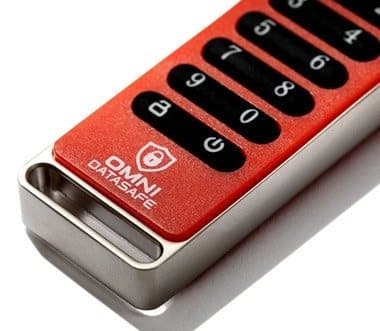
What the encryption protects
If the drive is locked and someone steals it, they should not be able to read your files without the PIN, and after 10 wrong guesses the data is erased. That protects against the most common risk for a physical drive: loss or theft.
What it does not protect
Once you unlock the drive and plug it in, your computer sees ordinary files. Anything on that computer, including malware, can read, copy, change or encrypt them while the drive is connected. The FAQ says your data is still safe if your computer is hacked "because the encryption happens on the secure chip on the drive itself". That is only true while the drive is locked or unplugged.
Ransomware is a good example. If ransomware is on your computer when you unlock and plug in the drive, it can encrypt the files on the drive just as it does files on your hard disk.
The missing certification
The US and Canadian governments run a programme that validates cryptographic modules against the FIPS 140 standard. Several keypad drives from established brands carry FIPS 140-2 or 140-3 validations, which means independent labs have tested how they protect keys and resist tampering. We found no FIPS listing for Omni DataSafe in NIST's Cryptographic Module Validation Program, and the page does not claim one. That does not mean it is insecure, but it means its security has not been independently verified.
Your PIN matters
A short or obvious PIN, such as 1234 or a birth year, is the weakest link. With a 10-attempt wipe, guessing is limited, but a PIN someone could guess in a few tries defeats the purpose. Use at least 7 or 8 digits that are not linked to you.
Physical attacks
Sophisticated attackers with laboratory equipment can sometimes extract data from hardware by attacking the chip directly. Certified drives are tested and designed to resist such attacks, for example with epoxy-filled cases. For a typical home user protecting documents from loss or theft, this is a remote risk. For someone who might be specifically targeted, it is a reason to choose a certified drive.
Who the real threats are
For most households, the realistic risks are a lost bag, a burglary, a nosy visitor or a family member stumbling across documents. A keypad drive handles all of these well. Phishing emails, weak online passwords and malware are far more common threats to personal data, and a drive does not address those; good password habits and up-to-date software do.
Keypad wear
Over years of use, the most-pressed keys on any keypad can show wear, hinting at which digits are in the PIN. Using a longer PIN with repeated digits, or changing the PIN occasionally, reduces this risk.
Testing the wipe without losing data
You do not need to test the 10-attempt wipe with real data. If you want to see how it works, do it before you copy anything important onto the drive, following the instructions. Afterwards, set up your real PIN and add your files.
Physical durability
The FAQ describes a rugged aluminium housing designed to withstand drops. Flash drives can still fail through electrical faults, water damage or wear. That is another reason to keep a second copy.
Are Omni DataSafe's claims true?
Omni DataSafe's encryption claim is partly fair: AES-256 is strong and widely trusted, but "unbreakable" describes the algorithm, not a device that has not been independently certified. "100% safe" and "impenetrable" overstate what any drive can do. Protection from malware applies only while it is locked, and "automatic backups" is misleading, because one drive is a single copy that can be lost or wiped.
"Unbreakable AES-256 military-grade encryption"
Partly fair. AES-256 is strong and widely trusted. "Unbreakable" applies to the algorithm, not to the whole device, which has not been independently certified.
"Your data is 100% safe" and "literally impenetrable"
Overstated. No device is 100% safe. The drive protects data at rest; it cannot protect files while unlocked on a compromised computer.
"The ONLY way to be sure your data is safe"
Not true. Encrypted cloud storage, password managers, software-encrypted drives and certified hardware drives are all valid options, each with trade-offs.
"Stored offline, you never have to worry about cloud hacks"
True as far as it goes. Data that never touches the internet cannot be stolen in a cloud breach. But offline storage brings its own risks: loss, damage, theft and forgetting where the drive is. Offline is a trade-off, not a free win.
"Protected if your device gets hacked or infected with malware"
Only while locked. Once unlocked and connected, files are exposed to anything on the computer.
"Automatic backups: saves data without prompts"
Misleading. The drive saves files you put on it, like any drive. It does not back anything up automatically, and as a single device it is not a backup.
"Ultra-fast data transfer"
Unverified. No transfer speeds are published. Encrypted drives are often slower than ordinary drives, though for documents this rarely matters.
"Mac, Windows and Linux compatible"
Plausible for the drive itself, as keypad drives do not need drivers. Check the organiser software's requirements separately.
"600,000+ document capacity" and "as seen on" logos
The capacity figure matches the FAQ's estimate for 32 GB of Word pages. The media logos have no links or dates.
Claims scorecard
| Claim | Our view |
|---|---|
| AES-256 encryption | Plausible; strong standard |
| Unbreakable, 100% safe | Overstated |
| Only way to be safe | Not true |
| Safe from malware | Only while locked |
| Automatic backups | Misleading |
| Ultra-fast transfer | Unverified |
| Cross-platform | Plausible |
| 10-attempt wipe | Plausible; standard feature |
Is Omni DataSafe better than a certified drive or a password manager?
For certified security, specialist keypad drives with FIPS 140 validation and tamper-resistant designs are the better choice, though often pricier. For passwords you use every day online, a reputable password manager is more convenient, working across devices with two-factor authentication, as CISA recommends. Omni DataSafe's advantages are its organiser software, offline storage and simplicity for non-technical users keeping important family documents.
| Option | Typical cost | Offline | Independent certification | Notes |
|---|---|---|---|---|
| Omni DataSafe | $79 | Yes | None found | Easy, includes organiser |
| Certified keypad drive (FIPS 140) | Often more | Yes | Yes | For high security or compliance |
| Unbranded keypad drive | Often less | Yes | Usually none | Little support |
| Ordinary drive with software encryption | Low | Yes | Depends on software | Needs software on each computer |
| Password manager | Free to about $60 a year | No (cloud) | Some audited | Best for everyday passwords |
| Fireproof safe with paper copies | Varies | Yes | Fire ratings | No tech required |
Omni DataSafe vs a certified keypad drive
Specialist brands sell keypad drives with FIPS 140 validation, tamper-resistant designs and published specs. They are the better choice if you need certified security. Omni DataSafe's advantages are its organiser software and its focus on non-technical users.
Omni DataSafe vs a password manager
For passwords you use every day online, a reputable password manager is more convenient: it fills in passwords, works across devices and supports two-factor authentication. CISA's guidance on strong passwords recommends password managers. A DataSafe can complement one as an offline emergency record.
Omni DataSafe vs a software-encrypted drive
Free tools built into Windows and macOS can encrypt an ordinary USB drive with a password. They cost nothing beyond the drive, but you type the password on your computer and need compatible software on every computer you use. A keypad drive avoids both issues, which is the main reason to pay more.
Combining options
The most resilient setup for important documents usually combines more than one method: originals on paper with a solicitor or in a fireproof safe, an encrypted offline copy such as a keypad drive, and a password manager for everyday logins. Omni DataSafe fits neatly into the middle of that plan.
Omni DataSafe vs a fireproof safe
Paper copies of a will and key documents in a fireproof safe or with a solicitor remain a sensible backup. Some documents, like original wills, may need to exist on paper anyway.
Omni DataSafe vs encrypted cloud storage
Some cloud services offer end-to-end encryption, where only you hold the key. They provide automatic syncing and backup across devices, which a single drive cannot. The trade-off is reliance on an account, a password and an internet connection. Many people use both: cloud for everyday files and an offline drive for a small set of critical documents.
Omni DataSafe vs other products we have reviewed
If you are organising important documents, our reviews of the Legacy Will online will service and the Memorygram memory book cover related tasks, and our Clickfree review covers automatic photo backup. The KeySmart key organiser is another small everyday-carry gadget. More are in our computing category.
To compare bundle prices, see today's Omni DataSafe offers (opens Omni DataSafe in a new tab).
Omni DataSafeScore 6.0/10
Why people buy it: Hardware AES-256 encryption unlocked by a PIN typed on the drive itself, so no password goes through your computer
$79.00 at Omni DataSafe · Price checked October 4, 2026
Check price at Omni DataSafe (opens Omni DataSafe in a new tab)We may earn a commission if you buy through our links.
Is Omni DataSafe legit, and what should you check before buying?
Omni DataSafe is a real keypad drive with a sensible design and a 30-day money-back guarantee, though we found no Trustpilot profile or FIPS certification. Before buying, plan a second encrypted copy somewhere else, because one drive can be lost, broken or wiped after wrong PIN attempts. A forgotten PIN cannot be recovered, and you may need an adapter for computers with only USB-C ports.
Keep a second copy
A single drive can be lost, broken or wiped after wrong PIN attempts.
What to do: keep a second encrypted copy in a different place, such as a second DataSafe with a trusted relative, and update both when documents change.
A forgotten PIN is permanent
The seller says it never has access to your data.
What to do: write the PIN down and store it securely and separately from the drive, for example in a sealed envelope with your will or a solicitor, and tell someone you trust where it is.
Malware
What to do: only unlock the drive on a computer you trust, with up-to-date security software, and unplug it as soon as you are done.
No certification
What to do: if you need certified encryption for work or compliance, choose a FIPS 140 validated drive instead.
Legal documents
A scanned will is useful as a reference but is usually not legally valid on its own; the signed original is what counts.
What to do: keep original wills and powers of attorney where your solicitor advises, and note on the drive where the originals are.
Who can access your data after you die
Even with an emergency file, executors may need legal authority to access accounts. The drive helps them find information quickly; it does not give them the legal right to act.
What to do: talk to a solicitor about your will and powers of attorney, and mention the drive in your instructions so executors know it exists.
Keeping information current
An emergency file is only useful if it is up to date. Old account details or outdated medication lists can cause confusion.
What to do: set a yearly reminder to review and update the drive and its backup copy.
USB-C computers
The product photos show a USB-A plug.
What to do: if your computer only has USB-C ports, buy a small USB-C to USB-A adapter.
Customs and returns
The FAQ says international buyers may pay customs or VAT. The page shows a 30-day money-back guarantee.
What to do: test the drive and software as soon as it arrives, and keep your packaging and confirmation email.
How to buy Omni DataSafe the smart way
- Decide how many copies you need (at least two for important documents), then go to the Omni DataSafe order page (opens Omni DataSafe in a new tab).
- Choose one drive, or a three-pack if you want a backup and a copy for family.
- Check whether shipping is added to a single drive.
- Test the PIN setup, the 10-attempt wipe instructions and the software within the first week.
- Keep your order confirmation for the 30-day guarantee.
What do owners say, and how did we score Omni DataSafe?
Omni DataSafe scores 6.0 out of 10: claim accuracy 0.8, build and durability 1.4, price competitiveness 1.2, usability 1.6 and owner satisfaction 1.0, each out of 2. We found no Trustpilot profile, and most online reviews are press-release-style articles. The page's testimonials describe replacing a password notebook, a solid metal build, ease of use for a tech newbie and family peace of mind.
Owner ratings
We found no Trustpilot profile for the brand. Search results for Omni DataSafe reviews are mostly press-release-style articles, which we have not used as owner ratings.
The testimonials on the page
The page shows four testimonials (two repeated): a parent who replaced a password notebook, a buyer who praises the metal build and status lights, a self-described tech newbie, and a family who used copies during their father's recovery. They describe ease of use and peace of mind. They are selected by the seller.
What we would want to know from owners
The most useful owner reviews would cover how intuitive the keypad and lights are in daily use, whether the organiser software runs smoothly on both Windows and Mac, how fast files copy, and how the company responds to support questions. Long-term reports on durability would also help. Little of this is available yet from independent sources.
If you buy one, those details are worth sharing, because they help other families decide whether a keypad drive suits them.
Note in particular which operating systems you used, how long setup took, whether anyone older or less confident with technology could use it unaided, and whether support answered questions quickly and clearly when you contacted them by phone or email. Honest detail of that kind, good or bad, is more useful to other buyers than a star rating alone, and it is exactly what the seller's selected testimonials leave out. We will update this review as reliable, independent owner feedback about the drive becomes available over time.
How we scored Omni DataSafe
Scores follow the five criteria on our how we test page, each worth up to 2 points.
| Criterion | Score | Why |
|---|---|---|
| Claim accuracy | 0.8 | Sound design, but unbreakable, malware and backup claims overstate |
| Build and durability | 1.4 | Metal housing; no independent testing or certification |
| Price competitiveness | 1.2 | Mid-priced for a keypad drive; small capacity |
| Usability | 1.6 | Simple PIN unlock and organiser software |
| Owner satisfaction | 1.0 | Positive testimonials; no independent rating |
| Total | 6.0 |
What we did, and did not, do
Nobody on our team has used Omni DataSafe. We checked the offer page our link opens, Prairie IT's launch release, NIST's validation programme and CISA's password guidance. We did not test encryption, transfer speeds, durability or the software.
How to use Omni DataSafe for the best results
Choose a PIN of 7 or more digits that is not your birthday, address or phone number, and record it somewhere separate from the drive. Unlock it only on a trusted, updated computer. Scan important documents as clearly named PDFs, delete any unencrypted copies afterwards, write a "start here" file for your family, and keep a second encrypted copy in another place.
- Choose a strong PIN. Use 7 or more digits that are not your birthday, address or phone number.
- Record the PIN safely. Store it separately from the drive, and tell a trusted person where.
- Use a trusted computer. Unlock it only on a computer you keep updated and secure.
- Organise your files. Use the organiser or clear folder names so someone else could find things in an emergency.
- Make a backup copy. Keep a second encrypted copy in a different place.
- Unplug when finished. Eject and remove it so it locks again.
- Review yearly. Update documents, check both copies work and replace the drive if it shows signs of failure.
What to store
Good candidates are scans of your will, powers of attorney, insurance policies, property deeds, pension and bank details, medical history and medication lists, emergency contacts and instructions for loved ones. Keep originals where they legally need to be.
Scanning documents
Use a scanner or a phone scanning app to save documents as PDFs. Name files clearly, such as "Home insurance policy 2026.pdf", so someone else could find them quickly. Delete any unencrypted copies left on your computer or phone afterwards, including from the downloads folder and recycle bin.
Writing a "start here" file
Add a simple document at the top of the drive explaining what is on it, who to contact, and where original documents are kept. In an emergency, the person opening it may be stressed and unfamiliar with your affairs.
What not to rely on it for
Do not use it as your only copy of irreplaceable photos or as everyday storage you carry around constantly. Frequent use and travel increase the risk of loss.
Where to keep it
Keep the drive somewhere safe but findable: a home safe, a locked drawer or with important papers. Avoid keeping it next to the written PIN. Do not leave it in a car, where heat and theft are risks.
Sharing with family
If you give copies to relatives, each drive has its own PIN. Decide who knows which PIN, and include instructions for what to do with the information.
Troubleshooting
If the drive does not appear on your computer, check that it is unlocked (the status light should show this) and try a different USB port. If it relocks before you plug it in, unlock it again and connect it promptly. If you are unsure about a light pattern, check the instructions or contact support before trying more PINs, so you do not trigger the wipe by accident.
Omni DataSafeScore 6.0/10
Before you buy: Check the final price, shipping and return terms at checkout.
$79.00 at Omni DataSafe · Price checked October 4, 2026
Check price at Omni DataSafe (opens Omni DataSafe in a new tab)We may earn a commission if you buy through our links.
What else do people ask about encrypted USB drives?
Most questions are about how safe these drives are. Well-made hardware-encrypted drives protect data well if lost or stolen, but they do not protect files from malware on a computer while unlocked. FIPS 140 validation means a drive's encryption module has been tested by an accredited lab under a US and Canadian government programme. Researchers have found flaws in some drives, usually in key handling rather than AES itself.
Are encrypted USB drives safe?
Well-made hardware-encrypted drives protect data well if lost or stolen. They do not protect files from malware on a computer while unlocked.
What is a FIPS 140 certified drive?
It is a drive whose encryption module has been tested by an accredited lab and validated under a US and Canadian government programme. Government agencies and regulated industries often require it.
Can encrypted USB drives be hacked?
Researchers have found flaws in some encrypted drives over the years, usually in how they handled keys rather than in AES itself. That is why independent testing matters.
What happens if the drive breaks?
Your data may be unrecoverable, because it is encrypted and tied to the drive's chip. That is why a second copy is essential.
Is a keypad drive better than a password-protected drive?
Usually. Typing the PIN on the drive keeps it away from your computer, and keypad drives work on any operating system without software.
How long do USB flash drives last?
Flash memory can retain data for years, but drives can fail without warning and data can degrade if a drive is left unpowered for very long periods. Check your drives at least once a year and keep more than one copy.
Can I change the PIN?
Most keypad drives let you change the PIN once unlocked. Follow the product's instructions, and update the written record of the PIN at the same time.
Do I need special software to use it?
Not for the drive itself, according to the seller: once unlocked, it appears as a normal drive. The organiser software is optional and may only run on certain operating systems.
Can I store passwords on an encrypted drive?
Yes. A spreadsheet or the included organiser on an encrypted drive is far safer than a notebook or an unencrypted file. For passwords you use daily, a password manager is more convenient; the drive works well as a backup record.
Is Omni DataSafe legit?
Yes. It is a real product from a Colorado company with a named founder and a 30-day guarantee. Its security claims are overstated, but the design is sensible.
Is Omni DataSafe worth it?
For non-technical users who want an easy, offline emergency file and will keep a second copy, it is a reasonable choice. If you need certified security or more storage, choose a FIPS-validated drive from a specialist brand.
Frequently asked questions
What is Omni DataSafe?
Omni DataSafe is a 32 GB USB flash drive with a number keypad and AES-256 hardware encryption, made by Prairie IT of Colorado. You unlock it by typing a PIN on the drive, and it comes with organiser software for passwords, bills, assets and estate planning.
How much does Omni DataSafe cost?
On 4 October 2026 the offer page our link opens listed one at $79, three for $198 and five for $297, with free shipping on the multi-packs. That works out at $79, $66 and $59.40 per drive. For documents and photos of important papers, 32 GB is plenty.
Is Omni DataSafe really unbreakable?
AES-256 is a strong, widely trusted encryption standard. But overall security also depends on the drive's hardware and firmware, your PIN and the computer you plug it into. No device is unbreakable, and we found no independent security certification for it.
What happens if I lose it?
The data stays encrypted. After 10 wrong PIN attempts, the drive erases its data, according to the seller. That protects a lost drive but also means your files are gone, so keep a backup. Keep a second encrypted copy in a different place.
What if I forget my PIN?
The seller says it never has access to your data. A forgotten PIN means your files cannot be recovered, and after 10 wrong tries the drive wipes itself. Record the PIN somewhere separate from the drive, and tell a trusted person where it is.
Does it protect against malware?
Only while it is locked. Once you unlock it and plug it in, your computer can read the files, and so can any malware on that computer. Unlock it only on a computer you keep updated and secure, and unplug it when you finish.
Does it work on Mac, Windows and Linux?
The seller says yes, with no special installation, because the PIN is entered on the drive. The organiser software may have its own requirements. Check whether your computer has a USB-A port, or use an adapter if it only has USB-C.
Is there a guarantee?
The page shows a 30-day money-back guarantee. International buyers may pay customs or VAT on delivery. Test the drive with copies of your files first, including the PIN and the organiser software, so any problem shows up within 30 days. Keep your order confirmation.
We may earn a commission if you buy through our links.
Prices accurate as of October 4, 2026. Check the seller's checkout for current pricing, promotions and terms.
What we checked: No hands-on use. Claims, specs (32 GB, AES-256, 10-attempt wipe, compatibility, metal housing), software features, prices, bundles, FAQ answers, guarantee, testimonials, founder story and images from the Omni DataSafe offer page our link opens (getomnidatasafe.io) on 2026-10-04. Company details from Prairie IT's 2023 launch release. FIPS status checked against NIST's validation programme; we found no listing. We found no Trustpilot profile for the brand.

About the author
Ethan Walker, Hardware & Gadget Tester
Ethan Walker covers hardware for Top10Gadgets: audio, computing, phone accessories, chargers, tools, car gadgets and sports equipment. Ethan believes a product should be judged on what happens when people actually use it…
- Headphones and speakers
- Chargers and phone accessories
- Tools and emergency gear
- Car accessories
- Durability and real-world performance
Writing for Top10Gadgets since 2026Full profile