Computing / Backup drives
ThePhotoStick Omni Review: One Backup Stick for Phones, Tablets and Computers, What It Costs and Where It Falls Short
A USB flash drive with a four-way adapter head and software that copies your photos and videos. The most flexible ThePhotoStick, but it costs well above plain drives, with a 30-day warranty.

By Ethan Walker, Hardware & Gadget Tester at Top10Gadgets
Updated 26 min readHow we test
Quick answer
It depends on how many kinds of devices you own. ThePhotoStick Omni is the most flexible stick the company sells: one drive with Lightning, USB-C and micro-USB connectors that backs up computers, phones and tablets, with an app that rates 4.5 on the App Store.
Score 4.9/10$69.99 at ThePhotoStick
Check price at ThePhotoStick (opens ThePhotoStick in a new tab)We may earn a commission if you buy through our links.
- Best for
- Households with a mix of computers, iPhones, Android phones and tablets
- Not for
- Anyone happy to drag folders to a plain flash drive or external hard drive
$69.99 at ThePhotoStick
Check price at ThePhotoStick (opens ThePhotoStick in a new tab)We may earn a commission if you buy through our links.
On this page · 12 sections
- 01Our verdict
- 02The short version
- 03Pros & cons
- 04How it works
- 05Who it's for
- 06How much does ThePhotoStick Omni cost?
- 07Are ThePhotoStick Omni's claims true?
- 08Is ThePhotoStick Omni better than cloud backup or a cheaper drive?
- 09Is ThePhotoStick Omni legit, and what should you check before buying?
- 10How did we score ThePhotoStick Omni?
- 11How to use ThePhotoStick Omni for the best results
- 12Frequently asked questions
Our verdict
It depends on how many kinds of devices you own. ThePhotoStick Omni is the most flexible stick the company sells: one drive with Lightning, USB-C and micro-USB connectors that backs up computers, phones and tablets, with an app that rates 4.5 on the App Store. For a mixed household that never backs up, it does the job simply. But at $69.99 to $149.99 it costs far more than plain drives, owner reviews are split, and the warranty lasts 30 days. ThePhotoStick Omni scores 4.9 out of 10, held back by price and reliability reports.
The short version
- What it is: a flash drive with a four-way adapter and software that backs up photos, videos and files from computers, phones and tablets.
- Price: $69.99 for 32 GB to $149.99 for 256 GB on 4 October 2026.
- Best trait: one stick and one button for every device in the house, including USB-C iPhones.
- Biggest drawback: a large premium over plain drives, with a 30-day warranty.
- Our score: 4.9 out of 10.
Pros & cons
The pros come from the adapter and simple software. The cons are about price, sales tactics, mixed owner reviews and a short warranty.
What we like
- One stick for Windows, Mac, iPhones, Android phones and tablets, with Lightning, USB-C and micro-USB connectors
- Fits USB-C iPhones and iPads, unlike the Lightning-only Mobile iPhone version
- Finds photos, videos and documents and skips duplicates
- Its app rates 4.5 from 4,451 ratings on the App Store
- Cheaper than ThePhotoStick Mobile at 32 GB to 128 GB
What we don't
- $69.99 for 32 GB up to $149.99 for 256 GB, far above plain flash drives
- Trustpilot shows the company at 3.0 from 572 reviews, 59% one-star
- Warranty covers defects for only 30 days after shipment
- Countdown timer and inflated 'retail' prices on the sale page
- 'Keeps your files safe' with no encryption mentioned
Sold by ThePhotoStick
ThePhotoStick Omni$69.99
How it works
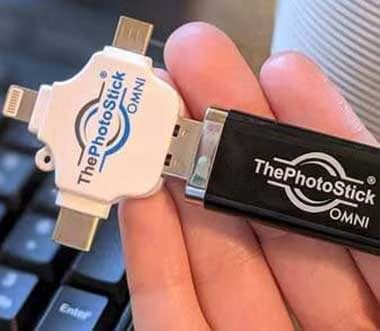
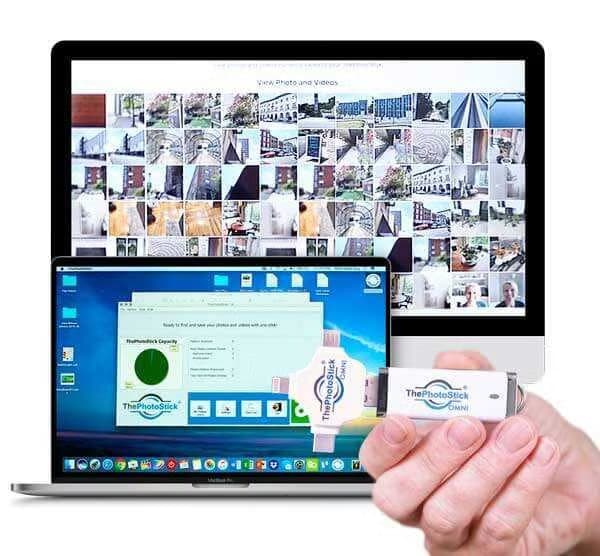
ThePhotoStick Omni is a USB-A flash drive with a white adapter head that adds Lightning, USB-C and micro-USB connectors. On a Windows PC or Mac, you plug it in and run the program stored on the stick. On a phone or tablet, you install the free app, plug the stick in through the right connector and start the backup. The software finds files, skips duplicates and copies the rest.
The page says the Omni handles more than 100 file types, including documents, voice memos and music as well as photos and videos, and sorts them into folders on the stick. Like the computer-only version in our ThePhotoStick review, it adds only new files on later backups.
Choose the connector
Step 1: The stick has a USB-A plug, and a white adapter head adds Lightning, USB-C and micro-USB connectors, so it fits computers, iPhones, Android phones and tablets.
Plug in and press Go
Step 2: On a computer, the built-in program runs from the stick. On a phone or tablet, you install the free ThePhotoStick Omni app. Then you start the backup with one button.
It finds, sorts and saves
Step 3: The software searches for photos, videos and other supported files, skips duplicates and copies the rest into folders on the stick. Later backups add only new files.
Why it appeals to mixed households
Families rarely use one brand of phone. Parents may have iPhones, children Android phones, and a grandparent an older tablet. A single stick that fits them all, without buying separate versions, is the Omni's main selling point.
The adapter head
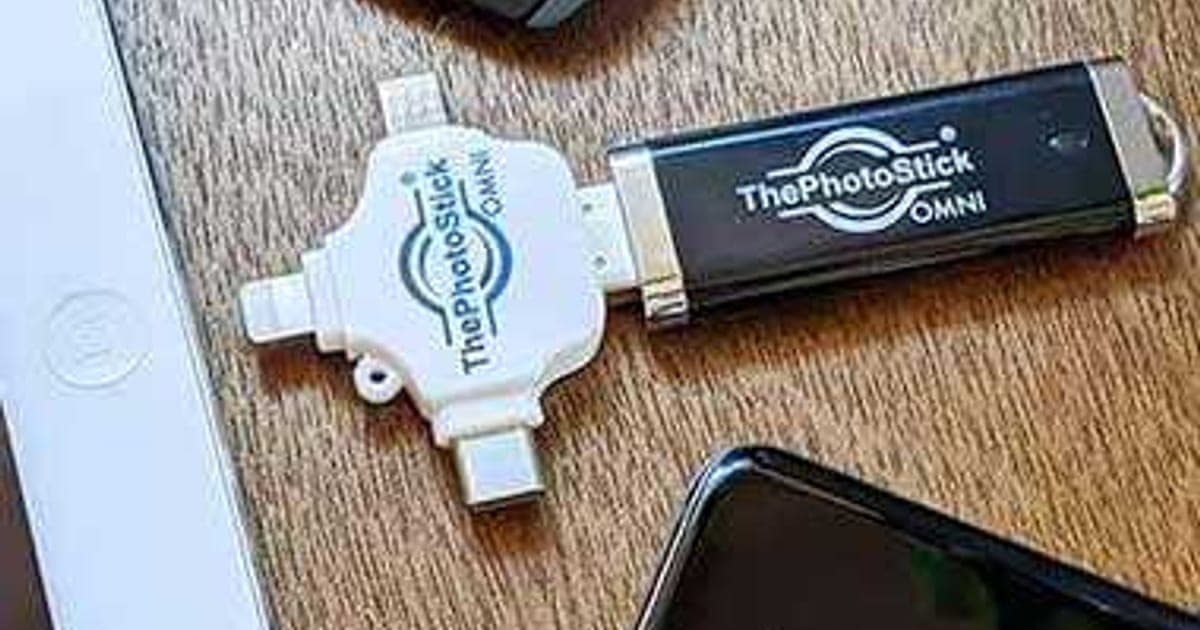
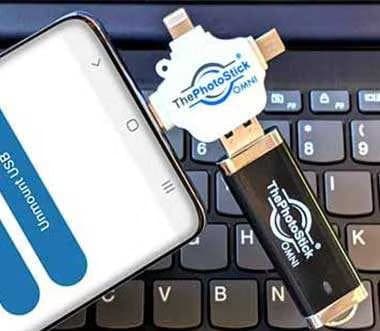
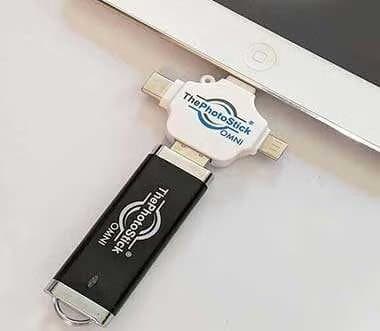
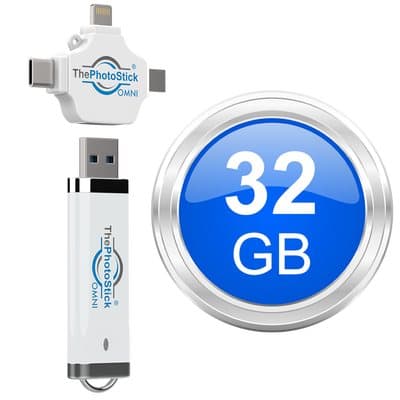
The photos show a white cross-shaped adapter with three connectors on its arms: Lightning for older iPhones and iPads, USB-C for newer phones, iPads and laptops, and micro-USB for older Android phones. The stick's own USB-A plug goes into the adapter, so the same stick fits nearly any device.
The stick itself
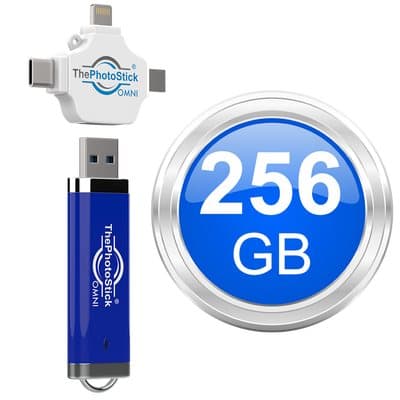
The stick is a standard-sized USB-A flash drive with a key ring loop, coloured white, black or blue depending on size in the photos. The adapter is a separate piece that slides onto the USB-A plug. Together they are about the length of a car key.
Why the Omni exists
ThePhotoStick began as a computer-only stick, then the company added the Mobile with separate iPhone and Android versions. The Omni combines both into one product with an adapter. For buyers, that makes it the simplest choice in the range.
The phone and tablet app
The company's app is listed as ThePhotoStick Omni. On the App Store on 5 October 2026, it rated 4.5 from 4,451 ratings, needed iOS 13 or later and had been updated on 29 September 2026. On Google Play it rated 4.0 from 1,642 ratings, with over 100,000 downloads.
What the app asks for
Like any backup app, it needs permission to read your photo library and, on Android, to access the USB device. On iPhones, granting full library access lets it see every photo; limited access will back up only the photos you pick.
Android compatibility
The page lists Android phones and tablets but gives no minimum version. The Google Play listing shows whether the app is compatible with your device. If Play says it is not, the stick will not back up that phone.
The computer program
On computers, nothing is installed, according to the page. The program searches the computer's folders and copies what it finds, as with ThePhotoStick for computers.
Voice memos and documents
The page says the Omni also finds documents, voice memos and music. On phones, apps keep some of these in private storage the backup app may not reach. On computers, documents in ordinary folders should be found. Check the stick for the files that matter most.
Weekly backups
The page says it "instantly backs up new files weekly". That most likely means you can run a backup each week and it adds only new files. A stick cannot back anything up while it is unplugged.
How files are organised
According to the page, files are sorted into folders on the stick automatically. That is helpful for finding things later, but the folders follow the program's logic, not your own albums. Expect to browse by date or file type rather than by event.
Speed on different devices
Copying through a phone port is usually slower than through a computer's USB 3 port, and older Lightning iPhones are slower than USB-C ones. The page gives no speeds. Large first backups on phones can take hours.
Live Photos, edits and HEIC
The page does not say how Live Photos, edited photos or HEIC files are handled. Backup apps often save a Live Photo as a still and a short video, and may keep only one version of an edited photo. iPhone HEIC files may not open on older Windows computers without extra software. Check a few after the first backup.
Photos stored only in the cloud
If an iPhone uses Optimise iPhone Storage, or an Android phone keeps photos only in Google Photos, the full-size files may not be on the device. The app would need to download them first, which takes time and data. Back up on Wi-Fi.
What it does not do
The page mentions no encryption, password or cloud copy. It is not a full phone backup either: messages, contacts and app data are not mentioned.
Who it's for
ThePhotoStick Omni suits households with a mix of Windows or Mac computers, iPhones, Android phones and tablets; owners of USB-C iPhones and iPads; and people who never back up but would press one button. It suits people who copy files themselves less well, as well as large video libraries, anyone needing encryption and contented cloud users.
- Households with a mix of computers, iPhones, Android phones and tablets
- Owners of USB-C iPhones and iPads who want an offline backup stick
- People who never back up and want one simple tool for every device
Why ThePhotoStick Omni appeals
Most families have photos split across several phones, an old laptop and a tablet. Each needs a different cable and a different backup method. The Omni's pitch is one stick and one button for all of them, with no subscription, and that is a genuinely useful idea.
The family archivist
Most families have one person who cares most about keeping photos. The Omni gives that person a single tool to collect pictures from everyone's devices during a visit, without logging into anyone's cloud account.
Mixed Apple and Android households
Because the adapter covers Lightning, USB-C and micro-USB, the same stick can back up a parent's older iPhone, a teenager's Android phone and a newer USB-C iPad. With the Mobile, that would take two separate sticks.
USB-C iPhone owners
iPhone 15 and later use USB-C, which the Mobile's iPhone version cannot plug into. The Omni's USB-C connector solves that, making it the company's better choice for recent iPhones.
iPad users
USB-C iPads, including recent iPad Air, iPad Pro and standard iPad models, often hold years of photos synced from phones or taken on the tablet. The Omni's USB-C connector fits them, which the Mobile's iPhone version cannot.
Older relatives
The Omni's single button suits people who find phone settings confusing, but the adapter adds a small step: choosing the right connector. A quick demonstration and a note on which connector fits their phone makes it easy to repeat.
Families with an old computer
The Omni also sweeps a Windows or Mac computer for photos, so it suits a household that wants to gather years of pictures from an old laptop and current phones in one place.
Gift buyers
The Omni is the safest ThePhotoStick to give as a gift, because it fits almost any phone, tablet or computer. You do not need to know which phone the recipient has. Offer to help with the first backup.
People leaving phones and computers behind
Before trading in a phone or recycling a laptop, a quick backup to the Omni makes sure nothing is lost. That one-off use alone can justify it for some families.
Travellers
On a trip, a phone, a tablet and perhaps a laptop all collect photos. One stick with three connectors can back them all up in the hotel without relying on Wi-Fi. Keep it separate from the devices so one theft does not take everything.
Small offices
A small business with photos and documents spread across a couple of computers and phones could use the Omni as a quick extra copy. The 100-plus file types help here. For business records, proper backup software with version history is safer.
Photographers and videographers
People who shoot a lot of 4K video or RAW photos will fill even the 256 GB stick quickly. They need external hard drives or SSDs with far more capacity, and usually dedicated software.
Who should skip it
Skip the Omni if you can copy folders to a plain flash drive or external hard drive, which cost far less. Skip it if your library is mostly video or larger than 256 GB. Skip it if you need encryption. And skip it if you are happy with cloud backup and do not want a second copy.
- Anyone happy to drag folders to a plain flash drive or external hard drive
- People with very large or video-heavy libraries
- Buyers who need encryption or a long warranty
- Those already using cloud backup who do not want a second copy
How much does ThePhotoStick Omni cost?
On 4 October 2026, the Omni cost $69.99 for 32 GB, $89.99 for 64 GB, $109.99 for 128 GB and $149.99 for 256 GB, with free shipping from 64 GB and between 53% and 60% off each additional stick. That is several times the price of a plain flash drive; a 128 GB SanDisk drive was about $12 at Walmart on 5 October 2026. Returns are accepted within 30 days of delivery, without refunding shipping or taxes.
ThePhotoStick Omni prices
| Size | Listed retail | Offer price | Photos, per the page | Extra sticks |
|---|---|---|---|---|
| 32 GB | $84.99 | $69.99 | 15,000 | 53% off |
| 64 GB | $119.99 | $89.99 | 30,000 | 55% off |
| 128 GB (most popular) | $169.99 | $109.99 | 60,000 | 56% off |
| 256 GB (best deal) | $269.99 | $149.99 | 120,000 | 60% off |
Shipping
Free shipping applies from 64 GB upwards, according to the page. The 32 GB stick adds shipping at checkout, which is not refunded on a return. Combined with the 32 GB size's high price per gigabyte, it is the weakest option.
Multi-buy maths
At the stated discounts, a second 128 GB stick costs about $48.40, making two about $158. A second 256 GB stick costs about $60, making two about $210. A second stick kept at a relative's home gives you an off-site copy.
Choosing a size
Add up the photo storage on every device you plan to back up. On iPhones, check Settings, General, iPhone Storage; on Android, Settings, Storage; on computers, the size of your photo folders or library. A family with several phones will usually need 128 GB or 256 GB.
What you are paying for
Compared with a plain drive, the extra cost buys three things: the adapter head, the computer program and the phone app, and the company's support. For people who need all three, that is the product. For people who need none, it is a large mark-up.
Price per gigabyte
The 32 GB stick costs about $2.19 per gigabyte, the 128 GB about 86 cents and the 256 GB about 59 cents. A plain 128 GB flash drive costs under 10 cents per gigabyte. You are paying mainly for the adapter, the software and the app.
Compared with the other ThePhotoStick models
At 128 GB, the Omni at $109.99 costs less than the Mobile at $120.99 and more than the computer-only stick at $79.99. If you only back up a computer, the cheaper stick is enough. If you back up phones, the Omni is the better buy at most sizes. Our ThePhotoStick Mobile review has the Mobile's full price list.
Is it good value?
For a mixed household that would otherwise never back up, the 128 GB Omni at $109.99 is a reasonable one-off cost for one tool that covers everyone. For a single computer user, or someone comfortable with cloud storage, it is poor value.
Plain drives with phone connectors
Mainstream storage brands sell dual and multi-connector flash drives with USB-C and Lightning plugs, often with their own backup apps. They generally cost less than the Omni for the same capacity. The Omni's advantage is one adapter covering three phone ports and the company's simple app.
The countdown timer
The pricing section on the page shows "Now On Sale For A Limited Time" with a countdown timer. Timers like this are a sales technique, and we found no sign that the price rises when it reaches zero. Do not let it rush the decision.
The "retail" prices
Each size shows a higher crossed-out retail price, such as $269.99 for 256 GB. We found no evidence the Omni regularly sells at those prices. Judge the offer price against alternatives instead.
Payment options
The checkout badges show major cards, PayPal and Google Pay. Paying by card or PayPal gives you an extra route to dispute a charge if a refund request is ignored.
Bundle labels
The 128 GB stick is labelled "most popular" and the 256 GB "best deal". The labels steer buyers towards bigger orders. Choose by the total size of your libraries, not the label.
The return policy
You can return the Omni for any reason within 30 days, starting from delivery, for a full refund of the purchase amount. Shipping, handling and taxes are not refunded. Email returns@thephotostick.com for instructions.
The warranty
The limited warranty covers defects in materials and workmanship for only 30 days after shipment, and liability is limited to the price paid.
Guarantee wording
The written policy says the 30 days start on delivery. The FAQ on the company's Mobile page says they start on the day of shipping. Keep your delivery confirmation and act quickly if something is wrong.
Who sells it
Prairie IT LLC of Haxtun, Colorado. The page credits Mark Oman, described as a former vice president and general manager at Hewlett-Packard, with creating ThePhotoStick after losing photos himself.

ThePhotoStick OmniScore 4.9/10
Best for: Households with a mix of computers, iPhones, Android phones and tablets
$69.99 at ThePhotoStick · Price checked October 4, 2026
Check price at ThePhotoStick (opens ThePhotoStick in a new tab)We may earn a commission if you buy through our links.
Are ThePhotoStick Omni's claims true?
The convenience claims are largely accurate; the safety claims overreach. One stick for computers, phones and tablets matches the adapter design, and the app's ratings support "easy to use". But "keeps your files safe", "stored safely and away from hackers" and "the only backup solution you'll ever need" go beyond what one unencrypted flash drive can do, and the 65% data-loss statistic has no visible source.
"Works on computers, phones and tablets"
The adapter covers the three common phone and tablet ports, and the page lists Windows, Mac, iPhone, Android and tablets. This is the Omni's strongest and most accurate claim.
"Automatically organizes your files neatly into folders"
The page shows files sorted into folders, and nothing suggests otherwise. How useful the folders are depends on how you like to browse. It is a fair claim.
"Removes duplicates"
Like the computer version, the Omni skips files it has already saved, according to the maker. That matters more for the Omni, since several family phones often hold the same shared photos.
"Easy to use"
The plug in and press Go design, and the app's 4.5 App Store rating from thousands of users, support this claim. Owner complaints mostly concern particular devices not being detected rather than the app being confusing.
"Keeps your files safe"
Flash drives can be lost, damaged or fail. Trustpilot reviewers for the company describe sticks that later would not open. A single stick protects you only if you also keep another copy.
"The only backup solution you'll ever need"
The US Cybersecurity and Infrastructure Security Agency's guide to data backup options recommends three copies on two types of storage, with one off-site. A stick on its own is one copy, usually kept at home.
How flash drives fail
Flash drives can fail suddenly, often from a damaged connector, a failed controller chip or wear after many writes. Unpowered drives can also slowly lose data over years. Checking the stick every few months and keeping another copy protects against both.
"Stores your files safely and away from hackers"
An unplugged stick is out of reach of online attackers. Without encryption, though, anyone who finds a lost stick can read every file.
"65% of people have lost files"
The page states that 65% of people or their families have lost files through accidental deletion, hardware failure or software problems, with a reference marker but no named source. Data loss is common, but we could not trace the figure.
"Not only do backups take a long time"
The page argues that ordinary backups are slow and complicated. Some are, but phone cloud backup runs automatically in the background once switched on. The Omni is simpler to understand rather than faster.
"Holds up to 120,000 photos & videos"
That applies to the 256 GB size, based on a 2 MB average photo, according to the company's FAQ for its Mobile model. The headline elsewhere says 60,000. Video and large modern photos reduce real counts sharply.
"Over 100 different file types"
The page says it backs up documents, voice memos and music as well as photos and videos. We could not see a full list. Check that file types you care about appear on the stick.
"1.5 million people use ThePhotoStick Omni"
The page says more than 1.5 million people use the Omni. That figure is likely shared across all the company's sticks, as the same number appears on the computer version's page. We could not verify it.
The founder story
The page says ThePhotoStick was created by Mark Oman, a former Hewlett-Packard executive, after he lost photos himself. We did not verify that background independently. A founder story is marketing, not evidence of reliability.
"As seen on" logos
The logos on the Omni page belong to local radio stations. They suggest advertising rather than independent reviews.
Is ThePhotoStick Omni better than cloud backup or a cheaper drive?
It is easier than both for a mixed household, but cloud backup is safer and plain drives are far cheaper. Cloud services back up automatically and off-site. A plain drive plus free tools gives more storage for the money. The Omni wins for people who need one physical tool for every device and will press one button, ideally alongside a cloud or second copy.
| ThePhotoStick Omni 128 GB | ThePhotoStick (computers) 128 GB | Clickfree | Cloud storage | |
|---|---|---|---|---|
| Price | $109.99 | $79.99 | $99.99 (128 GB) | Monthly fee |
| Phones and tablets | Yes, 3 connectors | No | Yes, 4 connectors | Yes |
| Computers | Yes | Yes | Yes | Yes |
| Off-site copy | No | No | No | Yes |
| Automatic | No | No | No | Yes |
Choose the Omni if
You have several kinds of devices, will not use cloud backup consistently, and want a single object and button for everything. Choose cloud if you want backups without remembering. Choose a plain drive if price matters most and you can copy files yourself.
ThePhotoStick Omni vs Clickfree
Clickfree is the closest rival: a cross-shaped drive with Lightning, USB-C, USB-A and micro-USB and an app. Our Clickfree review recorded $99.99 for 128 GB on 3 October 2026, a little less than the Omni, with similar concerns about relying on one drive. Compare like-for-like capacities before choosing.
ThePhotoStick Omni vs ThePhotoStick Mobile
The Mobile comes in separate Lightning iPhone and Android versions. At 32 GB to 128 GB, the Omni costs less, and it fits USB-C iPhones and computers too. At 256 GB, both cost about $149. For almost every buyer, the Omni is the better pick of the two.
ThePhotoStick Omni vs cloud backup
iCloud, Google Photos and OneDrive back up automatically over Wi-Fi and keep copies off-site, protecting against fire, theft and a lost stick. The trade-off is a monthly fee for large libraries. Many families would be best served by both.
Cloud plus Omni
A practical family setup is cloud backup on each phone for everyday protection, plus the Omni a few times a year as an offline copy. If a cloud account is lost or a subscription lapses, the stick still holds the photos.
ThePhotoStick Omni vs a plain drive and free tools
A plain flash drive or external hard drive, plus Time Machine on a Mac or File History on Windows, backs up a computer for far less. For phones, plugging into a computer and copying photos is free. These take more steps but cost little.
Time cost
The Omni saves time compared with copying files by hand, but a first backup of several devices can still take an afternoon. Cloud backup takes setup once, then runs by itself. Weigh your time against the cost of each option.
ThePhotoStick Omni vs an encrypted drive
If privacy matters more than convenience, our Omni DataSafe review covers a keypad-locked encrypted drive. Despite the similar name, it is unrelated to ThePhotoStick Omni and suits documents more than photo libraries.
ThePhotoStick Omni vs a computer and cable
If you have a computer, plugging each phone in with its own charging cable and copying photos is free. It needs more steps and some confidence with folders. The Omni suits people who would never do that.
ThePhotoStick Omni vs a portable SSD
Portable SSDs with USB-C plugs hold far more data, copy much faster and can plug into many phones and computers directly. They cost more up front but much less per gigabyte, and many come with backup software. For video-heavy families, an SSD is the better tool.
When a rival wins
If you only back up one computer, the cheaper ThePhotoStick for computers is enough. If you want automatic, off-site protection, cloud wins. If price matters most, plain drives win easily.
ThePhotoStick OmniScore 4.9/10
Why people buy it: One stick for Windows, Mac, iPhones, Android phones and tablets, with Lightning, USB-C and micro-USB connectors
$69.99 at ThePhotoStick · Price checked October 4, 2026
Check price at ThePhotoStick (opens ThePhotoStick in a new tab)We may earn a commission if you buy through our links.
Is ThePhotoStick Omni legit, and what should you check before buying?
Yes. ThePhotoStick Omni comes from Prairie IT LLC, a Colorado company that has sold ThePhotoStick for years, and its app has thousands of ratings. Before buying, check the size you need, ignore the countdown timer, plan a second copy, and test the stick on every device within 30 days, since the refund window and warranty are both short.
Read the right reviews
Search results mix ThePhotoStick with similar "photo stick" products from other companies, including photostick.com, a separate business with its own Trustpilot page. Check the seller name, Prairie IT, on any review you rely on.
Owner reviews
On 5 October 2026, Trustpilot showed the company at 3.0 from 572 reviews, with 31% five-star and 59% one-star. Praise focuses on simplicity and individual support staff. Complaints focus on devices not being recognised, slow deliveries and sticks that later failed.
What owners say about the app
App store ratings are higher than Trustpilot's, which suggests most people who install the app find it works. App complaints commonly mention devices not detected and backups stopping part way, which mirror the Trustpilot reports.
Test every device early
What to do: in the first week, back up each phone, tablet and computer you plan to use it with, and check the files open on a computer.
Sensitive photos
If your phone holds photos of passports, bank cards or medical letters, those will be copied to the stick too. Since it is not encrypted, consider removing them before backing up, or keep the stick somewhere locked.
Keep a second copy
Copy the stick's contents to a computer or cloud service, or keep a second stick elsewhere, using the multi-buy discount.
Check for software updates
The app was updated in late September 2026 on both stores. Keep it updated on each phone, since phone software changes can break older versions of backup apps.
Keep it private
Treat the stick like a photo album. It is not encrypted, so store it somewhere safe.
International orders
The page says it ships worldwide to more than 100 countries. Buyers outside the US may pay customs or VAT on arrival, which is not refunded on returns. Trustpilot complaints show some international deliveries took weeks.
How to buy ThePhotoStick Omni the smart way
- Add up the size of your photo and video libraries, then open ThePhotoStick Omni order page (opens ThePhotoStick in a new tab).
- Choose 128 GB or 256 GB for most families; 32 GB fills quickly.
- Ignore the countdown timer and crossed-out retail prices.
- Check the total, including any shipping on the 32 GB size, before paying.
- Test it on every device within 30 days of delivery.
How did we score ThePhotoStick Omni?
ThePhotoStick Omni scores 4.9 out of 10: claim accuracy 0.8, build durability 0.9, price competitiveness 0.9, usability 1.4 and owner satisfaction 0.9, each out of 2. It earns more than the other ThePhotoStick models on flexibility, fit for USB-C iPhones and price against the Mobile. Points come off for prices several times above plain drives, safety claims without encryption, a countdown timer and a 30-day warranty.
Why the Omni scores highest in the range
It covers more devices than the computer stick and costs less than the Mobile at most sizes, while fitting USB-C iPhones. Those advantages lift price competitiveness and usability compared with its siblings. The shared weaknesses (short warranty, mixed reviews, no encryption) keep it below 5.
How the score breaks down
We use the five criteria on our how we test page, each out of 2.
| Criterion | Score | Why |
|---|---|---|
| Claim accuracy | 0.8 / 2 | Device coverage accurate; safety and "only backup" claims overreach |
| Build durability | 0.9 / 2 | Standard flash drive with a separate adapter; 30-day warranty |
| Price competitiveness | 0.9 / 2 | Costly vs plain drives; cheaper than the Mobile |
| Usability | 1.4 / 2 | One stick and one button across devices |
| Owner satisfaction | 0.9 / 2 | App 4.5 and 4.0; Trustpilot 3.0 |
| Total | 4.9 / 10 |
What would raise the score
Encryption, a warranty of at least a year, lower prices for the smaller sizes, a sale page without a countdown timer, and a sourced data-loss statistic would all raise the score.
What we did, and did not, do
Nobody on our team has used ThePhotoStick Omni. We read the offer page and policy on 4 October 2026, and checked app stores, Trustpilot, CISA guidance and plain drive prices on 5 October 2026. Our computing hub lists other drives we have reviewed, including the NanoSecure review.
How to use ThePhotoStick Omni for the best results
Start with the device holding the most photos, use the right connector firmly, keep phones charged and unlocked with the app open, and let each backup finish. Then check the files on a computer, keep a second copy, and repeat every few weeks so new photos are added.
- Install the app on each phone and tablet first.
- Pick the right connector on the adapter head.
- Remove thick cases so the plug seats fully.
- Charge phones before a long first backup.
- Keep the app open until the backup finishes.
- Check the files on a computer afterwards.
- Repeat monthly and keep a second copy.
Check space first
Before plugging into the second or third device, check how much space is left on the stick. The app or a computer will show free space. If it is nearly full, back up the most important device first.
Order of backups
Back up the device with the most unique photos first, then the others. Duplicate removal should skip photos already saved, according to the maker, which keeps the stick tidy when family phones share the same pictures.
Check the result
Plug the stick into a computer and open a sample of photos and videos from each device. Check that dates look right and videos play. Do this before deleting anything from a phone.
Phones with thick cases
Rugged or wallet cases often stop the adapter's connector from seating fully. Remove the case for backups; a loose connection is a common cause of devices not being detected.
Using it on a computer
On a Windows PC or Mac, plug in the stick's USB-A end, or use the USB-C connector on newer laptops, and run the program from the stick. Allow any security prompts so it can read your folders.
Keep the adapter safe
The adapter head is a separate piece. Losing it means the stick fits only USB-A ports. Keep the two together on a key ring.
USB-C laptops
The adapter's USB-C connector should also let the stick plug into USB-C laptops, including recent MacBooks, so the computer program can run without an extra adapter.
When a backup stops
If a backup stops part way, keep the phone unlocked with the app open, remove the case, try another connector if your device has one, and restart. If it keeps failing, contact support within 30 days of delivery.
Store it well
Keep the stick and adapter together, somewhere cool and dry, away from heat and magnets. Consider giving a second stick to a relative as an off-site copy.
Keep a backup log
Write the date of each backup on a note kept with the stick, or in your phone's notes. It helps you remember when the last backup was and whether every family device is covered.
Other questions about all-device backup sticks
Can two people share one stick? Yes, if space allows; the files go into folders.
Does it back up WhatsApp or messages? Photos saved to the gallery should be found; messages are not mentioned.
Does it work on Chromebooks? The page does not list Chromebooks.
ThePhotoStick OmniScore 4.9/10
Before you buy: Check the final price, shipping and return terms at checkout.
$69.99 at ThePhotoStick · Price checked October 4, 2026
Check price at ThePhotoStick (opens ThePhotoStick in a new tab)We may earn a commission if you buy through our links.
Frequently asked questions
What is ThePhotoStick Omni?
It is a USB flash drive with a four-way adapter for Lightning, USB-C and micro-USB, plus software that finds and copies photos, videos and other files. It works on Windows and Mac computers and on phones and tablets through the free ThePhotoStick Omni app, according to the maker.
How much does ThePhotoStick Omni cost?
On 4 October 2026, the offer page listed 32 GB for $69.99, 64 GB for $89.99, 128 GB for $109.99 and 256 GB for $149.99, with free shipping on 64 GB and up and 53% to 60% off each additional stick.
Does ThePhotoStick Omni work with iPhone 15 and later?
It should, since the adapter includes a USB-C connector and the App Store app needs iOS 13 or later. The page lists iPhones generally rather than models, so check with support if you have an unusual device.
What is the difference between ThePhotoStick Omni and ThePhotoStick Mobile?
The Mobile comes in separate iPhone (Lightning) and Android versions. The Omni has one adapter for Lightning, USB-C and micro-USB, works on computers too, and on 4 and 5 October 2026 cost less at 32 GB to 128 GB.
Is ThePhotoStick Omni safe?
Your files stay on the stick rather than going to a server. The page mentions no encryption or password, so anyone who finds the stick can read it. Flash drives can also fail, so keep another copy.
What is the return policy?
Returns are accepted for any reason within 30 days of delivery for a refund of the purchase amount, by emailing returns@thephotostick.com. Shipping, handling and taxes are not refunded, and the warranty covers defects only for 30 days after shipment.
Is ThePhotoStick Omni worth it?
It is worth it for households with several types of devices who will not use cloud backup or copy files themselves. For anyone comfortable with either, plain drives and cloud services offer more storage or automatic backups for less.
We may earn a commission if you buy through our links.
Prices accurate as of October 4, 2026. Check the seller's checkout for current pricing, promotions and terms.
What we checked: No hands-on use. Claims, photos, prices and the refund and warranty policy from ThePhotoStick Omni offer page our link opens on 2026-10-04. App Store and Google Play listings for the ThePhotoStick Omni app, Trustpilot, CISA backup guidance and plain flash drive prices were checked on 2026-10-05.

About the author
Ethan Walker, Hardware & Gadget Tester
Ethan Walker covers hardware for Top10Gadgets: audio, computing, phone accessories, chargers, tools, car gadgets and sports equipment. Ethan believes a product should be judged on what happens when people actually use it…
- Headphones and speakers
- Chargers and phone accessories
- Tools and emergency gear
- Car accessories
- Durability and real-world performance
Writing for Top10Gadgets since 2026Full profile