Computing / Backup drives
Clickfree Ultra Review: How the 4-in-1 Photo Backup Drive Works, What It Costs and Whether to Trust It With Your Memories
A cross-shaped USB drive with four connectors and an app that copies photos and videos off your phone. It makes backing up easy, but one flash drive is not a safe only copy.

By Ethan Walker, Hardware & Gadget Tester at Top10Gadgets
Updated 29 min readHow we test
Quick answer
Only if you have never backed up your phone and want the simplest possible way to start, and you treat it as one copy, not the only copy. The Clickfree Ultra is a cross-shaped flash drive with Lightning, USB-C, USB-A and micro-USB connectors and an app that copies your photos and videos.
Score 5.2/10$34.99 at Clickfree
Check price at Clickfree (opens Clickfree in a new tab)We may earn a commission if you buy through our links.
- Best for
- People who have never backed up their phone and find computers and cloud settings confusing
- Not for
- Anyone who would rely on it as the only copy of irreplaceable photos
$34.99 at Clickfree
Check price at Clickfree (opens Clickfree in a new tab)We may earn a commission if you buy through our links.
On this page · 14 sections
- 01Our verdict
- 02The short version
- 03Pros & cons
- 04How it works
- 05Who it's for
- 06What do you get with Clickfree, and what does it cost?
- 07Is Clickfree a safe way to back up photos?
- 08Are Clickfree's claims true?
- 09Is Clickfree better than an ordinary flash drive or iCloud and Google Photos?
- 10Is Clickfree legit, and what should you check before buying?
- 11What do owners say, and how did we score Clickfree?
- 12How to use Clickfree for the best results
- 13What else do people ask about backing up phone photos?
- 14Frequently asked questions
Our verdict
Only if you have never backed up your phone and want the simplest possible way to start, and you treat it as one copy, not the only copy. The Clickfree Ultra is a cross-shaped flash drive with Lightning, USB-C, USB-A and micro-USB connectors and an app that copies your photos and videos. That convenience is real. But a single small drive is easy to lose or break, owners report failed and frozen backups, and ordinary flash drives cost far less per gigabyte. It scores 5.2 out of 10, from $34.99 for 32 GB.
The short version
- A 4-in-1 USB flash drive with an app that finds and copies photos, videos and some files from phones, tablets and computers.
- Capacities of 32, 64, 128 and 256 GB at $34.99, $69.99, $99.99 and $149.99 on 3 October 2026, with a 30-day guarantee and one-year warranty.
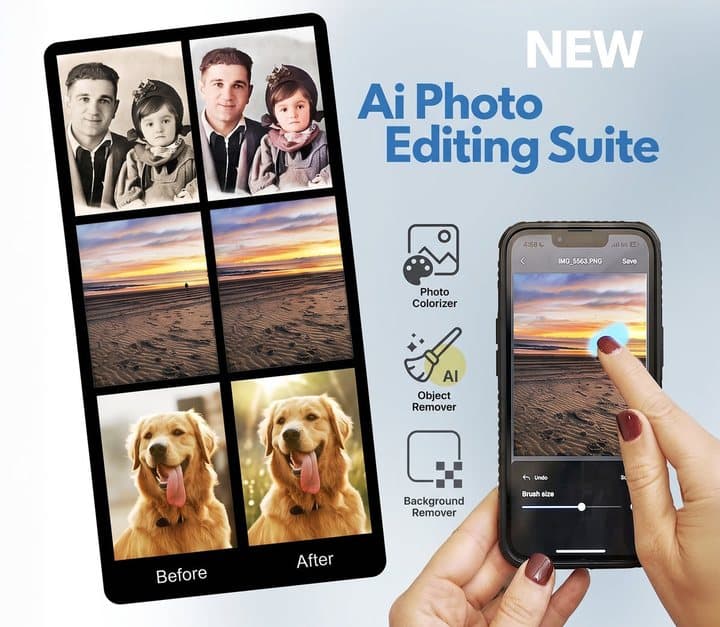
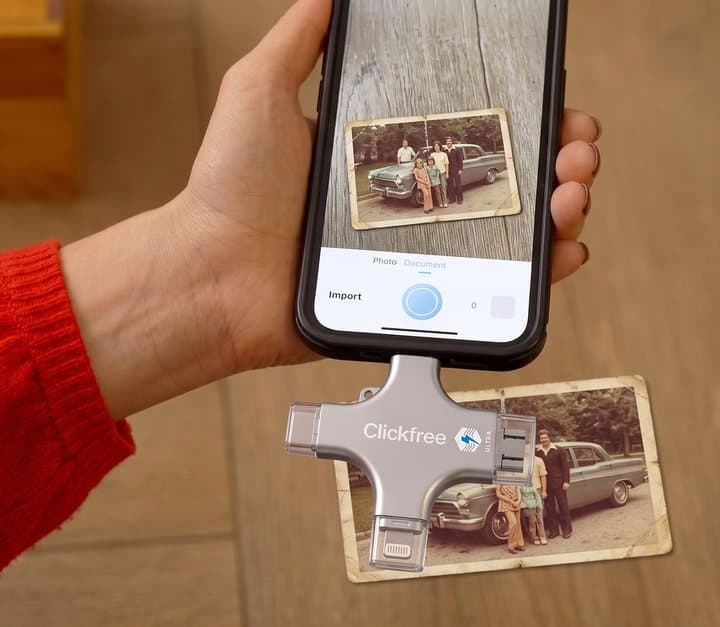
- Extras: shoot directly to the drive, scan paper photos with your phone camera, and AI photo touch-ups.
- Best trait: makes backing up simple for people who otherwise never would.
- Biggest drawback: a single flash drive is a fragile place for irreplaceable memories, and owner reports of failures are common.
- Our score: 5.2 out of 10, with the lowest marks for reliability and owner satisfaction.
Pros & cons
Clickfree solves a real problem: millions of people have years of photos on one phone with no backup. Anything that gets them to make a copy is better than nothing. But the marketing presents it as complete, secure protection, which a single flash drive cannot be.
What we like
- One drive with Lightning, USB-C, USB-A and micro-USB connectors works with iPhones, Android phones, tablets and computers
- The app finds and copies photos and videos for you, which suits people who find manual backup confusing
- Can shoot photos and video straight to the drive when your phone is full
- No monthly fee, unlike cloud storage
- 30-day money-back guarantee and one-year warranty
What we don't
- A small flash drive is easy to lose or damage and should never be your only copy
- Trustpilot shows 2.9 from 65 reviews, with reports of freezing, phones not recognised, lost dates and lost files
- Costs far more per gigabyte than an ordinary 4-in-1 flash drive
- Photo counts like '32,000 photos & videos' for 128 GB ignore that video uses far more space
- '100% secure' is not backed by any stated encryption; anyone who finds the drive can read it
Sold by Clickfree
Clickfree Ultra$34.99
How it works
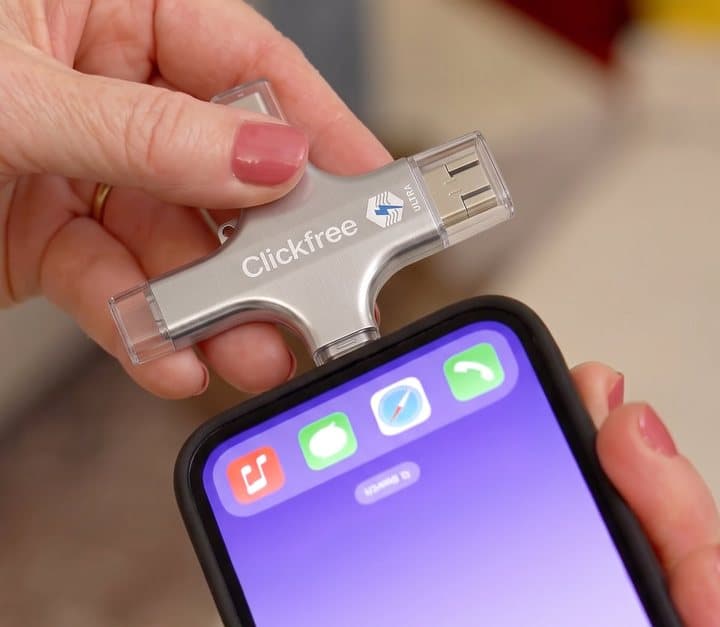
Clickfree is a flash drive plus software. The hardware is a small, cross-shaped stick with four connectors. The software, the Clickfree app on phones and tablets, does the work of finding and copying files.
Install the app and plug in
Step 1: On a phone or tablet you install the Clickfree app and plug the drive into the charging port using the matching connector; on a computer you plug in the USB-A or USB-C end.
The app finds your photos and videos
Step 2: The app scans your device for photos, videos and other supported files, then copies them to the drive and organises them, skipping files it has already backed up.
Free up space or view later
Step 3: Once copied, you can delete files from your phone to free space, view them from the drive on any device, or move them to a computer; the app also offers AI photo touch-ups and scanning of paper photos.
The app is the main thing you are paying for over an ordinary flash drive. Without it, copying photos from an iPhone to a USB drive means using the Files app, selecting photos and waiting, which many people find confusing.
Who it's for
Clickfree suits people who are not confident with technology and have never backed up their phone: parents and grandparents with years of family photos, people whose phones constantly warn that storage is full, and anyone who has been putting off "sorting out the photos" because they do not know how. It also suits mixed households with iPhones, Android phones and computers, since one drive fits all of them.
It is not the best choice for people who are comfortable with technology, who will get more storage for less money from an ordinary multi-connector flash drive, a portable SSD or cloud storage. And it is not a safe home for irreplaceable photos unless you also keep another copy.
Why Clickfree appeals
Most people's photos live in one place: their phone. Phones get lost, stolen, dropped in water and replaced, and every year people lose years of family photos because they never got round to backing up. Cloud settings and computer imports confuse many people, especially older users. A drive you plug in, with an app that says "back up" and does it, removes that barrier.
The "no monthly fee" message also lands with people tired of subscriptions, and the idea of holding your memories in your hand feels reassuring in a way a cloud account does not.
Who gets the most value
The value is highest for non-technical users with no backup at all, and for anyone buying a gift for an older relative who would never set up cloud backup. It is lowest for people who already have automatic cloud backup, where it adds a convenient second copy but at a high price per gigabyte.
As a gift
Clickfree is often bought as a gift for parents and grandparents. If you do, set it up with them, run the first backup together, and arrange a second copy, such as turning on their phone's cloud backup or copying the drive to your own computer.
Write simple instructions on a card to keep with the drive: which connector to use, where the app is, and what to tap. That small step makes it far more likely to be used again after you leave.
- People who have never backed up their phone and find computers and cloud settings confusing
- Anyone whose phone keeps saying storage is full and who wants an easy way to move photos off it
- Families with a mix of iPhones, Android phones and computers who want one drive for all of them
Who should skip it
- Anyone who would rely on it as the only copy of irreplaceable photos
- People already using iCloud, Google Photos or a computer backup that works
- Tech-confident buyers; an ordinary 4-in-1 flash drive or SSD gives more storage for less
- Anyone needing encrypted storage for sensitive files
What do you get with Clickfree, and what does it cost?
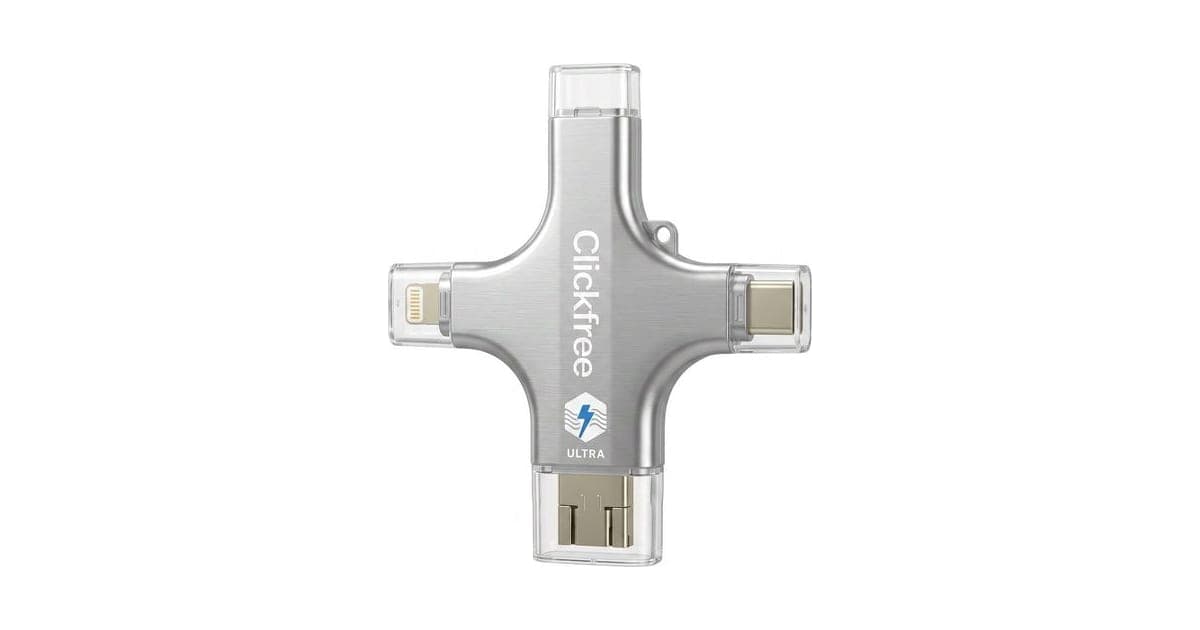
The Clickfree Ultra is a silver, cross-shaped drive about the size of a large key, with a connector on each arm: Lightning for older iPhones and iPads, USB-C for newer phones, tablets and laptops, USB-A for computers, and micro-USB for older Android devices. The app is a free download.
Specifications
| Spec | Clickfree Ultra |
|---|---|
| Type | Multi-connector USB flash drive with backup app |
| Connectors | Lightning, USB-C, USB-A, micro-USB |
| Capacities | 32, 64, 128, 256 GB (offer page) |
| Works with | iPhone, iPad, Android phones and tablets, Mac, Windows PC, many Chromebooks |
| File types | Photos, videos, GIFs, contacts, PDFs and more (offer page) |
| Extra features | Shoot directly to drive; scan paper photos; AI photo editing |
| Encryption | Not mentioned |
| Warranty | 1 year |
How much fits
The offer page says 32 GB saves 8,000 photos and videos, 64 GB 16,000, 128 GB 32,000 and 256 GB 64,000. That works out at about 4 MB per item, which is a reasonable size for a phone photo. Videos are much larger: a minute of 4K video can use several hundred megabytes. Clickfree's own store is more careful, saying 128 GB holds about 30,000 photos or 13 hours of 4K video.
What this means for you: check how much storage your photos and videos use (in your phone's storage settings) and choose a drive with plenty of room to spare. If you film a lot, the 32 GB model will fill quickly.
Clickfree price by capacity
On 3 October 2026 the offer page our link opens showed:
| Capacity | Price | Shown as | Shipping | Cost per GB |
|---|---|---|---|---|
| 32 GB | $34.99 | Retail $69.99 | Added | About $1.09 |
| 64 GB | $69.99 | Retail $139.99 | Free | About $1.09 |
| 128 GB (most popular) | $99.99 | Retail $199.98 | Free | About $0.78 |
| 256 GB (best deal) | $149.99 | Retail $299.99 | Free | About $0.59 |
The page offers 60% off additional units. Clickfree's own store listed the Ultra 128 GB at $199.99 and older Clickfree Pro models from $74.99 for 64 GB, so the offer page is the cheaper route for this model.
Choosing a capacity
As a rough guide: 32 GB suits a phone with a few thousand photos and little video; 64 GB a typical phone with some video; 128 GB most families' main phone; 256 GB heavy video users or several phones on one drive. Buying the next size up costs less than buying a second drive later. The per-gigabyte price also falls at larger sizes on this offer.
Is Clickfree good value?
As storage, no. Ordinary multi-connector flash drives with Lightning, USB-C and USB-A are widely sold for far less per gigabyte, and portable SSDs offer much more storage for the money. What you pay extra for is the Clickfree app's simplicity, the four connectors in one, and the brand's support. For someone who will actually use it because it is simple, that premium can be worth it. For anyone comfortable copying files themselves, it is not.
Who makes it
Clickfree has been a consumer backup brand for well over a decade; technology sites reviewed its automatic backup hard drives and earlier USB models years ago. The current range is sold through the brand's own store, which lists the Ultra, Ultra 2.0 (shown as coming soon) and older Pro models, and through offer pages like the one our link opens. Support contact details are on the brand's site.
The Ultra vs the Ultra 2.0 and Pro
The brand's store describes an Ultra 2.0 with up to twice as fast backups, an LED status light and a USB-C pass-through port so you can charge your phone while backing up, listed as coming soon. The older Clickfree Pro has the same four connectors in a different shape. The offer page sells the Ultra; check the product name at checkout so you know which you are getting.
The extras
The Clickfree store sells AI editing credits ($19.99 for 200, up to $99.99 for 1,500), unlimited AI editing for $199.99, photo books, posters, travel cases and gift tins. The offer page mentions AI enhancement as a feature; check whether it is included or credit-based before relying on it.

Clickfree UltraScore 5.2/10
Best for: People who have never backed up their phone and find computers and cloud settings confusing
$34.99 at Clickfree · Price checked October 3, 2026
Check price at Clickfree (opens Clickfree in a new tab)We may earn a commission if you buy through our links.
Is Clickfree a safe way to back up photos?
Clickfree is a convenient way to make one copy of your photos, but one copy is not a backup strategy. Experts commonly recommend the 3-2-1 rule: three copies, on two types of storage, with one kept off-site. A small flash drive kept at home can be lost, broken or destroyed along with your phone, and flash drives can fail without warning, as several Trustpilot reviewers describe.
This is the key question, because the product is sold on protecting irreplaceable memories.
One copy is not a backup strategy
Data protection experts commonly recommend the 3-2-1 rule: three copies of anything important, on two different types of storage, with one copy kept off-site. A Clickfree drive is one copy, on one small device, usually kept in the same house as your phone. If your house floods, burns or is burgled, both copies can go together. If the drive fails, is dropped in water or is lost, the backup is gone.
Flash drives fail
Flash drives are convenient but not designed as long-term archives. They can fail without warning, and their small size makes them easy to lose. Several Trustpilot reviewers describe drives freezing mid-backup or losing files; one says they lost everything.
The cloud is not "risky", it is a different risk
The offer page says the cloud is not secure. Major cloud photo services encrypt data and store copies across multiple data centres, and account breaches usually come from weak or reused passwords rather than the services themselves. Turning on two-factor authentication makes accounts much safer. Cloud storage protects against losing your phone or drive; a physical drive protects against losing access to an account. They complement each other.
What we recommend
- Turn on your phone's cloud photo backup (iCloud Photos or Google Photos), with two-factor authentication.
- Keep a physical copy as well, on a Clickfree, another flash drive, a computer or an external drive.
- Store the physical copy somewhere safe, ideally away from your home, such as with a relative.
- Check your backups now and then by opening a few files.
What a good photo backup routine looks like
- Cloud photo backup switched on and working, checked once a month in settings.
- A physical copy updated every month or after big events.
- The physical copy stored away from your phone and, ideally, away from your home.
- Once a year, open a sample of old photos from each copy to make sure they still open.
- Every few years, move the physical copy to newer storage.
What happens if the drive fails
If a flash drive stops working, data recovery services can sometimes retrieve files, but it is expensive and not guaranteed. That is why a second copy matters more than which drive you buy.
Are Clickfree's claims true?
Clickfree's core claim holds up: its app makes copying photos and videos genuinely simple. Other claims overreach. "Preserve all your memories" ignores that it copies photos, videos and some files, not apps or messages, and owners report incomplete or frozen backups. "100% secure" is not backed by any stated encryption, so a lost drive is readable by anyone, and "never lose a photo again" depends on keeping other copies.
"Preserve all your favourite memories with one click"
Clickfree makes copying easier, and the app's "back up" button is genuinely simple. "All" is optimistic: it copies photos, videos and supported files, not apps, messages or settings, and several owners report incomplete or frozen backups.
"100% secure"
Offline storage avoids the risk of a cloud account breach, but the offer page does not mention encryption. A lost Clickfree drive is readable by anyone who finds it. "Secure" in the sense of hard to access, no; in the sense of not online, yes.
"Guaranteed to work"
The 30-day guarantee and one-year warranty offer a refund or replacement, not a guarantee that your files are safe. Owner reports of recognition problems with newer phones suggest testing it promptly.
"Never lose a precious photo or video again"
No single device can promise that. With a second copy elsewhere, your chances of losing photos fall dramatically.
"Works with all devices"
The four connectors cover nearly all phones, tablets and computers in use. Compatibility also depends on the app supporting your phone's operating system, and some reviewers say their newer phone was not recognised.
"Built-in AI photo enhancement" and "scan old photos"
Scanning uses your phone's camera, which works but is not the same as a flatbed scanner for quality. AI touch-ups (colourising, fixing blur, removing backgrounds) are offered in the app; the store sells editing credits separately, so check what is included.
"1,000,000+ devices sold"
Clickfree has existed as a backup brand for many years; reviews of its older backup drives date back over a decade. We could not verify the sales figure.
"Frees up phone storage"
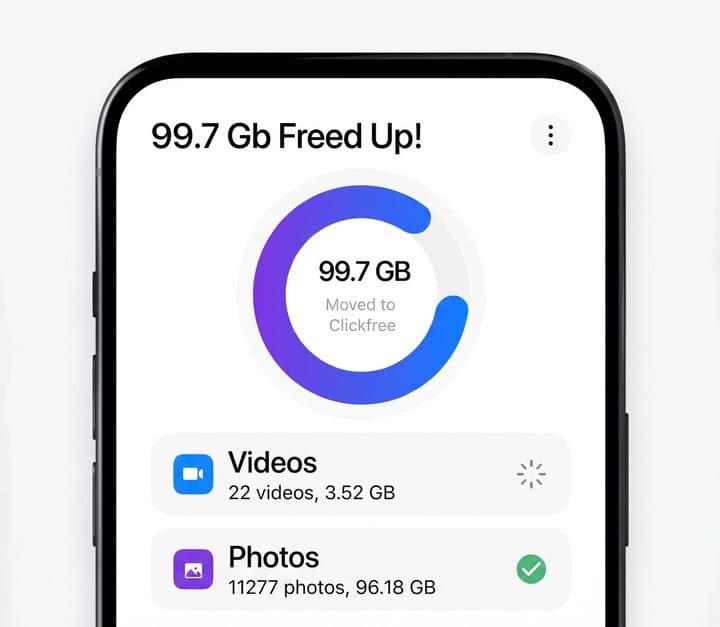
True, once you delete the copied files from your phone. The app's example screen shows nearly 100 GB freed. Remember that deleting from your phone also removes them from iCloud or Google Photos if those are syncing, so check your cloud settings before deleting.
"Organises your files"
The app sorts backups by date and type. Several Trustpilot reviewers say original dates were lost on some photos, which can make a library harder to browse later. Test with a few photos before relying on it.
Claims scorecard
| Claim | What we found | Our view |
|---|---|---|
| One-click backup of photos and videos | Simple app; some failures reported | Mostly supported |
| Works with all devices | Four connectors; some newer phones not recognised | Mostly supported |
| 100% secure | No stated encryption | Overstated |
| Never lose a photo again | Single drive can fail or be lost | Misleading |
| 32,000 photos and videos on 128 GB | Store says 30,000 photos or 13 hours of 4K video | Overstated for video |
| No monthly fees | True | Supported |
| Shoot directly to drive | Stated feature | Supported |
Is Clickfree better than an ordinary flash drive or iCloud and Google Photos?
Many brands sell flash drives with the same four connectors for far less per gigabyte, so confident users get better value elsewhere; Clickfree's advantages are its simple app and support. Cloud services such as iCloud and Google Photos back up automatically every day and keep copies off-site, for a small monthly fee beyond the free tier. The ideal setup is cloud backup plus a physical copy.
Scanning a printed photo with the phone
The app after a backup, as shown by the brand
Plugged into a laptop
| Option | Typical cost | Automatic | Off-site | Best for |
|---|---|---|---|---|
| Clickfree Ultra | $35 to $150 one-off | Manual, via app | No | People who want the simplest physical backup |
| Ordinary 4-in-1 flash drive | Much less per GB | Manual | No | Confident users wanting cheap physical copies |
| iCloud Photos / Google Photos | About $1 to $3 a month for common plans | Yes | Yes | Everyone with a smartphone |
| Computer backup (Photos app, Windows Photos) | Free if you have a computer | Semi | No | People with a computer at home |
| Portable SSD or external hard drive | Moderate | With software | No (unless stored away) | Large libraries, many videos |
| Professional photo scanning | Per photo | N/A | N/A | Large collections of paper photos |
Clickfree vs an ordinary 4-in-1 flash drive
Many brands sell flash drives with the same four connectors for far less, often with their own backup apps. Clickfree's advantages are its app, aimed at non-technical users, and its support. If you or the person you are buying for are comfortable with technology, an ordinary drive is better value.
Clickfree vs iCloud or Google Photos
Cloud services back up automatically, every day, without plugging anything in, and keep copies off-site. They cost a small monthly fee once you exceed the free tier. Clickfree has no fee but needs you to remember to plug it in. The ideal is both.
If cost is the concern, many people do not need large cloud plans: free tiers cover a few gigabytes, and the cheapest paid tiers cover most phone photo libraries for a few dollars a month. Over five years, that may cost more or less than a Clickfree depending on the plan, but it also gives you automatic, off-site protection.
Clickfree vs a computer
If you have a computer, connecting your phone and importing photos into the computer's photo app is free. Then back up the computer to an external drive or the cloud. It is more steps, but gives you more storage and more control.
Clickfree vs a portable SSD
Portable SSDs hold hundreds of gigabytes to several terabytes, are fast and durable, and cost less per gigabyte. Most need a cable and a computer or a phone that supports external storage. They are the better choice for big libraries or lots of video.
Clickfree vs a SanDisk-style iPhone flash drive
Major storage brands also sell flash drives with Lightning or USB-C connectors and companion backup apps, often for less. They usually have two connectors rather than four. If everyone in your household uses the same kind of phone, a two-connector drive from a mainstream storage brand may be the better value.
The closest rival from another brand is covered in our ThePhotoStick Omni review, a similar multi-connector stick that also backs up computers.
Clickfree vs a family photo-sharing service
Shared family albums in iCloud, Google Photos and similar services let relatives contribute and view photos, and they keep copies in the cloud. They are not a full backup, but they are a good way to make sure important photos exist in more than one place, including with family members.
Clickfree vs professional photo scanning
For boxes of old prints, Clickfree's phone-camera scanning is convenient for a few favourites. For hundreds or thousands of prints, slides or negatives, a professional scanning service gives sharper, colour-corrected results and handles the work for you.
If you have decided Clickfree's simplicity is worth the premium, the Clickfree order page (opens Clickfree in a new tab) lists the four capacities. Our computing section and tech and gadgets hub cover more devices, including the Anything Speaker, SafeSleeve Air-Tube headphones and the CordBrick cord holder. For paper photos and children's art, our Artkive review covers a professional alternative.
Clickfree UltraScore 5.2/10
Why people buy it: One drive with Lightning, USB-C, USB-A and micro-USB connectors works with iPhones, Android phones, tablets and computers
$34.99 at Clickfree · Price checked October 3, 2026
Check price at Clickfree (opens Clickfree in a new tab)We may earn a commission if you buy through our links.
Is Clickfree legit, and what should you check before buying?
Clickfree is a real product with a 30-day guarantee and a one-year warranty, but its unclaimed Trustpilot profile shows 2.9 from 65 reviews, with reports of freezing and newer phones not being recognised. Before buying, test it with your phone as soon as it arrives, check that photos copied correctly before deleting anything, and keep a second copy in the cloud or on a computer.
Keep a second copy
The most important point in this review.
What to do: turn on cloud photo backup, or copy the Clickfree's contents to a computer or second drive, and store one copy away from home.
Check what the app backs up
Clickfree copies photos, videos and certain file types, not your whole phone.
What to do: for a full phone backup, use iCloud backup on iPhone or Google backup on Android, or your computer's backup tools.
Choose the right capacity
Video fills drives fast.
What to do: look at how much space your photos and videos use in your phone's settings, and buy at least that much, plus room to grow.
Test before deleting anything
Some owners report that dates were lost or backups were incomplete.
What to do: after a backup, open a sample of photos and videos from the drive, including the oldest ones, and check they play and show correct dates before deleting anything from your phone.
Test compatibility early
Several reviewers say newer phones were not recognised.
What to do: try it on every device you plan to use within the 30-day window, and contact support or return it if it does not work.
Phone cases
Thick or rugged phone cases can stop the connector from plugging in fully, which can cause failed or interrupted backups.
What to do: remove the case before backing up if the connector does not sit firmly.
Battery and time
Large backups can take a while and use battery.
What to do: start a big backup with the phone well charged, keep the screen on if the app needs it, and do not move the phone around while the drive is plugged in.
Keep it safe
It is small, unencrypted and easy to lose.
What to do: store it somewhere fixed and safe, not in a coat pocket or bag, and do not keep sensitive documents on it unencrypted.
iPhone storage settings
On iPhone, if "Optimise iPhone Storage" is on in iCloud Photos settings, full-resolution originals may be in iCloud rather than on the phone. A local backup app may then copy smaller versions or need to download originals first, which takes time and data.
What to do: if you use iCloud Photos with optimised storage, check whether the backup includes full-resolution files, or switch to "Download and Keep Originals" before backing up, if you have space.
Live Photos and file formats
iPhones save photos in HEIC format and Live Photos as a photo plus a short video. Some backup tools convert or drop parts of these.
What to do: check that Live Photos and HEIC files open correctly from the drive on the devices you will use to view them.
Drive formatting
Some computers and phones handle certain drive formats better than others. Clickfree drives come ready to use, but if you ever reformat one on a computer, choose a format that works with all your devices.
What to do: avoid reformatting unless support advises it, and copy everything off first.
How to buy Clickfree the smart way
- Check how much storage your photos and videos use, then open the Clickfree offer page (opens Clickfree in a new tab) and pick a capacity with room to spare.
- If you film a lot, choose 128 GB or 256 GB; the price per gigabyte also falls.
- Only buy extra units at 60% off if someone else will use them, or for a second backup copy.
- Check the order summary for add-ons like AI credits or cases.
- Save your order confirmation; the 30-day guarantee and one-year warranty depend on it.
- Test a full backup on every device in the first week, and set up a second copy.
What do owners say, and how did we score Clickfree?
Clickfree scores 5.2 out of 10: claim accuracy 0.9, build durability 1.0, price competitiveness 1.0, usability 1.4 and owner satisfaction 0.9, each out of 2. Its Trustpilot profile showed 2.9 from 65 reviews, with 44% five-star and 37% one-star. Positive reviews praise easy transfers for non-technical users; negative ones describe freezing, phones not being recognised, lost photo dates and data loss.
Trustpilot
On 3 October 2026 the Trustpilot profile for clickfreebackup.com showed a TrustScore of 2.9 out of 5 from 65 reviews: 44% five-star, 9% four-star, 5% three-star, 5% two-star and 37% one-star. The profile was unclaimed.
Positive reviews praise clear instructions and easy transfers for people without technical skills. Negative reviews describe the device freezing or failing mid-backup, newer phones not being recognised, photos losing their original dates, limited storage, data loss and slow support.
What the split means
Nearly half five-star and over a third one-star is a polarised record. The positive group is mostly people for whom it worked smoothly on their phone. The negative group is mostly people whose phone was not recognised or whose backup failed. Phone model and operating system version seem to matter, so test it on yours straight away.
What we would test with a drive in hand
If we test Clickfree ourselves, we will back up an iPhone and an Android phone with the same mixed library of photos, Live Photos and 4K videos, time each backup, check that dates, file formats and full resolution are preserved, and compare against an ordinary multi-connector flash drive. We will update this review with the results.
The testimonials on the page
The offer page's testimonials describe backing up 1,185 photos and videos from a Samsung in about five minutes, peace of mind for a user whose phone was failing, ease of use for someone in their seventies, and enjoying the colourise feature on old black-and-white photos.
Earlier third-party reviews
Clickfree has been reviewed by technology publications for many years, mostly its older backup hard drives and earlier USB models. Those reviews generally praised its simplicity and criticised its limited control and, in one case, the iOS app's design. We found no recent independent hands-on review of the Ultra.
How we scored Clickfree
Every score on the site follows the five criteria on our how we test page.
| Criterion | Score | Why |
|---|---|---|
| Claim accuracy | 0.9 / 2 | Simple backup as claimed; "100% secure", "never lose" and capacity claims overstated |
| Build durability | 1.0 / 2 | Flash drive; owner reports of freezing and failure |
| Price competitiveness | 1.0 / 2 | Far more per GB than ordinary multi-connector drives |
| Usability | 1.4 / 2 | Easy app for non-technical users; compatibility problems reported |
| Owner satisfaction | 0.9 / 2 | 2.9 from 65 Trustpilot reviews, 37% one-star |
| Total | 5.2 / 10 |
The score would rise with stated encryption, clearer capacity figures and better reliability reports.
What we did, and did not, do
Nobody on our team has used the Clickfree Ultra, and this review does not claim otherwise. We read the offer page our link opens, Clickfree's own store data, its Trustpilot profile and summaries of earlier third-party reviews, all on 3 October 2026.
How to use Clickfree for the best results
Install the Clickfree app from the official app store, plug the drive in with the connector that fits your device, and start a backup, keeping the phone charged and the app open until it finishes. Then open several photos and videos on the drive to check they copied. Set a monthly reminder to back up again, and copy the drive's contents to a computer or cloud service.
- Install the Clickfree app on your phone or tablet from the official app store.
- Plug the drive in using the connector that fits your device.
- Open the app and start a backup; keep the phone charged and the app open until it finishes.
- When it completes, open several photos and videos on the drive, including old ones, to check them.
- Only then delete files from your phone if you need space.
- Copy the drive's contents to a computer or turn on cloud backup, so you have a second copy.
- Repeat regularly, monthly or after big events, and store the drive somewhere safe.
Setting a reminder
Backups only help if they are recent. Put a monthly reminder in your phone's calendar, such as the first Sunday of each month, to plug the drive in and run a backup. Pair it with something you already do, like charging your phone overnight on a weekend.
After each backup, glance at the most recent photos on the drive to confirm they arrived. It takes seconds and catches problems before you need the backup.
Copying the drive to a computer
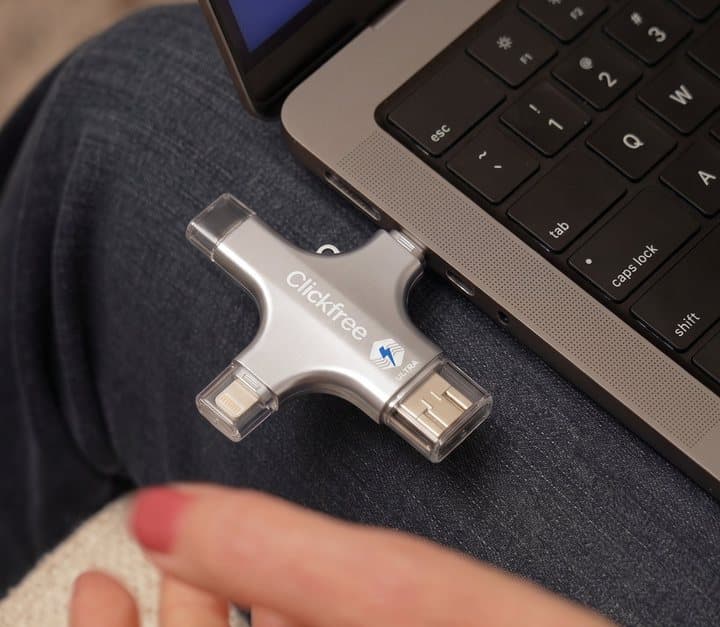
Plug the drive's USB-A or USB-C end into a computer and copy its folders to the computer's Pictures folder or an external drive. This gives you the second copy recommended throughout this review, and makes the photos easier to browse on a bigger screen.
Restoring photos to a new phone
When you change phones, plug the drive into the new phone and use the app's restore option, or copy photos back from a computer. Restore to a phone with enough free storage, and check a sample of photos afterwards.
Backing up a large library
The first backup of thousands of photos can take a long time, especially with lots of video. Do it with the phone plugged into a charger if possible, and leave it undisturbed. If it freezes, restart the app; it should skip files already copied.
Using it on a computer
Plug the USB-A or USB-C end into the computer. Depending on the model, the drive appears as storage and may also run Clickfree's software. You can copy files to and from it like any USB drive.
Shooting directly to the drive
If your phone is full, the app lets you take photos and videos straight onto the drive. It is handy at events, but the drive sticks out of the phone, which makes holding it awkward. Remember those files exist only on the drive until you copy them elsewhere.
Scanning old photos
Use good, even light, lay photos flat, avoid glare and hold the phone parallel. For large or valuable collections, a flatbed scanner or professional service gives better results.
Write names, places and dates on a note as you scan, or add them as captions in the app afterwards. Future family members will value knowing who is in each photo as much as the image itself.
Looking after it
Keep it in a case or gift tin, away from water, heat and magnets. Do not unplug it during a backup. If it ever behaves oddly, copy everything off it to another device straight away.
Avoid leaving it plugged into a phone in a pocket or bag, where the connectors can bend or snap. Fold-out and exposed connectors are the most fragile parts of multi-connector drives.
Clickfree UltraScore 5.2/10
Before you buy: Check the final price, shipping and return terms at checkout.
$34.99 at Clickfree · Price checked October 3, 2026
Check price at Clickfree (opens Clickfree in a new tab)We may earn a commission if you buy through our links.
What else do people ask about backing up phone photos?
Most questions are about the easiest method. On an iPhone, turning on iCloud Photos is easiest and runs automatically; on Android, Google Photos backup does the same. For a physical copy, import photos to a computer or use a drive like Clickfree. Cloud backup runs continuously, while a monthly physical backup, plus one after holidays and important events, is a good habit.
What is the easiest way to back up iPhone photos?
Turning on iCloud Photos in Settings is the easiest, and it runs automatically. For a physical copy too, import photos into a computer or use a drive like Clickfree.
What is the easiest way to back up Android photos?
Google Photos backup runs automatically when switched on. You can also copy photos to a computer with a cable or use a USB-C flash drive.
How often should I back up my phone?
Automatic cloud backup runs continuously. For a physical backup, monthly is a good habit, plus after holidays and important events.
Do flash drives lose data over time?
Data on flash drives can degrade if the drive is left unused for years, and drives can fail suddenly. Copy important data to newer storage every few years and keep more than one copy.
Is it safe to delete photos from my phone after backing up?
Only after you have checked the backup opens correctly and you have a second copy. Many people lose photos by deleting them after a backup that silently failed.
What does the 3-2-1 backup rule mean?
Keep three copies of important data, on two different types of storage, with one copy off-site. For photos, that might be your phone, a cloud service and a drive kept at a relative's house.
Can I use Clickfree with more than one phone?
Yes. One drive can back up several devices, and the app keeps each device's files separate. Make sure the capacity is large enough for everyone's photos and videos combined.
Does Clickfree need the internet?
Backing up to the drive does not need an internet connection. The AI editing features may need a connection and credits.
What should I do with old phones full of photos?
Charge them, back them up with Clickfree or a computer, check the copies, then wipe and recycle the phones. Old phones in drawers are a common place for forgotten photos to be lost when batteries swell or devices are thrown away.
Is a hard drive better than a flash drive for photos?
For large libraries, a portable SSD or external hard drive holds far more for the money and is designed for bigger, regular backups. Flash drives are better for portability and convenience. Either way, keep a second copy.
Frequently asked questions
Does Clickfree really back up everything?
It backs up photos, videos, contacts, PDFs and other supported files it can find, according to the offer page. It is not a full phone backup: apps, messages and settings are not included. Some Trustpilot reviewers report backups freezing, phones not being recognised, or dates not being kept on photos.
How much does Clickfree cost?
On 3 October 2026 the offer page showed $34.99 for 32 GB, $69.99 for 64 GB, $99.99 for 128 GB and $149.99 for 256 GB, with 60% off additional units. Clickfree's own store listed the Ultra 128 GB at $199.99 and older Pro models from $74.99.
How many photos does Clickfree hold?
Clickfree's store says 128 GB holds about 30,000 photos or 13 hours of 4K video. The offer page's figure of 32,000 'photos & videos' for 128 GB assumes mostly photos; videos use far more space, so a phone with lots of video fills it much faster.
Is Clickfree better than iCloud or Google Photos?
It has no monthly fee and keeps a physical copy in your hands. Cloud services back up automatically, keep copies off-site and survive a lost drive, for about $1 to $3 a month for typical plans. The safest approach is both: cloud plus a physical copy.
Does Clickfree work with iPhone?
Yes. It has a Lightning connector for older iPhones and a USB-C connector for iPhone 15 and newer, and you use the Clickfree app. Some reviewers say newer phones were not recognised, so test it within the 30-day window.
Is Clickfree secure?
It keeps your files offline, which avoids cloud breaches. But the offer page does not mention encryption, so anyone who finds the drive could view the files. Keep it somewhere safe, and do not use it for sensitive documents without encryption.
Can Clickfree free up space on my phone?
Yes. After copying photos and videos to the drive, you can delete them from your phone. Before deleting, open a few files on the drive to check they copied correctly, and keep a second copy somewhere else. Pick a capacity that fits your library.
How long do flash drives last?
Flash drives can last years, but they can fail without warning, and their small size makes them easy to lose. Treat any single drive as one copy among several, not a permanent archive. Check the drive's contents now and then.
We may earn a commission if you buy through our links.
Prices accurate as of October 3, 2026. Check the seller's checkout for current pricing, promotions and terms.
What we checked: No hands-on use. Claims, capacities, prices (shown after scrolling), features, testimonials, warranty and guarantee from the Clickfree offer page our link opens (getclickfreeultra.com) on 2026-10-03. Store prices, capacity figures and model descriptions from Clickfree's own store data the same day. Trustpilot profile for clickfreebackup.com and earlier third-party reviews of Clickfree products summarised in search results were read the same day.

About the author
Ethan Walker, Hardware & Gadget Tester
Ethan Walker covers hardware for Top10Gadgets: audio, computing, phone accessories, chargers, tools, car gadgets and sports equipment. Ethan believes a product should be judged on what happens when people actually use it…
- Headphones and speakers
- Chargers and phone accessories
- Tools and emergency gear
- Car accessories
- Durability and real-world performance
Writing for Top10Gadgets since 2026Full profile