Cellphone Accessories / Cable management
CordBrick Review: What the Weighted Cord Holder Does Well, Where It Falls Short and How to Buy It
A weighted silicone block that keeps charging cables from sliding off desks, wraps cords for travel and props up your phone. It is a well-made small fix, but $20 is a lot for silicone.

By Ethan Walker, Hardware & Gadget Tester at Top10Gadgets
Updated 29 min readHow we test
Quick answer
Yes, if a charging cable sliding off your nightstand or desk annoys you every day and you want a tidy fix without sticky clips. CordBrick is a small silicone block with a steel core that grips phone and watch cables, wraps a cable for travel and props up your phone.
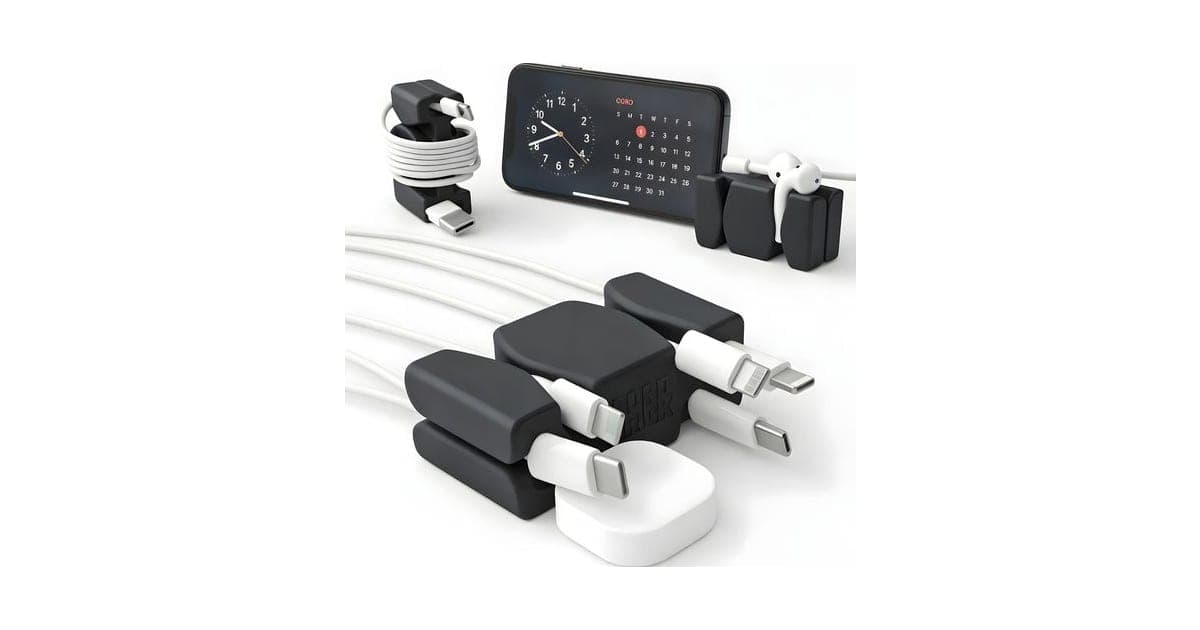
Score 7.0/10$19.99 at CordBrick
Check price at CordBrick (opens CordBrick in a new tab)We may earn a commission if you buy through our links.
- Best for
- Anyone whose phone or watch charger keeps falling behind the bed or desk
- Not for
- People who need to manage thick laptop, monitor or keyboard cables
$19.99 at CordBrick
Check price at CordBrick (opens CordBrick in a new tab)We may earn a commission if you buy through our links.
On this page · 14 sections
- 01Our verdict
- 02The short version
- 03Pros & cons
- 04How it works
- 05Who it's for
- 06How much does CordBrick cost, and what do you get?
- 07How well does CordBrick work?
- 08Are CordBrick's claims true?
- 09Is CordBrick better than adhesive cable clips or a binder clip?
- 10Is CordBrick legit, and what should you check before buying?
- 11What do owners say, and how did we score CordBrick?
- 12How to use CordBrick for the best results
- 13What else do people ask about cable organisers?
- 14Frequently asked questions
Our verdict
Yes, if a charging cable sliding off your nightstand or desk annoys you every day and you want a tidy fix without sticky clips. CordBrick is a small silicone block with a steel core that grips phone and watch cables, wraps a cable for travel and props up your phone. It is well made, US patented and praised by a hands-on reviewer. It scores 7.0 out of 10, held back by a $20 price for a simple object, shipping on small orders and its limits with thick cables and tablets.
The short version
- A weighted silicone cord holder, about 2.3 by 1.35 by 0.85 inches and about 3 oz, with a carbon steel core.
- Holds up to six thin charging cables, wraps a cable for travel, stands a phone and grips AirPods, according to the brand.
- $19.99 plus shipping for one on 3 October 2026, $39.99 for three, $59.99 for five and $79.99 for eight, with a 30-day guarantee and free returns.
- Best trait: a simple, durable, adhesive-free way to stop cables falling behind furniture.
- Biggest drawback: the price for what it is, and it only suits small cables.
- Our score: 7.0 out of 10, one of the higher scores in this batch, with the lowest mark for price.
Pros & cons
CordBrick is that rare offer-page product with modest, accurate claims and an honest, simple job. It does what it says. Whether it is worth $20 depends on how much the problem bothers you.
What we like
- Steel core and grippy silicone keep phone and watch chargers from sliding off the edge of a nightstand or desk
- No adhesive, so it never leaves sticky residue and can be moved anywhere
- Doubles as a cable wrap for travel and a small phone stand for video
- Holds up to six thin cords and fits AirPods, according to the brand
- US patented, with independent awards and a positive hands-on review
What we don't
- About $20 for a small silicone block, more than simple cable clips
- Made for phone-size charging cables, not thick laptop, HDMI or keyboard cables
- Will not stand a tablet, by the brand's own description
- Shipping is added to the single and two-pack offers
- No independent owner rating platform we could find
Sold by CordBrick
CordBrick$19.99
How it works
There is no technology to explain beyond weight and friction. That simplicity is the point.
Weight keeps it in place
Step 1: A slug of carbon steel inside makes the small silicone block heavy for its size, and the grippy silicone base resists sliding, so it stays where you put it without adhesive.
Channels grip the cords
Step 2: You push charging cables into slots on the top and bottom; the flexible silicone pinches them so the connector end stays on the table instead of falling behind the furniture.
Ends flex for other jobs
Step 3: The jaws at each end open to hold a phone upright or at an angle, grab earbuds, or anchor a coiled cable so you can wrap it neatly for travel.
Most cable clips stick to furniture with adhesive, which can peel paint or leave residue, or rely on magnets that need a matching plate. CordBrick simply sits there, heavy enough that a cable's weight will not pull it off the edge.
Who it's for
CordBrick suits anyone who charges a phone, watch or earbuds at a nightstand, desk or kitchen counter and is tired of the cable slipping off and falling behind. It suits renters and people with nice furniture who do not want adhesive clips. It suits travellers who want a cable to stay neatly wrapped in a bag. And it is a popular small gift and stocking filler.
It is not for managing big cables behind a desk, such as laptop chargers, monitor leads or keyboard cables, and it will not stand a tablet. If you already charge wirelessly, the problem it solves may not exist for you.
Why CordBrick appeals
Almost everyone has had the nightly ritual of reaching for a phone charger and finding it has slid off the nightstand and down the back of the bed. It is a tiny problem, repeated hundreds of times a year. CordBrick fixes it with something you never have to think about again: no batteries, no setup, nothing to stick on.
It also appeals because it looks good and feels solid. The silicone comes in bright and muted colours, the weight gives it a satisfying heft, and it does a few other small jobs, so it earns its place on a desk or bedside table rather than looking like a cheap clip.
Who gets the most value
Households with several charging spots and several people get the most from it, especially with the multi-packs. People with a back problem or limited mobility, who find bending to retrieve cables difficult, often appreciate it most, as one testimonial on the page describes.
As a gift
CordBrick is sold heavily as a stocking filler and small gift. It is a safe choice: inexpensive in multi-packs, useful to almost anyone with a phone, and available in colours. A variety pack lets you give one to each family member.
- Anyone whose phone or watch charger keeps falling behind the bed or desk
- Renters and anyone who does not want adhesive cable clips on furniture
- Travellers who want a tidy way to wrap and carry a charging cable
Who should skip it
- People who need to manage thick laptop, monitor or keyboard cables
- Anyone wanting a tablet stand
- Budget buyers happy with a few cheap cable clips or a binder clip
- People who already use a wireless charging pad, which removes the loose cable
How much does CordBrick cost, and what do you get?
CordBrick cost $19.99 for one on the offer page on 3 October 2026, with multi-packs bringing the price down to about $10 each; shipping is added to the smaller packs, while the five- and eight-packs ship free. You get one small silicone block with a carbon steel core, about 2.3 by 1.35 inches, in black, gray, light gray, aqua, pink or a variety pack.
You get a small silicone block in your chosen colour. The offer page lists black, gray, light gray, aqua, pink and a variety pack. CordBrick's own store also sells blue, mint, coral and glow-in-the-dark versions.
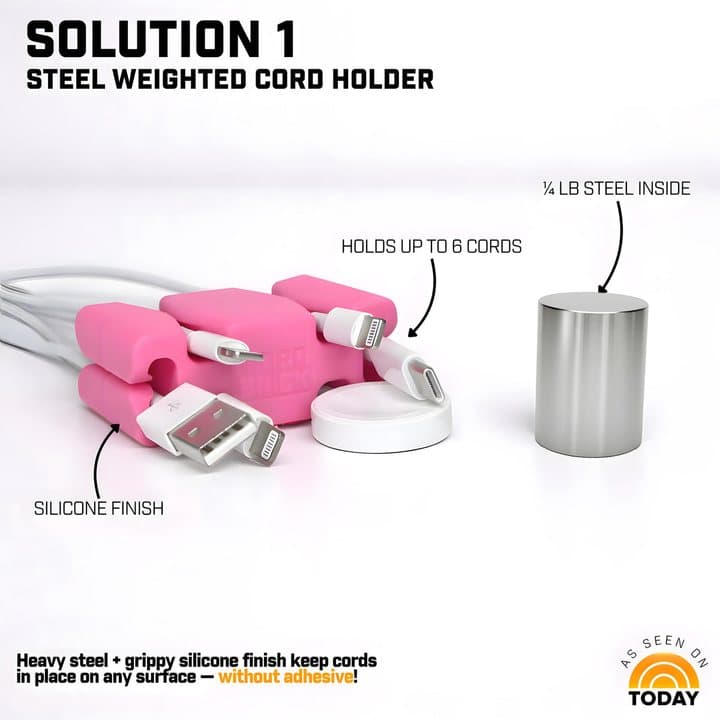
The cord holder, with the steel weight shown
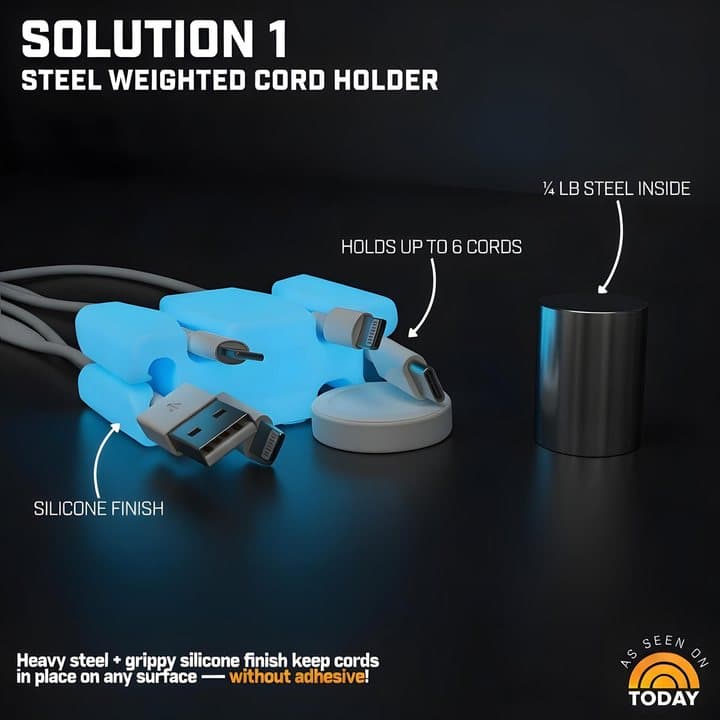
The glow-in-the-dark version
Specifications
| Spec | CordBrick |
|---|---|
| Material | Silicone outside, carbon steel inside |
| Size | About 2.30 x 1.35 x 0.85 in (third-party specification) |
| Weight | About 3 oz; brand says about 100 g; glow version 3.6 oz |
| Cord capacity | Up to 6 thin cords (brand) |
| Other uses | Cable wrap, phone stand, earbud holder |
| Adhesive | None |
| Patent | US patented (brand) |
| Colours | Black, gray, light gray, aqua, pink and more; glow versions |
A note on the weight
The brand's graphic says "¼ lb steel inside", while its own promotional listing describes about 100 g in total, roughly a quarter of a pound, and third-party specifications say about 3 oz. The total is what matters: it is heavy for its size, enough to hold several phone cables in place. It is not heavy enough to anchor thick, stiff cables with heavy plugs.
CordBrick price and bundles
On 3 October 2026 the offer page our link opens showed:
| Package | Total | Per CordBrick | Shipping |
|---|---|---|---|
| Buy 1 | $19.99 | $19.99 | Added |
| Buy 2, get 1 free (3) | $39.99 | $13.33 | Added |
| Buy 3, get 2 free (5) | $59.99 | $12.00 | Free |
| Buy 4, get 4 free (8) | $79.99 | $10.00 | Free |
CordBrick's own store listed single CordBricks at $20 and glow versions at $25, along with a larger DeskBrick at $25 and a MugBrick drink holder at $30. A 2023 hands-on review by Serious Insights listed it at $14.97, so prices have varied.
Is $20 good value?
For one silicone block, $20 is a premium price. Basic adhesive cable clips cost a few dollars for a pack, and a binder clip on the edge of a table does a rough version of the same job for pennies. What you pay for is the weight, the no-adhesive design, the extra uses and good build quality. The multi-packs make much more sense: at $10 to $12 each, putting one at every charging spot in the house becomes reasonable.
Price per use
If a CordBrick lasts several years at a nightstand, and you plug in your phone every night, that is well over a thousand uses for $10 to $20. Viewed that way, the cost per use is tiny; the question is whether a cheaper option would do the same job for you.
Who makes it
CordBrick is a small US company that sells through its own store, eBay and, according to third-party summaries, major US retailers, as well as offer pages like the one our link opens. Its store also runs a promotional products business, selling branded CordBricks, DeskBricks and MugBricks to companies for giveaways. The brand describes CordBrick as US patented and award-winning.
The company's own comparison graphic contrasts CordBrick with generic magnetic, adhesive and weighted holders, marking itself as US-owned, patented and award-winning against unbranded imports. That is marketing, but it reflects a real difference between a small branded product and the many look-alikes sold online.
Look-alikes and copies
Weighted silicone cord holders are easy to copy, and similar products appear on marketplaces at lower prices. Some may be lighter or use softer silicone. If price matters most, a copy may do; if you want the version the hands-on review tested, buy from CordBrick or its listed retailers.
Colours and the glow versions
The offer page lists black, gray, light gray, aqua, pink and a variety pack. The brand's store adds blue, mint, coral and glow-in-the-dark versions in blue, green, orange, pink and yellow at $25. The glow versions absorb light during the day and glow at night, which helps find the cable in a dark bedroom.
The bigger siblings
If your problem is bigger cables or a cluttered desk, CordBrick's store sells a DeskBrick, described as weighing over half a pound with four corner pockets for cables, phones and small items. That suits desks better than the original CordBrick.

CordBrickScore 7.0/10
Best for: Anyone whose phone or watch charger keeps falling behind the bed or desk
$19.99 at CordBrick · Price checked October 3, 2026
Check price at CordBrick (opens CordBrick in a new tab)We may earn a commission if you buy through our links.
How well does CordBrick work?
CordBrick works well for its main job: keeping phone, watch and earbud cables from sliding off a nightstand or desk. Serious Insights' hands-on review found its channels held charging and headphone cables firmly and its end jaws held an iPhone Pro upright. It also wraps a cable for travel. It struggles with thick laptop, HDMI or keyboard cables and will not stand a tablet.
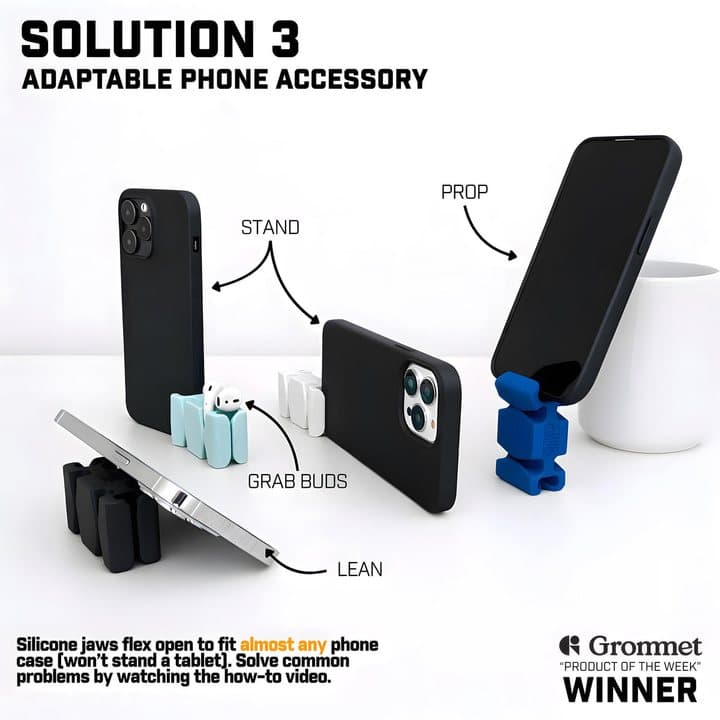
Phone stand and earbud holder uses
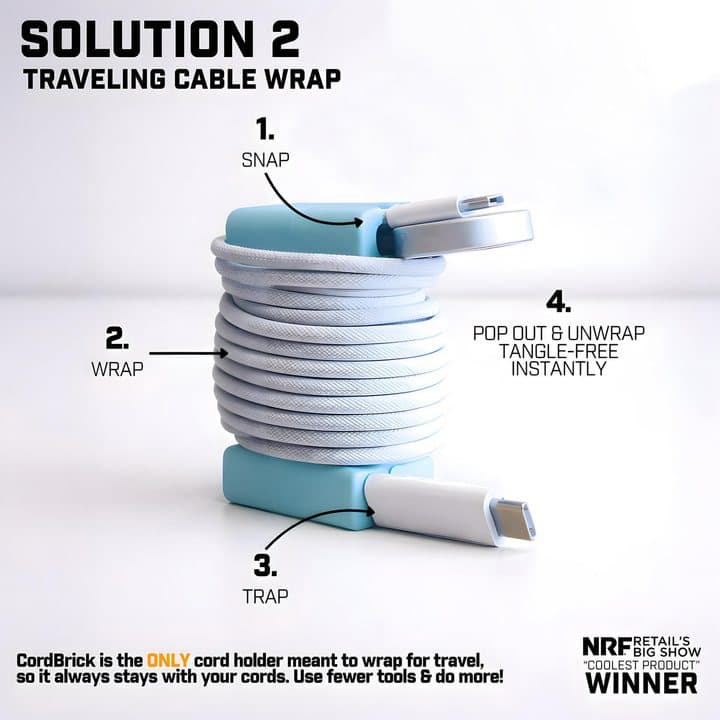
Wrapping a cable for travel
What a hands-on reviewer found
Serious Insights reviewed CordBrick hands-on and described it as a nice little block of silicone weighted by a steel ingot, useful for desk and travel cable clutter. It found the channels held headphone and charging cables well, and that the end jaws held an iPhone Pro upright. Its main criticisms: it only stands phones, not tablets, and a larger version would help with thicker cables such as USB-C laptop leads, HDMI and keyboard cables. It also disliked the plastic window packaging.
Recognition
The brand says CordBrick is US patented, featured on the Today show, named a Grommet Product of the Week, and voted second-place "Coolest Product" at the 2023 NRF retail show. Third-party summaries in search results repeat the NRF placing. These suggest a genuine, well-received small product rather than a generic import.
Awards and media features show a product has impressed buyers and editors; they are not durability tests. The hands-on review and owner stories are better guides to how it performs day to day.
What the design gets right
Small cable organisers often fail in one of three ways: too light, so the cable pulls them off; adhesive that fails or damages furniture; or slots too tight or too loose for real cables. CordBrick addresses all three with a heavy core, no adhesive and flexible silicone channels. That combination is why it has done well in a crowded category of cheap clips.
Where it works best
- Nightstands: keeps a phone or watch charger at the edge, ready to plug in, so you never fish behind the bed.
- Desks: holds the ends of a phone cable, earbud cable and watch cable together.
- Kitchen counters: a family charging spot for several phones.
- Cars: holds a charging cable in a cup holder or console, according to the brand.
- Travel bags: keeps a wrapped cable from unravelling.
Where it struggles
- Thick cables: laptop chargers, monitor cables and braided heavy-duty cables may not fit the channels or may pull it over.
- Many cables at once: six is the brand's maximum; heavy plugs on several cables can tip it.
- Tablets: the jaws will not hold one.
- Sloped or very smooth surfaces: grip relies on friction and weight.
How many cables is realistic
The brand says up to six. In practice, two or three cables with light plugs, such as a phone cable, a watch charger and an earbud cable, is a comfortable load. Six thin cables fit, but the combined weight of several plugs hanging over the edge can start to pull the brick, especially if the plugs are heavy.
Phone stand: what to expect
The jaws flex to hold most phones in a case, upright or sideways, which is handy for video calls, recipes in the kitchen or watching a video on a desk. It is a small, low stand, so the viewing angle is fixed and fairly upright. For long video calls or typing on a phone, a dedicated adjustable stand is more comfortable.
Very large phones in thick protective cases may be a tight fit in the jaws; the brand says it fits almost any phone case. Try your own phone and case in the first week.
Travel cable wrap
The brand's "snap, wrap, trap" method anchors the cable end in a channel, wraps the cable around the brick and tucks the end in. The hands-on review praised it for keeping travel cables tidy. The trade-off is weight: at about 3 oz, it is heavier than a cable tie or Velcro strap.
Are CordBrick's claims true?
Most of CordBrick's claims are accurate. Stopping cables falling off nightstands and desks matches the hands-on review and owner testimonials, and it needs no adhesive. "The ultimate 8-in-1 device" overstates it, since several of the eight uses overlap and it really does three or four things well. "Any surface" is optimistic on sloped, soft or very dusty surfaces.
"Say goodbye to tangled and falling cords"
For phone, watch and earbud cables at a nightstand or desk, this matches what the hands-on review and owner testimonials describe. "Tangled" applies mainly when you use it to wrap a cable.
"The ultimate 8-in-1 device"
The page lists eight uses: hold cables, declutter, shorten and wrap cords, phone stand, video calls, quick phone grab, AirPods holder, and durability. Some of those overlap, and "durability" is a feature, not a use. Realistically, it does three or four things well.
"Holds cables and chargers in place on any surface"
On flat, dry surfaces such as wood, laminate, glass and stone, the combination of weight and silicone grip works well. On sloped, soft or very dusty surfaces, it is less reliable. "Any surface" is a little optimistic.
"Perfect for cars"
The page suggests cars, and some people keep one in a cup holder or console tray. In a moving car, any loose heavy object can slide or become a projectile under hard braking, so keep it in a holder or tray where it cannot move.
"No adhesive, no residue"
True. It grips with weight and friction.
"Perfect fit for all AirPods"
The brand says its slots fit AirPods, AirPods Pro and AirPods 3. We could not verify this for other earbuds; owners describe holding AirPods in images and testimonials.
"Reusable and built to last"
Solid silicone over steel has little that can break. Very high heat and sharp blades are the brand's own exceptions.
"$5 million in sales" and "ships within 12 hours"
We could not verify these. The brand sells through its own store, eBay and, according to third-party summaries, major US retailers.
Claims scorecard
| Claim | What we found | Our view |
|---|---|---|
| Stops cords falling off furniture | Hands-on review and owners agree | Supported |
| No adhesive, no residue | True of the design | Supported |
| Holds up to 6 cords | Brand figure; works best with thin cables | Mostly supported |
| Phone stand | Works with phones; not tablets | Supported |
| 8-in-1 | Overlapping uses | Overstated |
| Fits all AirPods | Brand figure | Plausible |
| Built to last | Simple, durable materials | Plausible |
Is CordBrick better than adhesive cable clips or a binder clip?
Adhesive cable clips cost a few dollars and stay exactly where you stick them, which suits permanent setups, but they can damage paint and veneer when removed. A binder clip on a table edge holds a cable for almost nothing but looks utilitarian. CordBrick costs more but moves anywhere, leaves no trace, props up a phone and wraps cables for travel, so it suits renters and nightstands.
| Option | Typical cost | Adhesive | Best for |
|---|---|---|---|
| CordBrick | $10 to $20 each | No | Nightstands and desks, renters, travel |
| Adhesive cable clips | A few dollars a pack | Yes | Permanent setups behind desks |
| Magnetic cable holders | Low to moderate | Usually yes for base | Quick snap-on cable ends |
| Weighted desk organisers (e.g. DeskBrick) | Around $25 | No | Bigger cables and desk items |
| Binder clip or bag clip | Pennies | No | Quick, ugly, effective |
| Wireless charging pad | $15 to $60 | No | Removing the loose cable entirely |
| Cable sleeves and trays | Moderate | Sometimes | Hiding cables behind desks |
CordBrick vs adhesive cable clips
Adhesive clips are cheap and stay exactly where you stick them, which suits permanent setups behind a desk. They can damage paint and veneer when removed and are fiddly to move. CordBrick costs more but moves anywhere and leaves no trace.
CordBrick vs a binder clip
A binder clip clamped to a table edge holds a cable surprisingly well for almost nothing. It looks utilitarian and can mark soft wood. CordBrick is neater, grippier and does more.
CordBrick vs a wireless charger
If your phone supports wireless charging, a charging pad or stand on the nightstand removes the dangling cable altogether. It costs more and charges a little more slowly, but solves the root problem for one device.
CordBrick vs DeskBrick
The DeskBrick from the same company is larger and heavier with corner pockets, and suits desks with more cables and items. CordBrick is better for nightstands and travel.
CordBrick vs cable ties and Velcro straps
For travel, a reusable Velcro strap or cable tie keeps a cable coiled for a fraction of the cost and weight. CordBrick does the same job and also holds the cable in place at your destination, but adds weight to your bag.
CordBrick vs a charging station
A multi-device charging station or dock holds phones, watches and earbuds together on one stand, often with built-in wireless charging. It costs much more but replaces several cables. CordBrick is the low-cost, low-tech alternative.
If you have decided a weighted cord holder suits you, the CordBrick order page (opens CordBrick in a new tab) lists the single and multi-pack offers and colours. Our cellphone accessories section and tech and gadgets hub cover more gadgets, including the Clickfree backup drive, the Anything Speaker and Air-Tube headphones. To keep your phone charged away from the wall, see our Rush Charge Universe power bank review.
CordBrick vs a magnetic cable holder
Magnetic holders use a small magnet on the cable and a base, often adhesive, on the furniture. They are quick to use but need the adhesive base and small magnetic clips on each cable, which can get lost. CordBrick has no parts to attach to cables.
CordBrickScore 7.0/10
Why people buy it: Steel core and grippy silicone keep phone and watch chargers from sliding off the edge of a nightstand or desk
$19.99 at CordBrick · Price checked October 3, 2026
Check price at CordBrick (opens CordBrick in a new tab)We may earn a commission if you buy through our links.
Is CordBrick legit, and what should you check before buying?
CordBrick is a genuine, US-patented product that was featured on the Today show and named a Grommet Product of the Week, according to the brand. Before buying, compare the total with shipping against CordBrick's own store and retailers, especially for a single unit, and check your cables: thin phone, watch and earbud cables fit, but thick laptop or monitor cables may not.
Shipping on small orders
The single and three-pack offers add shipping; the five- and eight-packs ship free.
What to do: compare the total with shipping against CordBrick's own store and retailers, especially for a single unit.
Cable size
What to do: check your cables. Thin phone, watch and earbud cables fit; thick laptop or monitor cables may not. For a desk full of big cables, look at a larger organiser.
Surfaces
What to do: on delicate or freshly oiled wood, check the surface occasionally; silicone can rarely leave a faint mark that wipes off.
Children and pets
It is small and heavy.
What to do: keep it away from very young children and pets who might chew silicone or swallow small parts, and do not leave it where it could fall on someone from a height.
Dogs in particular may chew silicone items. If a pet chews it open, the steel core could be a hazard; replace a damaged CordBrick.
Returns
The offer page promises a 30-day guarantee with free returns.
What to do: keep the packaging and try it with all your cables in the first week.
Cable care
Clamping a cable tightly in a channel for months is unlikely to damage it, but sharp bends right behind the plug do wear cables out.
What to do: clip the cable a little way back from the connector, so the plug rests naturally rather than bending sharply.
Where to put it
What to do: keep it near the front edge of the surface, within reach, but not overhanging; it should sit fully on the surface so its weight works. Avoid placing it where it could be knocked onto a hard floor or someone's foot.
Heat
Silicone handles normal room temperatures easily but should be kept away from high heat.
What to do: do not leave it on a radiator, under a hot lamp, or on a car dashboard in summer sun.
Charging safety
A tidy cable is also a safer one: cables trapped under furniture, pinched behind beds or tangled under bedding can be damaged, and damaged chargers can overheat.
What to do: replace frayed or kinked cables, use reputable chargers, avoid charging phones under pillows, and keep chargers away from bedding.
How to buy CordBrick the smart way
- Count how many charging spots you have, then open the CordBrick offer page (opens CordBrick in a new tab).
- For one spot, compare the $19.99 plus shipping with the brand's store; for several, the five- or eight-pack at $10 to $12 each is the best value.
- Pick colours that match your furniture, or a variety pack to tell family members' chargers apart.
- Check the order summary for shipping and add-ons.
- Save your order confirmation; the 30-day guarantee starts from your order.
- Try it with your thickest cable first to make sure it fits.
What do owners say, and how did we score CordBrick?
CordBrick scores 7.0 out of 10: claim accuracy 1.4, build durability 1.5, price competitiveness 1.3, usability 1.6 and owner satisfaction 1.2, each out of 2. The offer page shows 487 reviews and specific testimonials, from a family organising kitchen chargers to a buyer avoiding adhesive on furniture. A hands-on review backs up the praise, though we found no independent rating platform.
The testimonials on the page
The offer page shows a review count of 487 and several detailed testimonials: a buyer who now has CordBricks all over the house and likes that it avoids adhesive, someone who uses one in bed to keep an iPad cable handy, a large family keeping kitchen chargers organised, and a buyer with a bad back who no longer bends to hunt for cords at night. Several mention the weight being just right.
Reading the testimonials
The page's testimonials describe practical, specific uses rather than vague praise, which makes them more believable: a family kitchen charging spot, a cable kept handy in bed, a buyer avoiding adhesive on furniture. They are still chosen by the seller. The consistent theme is that the weight is enough for phone cables, which matches the hands-on review.
What we would test with a CordBrick in hand
If we test it ourselves, we will try it with a range of cables, from thin earbud leads to braided USB-C and a laptop charger, on wood, glass and laminate, measure how much pull it takes to drag it off a table edge, and check how well it holds different phones in cases. We will update this review with the results.
Independent ratings
We found no Trustpilot profile for the brand. Serious Insights' hands-on review was positive, and third-party summaries say the majority of reviews on the company's site are five stars. CordBrick is also sold on eBay and, according to those summaries, at major US retailers.
How we scored CordBrick
Every score on the site follows the five criteria on our how we test page.
| Criterion | Score | Why |
|---|---|---|
| Claim accuracy | 1.4 / 2 | Core claims accurate; "8-in-1" and weight wording overstated |
| Build durability | 1.5 / 2 | Silicone over steel; very little to fail |
| Price competitiveness | 1.3 / 2 | Pricey as a single; reasonable in multi-packs |
| Usability | 1.6 / 2 | Simple and versatile; limited to thin cables |
| Owner satisfaction | 1.2 / 2 | Positive testimonials and hands-on review; no independent rating platform |
| Total | 7.0 / 10 |
The score would rise with a cheaper single-unit price including shipping and an independent owner rating.
What we did, and did not, do
Nobody on our team has used CordBrick, and this review does not claim otherwise. We read the offer page our link opens, CordBrick's own store data, the Serious Insights review and third-party specifications, all on 3 October 2026.
How to use CordBrick for the best results
Place CordBrick near the front edge of your nightstand or desk, where you want the cable end within easy reach. Push the cable into a channel a little way behind the connector, so the plug rests on the table without a sharp bend, and add other thin cables to the remaining channels, up to six. For a family charging spot, give each person a different coloured brick.
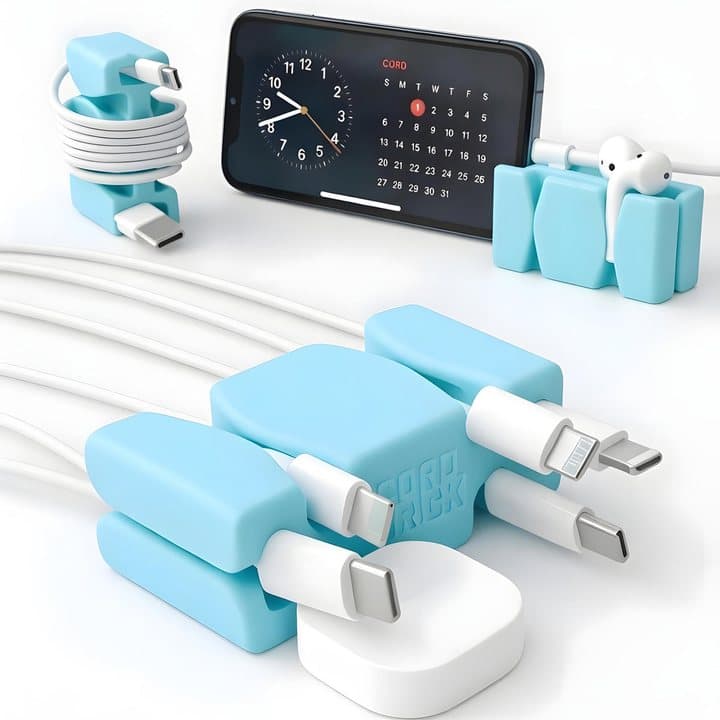
- Place it near the front edge of your nightstand or desk, where you want the cable end to sit within easy reach.
- Push the cable into a channel a little way behind the connector, so the plug end rests on the table without a sharp bend.
- Add other thin cables to the remaining channels, up to six, keeping heavier plugs on opposite sides for balance.
- To use it as a phone stand, flex open one end and set your phone into the jaw, upright or landscape.
- To wrap a cable for travel, snap the end into a channel, wrap the cable around the brick, and tuck the last part in.
- Wipe it clean with a damp cloth when it gets dusty, since dust on the base reduces its grip.
- Move it to wherever you need it; there is nothing to unstick.
Setting up a family charging station
Give each family member a different coloured CordBrick at a shared charging spot, with their own cable in it, ideally labelled. Everyone knows which cable is theirs, and none end up on the floor.
Put the station near a power strip with enough sockets, away from sinks and cookers if it is in the kitchen, and make it the place phones live overnight. Many families find that a shared charging spot outside bedrooms also helps everyone sleep better.
In the car
Place it in a cup holder or flat console tray with your charging cable clipped in. Make sure it cannot slide or become a loose object under heavy braking.
At the office
On a shared or hot desk, a CordBrick keeps your own cable together and easy to pack away at the end of the day. A distinctive colour helps stop colleagues borrowing it by accident.
For people with limited mobility
For people who find bending, reaching behind furniture or fine finger movements difficult, keeping the charging cable end at the front of the table makes plugging in much easier. Choose a spot within easy reach of the bed or chair.
At a hotel
Clip your phone cable into it on the bedside table, so the end does not slide behind the bed in an unfamiliar room. It also helps you remember to pack the cable when you leave.
Its bright colour is easy to spot when you check the room before checking out, which is when chargers are most often left behind.
Cleaning
Silicone picks up dust and lint. Wash it with warm soapy water, rinse and let it dry fully before use.
A tidy nightstand in five minutes
- Unplug everything and wipe the surface.
- Plug your charger into the nearest socket or a small power strip behind the furniture.
- Run the cable up the back or side of the nightstand, not across the top.
- Clip the cable end into a CordBrick at the front edge, so the plug sits ready.
- Add a second cable for a watch or earbuds if needed, and stop there; fewer items stay tidier.
A tidy desk
On a desk, use CordBrick for the cables you plug and unplug often, such as phone and earbud cables. Route permanent cables, like monitor and laptop power, behind or under the desk with clips, sleeves or a cable tray. Separating "always connected" from "grab and go" cables is the key to a desk that stays tidy.
Using the glow version
The GlowBrick charges from room light and glows in the dark, making cables easier to find at night. Place it where it gets some light during the day.
The glow fades over the night as stored light is used up, so it is brightest in the evening. It is a gentle glow, not a night light, and will not disturb sleep for most people.
Replacing it
There is little to wear out. Replace it if the silicone tears, the channels stretch so they no longer grip, or it picks up stains you cannot clean. The steel core inside means it should not be cut or punctured.
Moving it around
Because there is nothing stuck down, you can carry a CordBrick from the nightstand to the desk to a travel bag. Keep the cable clipped in as you move it, so the two stay together.
CordBrickScore 7.0/10
Before you buy: Check the final price, shipping and return terms at checkout.
$19.99 at CordBrick · Price checked October 3, 2026
Check price at CordBrick (opens CordBrick in a new tab)We may earn a commission if you buy through our links.
What else do people ask about cable organisers?
Most questions are about keeping chargers in reach and protecting cables. To stop a phone charger falling behind the bed, anchor the cable end on the surface with a weighted holder, a clip on the nightstand edge or a wireless charging pad. Adhesive clips can pull off paint or veneer when removed. For travel, wrap cables loosely, because sharp bends near the connector cause most failures.
How do I stop my phone charger falling behind the bed?
Use a weighted holder like CordBrick, a clip on the nightstand edge, or a wireless charging pad. Keeping the cable end anchored on the surface is the simple fix.
Are adhesive cable clips bad for furniture?
They can be. Removing them can pull off paint, varnish or veneer, and some leave residue. Test on a hidden area or use non-adhesive options on good furniture.
What is the best way to pack cables for travel?
Wrap them loosely, not tightly around the plug, and keep them in a small pouch or secured with a strap or holder. Sharp bends near the connector are the most common cause of cable failure.
Does wrapping cables tightly damage them?
Tight bends, especially near the plug, can break the wires inside over time. Wrap in loose loops and avoid kinking.
What is the best cable organiser for a desk?
For a few cables, a weighted holder or clips. For many cables, a cable tray under the desk, sleeves to bundle them, and a power strip mounted out of sight.
Is silicone safe?
Silicone used in household products is generally considered stable and safe for skin contact. Keep it away from very high heat and sharp objects, which can damage it.
What is the difference between CordBrick and DeskBrick?
DeskBrick is the larger model from the same company, at $25 on its store, weighing over half a pound with four flexible corner pockets for phones, cables and small desk items. CordBrick is smaller and lighter, suited to nightstands and travel. If you mainly need a desk organiser, DeskBrick is the better fit.
Do I need a separate one for each cable?
No; one CordBrick holds several thin cables. Many people still prefer one per charging spot around the home, which is what the multi-packs are for.
Can I use CordBrick on a bed?
Yes; one owner uses it in bed to keep an iPad cable handy. On a soft surface it will not grip as firmly, but its weight still stops the cable sliding off. Do not leave cables or chargers under pillows or covers, where they can overheat.
Will CordBrick hold a USB-C laptop cable?
Thin USB-C cables fit. Thicker laptop charging cables, especially braided ones with large plugs, may be a tight fit or heavy enough to pull it. The hands-on reviewer suggested a larger version for such cables; the brand's DeskBrick is closer to that.
Is CordBrick good for kids' devices?
Yes, it helps keep tablet and phone cables in one place in shared spaces. Supervise young children, since it is small and heavy, and remember it will not stand a tablet.
Does it work for Apple Watch chargers?
The brand and its images show watch chargers held in place. The puck-style charger itself can rest on the table while its cable is held in a channel.
How many CordBricks do I need?
One per charging spot: nightstands, desk, kitchen counter, maybe the car and a travel bag. That is why the five- and eight-packs are popular, and where the price per brick becomes reasonable.
Can I put CordBrick in the dishwasher?
The brand says its MugBrick is dishwasher safe; it does not say the same for CordBrick on the page we read. Washing by hand with warm soapy water is the safe choice.
Is the weight safe to travel with?
Yes. At about 3 oz, it adds a little weight to a bag but has no battery or restricted materials, so it is fine in hand luggage and checked bags.
Frequently asked questions
What does CordBrick do?
It is a small weighted silicone block that holds the ends of charging cables so they do not slide off your nightstand or desk. It also wraps a cable for travel, holds your phone upright or at an angle, and grips AirPods, according to the brand.
How heavy is CordBrick?
Third-party specifications list it at about 3 oz, and the brand describes about 100 g in total including the steel insert. Its glowing version is listed at 3.6 oz. Its graphics label the steel weight as a quarter-pound, which is more than the totals suggest.
How much does CordBrick cost?
On 3 October 2026 the offer page showed $19.99 for one plus shipping, $39.99 for three plus shipping, $59.99 for five and $79.99 for eight, with free shipping on the larger packs. CordBrick's own store listed singles at $20 and glow versions at $25.
Does CordBrick work with all cables?
It is designed for phone, watch and earbud charging cables. A hands-on reviewer at Serious Insights found it worked well for those and suggested a larger version for thicker cables like USB-C laptop leads, HDMI and keyboard cables.
Can CordBrick hold a tablet?
No. The brand's own images say its jaws fit almost any phone case but will not stand a tablet. It holds most phones upright, in or out of a case, which suits video calls. For a tablet, use a dedicated stand.
Does CordBrick leave marks on furniture?
It uses no adhesive, so there is no sticky residue. The silicone grips by friction. On some delicate or freshly finished surfaces, silicone can occasionally leave a faint mark if left for a long time; wipe the surface if so.
Is CordBrick worth it?
If a cable sliding behind your nightstand annoys you every night, $20 for a durable, adhesive-free fix that also stands your phone is reasonable. If you just need to stop one cable falling, a cheap clip or a binder clip does the basic job.
Is there a glow-in-the-dark CordBrick?
Yes. The brand sells a GlowBrick in several glowing colours, which makes the cable easier to find in a dark bedroom. The glow version is slightly heavier, at about 3.6 oz, and works the same way as the standard brick.
We may earn a commission if you buy through our links.
Prices accurate as of October 3, 2026. Check the seller's checkout for current pricing, promotions and terms.
What we checked: No hands-on use. Features, bundles (shown after scrolling), colours, guarantee and testimonials from the CordBrick offer page our link opens (getcordbrick.com) on 2026-10-03. Store prices, product descriptions, weight figures, the US patent and award mentions, and product images from CordBrick's own store data the same day. A hands-on review by Serious Insights and third-party specifications summarised in search results were read the same day.
See how CordBrick compares in Holiday Gift Guide 2026: 8 Gifts We Would Actually Give

About the author
Ethan Walker, Hardware & Gadget Tester
Ethan Walker covers hardware for Top10Gadgets: audio, computing, phone accessories, chargers, tools, car gadgets and sports equipment. Ethan believes a product should be judged on what happens when people actually use it…
- Headphones and speakers
- Chargers and phone accessories
- Tools and emergency gear
- Car accessories
- Durability and real-world performance
Writing for Top10Gadgets since 2026Full profile