Audio / TV headphones
HearDirect Wireless TV Headset Review: How the Under-Chin Headset Works, Who It Helps and What It Costs
An under-chin wireless TV headset so one person can listen at their own volume. Sensible for couples, but the page gives almost no specs and established TV listening systems cost about the same.

By Ethan Walker, Hardware & Gadget Tester at Top10Gadgets
Updated 29 min readHow we test
Quick answer
Yes, if you want a simple under-chin headset so one person can hear the TV at their own volume without blasting everyone else. The HearDirect Wireless TV Headset plugs into your TV's optical or line-out socket, takes minutes to set up, and comes with a 100-day return window and free US shipping at $79.99.
Score 5.2/10$79.99 at HearDirect
Check price at HearDirect (opens HearDirect in a new tab)We may earn a commission if you buy through our links.
- Best for
- Couples and families who disagree about TV volume
- Not for
- People with significant hearing loss who need a prescribed hearing aid, a telecoil loop or an audiologist's advice
$79.99 at HearDirect
Check price at HearDirect (opens HearDirect in a new tab)We may earn a commission if you buy through our links.
On this page · 14 sections
- 01Our verdict
- 02The short version
- 03Pros & cons
- 04How it works
- 05Who it's for
- 06How much does HearDirect cost, and what's in the box?
- 07How well does HearDirect work for TV sound?
- 08Are HearDirect's claims true?
- 09Is HearDirect better than TV Ears, Sennheiser or Bluetooth headphones?
- 10Is HearDirect legit, and what should you check before buying?
- 11What do owners say, and how did we score HearDirect?
- 12How to use HearDirect for the best results
- 13What else do people ask about TV headsets for hearing loss?
- 14Frequently asked questions
Our verdict
Yes, if you want a simple under-chin headset so one person can hear the TV at their own volume without blasting everyone else. The HearDirect Wireless TV Headset plugs into your TV's optical or line-out socket, takes minutes to set up, and comes with a 100-day return window and free US shipping at $79.99. But the page publishes almost no specs, its survey figures are unsourced, and proven TV listening systems cost about the same. HearDirect scores 5.2 out of 10, held back by thin specs and unverifiable claims.
The short version
- An under-chin, stethoscope-style wireless headset with a charging cradle and a small TV transmitter.
- Connects to optical, line-out or coax audio; optical and line-out cables are included.
- The wearer sets their own volume; the TV can stay at a normal level or be muted.
- $79.99 on 4 October 2026, $134.99 for two and $179.98 for three, with free shipping.
- Battery: more than eight hours per charge, according to the page.
- 100-day return window in the FAQ; ships from Indianapolis, Indiana.
- Best trait: an easy, low-tech way to end arguments over TV volume.
- Biggest drawback: no published range, wireless type or audio specs.
- Our score: 5.2 out of 10.
Pros & cons
HearDirect is a familiar and useful type of product: the TV listening headset. The cons are about what the page does not tell you, not about the idea.
What we like
- Lets one person set their own TV volume while the rest of the room listens at a normal level, or with the TV muted
- Under-chin, stethoscope-style design is light and easy to put on, with a charging cradle that doubles as a stand
- Connects by optical, line-out or coax audio, and both optical and line-out cables are included
- A second headset can pair with the same transmitter, so two people can each set their own volume
- 100-day return window in the page's FAQ, free US shipping, ships from Indianapolis
What we don't
- No published specs: no wireless type, range, frequency response, maximum volume or battery capacity beyond "8+ hours"
- "96% say dialogue is clearer" and similar figures come with no survey details
- "Background noise cancelling" and "surround sound" are vague claims for a simple in-ear stetho-style headset
- Not a hearing aid and not a medical device; people with hearing loss should still have a hearing test
- $79.99 is close to the price of established TV listening systems with published specs and long track records
- One testimonial names a different product, "HearSound", which suggests recycled reviews
Sold by HearDirect
HearDirect Wireless TV Headset$79.99
How it works
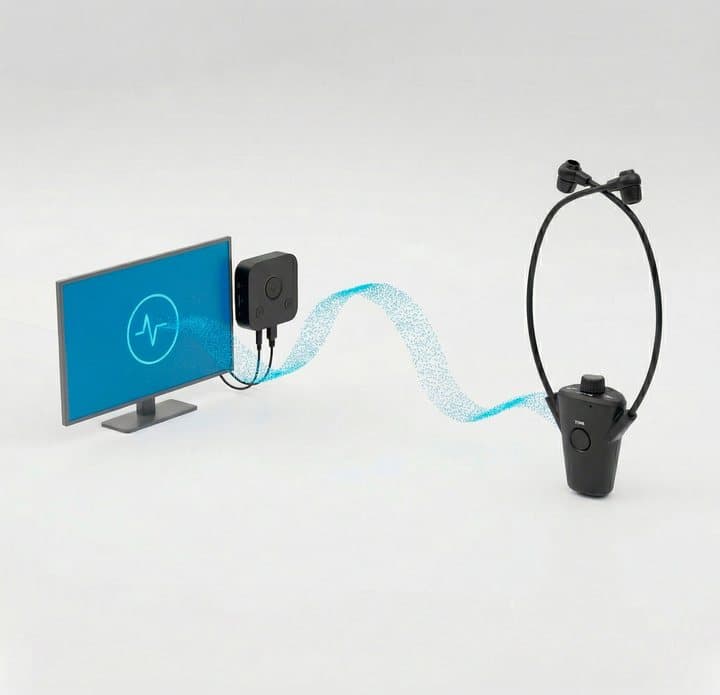
A TV listening system has two parts. A transmitter connects to the TV's audio output and sends the sound wirelessly. A headset receives it and plays it into your ears at whatever volume you choose. Because the transmitter takes the sound from a separate output, the TV's own speakers can keep playing at a normal level for everyone else.
Connect the transmitter to the TV
Step 1: Plug the small transmitter into your TV's optical audio output with the included cable, or use the line-out cable if your TV has a headphone or analogue output. The brand says optical gives the best results.
Put the headset on
Step 2: Lift the headset off its charging cradle, place the ear tips in your ears and let the receiver hang under your chin. It picks up the TV sound wirelessly from the transmitter.
Set your own volume
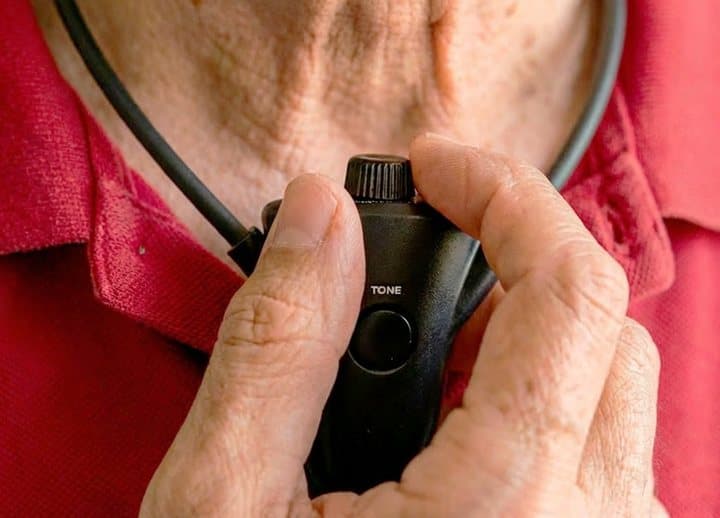
Step 3: Turn the volume on the headset's receiver up or down. It works independently of the TV, so others can keep the TV at a normal level, or mute it altogether.
How the transmitter sends sound to the headset
Adjusting the volume on the receiver
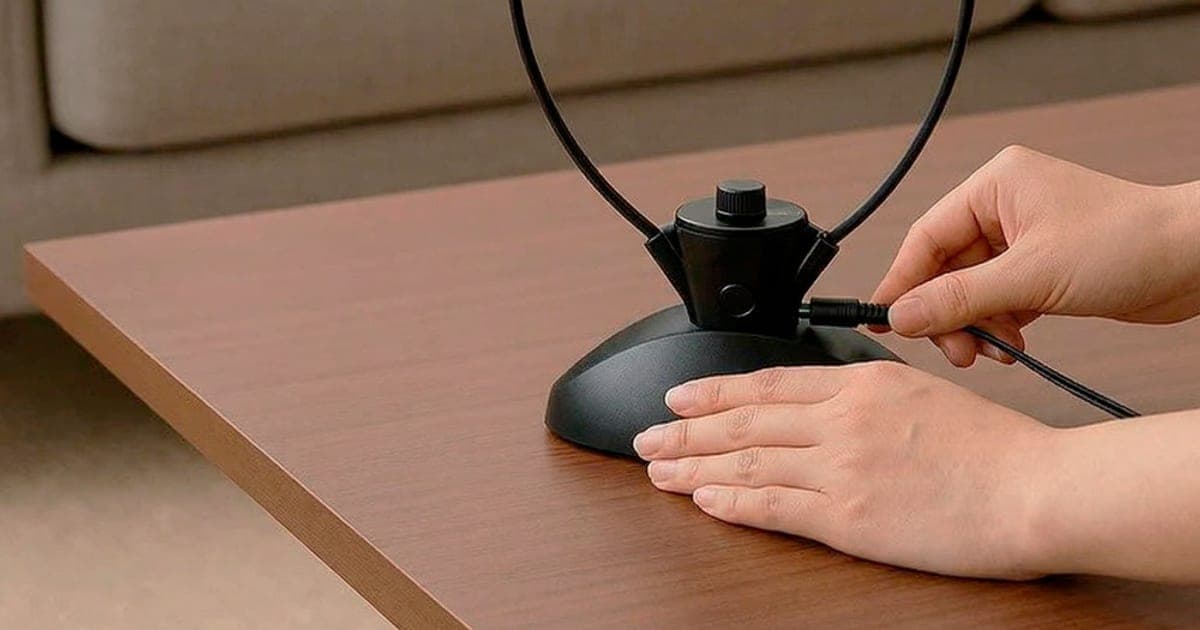
The HearDirect headset is the under-chin type. Two flexible arms hold soft ear tips, and the receiver, with its volume control, hangs under your chin like a stethoscope. Between uses it sits on a round cradle that charges it.
Why under-chin designs suit TV listening
Under-chin headsets are light, quick to put on and take off, and do not press on the top of your head or squeeze your ears like over-ear headphones. They are a common choice for older viewers and people who wear glasses. The trade-off is that the ear tips sit in the ear canal, which some people find less comfortable over long periods, and that they block less outside noise than closed headphones.
What the transmitter does
The page describes a "sleek hideaway transmitter" that can sit behind the TV, out of sight. It plugs into the TV's optical output (also called SPDIF or Digital Audio Out), a line-out or headphone socket, or a coax digital output. The brand recommends optical for the best experience.
What the page does not say
The page does not name the wireless technology (for example 2.4 GHz digital radio or infrared), the range, the maximum volume, the frequency response or whether there are tone or balance controls. These details matter: infrared needs line of sight, radio can pass through walls, and tone controls help people whose hearing loss affects high frequencies most. The FAQ says it does not need line of sight, which points to radio rather than infrared.
Why TV dialogue is hard to hear
Many people blame their ears when the real culprit is partly the TV. Modern flat TVs have small, downward- or rear-firing speakers, and film and drama soundtracks often mix quiet dialogue under loud music and effects. Add a room with hard surfaces, a distance of three or four metres and a little age-related hearing loss, and speech becomes hard to follow even at high volume.
A headset fixes the distance and room problems by putting the sound right at your ears. It does not change the mix, which is why some people also benefit from a dialogue mode on the TV.
How age-related hearing loss changes TV listening
Age-related hearing loss usually affects high-pitched sounds first. Those carry consonants such as s, f, t and th, which make speech intelligible. People with this pattern often say they can hear that someone is talking but cannot make out the words. Turning the TV up makes the low sounds louder too, which is why it can feel too loud for others before it is clear enough for the listener. Headsets with tone controls can lift the high frequencies; the HearDirect page does not say whether it has one.
Who it's for
HearDirect suits households where one person needs the TV louder than everyone else wants it. That is often a couple where one partner has some age-related hearing loss, but it can also be a parent watching late at night while children sleep, or someone who simply prefers to hear dialogue more clearly.
It is less suited to people with significant hearing loss, who may need a prescribed hearing aid, a TV streamer for their aid, or a loop system, ideally with an audiologist's advice.
Why HearDirect appeals
TV volume is a classic household argument. Turning on captions helps some people, but many find them distracting. A headset that lets one person hear clearly without disturbing anyone else is a simple fix, and the page sells it well: friendly photos of couples on the sofa, a short setup, free shipping and a long return window.
There is also a practical point the page makes fairly. Bluetooth headphones can be fiddly to pair with a TV, some lag behind the picture, and many TVs switch off their speakers when Bluetooth headphones connect. A dedicated TV transmitter avoids those problems.
A typical evening with it
You switch on the TV at your usual volume. Your partner lifts the headset off its cradle, pops the ear tips in and turns the receiver's volume up until dialogue is clear. You hear the TV at a comfortable level; they hear it louder and closer. When the film ends, the headset goes back on the cradle to charge. If one of you wants to watch late at night, you can mute the TV and still hear it through the headset, according to the FAQ.
Who gets the most value
Couples with a clear volume gap, and people who watch a lot of TV alone in a shared home, get the most value. Two-person households where both want headsets can use the two-pack.
Who gets the least
People with no volume disagreement, people who dislike in-ear tips, and people who need medical-grade amplification will get the least.
What it will not do
It will not test or treat hearing loss, work with TVs that have no suitable audio output, help with phone calls or conversations in the room, or replace a hearing aid. It also will not make poorly mixed dialogue clearer if the problem is in the programme's sound mix rather than the volume.
As a gift
TV headsets are a popular gift for older parents. HearDirect's simple setup suits that. If you are buying for someone else, check their TV has an optical or headphone output, and plan to set it up with them on the first evening.
- Couples and families who disagree about TV volume
- People with mild hearing difficulty who struggle to follow TV dialogue at normal volume
- Anyone who wants to watch late at night without waking the household
Who should skip it
- People with significant hearing loss who need a prescribed hearing aid, a telecoil loop or an audiologist's advice
- Anyone who wants detailed specs, published range figures or a proven brand before buying
- Hearing aid wearers who cannot comfortably fit ear tips over or in place of their aids
- TVs with no optical, analogue or coax audio output, such as some small or very old sets
How much does HearDirect cost, and what's in the box?
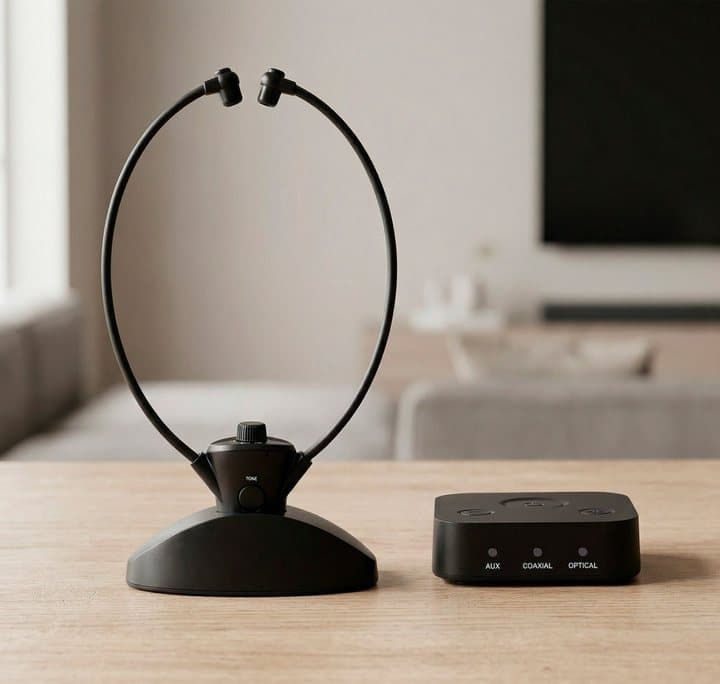
HearDirect costs $79.99 for one headset on the offer page, checked on 4 October 2026, or $134.99 for two and $179.98 for three, all with free US shipping. You get the under-chin headset, a charging cradle, the hideaway transmitter and both optical and line-out cables. The FAQ offers a 100-day return window. What you do not get is published range, wireless type or audio specs.
According to the FAQ, the box contains the wireless headset, the transmitter, the cables you need and a quick start manual. The FAQ says both optical and line-out cables are included. The photos also show the round charging cradle.
Specifications
| Item | Detail |
|---|---|
| Type | Under-chin wireless TV headset with transmitter |
| TV connections | Optical, line-out or coax audio, according to the FAQ |
| Cables included | Optical and line-out, according to the FAQ |
| Battery | More than eight hours per charge, according to the page |
| Charging | Charging cradle |
| Multiple users | A second headset can pair with the same transmitter |
| Wireless type | Not stated; the FAQ says no line of sight is needed |
| Range | Not stated |
| Tone or balance controls | Not stated |
| Ships from | Indianapolis, Indiana |
| Returns | 100 days, according to the FAQ |
HearDirect price and bundles
On 4 October 2026 the HearDirect offer page (opens HearDirect in a new tab) listed:
| Bundle | Price | Per headset | Retail shown |
|---|---|---|---|
| 1 headset | $79.99 | $79.99 | $89.99 |
| 2 headsets (buy 1, get 1 50% off) | $134.99 | $67.50 | $179.98 |
| 3 headsets (buy 2, get 1 free) | $179.98 | $59.99 | $269.97 |
All three showed free shipping. The two-pack is labelled most popular and the three-pack best deal. If you need one headset, buy one.
Do you need two headsets?
Only if two people want to listen through headsets at once. If one person uses the headset and the other listens through the TV speakers, a single headset is enough. Each extra headset pairs with the original transmitter, according to the FAQ.
International orders
The page says it ships worldwide, with charges in US dollars and possible customs, duties or VAT on delivery. The transmitter connects to standard TV audio outputs, so it should work with TVs in most countries, but check the charging cradle's power supply and plug for your region.
Is it good value?
At $79.99, HearDirect sits between cheap unbranded RF headsets and well-known systems. TV Ears, a long-established brand, lists its Dual Digital system at $199.95 on its own site, with published range and volume figures. Sennheiser's RS 5200, reviewed by TechRadar, is a premium under-chin system. HearDirect is cheaper than those, but buyers get far less published information for their money.
Who makes it
The page says HearDirect is a US company and lists a "Hear Direct Club" email address for support. Orders ship from Indianapolis, Indiana, according to the FAQ. The page does not name a manufacturer or say where the headset is made. The receiver in the photos is marked "TONE", which may be the maker's brand.

HearDirect Wireless TV HeadsetScore 5.2/10
Best for: Couples and families who disagree about TV volume
$79.99 at HearDirect · Price checked October 4, 2026
Check price at HearDirect (opens HearDirect in a new tab)We may earn a commission if you buy through our links.
How well does HearDirect work for TV sound?
HearDirect should do its core job well: giving one person louder, closer TV sound while everyone else listens at a normal level or with the TV muted. That suits late-night viewing and people who dislike fiddly gadgets. The open questions are its unpublished range, the comfort of in-ear tips over long sessions and the lack of tone controls, which matter most when hearing loss affects high pitches.
Nobody on our team has used HearDirect, so this section is based on how these systems work, what the page and FAQ say, and how similar under-chin headsets are generally described in independent reviews.
Where it should work well
- Personal volume. This is the core job, and any working TV headset does it. The wearer gets louder, closer sound; everyone else gets normal volume.
- Late-night watching. With the TV muted, the headset becomes private listening.
- Clarity at lower volume. Sound delivered straight into the ear competes with less room echo and background noise, so many people follow speech better than from TV speakers across a room.
- Simple use. One volume control and a cradle to charge on suit people who dislike gadgets.
Where it may struggle
- Comfort over long sessions. In-ear tips can feel tiring after a few hours for some people.
- Range. With no published range, you cannot tell whether it will work from the kitchen or another room.
- Hearing loss that affects some pitches. Without tone controls, turning up the volume makes everything louder, including bass and music, rather than lifting speech.
- Older TVs. Some sets have only RCA or headphone outputs; others have optical only.
- Lip sync. The page says there is no audio lag. Dedicated TV transmitters usually manage this well, but nothing on the page shows test results.
Battery life in practice
More than eight hours per charge covers a long evening of viewing. Because the headset lives on its charging cradle between uses, most people will never run it flat. Batteries in small headsets wear out over years, and the page does not say whether the battery can be replaced.
Comfort and fit
Under-chin headsets rely on ear tips that sit in the entrance of the ear canal and on light spring pressure from the arms. The page says the ear pads are soft and breathable and the design is lightweight. Comfort varies from person to person: people with small or narrow ear canals sometimes find standard tips too large, and people with sensitive ears may prefer foam tips. The page does not say whether different tip sizes are included.
Sound quality expectations
A TV listening headset is built for clear speech rather than hi-fi music. Expect sound that is closer and clearer than TV speakers across the room, but do not expect the bass or detail of good music headphones. That is normal for this category and not a reason to avoid it.
What owners say about using it
The page shows four short five-star testimonials. Owners describe clearer dialogue, a quieter house and no more rewinding. One says the headset "saved my marriage" but calls it "HearSound headphones", a different product name, which makes the testimonials harder to trust. We found no independent owner reviews.
Are HearDirect's claims true?
HearDirect's core claims are plausible. Almost every TV with an optical, line-out or coax output should work, and dedicated TV transmitters usually keep sound in sync. The marketing goes further than the evidence, though. "Surround sound" and "noise cancellation" are overstated for a two-earpiece under-chin headset, the 96% and 99% survey figures have no source, and we found no coverage behind the "As seen on" TV logos.
"Works with 99% of TVs"
Plausible. Almost all modern TVs have an optical output, and many older ones have a headphone or RCA output. Some very small TVs and monitors have neither.
"Never loses connection" and "no audio lag"
Dedicated TV transmitters usually connect reliably and keep sound in sync. "Never" is a strong word, and walls, distance and interference can still cause dropouts with any wireless system.
"Background noise cancellation"
Vague. In-ear tips block some room noise passively. The page does not describe active noise cancellation, and an under-chin stetho headset is not usually built for it.
"Crystal-clear surround sound"
Overstated. A two-earpiece headset plays stereo at most. "Surround sound" usually means multi-channel audio or virtual surround processing, and the page gives no detail of either.
"Amplifies quiet sounds... automatic sound adjustment"
Possible if the headset compresses loud and quiet sounds, which some TV listening systems do. The page gives no technical detail.
"96% say dialogue is clearer... 99% say their household is happier"
Unsourced. The page gives no survey size, method or date. Treat these as marketing.
"Featherlight materials" and "all-day comfort"
Under-chin headsets are typically very light, so the claim is plausible. The page gives no weight. All-day comfort depends heavily on the ear tips and the wearer.
"8+ hours per charge"
Reasonable for a small headset, and enough for a long evening. The page does not say how long a full charge takes.
"Hearing experts available by email, chat or text"
We could not verify who the support staff are or what qualifications they have. Support for setup questions is useful; it is not the same as an audiologist.
"As seen on Fox, CBS, ABC"
The page shows the logos without links or details, and we found no coverage.
Claims scorecard
| Claim | Our view |
|---|---|
| Works with 99% of TVs | Plausible |
| Personal volume, TV muted | True of TV headsets |
| Never loses connection | Overstated |
| No audio lag | Plausible, untested |
| Noise cancellation | Vague |
| Surround sound | Overstated |
| 96% to 99% survey figures | Unsourced |
| As seen on TV logos | Unverified |
Is HearDirect better than TV Ears, Sennheiser or Bluetooth headphones?
HearDirect is cheaper than established systems such as TV Ears' Dual Digital, listed at $199.95, and Sennheiser's RS 5200, but those publish range, volume and frequency details, and some offer speech or tone controls. Choose HearDirect if the problem is simply volume preference and you value a 100-day return window. Choose an established system for noticeable hearing loss. Try Bluetooth headphones or captions first if you already have them.
| Option | Typical cost | Best for | Drawbacks |
|---|---|---|---|
| HearDirect headset | $79.99 | Simple personal TV volume | Few specs, unknown brand |
| Established under-chin systems (TV Ears, Sennheiser) | More | Proven range, tone controls | Higher price |
| Bluetooth headphones paired to the TV | Varies | People who already own them | Pairing, lag, speakers may switch off |
| TV streamer for hearing aids | Varies | Hearing aid wearers | Needs compatible aids |
| Hearing loop | Higher | Telecoil users | Installation |
| Soundbar with dialogue mode | Varies | Clearer speech for everyone | Same volume for all |
| Captions | Free | Following dialogue | Distracting for some |
HearDirect vs TV Ears and Sennheiser
TV Ears and Sennheiser have sold TV listening systems for many years and publish range, volume and frequency details. Some models offer speech-focused modes and tone controls, which help people whose hearing loss mainly affects high frequencies. They cost more.
HearDirect is cheaper, with a long return window, but you are buying with far less information. If budget allows and the listener has noticeable hearing loss, a system with speech or tone controls is worth the extra cost. If the main problem is simply volume preference, HearDirect's simpler approach may be enough. TechRadar's Sennheiser RS 5200 review is a useful guide to what a premium under-chin system offers.
HearDirect vs Bluetooth headphones
If you already own Bluetooth headphones and your TV supports Bluetooth audio, try them first; it costs nothing. If the speakers cut out when headphones connect, or the sound lags, a dedicated system like HearDirect is easier. Our Air Tube headphones review covers a different style of headphone for everyday listening.
HearDirect vs a hearing aid
If you struggle to follow conversations as well as TV, a headset only helps with one of those. Since 2022, the FDA has allowed over-the-counter hearing aids for adults with perceived mild to moderate hearing loss, and many hearing aids can stream TV sound directly. Our Audien Atom One review looks at one low-cost option.
HearDirect vs a soundbar
A soundbar with a dialogue or speech mode makes speech clearer for the whole room. It does not let one person have a different volume, but it can end the argument if the real problem is muddy TV speakers.
Other audio and TV gadgets we have reviewed
Our Anything speaker review looks at a vibration speaker, and our GoDonut review covers a phone accessory. You can browse the rest in our audio category.
Captions as a free first step
Subtitles cost nothing and help many people follow dialogue, especially in programmes with accents or fast speech. If the person struggling is happy to read captions, try them for a week before buying any equipment. If captions are distracting or tiring, a headset is the natural next step.
HearDirect Wireless TV HeadsetScore 5.2/10
Why people buy it: Lets one person set their own TV volume while the rest of the room listens at a normal level, or with the TV muted
$79.99 at HearDirect · Price checked October 4, 2026
Check price at HearDirect (opens HearDirect in a new tab)We may earn a commission if you buy through our links.
Is HearDirect legit, and what should you check before buying?
The page says HearDirect is a US company shipping from Indianapolis, and its FAQ offers a 100-day return window, but it has no Trustpilot profile or independent reviews, names no manufacturer and states no written warranty. Before buying, check your TV has an optical, line-out or coax output, confirm the return terms because a badge on the page mentions 30 days, and remember that it is not a hearing aid.
Check your TV's outputs
The headset needs an optical, line-out or coax audio output.
What to do: look at the back or side of your TV for an optical socket (a small square port often labelled Optical, SPDIF or Digital Audio Out) or a headphone socket. Take a photo if you are unsure and ask support.
Optical output settings
Some TVs send optical audio in a surround format by default, which simple headsets may not play.
What to do: if you get no sound over optical, set the TV's digital audio output to PCM or stereo in its sound menu.
Headphone sockets can mute the speakers
On some TVs, plugging anything into the headphone socket mutes the speakers.
What to do: use optical if your TV has it. If you must use the headphone socket, check the TV's settings for an option to keep speakers on.
Hearing health
A TV headset is not a hearing aid and cannot tell you whether your hearing has changed. The NIDCD's guide to assistive devices explains how TV listening systems fit alongside hearing aids and other tools.
What to do: if you or a family member often struggle to follow speech, book a hearing test.
Volume safety
Sound delivered straight into the ear can be loud.
What to do: set the lowest volume that lets you follow speech comfortably, and take breaks during long sessions.
Shared homes and pets
The headset lives on a cradle in the living room, where children and pets can reach it.
What to do: keep the cradle somewhere stable and out of reach of chewing pets, and route the transmitter cable so it cannot be pulled.
Hygiene
In-ear tips collect earwax.
What to do: wipe the tips regularly and do not share them without cleaning. Ask support about replacement tips.
Returns
The FAQ promises a 100-day return window and full refund if it does not work with your TV. A small badge image on the page refers to a 30-day guarantee, so confirm the terms.
What to do: keep the box, cables and order confirmation, and contact support before returning anything.
Warranty
The page promises a quality promise and lifetime support but does not state a written warranty period for defects after the return window.
What to do: ask support how long the headset is covered against faults, and whether replacement batteries, cradles and ear tips are available.
Buying for an older relative
Older relatives may not want to fiddle with TV settings, and the optical output setting is the step most likely to cause trouble.
What to do: set it up for them, label the volume control, and leave a short note on how to charge it on the cradle.
How to buy HearDirect the smart way
- Check your TV has an optical, line-out or coax output, then order from the HearDirect order page (opens HearDirect in a new tab).
- Decide how many people need a headset; one is enough if the others use the TV speakers.
- Check which bundle is selected before paying; the two-pack is marked most popular.
- Note the 100-day return window and keep all packaging.
- Set it up with the person who will use it, so they know how to adjust the volume and charge it.
- If it does not suit them, contact support well inside the return window.
What do owners say, and how did we score HearDirect?
HearDirect scores 5.2 out of 10 on our five criteria: claim accuracy 0.8, build durability 1.1, price competitiveness 1.2, usability 1.4 and owner satisfaction 0.7, each out of 2. The only owner reviews are four five-star testimonials on the offer page, and one names a different product. On 4 October 2026 we found no Trustpilot profile or independent test, and nobody on our team has used it.
Reviews on the page
The offer page shows four testimonials, all five stars. Owners describe catching every word, a peaceful house and less rewinding. One testimonial names "HearSound headphones", a different product, which suggests the reviews may have been reused across products.
Independent reviews
We found no Trustpilot profile, retail listing with reviews or independent test of HearDirect on 4 October 2026. That is common for new offer-page brands but leaves buyers with little to go on.
What we would test with HearDirect in hand
If we test it ourselves, we will check the range through walls, measure lip-sync delay, compare speech clarity with TV speakers and an established system, test battery life against the eight-hour claim, and try it with several TV models over optical and line-out. We will update this review with the results.
How we scored HearDirect
Every score on the site follows the five criteria on our how we test page.
| Criterion | Score | Why |
|---|---|---|
| Claim accuracy | 0.8 / 2 | Core function plausible; survey figures, "surround" and "noise cancelling" overreach |
| Build durability | 1.1 / 2 | Simple design with cradle; no specs or warranty details |
| Price competitiveness | 1.2 / 2 | Cheaper than established systems; less information for the money |
| Usability | 1.4 / 2 | Easy setup, cables included, independent volume |
| Owner satisfaction | 0.7 / 2 | Seller-picked testimonials only, one naming another product |
| Total | 5.2 / 10 |
The score would rise with published specs (wireless type, range, volume, tone controls), a clear warranty and independent owner reviews.
What we did, and did not, do
We read the offer page and its FAQ, the NIDCD's guide to assistive devices, the FDA's OTC hearing aid guidance, TechRadar's RS 5200 review and TV Ears' product information, all on 4 October 2026. Nobody on our team has used HearDirect, and no figures here come from our own testing.
How to use HearDirect for the best results
Connect the transmitter to your TV's optical output with the included cable, and if there is no sound, set the TV's digital audio output to PCM or stereo. Charge the headset fully on its cradle before first use. Pick the ear tip that seals comfortably, start at a low volume and raise it until dialogue is clear, then put the headset back on the cradle after each session.
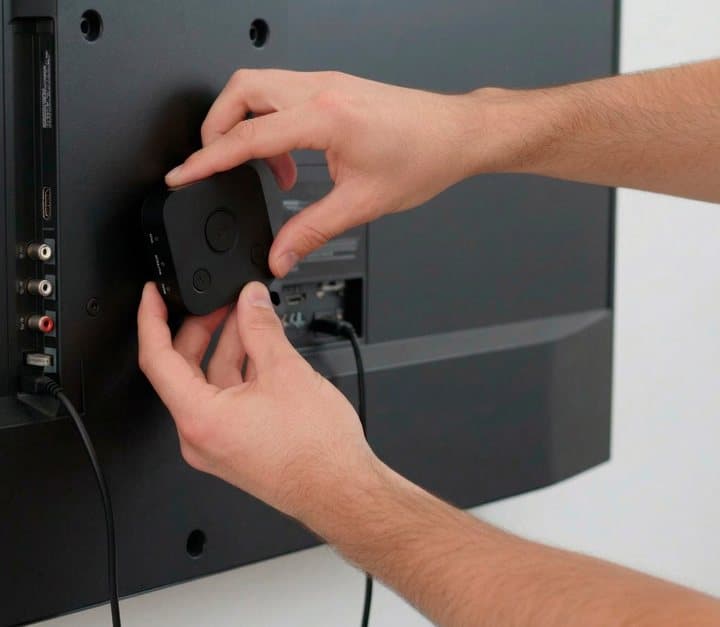
Fitting the transmitter behind the TV
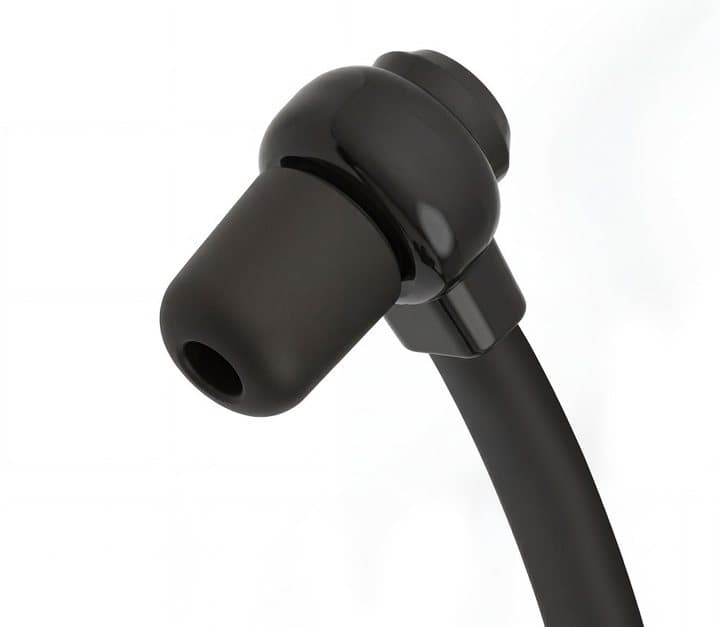
One of the soft ear tips
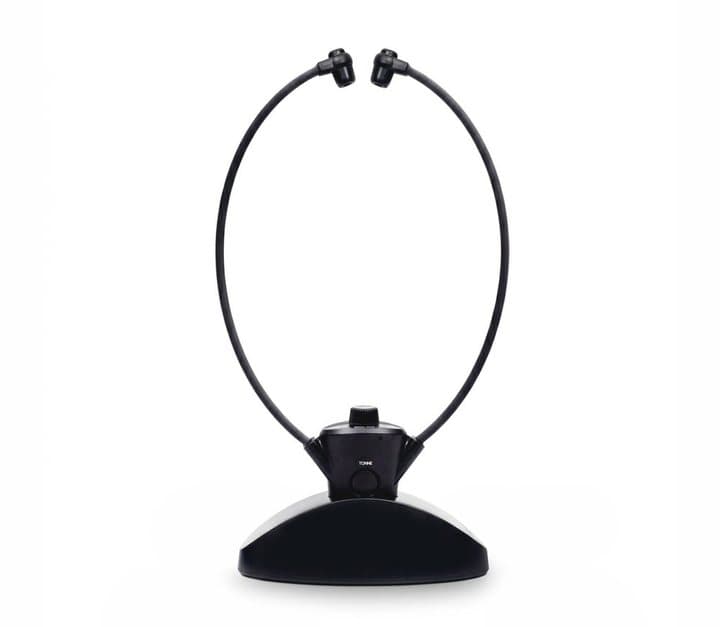
The headset and cradle
- Find your TV's optical output and connect the transmitter with the optical cable.
- If there is no sound, set the TV's digital audio output to PCM or stereo.
- Place the transmitter behind or near the TV, with its power connected.
- Put the headset on its cradle and let it charge fully before first use.
- Choose the ear tip size that seals comfortably in your ears.
- Start with the volume low, then raise it until dialogue is clear.
- Return the headset to its cradle after each use.
Setting up on common TV brands
Most TVs hide the optical setting in a sound or audio output menu. Look for options such as Digital Audio Out, Optical Output Format or Audio Format, and choose PCM or Stereo rather than Auto, Bitstream or Dolby. Some TVs also have a separate option to keep the internal speakers on while optical output is active; make sure it is set so the room still hears the TV.
Using it with a cable or satellite box
If you watch mostly through a cable or satellite box connected by HDMI, the TV usually passes that audio to its optical output. If not, check whether the box has its own optical output and connect the transmitter there instead.
Getting the clearest dialogue
Turn off any TV sound effects like virtual surround or bass boost for the optical output, which can muddy speech. If your TV has a dialogue or clear voice mode, try it.
Using the line-out instead
If your TV has no optical output, use the line-out cable in the headphone or audio out socket. Set the TV's headphone volume high and control the level on the headset. Check the TV still plays through its speakers.
Pairing a second headset
Follow the quick start guide to pair a second headset with the transmitter. Each person then controls their own volume.
Finding the right volume
Start each session at a low level and raise it slowly until speech is clear, rather than starting loud. Ears adapt to loud sound, so a level that seems right after an hour may be louder than you need. If you find yourself turning it up week after week, that is a sign to get your hearing checked rather than simply turning the volume higher.
Where to put the cradle
Keep the cradle beside the chair of the person who uses the headset, near a power socket, and within easy reach. Habit is the main reason these headsets stay charged: if it lives on the cradle, it is always ready.
Looking after the ear tips
Wipe tips with a dry or slightly damp cloth after use. Replace worn tips. Keep the headset away from water.
Troubleshooting
| Problem | Likely cause | What to try |
|---|---|---|
| No sound over optical | TV sending surround format | Set digital audio out to PCM or stereo |
| TV speakers go silent | Headphone socket in use | Use optical, or change TV speaker settings |
| Crackling or dropouts | Distance or obstacles | Move closer or reposition the transmitter |
| Sound out of sync | TV audio delay setting | Adjust the TV's audio delay or lip-sync setting |
| Headset will not charge | Not seated on cradle | Reseat it and check the cradle's power |
| Sound too quiet | TV output level low | Raise TV line-out level, then use headset volume |
HearDirect Wireless TV HeadsetScore 5.2/10
Before you buy: Check the final price, shipping and return terms at checkout.
$79.99 at HearDirect · Price checked October 4, 2026
Check price at HearDirect (opens HearDirect in a new tab)We may earn a commission if you buy through our links.
What else do people ask about TV headsets for hearing loss?
Most questions come down to compatibility, safety and range. A TV headset needs an optical, line-out or coax output, works best at the lowest volume that keeps speech clear, and may not fit alongside behind-the-ear hearing aids. HearDirect publishes no range figure, so test listening from another room during the return window. If you struggle with conversations as well as TV, book a hearing test first.
What is the best way to hear the TV better without making it louder for everyone?
A TV listening headset like HearDirect, Bluetooth headphones with speakers kept on, a hearing aid with a TV streamer, or a hearing loop. Which suits you depends on how much difficulty you have and whether you already wear hearing aids.
How loud is too loud?
Hearing experts generally advise keeping personal listening at a level where you could still hear someone speaking to you from arm's length, and taking breaks. If sound seems muffled or your ears ring after watching, the volume was too high.
Are under-chin headsets better than over-ear headphones?
They are lighter and quicker to put on, and suit glasses wearers. Over-ear headphones block more noise and are often more comfortable for long listening.
Can I use HearDirect with hearing aids?
It depends on your aids. In-ear tips may not fit alongside behind-the-ear aids. Many hearing aid wearers do better with a TV streamer designed for their aids.
Can HearDirect connect to a soundbar or cable box?
If the soundbar or box has an optical or line-out output, the transmitter can likely take sound from there. Check that the sound still plays through the main speakers.
Does HearDirect use Bluetooth?
The page does not say what wireless technology it uses and contrasts it with Bluetooth headphones. The FAQ says it does not need line of sight.
Can I use HearDirect with a computer or tablet?
If the device has a headphone output, the line-out cable may work. The page focuses on TVs.
How far can I walk away from the TV?
The page does not state a range. If you want to listen from another room, choose a system with a published range.
Is HearDirect worth it?
For a household that needs a simple personal-volume fix and values a long return window, it is a reasonable try at $79.99. If you want proven range, tone controls and a long-established brand, spending more on a known system is the safer choice.
Can HearDirect be used with a projector or streaming stick?
The transmitter needs an audio output. A projector with an audio out socket will work; a streaming stick plugged into a TV sends its sound through the TV, so connect the transmitter to the TV as usual.
Will the TV remote still control the volume in the headset?
Usually not. With optical output, the TV remote typically changes the speaker volume only, and the headset volume is set on the headset. That is the point: each person controls their own level.
Will it work in another room?
Radio-based TV headsets often work through a wall or two, but the page gives no range figure. If you want to keep listening while you make a drink in the kitchen, test it during the return window.
Does it need Wi-Fi or an app?
The page does not mention an app or Wi-Fi. The transmitter connects directly to the TV and the headset pairs with the transmitter, so there is nothing to download.
Can I fall asleep wearing it?
It is not designed for sleeping. The arms and receiver can be uncomfortable lying down, and in-ear tips are not ideal for long overnight wear.
Frequently asked questions
What is the HearDirect Wireless TV Headset?
It is an under-chin wireless headset with a charging cradle and a small transmitter that connects to your TV's audio output. The person wearing it controls their own volume, while the TV can stay at a normal level or be muted.
How much does HearDirect cost?
On 4 October 2026 the offer page listed one headset at $79.99, two for $134.99 (buy one, get one 50% off) and three for $179.98 (buy two, get one free), all with free shipping. The page shows a retail price of $89.99 for one.
Will HearDirect work with my TV?
The FAQ says it works with any TV that has an optical audio, line-out or coax audio output, and that optical and line-out cables are included. Check the back of your TV for an optical (often labelled SPDIF or Digital Audio Out) or headphone socket before ordering.
Can two people use HearDirect at once?
Yes, according to the brand. A second headset can be paired with the same transmitter, and each person sets their own volume. The two-pack bundle is the cheapest way to get a second headset. If only one person wears a headset and the others listen through the TV speakers, one is enough.
How long does the battery last?
The page says one charge lasts more than eight hours. The headset charges on its cradle. The brand does not give a charging time or battery capacity. Because the headset lives on its cradle between uses, most people will never run it flat, but the page does not say whether the battery can be replaced.
Is HearDirect a hearing aid?
No. It is a TV listening headset. It makes TV sound louder and closer for the wearer, but it does not test or correct hearing. If you notice you are struggling to hear, a hearing test is the right first step.
What if HearDirect does not work with my TV?
The FAQ says you can return it within 100 days for a full refund. Keep the packaging and your order confirmation, and contact support before sending anything back. A small badge on the page mentions a 30-day guarantee, so confirm the terms when you order.
Is HearDirect better than Bluetooth headphones?
For TV, a dedicated transmitter often avoids the pairing problems and lip-sync delay some Bluetooth headphones have, and it lets the TV speakers stay on. Many TVs can also send Bluetooth audio, but not always to headphones and speakers at the same time.
We may earn a commission if you buy through our links.
Prices accurate as of October 4, 2026. Check the seller's checkout for current pricing, promotions and terms.
What we checked: No hands-on use. Claims, prices, bundles, FAQ answers, guarantee wording, survey figures, testimonials and images from the HearDirect offer page our link opens (getheardirect.com) on 2026-10-04, including the FAQ panel. Background on TV listening systems and alternatives from the NIDCD's guide to assistive listening devices, the FDA's guidance on over-the-counter hearing aids, TechRadar's Sennheiser RS 5200 review and TV Ears' published product information, read the same day. We found no independent owner reviews or Trustpilot profile for HearDirect.

About the author
Ethan Walker, Hardware & Gadget Tester
Ethan Walker covers hardware for Top10Gadgets: audio, computing, phone accessories, chargers, tools, car gadgets and sports equipment. Ethan believes a product should be judged on what happens when people actually use it…
- Headphones and speakers
- Chargers and phone accessories
- Tools and emergency gear
- Car accessories
- Durability and real-world performance
Writing for Top10Gadgets since 2026Full profile