Smart Home / Video doorbells
Video DoorBell Review: A $99 Wireless 720p Doorbell, the Security Questions Around Budget Doorbells, and Safer Choices
A battery Wi-Fi video doorbell with a 720p camera, motion alerts and two-way talk. Useful, but it resembles budget doorbells Consumer Reports found had serious security flaws, and the app is not named.

By Alex Carter, Senior Tech Reviewer at Top10Gadgets
Updated 26 min readHow we test
Quick answer
Not until you know exactly which app it uses. A video doorbell lets you see and speak to visitors from your phone, and this wireless 720p model promises that without wiring.
Score 3.2/10$99.00 at G Com Pte Ltd
Check price at G Com Pte Ltd (opens G Com Pte Ltd in a new tab)We may earn a commission if you buy through our links.
- Best for
- People who want to see who is at the door before answering, and accept a budget device's trade-offs
- Not for
- Anyone who cannot confirm the app and its security record before buying
$99.00 at G Com Pte Ltd
Check price at G Com Pte Ltd (opens G Com Pte Ltd in a new tab)We may earn a commission if you buy through our links.
On this page · 12 sections
- 01Our verdict
- 02The short version
- 03Pros & cons
- 04How it works
- 05Who it's for
- 06Is the Video DoorBell safe to connect to your home Wi-Fi?
- 07What do you actually get for $99, and what costs extra?
- 08Is Video DoorBell better than Ring or Blink?
- 09Is Video DoorBell legit, and what should you check before buying?
- 10How did we score Video DoorBell?
- 11How to use Video DoorBell: setup, security and everyday tips
- 12Frequently asked questions
Our verdict
Not until you know exactly which app it uses. A video doorbell lets you see and speak to visitors from your phone, and this wireless 720p model promises that without wiring. But it resembles budget doorbells sold under many names that Consumer Reports found had serious security flaws, the page does not name its app, and night vision, promised in its own title, is sold as a $14 add-on. At $99 it costs as much as branded doorbells. Video DoorBell scores 3.2 out of 10, held back by security uncertainty and extras.
The short version
- What it is: a battery-powered Wi-Fi video doorbell with a 720p camera, motion alerts, two-way talk and a chime.
- Price: $99 for one on 4 October 2026, with a five-pack for $297 preselected. Delivery was listed as free.
- Best trait: no-wiring installation and phone alerts when someone is at the door.
- Biggest drawback: an unnamed app and a design family with a poor security record.
- Our score: 3.2 out of 10.
Pros & cons
The pros are what any video doorbell offers. The cons are about trust, image quality and what is really included.
What we like
- See, hear and speak to visitors from your phone wherever you are
- Battery powered, so no doorbell wiring is needed, according to the page
- Motion alerts when someone approaches the door
- Comes with a chime, according to the product title
- Free delivery, and the seller names a registered company with a Singapore address
What we don't
- Consumer Reports found serious security flaws in budget doorbells of a similar design sold under many names
- The page does not name the app, so you cannot check its security record before buying
- Night vision, promised in the product title, is sold as a $14 add-on, and the power option as a $7 add-on
- 720p video is low resolution next to current branded doorbells
- At $99, it costs about the same as or more than branded doorbells from Ring and Blink
- Refunds need a returns number first, and you pay return postage to an overseas seller
Sold by G Com Pte Ltd
Video DoorBell$99.00
How it works
A video doorbell combines a camera, microphone, speaker, motion sensor and button. When someone presses the button or walks into view, the doorbell connects over your home Wi-Fi to a company's servers, which send an alert to your phone. Opening the app streams live video and lets you talk through the doorbell.
Charge and mount it
Step 1: Charge the batteries, fix the mounting plate beside your door, clip the doorbell on and plug the chime into an indoor socket.
Connect it to Wi-Fi
Step 2: Install the companion app, create an account and connect the doorbell to your home Wi-Fi so it can send alerts and video to your phone.
Answer from your phone
Step 3: When someone presses the button or motion is detected, your phone gets an alert. Open the app to see live video and talk through the doorbell's speaker.
Who it's for
Video DoorBell suits someone who wants to see who is at the door before answering and cannot run wiring, provided they first confirm the app and its security. For most people, a branded doorbell at a similar price is the safer choice.
- People who want to see who is at the door before answering, and accept a budget device's trade-offs
- Renters who need a no-wiring doorbell and will check the app's security first
- Buyers who confirm with support which app it uses and what is in the box
Why Video DoorBell appeals
Parcels left on doorsteps, cold callers and unexpected visitors make a video doorbell attractive. The page promises easy installation with no wiring, HD video so you can answer your door and watch at any time from anywhere, 8 to 12 months of battery life, iOS and Android compatibility, motion alerts if someone hovers around your house, and two-way audio with noise cancellation.
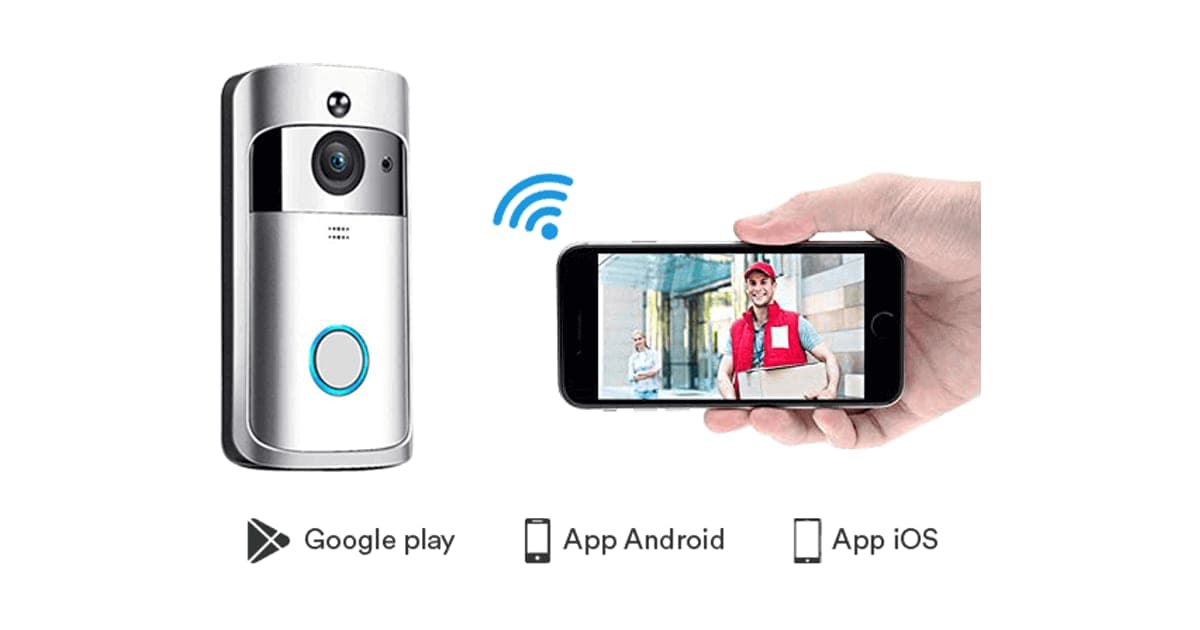
The photos show a silver doorbell with a glowing ring button and a phone displaying a smiling delivery driver, a reassuring picture of what doorbells are for.
Who gets the most value
People who are often out but receive parcels benefit from seeing and speaking to couriers. People with mobility issues can answer the door from a chair. Parents can check who is at the door before children open it. These are real benefits of any video doorbell.
Renters
Battery doorbells that need no wiring are popular with renters, since they can be removed when you move. Check your tenancy agreement before drilling, and keep the original doorbell to refit.
People worried about crime
A visible camera may deter some opportunistic thieves, and recordings can help police. But a low-resolution camera may not capture faces clearly, and a doorbell that can be hacked can become a privacy risk rather than a protection.
Delivery-heavy households
If parcels arrive most days, a doorbell that lets you tell couriers where to leave things can save trips to the depot. That is only true if alerts arrive quickly and two-way talk works reliably. Test both thoroughly in the first week while you can still return it.
Older relatives
Video doorbells can help older people avoid opening the door to strangers and cold callers. Family members can sometimes share access to see who visits. For an older relative, reliability and a simple app matter most, so a well-supported brand is a better choice than an unknown one. Set it up for them and check it works.
Parents of teenagers
Some parents like knowing when children get home from school. A doorbell's motion alerts can show arrivals, but use it openly, so teenagers know the camera is there, and avoid using it to monitor them more than you would tell them about.
People in flats
In blocks of flats, a doorbell camera on your own door may capture shared corridors and neighbours' doors. Check your building's rules and your tenancy or lease before fitting one, and angle it carefully.
Who should skip it
Skip Video DoorBell if you cannot confirm its app and security, need clear video for evidence, or can buy a branded doorbell at a similar price.
- Anyone who cannot confirm the app and its security record before buying
- People who want clear video for identifying faces or number plates
- Buyers who can get a branded doorbell for the same or less
- Households where a hacked camera would be a serious privacy risk
Is the Video DoorBell safe to connect to your home Wi-Fi?
We cannot say, and that is the problem. The page does not name the app or describe its security. In 2024 Consumer Reports found serious flaws in budget video doorbells sold under brands such as Eken and Tuck, and many other names, that all used the Aiwit app: strangers could take control of a doorbell and view images, and the devices exposed home IP addresses and Wi-Fi names. Ask which app this doorbell uses before buying.
What Consumer Reports found
Consumer Reports' investigation, reported widely in 2024, found that doorbells sold as Eken, Tuck and many other brand names through major online retailers shared the same Aiwit app. It found that someone nearby could create an account and pair the doorbell to their own phone, then view images and control it, and that the doorbells sent home IP addresses and Wi-Fi network names over the internet without encryption. Consumer Reports also said many lacked required FCC ID labels.
Why the same flaws can spread across brands
When many sellers rebrand the same device and app, a flaw in that app affects every brand at once, and buyers of each brand may never hear about it. Branded makers with their own apps answer for their security directly. That is one reason an unnamed app is a bigger concern on a security camera than on, say, a step counter.
What happened next
Consumer Reports later reported that Eken fixed security issues in its video doorbell cameras after meeting its engineers and releasing a firmware update. It also reported that the FCC proposed a fine of $734,872 against Eken. Fixes only help doorbells that receive and install updates.
Does this doorbell use the same app?
We do not know. The Video DoorBell's silver body, round camera and ring-lit button resemble many budget doorbells sold under different names, including types that used Aiwit. The page shows only generic app store icons. What to do: ask support for the app's exact name and look up its security history before buying.
Who sells the same design
Consumer Reports found identical-looking doorbells sold under many brand names, which makes it hard for buyers to know whose app and servers they are trusting. When a product page shows only generic app store icons and no brand behind the app, you cannot tell which company holds your doorbell's video. That uncertainty is reason enough to ask before buying.
Why doorbell security matters
A doorbell camera faces your front door, records who comes and goes, and sits on your home network. If someone can view it, they can see when you are out. If it leaks your Wi-Fi details or IP address, it can expose other devices. A doorbell from a company with a clear security policy and regular updates is worth more than a cheaper one without.
If you already own a budget doorbell
If you have a budget doorbell and are unsure of its app, check the app's name in your phone. If it is Aiwit, read Consumer Reports' advice and look for the latest firmware. If you cannot confirm the app is maintained and secure, disconnecting the doorbell from Wi-Fi until you can is the cautious choice.
The FCC label
In the US, wireless devices need FCC authorisation and an FCC ID on the label. Consumer Reports found some budget doorbells without one. What to do: check for an FCC ID on the doorbell or box when it arrives, and look it up on the FCC's database.
What a strong security setup looks like
Well-run doorbell services encrypt video in transit, require you to confirm ownership before pairing a device, support two-factor authentication on accounts and release regular firmware updates. Some offer end-to-end encryption, so even the company cannot see your video. These are the features to look for in any camera that faces your home.
How to check an app before buying
Search the app's name with words such as "security", "vulnerability" and "hacked", and read recent app store reviews for complaints about strangers accessing cameras or account problems. Check how recently the app was updated. A company that publishes a security policy and a way to report vulnerabilities takes security more seriously than one that does not.
What firmware updates do
Firmware is the software inside the doorbell. Updates can fix security flaws, improve alerts and add features. A doorbell that never receives updates keeps whatever flaws it shipped with. Ask support how updates are delivered and how often they have been released.
What the offer page claims
The title reads "Video DoorBell, smart wireless Wi-Fi video doorbell with chime, 720P HD home security camera with PIR motion detection, night vision, two-way talk and real-time video, app control for iPhone, Samsung, LG, Sony, Nokia etc". The bullets are: easy installation, easy maintenance, no wiring needed; HD video quality, answer your door and watch at any time from anywhere; long-lasting battery life, 8 to 12 months on a single charge; compatible with iOS and Android; smart security motion detection alerts your phone if someone hovers around your house; and two-way audio with noise cancellation.
What do you actually get for $99, and what costs extra?
On 4 October 2026, with the United States selected, one Video DoorBell cost $99, shown as half of $198, with free delivery. The five-pack for $297 was preselected. The page code sells night vision for $14, a battery or existing wire power option for $7 and a mounting bracket kit for $9, and a 3-year warranty cost $19. With all three add-ons, one doorbell costs $129.
Video DoorBell price and bundles
| Package | Total | Per doorbell |
|---|---|---|
| 1 Video DoorBell | $99 | $99.00 |
| 2 Video DoorBells | $159 | $79.50 |
| Buy 2, get 1 free (3) | $197 | $65.67 |
| 4 Video DoorBells | $249 | $62.25 |
| Buy 3, get 2 free (5), preselected | $297 | $59.40 |
Most homes need one doorbell. You can check today's packages on the Video DoorBell order page (opens G Com Pte Ltd in a new tab).
Night vision, sold separately
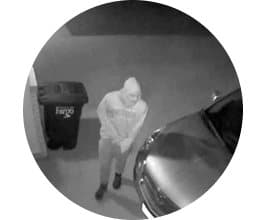
The title lists night vision among the doorbell's features, but the page code offers a "Night Vision Camera Option" for $14, shown reduced from $28, with a black-and-white image of a hooded person at night. Night vision matters for a doorbell, because many deliveries and visits happen after dark in winter. What to do: ask support whether the standard doorbell sees at night.
Power, sold separately
The page says no wiring is needed and promises 8 to 12 months per charge, but sells a "Battery or Existing Wire Power Option" for $7, shown reduced from $15. Its image shows two blue cylindrical batteries being inserted into the back of a doorbell. What to do: ask whether batteries come as standard, and what type they are.
What the add-on images show
The three add-on images are a hand inserting two blue cylindrical batteries into the back of a doorbell, a grainy night-time image of a hooded figure, and an exploded diagram of a mounting plate with screws and plugs beside a silver and black doorbell. They give a sense of the parts but no specifications, and the bracket image shows a different doorbell from the main photo.
The mounting bracket
The page code offers a mounting bracket kit for $9, shown reduced from $19, with a diagram of a plate, screws and wall plugs and a silver and black doorbell that looks different from the one in the main photo. Ask whether the standard doorbell includes a mounting plate and screws.
720p in practice
720p video is 1280 by 720 pixels. It is enough to see that someone is at the door and roughly what they look like in good light. At a distance, at night or in harsh sun, faces and details blur. Many current branded doorbells record at higher resolutions, with wider views that show a person head to toe and parcels on the step.
Two-way talk
Talking through a doorbell has a short delay, and budget doorbells can sound tinny or break up on weak Wi-Fi. Noise cancellation, which the page promises, helps on busy streets. Check that your Wi-Fi reaches the front door well before relying on live conversations.
Motion detection type
The title mentions PIR motion detection, which senses body heat. PIR sensors are less likely than camera-based detection to trigger on moving shadows, but they can still react to warm cars and animals. Range and sensitivity settings help. The page gives no detection range.
Alert speed
The time from a button press to your phone ringing matters, because visitors leave if nobody answers. Battery doorbells wake from sleep when pressed, which adds a delay, and weak Wi-Fi adds more. Owners of budget battery doorbells often report delays of several seconds. Test it with a family member at the door before relying on it for deliveries.
Wi-Fi strength at the door
Front doors are often far from the router and surrounded by brick or metal. A weak signal causes slow alerts, frozen video and faster battery drain. Test your phone's Wi-Fi at the door first. A Wi-Fi extender or mesh point near the door can help.
Battery life
The page promises 8 to 12 months on a charge. Battery doorbells' real life depends on how often they are triggered, how much live view you use and the weather. Busy streets and cold winters shorten it. Expect to recharge more often than the best case.
The chime
The product title mentions a chime, which plugs into an indoor socket and rings when someone presses the button. Place it where you can hear it from most of the house. If the chime and doorbell lose their pairing, follow the leaflet to pair them again.
Cloud storage
Many doorbells store clips in the cloud, sometimes with a subscription. The page does not say whether clips are stored on a memory card, in the cloud or not at all, or whether any plan costs extra. Ask before buying.
Who sells it
The order page and impressum name G Com Pte Ltd, at 137 Market Street in Singapore, with a company registration number, email and phone number. The footer says "G Com Pte Ltd - Hong Kong". We found no independent rating profile for the store. With the United States selected, the order page said charges would appear as panameedia.

Video DoorBellScore 3.2/10
Best for: People who want to see who is at the door before answering, and accept a budget device's trade-offs
$99.00 at G Com Pte Ltd · Price checked October 4, 2026
Check price at G Com Pte Ltd (opens G Com Pte Ltd in a new tab)We may earn a commission if you buy through our links.
Is Video DoorBell better than Ring or Blink?
No. Ring's Battery Doorbell lists at $99.99 and has sold for $49.99, and Blink's Video Doorbell lists at $49.99 and often sells for less, both from established companies with known apps, regular updates and published security policies. They offer clearer video than 720p in current models, though their cloud recording features often need subscriptions. Video DoorBell costs as much or more, with an unnamed app.
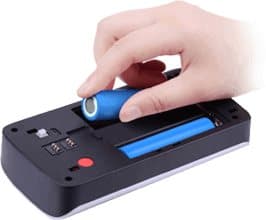
The $7 Battery or Existing Wire Power Option add-on image
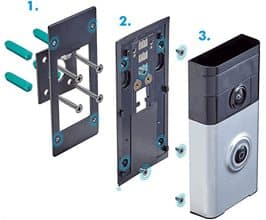
The $9 Mounting Bracket Kit add-on image, showing a different-looking doorbell
| Doorbell | Video | App and updates | Price seen |
|---|---|---|---|
| Video DoorBell | 720p | App not named | $99, plus add-ons |
| Ring Battery Doorbell | Head-to-toe HD | Ring app, regular updates | $99.99 list, often less |
| Blink Video Doorbell | HD | Blink app | $49.99 list, often less |
| Budget doorbells on Aiwit | Low resolution | Security flaws found in 2024 | Often low |
Video DoorBell vs Ring
Ring is the best-known video doorbell brand. Coverage of its 2026 range lists the Ring Battery Doorbell at $99.99, with frequent deals much lower. It offers wide video, a maintained app and integration with Alexa. Many features need a Ring Protect subscription. This is the clear rival win for most buyers.
Why established brands cost less here
Large brands sell doorbells in huge numbers and often discount the hardware, expecting to earn from subscriptions and accessories. That is why a branded doorbell can cost less than this one. Weigh the subscription cost, but also the security investment and app support that come with an established platform.
Video DoorBell vs Blink
Blink, also owned by Amazon, offers a budget doorbell that Tom's Guide has reported on sale for well under $50, with local storage options that avoid a subscription. It is a cheaper and better-supported choice than Video DoorBell.
Video DoorBell vs a smart lock with camera
Some newer smart locks and door viewers combine a camera with locking features. They cost more but let you see visitors and let trusted people in. If you are replacing door hardware anyway, they are worth a look, again from established brands with good security records.
Subscriptions to consider
Branded doorbells often need a subscription for recorded clips and some smart features, which adds a yearly cost. Some offer local storage instead. When comparing, add up the doorbell price and the subscription over two or three years. A budget doorbell without a subscription can seem cheaper, but only if it is secure and reliable.
Video DoorBell vs a peephole camera
Digital peephole viewers let you see who is outside without Wi-Fi or an app. They do not alert your phone, but they cannot be hacked over the internet either.
What to look for in any video doorbell
Look for a maintained app from a named company, regular firmware updates, two-factor authentication, a clear weather rating, a resolution and field of view that covers your doorstep, night vision included as standard, clear storage options and subscription costs, and an FCC ID in the US. A good doorbell page lists all of these; this one lists few.
Video DoorBell vs a wired doorbell and intercom
If you own your home and want reliability, a wired video doorbell or intercom avoids battery changes. Installation is more involved but the result lasts.
Other smart home gadgets we have reviewed
Our RYSE SmartShade review covers a blind motor and the importance of app support, our GuideLight review a night light, and our invisaWear review a personal safety wearable. Browse more smart home reviews.
If you still prefer Video DoorBell, check today's packages on the Video DoorBell offer page (opens G Com Pte Ltd in a new tab) after confirming the app.
Video DoorBellScore 3.2/10
Why people buy it: See, hear and speak to visitors from your phone wherever you are
$99.00 at G Com Pte Ltd · Price checked October 4, 2026
Check price at G Com Pte Ltd (opens G Com Pte Ltd in a new tab)We may earn a commission if you buy through our links.
Is Video DoorBell legit, and what should you check before buying?
Video DoorBell is a real product from a named seller, and a doorbell should arrive if you order. Before buying, ask which app it uses and whether night vision, batteries and a mounting plate are included, check for an FCC ID, change the preselected five-pack, and know that refunds need a returns number and that return postage is yours to pay.
Ask about the app
What to do: email support for the app's exact name. If it is Aiwit, read Consumer Reports' findings and check for firmware updates. If support cannot name the app, do not buy.
Ask what is included
What to do: ask whether night vision, batteries, a chime and a mounting plate come as standard, and get the answer in writing.
Check the selected bundle
The five-pack for $297 was preselected. What to do: change it to one doorbell before entering your details.
Membership offers
The page code contains text for a "Gadget Discount Club" membership, free for 30 days and then "a small fee of $9 may apply". We did not see it on the order page with the United States selected. What to do: read every checkbox and post-purchase page.
Refunds and returns
The page code promises a 30-day guarantee with a full refund or replacement, less shipping and handling. The terms focus on defective or damaged products, which may be returned within two years once you have a returns number. Return postage is at your cost and is not reimbursed.
What to do: set up and test the doorbell, including at night, on the day it arrives, and contact support straight away if anything does not match.
Check weather resistance
The page does not give a weather rating. A doorbell is exposed to rain, frost and sun. What to do: ask support for the IP rating, and if your door faces the weather, consider a porch or a small cover.
Protect your network
What to do: if you install any budget smart camera, put it on a separate guest Wi-Fi network if your router allows, use a strong unique password for the app, enable two-factor authentication if offered, and install firmware updates.
Check how many doorbells you need
Most homes need one doorbell. A second may make sense for a back door used by deliveries. What to do: ignore the preselected five-pack unless you genuinely have several entrances.
Check the battery type
The add-on image shows cylindrical cells being inserted into the back of a doorbell. Many budget doorbells use replaceable lithium cells. What to do: ask what type the doorbell uses, whether they are included, and where to buy replacements from a reputable source, since poor-quality lithium cells can be a fire risk.
Respect neighbours' privacy
Doorbell cameras can capture neighbours' doors, gardens or the street. In some places, recording beyond your property raises data protection issues. What to do: angle the camera at your own doorstep, and use privacy zones if the app offers them.
How to buy Video DoorBell the smart way
- Ask support for the app name, and check its security record.
- Ask whether night vision, batteries and a mounting plate are included.
- Open the Video DoorBell order page (opens G Com Pte Ltd in a new tab) and select your country.
- Change the preselected five-pack to one doorbell.
- Note the card statement name, panameedia, and save your order email.
- Check the FCC ID and test it day and night when it arrives.
How did we score Video DoorBell?
Video DoorBell scores 3.2 out of 10: claim accuracy 0.5, build durability 0.8, price competitiveness 0.5, usability 1.0 and owner satisfaction 0.4, each out of 2. It offers the standard video doorbell features on paper, but the app is unnamed, similar budget doorbells had serious security flaws, night vision from its own title is an add-on, and branded doorbells cost the same or less.
What owners say
We found no Trustpilot profile for the gadgetxaura.com store and no independent retailer reviews for this Video DoorBell. Owners of similar budget battery doorbells elsewhere often like the low price and easy install, and complain about delayed alerts, short battery life in cold weather, grainy night video and apps that are clunky or disappear.
How the score breaks down
We use the five criteria on our how we test page, each out of 2.
| Criterion | Score | Why |
|---|---|---|
| Claim accuracy | 0.5 / 2 | Night vision in the title but sold as an add-on; no app or security details |
| Build durability | 0.8 / 2 | Outdoor device with no stated weather rating |
| Price competitiveness | 0.5 / 2 | Same or more than branded doorbells; extras add up to $129 |
| Usability | 1.0 / 2 | No-wiring install and phone alerts; unnamed app |
| Owner satisfaction | 0.4 / 2 | No independent ratings for this product |
| Total | 3.2 / 10 |
What we did, and did not, do
Nobody on our team has used Video DoorBell. We read the offer page our link opens with the United States selected, its code and the seller's terms on 4 October 2026, along with Consumer Reports' press release on Eken's fixes and coverage of its doorbell security investigation, Ring and Blink pricing coverage and the top-ranking Video DoorBell pages.
How to use Video DoorBell: setup, security and everyday tips
Before mounting, set up the doorbell indoors, update its firmware, change any default password and connect it to a separate guest network if you can. Mount it at about chest height beside the door, angle it at your doorstep only, set motion zones to avoid the street, and recharge the battery before it runs flat.
- Charge fully first. Note the date so you can track battery life.
- Set up indoors. Connect the app and test video, alerts and talk before mounting.
- Update and secure it. Install firmware updates and set a strong, unique password.
- Mount at chest height. Around 120 cm is typical for faces.
- Plug in the chime. In a central spot where you will hear it.
- Set motion zones. Cover your path and step, not the pavement.
- Check at night. See whether night vision works without the add-on.
Sharing access with family
Many doorbell apps let you share access with family members, so several phones get alerts. Use the app's sharing feature rather than sharing one login, so you can remove access later. Check what each shared user can see and control.
Recording and storage
Find out where clips are saved: a memory card in the doorbell, the cloud or your phone. A memory card can be stolen with the doorbell; cloud storage depends on the company and may cost extra. Download important clips promptly if you need them for police or insurance.
Reducing false alerts
Passing cars, trees and pets trigger motion alerts. Narrow the motion zone, lower sensitivity and use schedules if the app allows. Too many alerts drain the battery and make you ignore real ones.
Cold weather
Lithium batteries lose capacity in the cold. Expect shorter battery life in winter, and bring the doorbell indoors to charge if it struggles.
Checking the camera angle
Once mounted, open live view and check what you can see: faces at the door, the step for parcels, and as little of the street and neighbours' property as possible. Adjust with a wedge or angle mount if needed. A minute spent here avoids months of unhelpful video.
Talking to visitors safely
You do not need to tell visitors you are not home. Phrases such as "I can't come to the door right now, please leave it on the step" work whether you are upstairs or away. If someone behaves suspiciously, do not open the door; call the police if you feel threatened.
Placement for parcels
If deliveries are your main concern, check that the camera can see your doorstep or porch floor, where parcels are left. Many budget doorbells have a narrow vertical view that misses the ground. A wedge mount can tilt the camera downward if needed.
Recharging
Most battery doorbells detach from the mounting plate for charging. Some owners keep a second set of batteries charged and ready, if the design allows swapping.
Keeping the lens clean
Rain spots, dust and spider webs blur the picture and trigger false motion alerts. Wipe the lens gently with a soft cloth every few weeks. Spiders like the warmth around doorbell lights, so check the area regularly.
After storms, check that the doorbell is still firmly on its plate and that water has not got behind it. Look at the charging port cover, if it has one, and make sure it is closed, because a wet port can stop charging or damage the electronics. A quick look every few weeks keeps a small, exposed device working through the seasons.
In very hot climates, direct afternoon sun can overheat a dark doorbell and shorten battery life. A small shade or a mounting position under the porch roof helps, and many owners find the battery lasts noticeably longer once the doorbell is out of full sun. Check the leaflet for the operating temperature range, if one is given, before mounting it somewhere very exposed. Freezing winters and scorching summers both test small outdoor gadgets, and a sheltered spot helps any doorbell last longer and work more reliably.
When to replace it
Replace a doorbell that no longer receives app updates, cannot hold a charge or has been physically damaged. An outdated, unpatched camera on your network is a risk worth removing even if it still seems to work.
Removing it when you move
Take the doorbell off its plate, remove it from your app account and factory reset it before leaving it or handing it on. Fill screw holes if you are renting.
Other questions about video doorbells
Do video doorbells deter burglars? A visible camera may put off some opportunistic thieves, and recordings can help investigations. Good lighting, locks and neighbours who look out for each other also matter.
Can a doorbell camera be stolen? Battery doorbells clip onto a plate and can sometimes be removed by a determined thief. Some brands include security screws and theft replacement schemes. Ask whether this doorbell has a security screw.
Will a video doorbell work without Wi-Fi? Without Wi-Fi, a doorbell cannot send alerts or video to your phone. Some can still ring the indoor chime, depending on the design.
Is it legal to record visitors? Recording your own doorstep is generally allowed, but rules on recording audio and capturing public areas vary by country and state. Check local rules and avoid pointing the camera beyond your property.
How long do doorbell batteries last in practice? It depends on traffic past your door, alert settings, Wi-Fi strength and temperature. A busy street in winter can drain a battery far faster than the best-case figure.
Can I use it with Alexa or Google? The page does not mention smart speaker support. Branded doorbells often show video on smart displays. Ask support if this matters to you.
Video DoorBellScore 3.2/10
Before you buy: Check the final price, shipping and return terms at checkout.
$99.00 at G Com Pte Ltd · Price checked October 4, 2026
Check price at G Com Pte Ltd (opens G Com Pte Ltd in a new tab)We may earn a commission if you buy through our links.
Frequently asked questions
Is the Video DoorBell safe from hackers?
We cannot tell. The page does not name the app or describe its security. In 2024 Consumer Reports found serious flaws in budget doorbells sold under many brand names through the Aiwit app, which could let strangers view footage. Ask support which app this doorbell uses before buying, and check its record.
Does the Video DoorBell have night vision?
The product title promises night vision, but the order page sells a Night Vision Camera Option as a $14 add-on, shown reduced from $28. That suggests the standard doorbell may not include it. Ask support in writing before ordering.
Does it need wiring?
The page says no wiring is needed and the battery lasts 8 to 12 months. A Battery or Existing Wire Power Option is also sold as a $7 add-on, with an image of batteries being inserted. Ask whether batteries are included as standard.
How much does the Video DoorBell cost?
With the United States selected on 4 October 2026, the offer page listed one for $99, two for $159, three for $197, four for $249 and five for $297. The five-pack was preselected. Delivery was listed as free, and a 3-year warranty add-on cost $19.
Is 720p good enough for a doorbell?
It shows who is at the door in good light, but fine details such as faces at a distance or number plates are hard to make out. Current branded doorbells commonly record at higher resolutions with wide head-to-toe views.
What should I do if my doorbell uses the Aiwit app?
Consumer Reports advised owners of doorbells using the Aiwit app to disconnect them from home Wi-Fi and remove them from the door. Consumer Reports later reported that the app's owner, Eken, released a firmware update to fix the issues. Check for updates and current advice.
Is the Video DoorBell legit?
It is a real product sold by G Com Pte Ltd, which lists a Singapore address, company number, email and phone. The concerns are the unnamed app, the security record of similar budget doorbells, features sold as add-ons, the preselected five-pack and refund terms that leave return postage to you.
We may earn a commission if you buy through our links.
Prices accurate as of October 4, 2026. Check the seller's checkout for current pricing, promotions and terms.
What we checked: No hands-on use. Features, photos, prices with the United States selected, the preselected bundle, add-ons and their images, warranty and card statement name from the Video DoorBell offer page our link opens (gadgetxaura.com) on 2026-10-04, plus the bundle and add-on data in the page's own code. Refund and cancellation terms from the same site's terms page that day. Consumer Reports' 2024 press release on Eken doorbell fixes and coverage of its video doorbell security investigation, Ring and Blink pricing coverage and the top-ranking Video DoorBell pages were read the same day.

About the author
Alex Carter, Senior Tech Reviewer
Alex Carter is the senior tech reviewer at Top10Gadgets, covering the everyday gadgets, home and kitchen devices, smart home products and accessories most people actually buy. Alex judges a product the way a normal buyer…
- Everyday gadgets and accessories
- Smart home devices
- Home and kitchen gadgets
- Value for money
- Long-term reliability
Writing for Top10Gadgets since 2026Full profile