Smart Home / Security cameras
Sight Bulb Review: A $39.95 Light Bulb Security Camera, Its 2.7-Star App and the $16 Rivals That Look the Same
A pan and tilt Wi-Fi camera that screws into a light socket, with no monthly fee. Easy to fit, but the app rates 2.7 on the App Store, and similar cameras cost about $16.

By Alex Carter, Senior Tech Reviewer at Top10Gadgets
Updated 26 min readHow we test
Quick answer
Worth it only if easy installation matters more to you than a dependable app. Sight Bulb is a pan-and-tilt Wi-Fi camera that screws into a light socket, records motion to a memory card and costs $39.95 with no monthly fee, which is a genuinely simple way to watch a porch or a room.
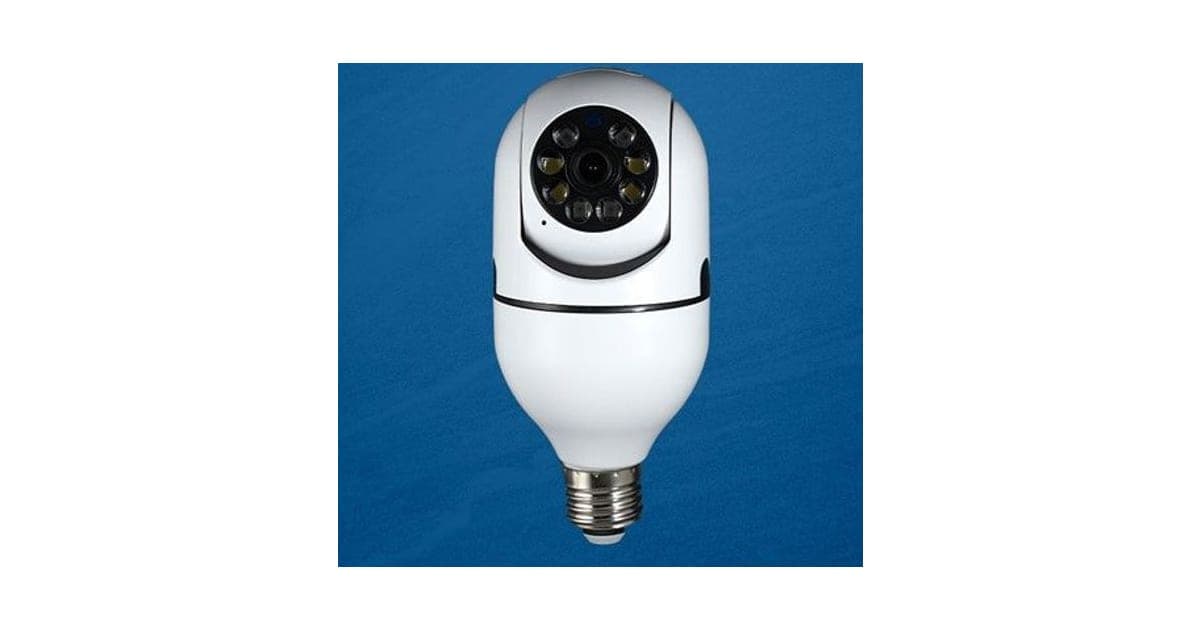
Score 3.8/10$39.95 at Trend Makers, Inc.
Check price at Trend Makers, Inc. (opens Trend Makers, Inc. in a new tab)We may earn a commission if you buy through our links.
- Best for
- Renters and anyone who cannot drill or wire a camera
- Not for
- Anyone who needs dependable alerts and a well-reviewed app
$39.95 at Trend Makers, Inc.
Check price at Trend Makers, Inc. (opens Trend Makers, Inc. in a new tab)We may earn a commission if you buy through our links.
On this page · 12 sections
- 01Our verdict
- 02The short version
- 03Pros & cons
- 04How it works
- 05Who it's for
- 06How good is the Sight Bulb app?
- 07How much does Sight Bulb cost, and what do you get?
- 08Is Sight Bulb better than the Wyze Bulb Cam or a $16 bulb camera?
- 09Is Sight Bulb legit, and what should you check before buying?
- 10How did we score Sight Bulb?
- 11How to use Sight Bulb for the best results
- 12Frequently asked questions
Our verdict
Worth it only if easy installation matters more to you than a dependable app. Sight Bulb is a pan-and-tilt Wi-Fi camera that screws into a light socket, records motion to a memory card and costs $39.95 with no monthly fee, which is a genuinely simple way to watch a porch or a room. But its app averaged 2.7 out of 5 from 211 App Store ratings, the socket must stay switched on, and similar bulb cameras have sold for about $16. Sight Bulb scores 3.8 out of 10, held back mainly by its app.
The short version
- What it is: a Wi-Fi security camera shaped like a light bulb, powered by any standard socket, with pan, tilt, night vision and two-way audio.
- Price: $39.95 for one on 4 October 2026, with packs of three, five and eight. No subscription is required.
- Best trait: fits in seconds wherever you have a light socket, with no wiring or batteries.
- Biggest drawback: a poorly rated app that has not been updated since 2024.
- Our score: 3.8 out of 10.
Pros & cons
The pros come from the socket-powered design. The cons are about the app, missing specifications and price compared with similar cameras.
What we like
- Screws into a standard light socket for power, with no wiring, batteries or drilling
- Motorised pan and tilt lets you turn the view from the app
- Two-way audio, motion alerts and infrared night vision, according to the page
- Records to a memory card, so there is no monthly subscription
- 30-day money-back guarantee from a named US company
What we don't
- The Sight Bulb app averaged 2.7 out of 5 from 211 App Store ratings, and was last updated in April 2024
- The socket's switch must stay on all the time, and the page does not say whether it still gives light
- Similar pan-tilt bulb cameras have sold for about $16, and the Wyze Bulb Cam for about $50 with 2K video
- No resolution beyond 1080p, Wi-Fi band, weather rating or encryption details are given
- Returns need an RMA number, return postage is yours, and refunds are less processing and handling
Sold by Trend Makers, Inc.
Sight Bulb$39.95
How it works
Most home cameras need a battery that has to be recharged or a power cable running to a socket. Sight Bulb takes its power from a light fitting instead. You screw it into a standard E26 socket, the size used for most US household bulbs, leave the switch on, and the camera powers up. You connect it to Wi-Fi through the Sight Bulb app, and from then on you can watch live, turn the camera, talk through its speaker and get alerts when it sees motion.
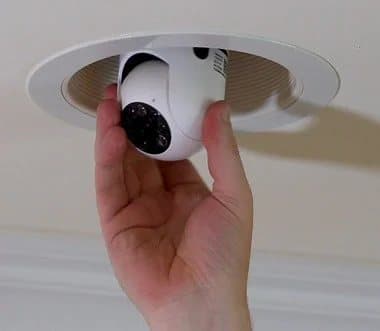
The photos show a white dome on a bulb-shaped neck. The head turns left and right and tilts up and down under motor control, which is how the page can claim 360° coverage from a lens that sees a narrower view at any one moment. A ring of LEDs surrounds the lens for night vision. A memory card slot on the body stores recordings.
Screw it into a socket
Step 1: Screw the Sight Bulb into a standard E26 light socket, indoors or in a covered outdoor fixture, and leave the light switch on so it has power.
Connect it to Wi-Fi
Step 2: Install the Sight Bulb app, create an account and add the camera to your home Wi-Fi by following the in-app steps.
Watch, talk and get alerts
Step 3: View live video from your phone, turn the camera, talk through its speaker and get alerts when it detects motion. Clips are saved to the memory card inside.
What "360°" means here
A pan-and-tilt camera does not see all around at once. It points in one direction and the motor turns it. "360°" means you can steer the view all the way around, and that auto-tracking can turn it to follow movement. Anything happening behind the camera while it points elsewhere is not recorded.
Auto motion tracking
According to the page, Sight Bulb locks onto movement and follows it. On cameras of this type, tracking turns the head towards a moving person or animal, which keeps them in frame but can also be triggered by passing cars, swaying plants or changing light.
Night vision
Infrared LEDs light the scene with light your eyes cannot see, and the camera switches to black-and-white video in the dark. The page promises "night vision" without saying how far it reaches. Infrared reflects off glass, so a camera pointing through a window at night usually sees its own reflection, as one customer quoted on the page found.
Storage and the memory card
Sight Bulb records clips to a memory card when it detects motion, and the app's store listing says each camera uses a 64 GB card. Recording to a card means no subscription, but it also means a thief who takes the camera takes the footage with it.
Two-way audio
A microphone and speaker let you listen and talk through the app. The page suggests telling a delivery driver where to leave a parcel or calming a pet. Small speakers in budget cameras are usually clear enough for short instructions, but can sound tinny or distorted at full volume, and there is often a short delay that makes conversation stilted.
The E26 socket
E26 is the standard medium screw base used for most household bulbs in the US. Many outdoor lanterns and recessed ceiling lights also use it. Candelabra sockets, used in some chandeliers and decorative lamps, are smaller, and the page's footnote warns that Australian, European and UK sockets may affect performance. Adapters exist, but add length and may not fit enclosed fittings.
What the photos show about size
The photos show a camera noticeably taller than a standard bulb, with a dome on a long neck. That height is why it may not fit inside small lanterns, globes or recessed cans with shallow housings. The page does not give dimensions or weight.
Who it's for
Sight Bulb suits renters, people who cannot drill or run cables, and anyone who wants a quick way to watch a front room, a pet, a child's playroom or a covered porch. It suits people who mainly want live viewing and two-way talk. It does not suit anyone who needs dependable, instant alerts, people who need that socket's light to keep working, or exposed outdoor spots.
- Renters and anyone who cannot drill or wire a camera
- People who want an indoor camera for pets, children or a front room
- Owners of covered porch lights who want a quick outdoor view
Why Sight Bulb appeals
Security cameras are useful, but installing them can be a chore: batteries to charge, cables to hide, holes to drill and subscriptions to pay. A camera that goes in like a bulb and costs under $40 removes most of that. Watching your porch from a phone, talking to a delivery driver or checking on a dog at lunchtime all become possible in a few minutes of setup.
Renters
Renters often cannot drill walls or wire in cameras. Screwing a camera into an existing fitting leaves no trace, and it comes with you when you move. Check your lease for any rules about cameras, especially in shared spaces.
Pet owners
A pan-and-tilt indoor camera lets you follow a pet around a room and talk to it through the speaker. If your pet roams several rooms, one camera will only cover one. Place it high, in a ceiling or wall fitting, for the widest view.
Parents and carers
Parents sometimes use cameras to check on older children or a nanny, and carers use them to check on relatives. Always tell people they are being recorded, and follow local rules on recording audio, which are stricter than video in some states.
Porch and doorstep
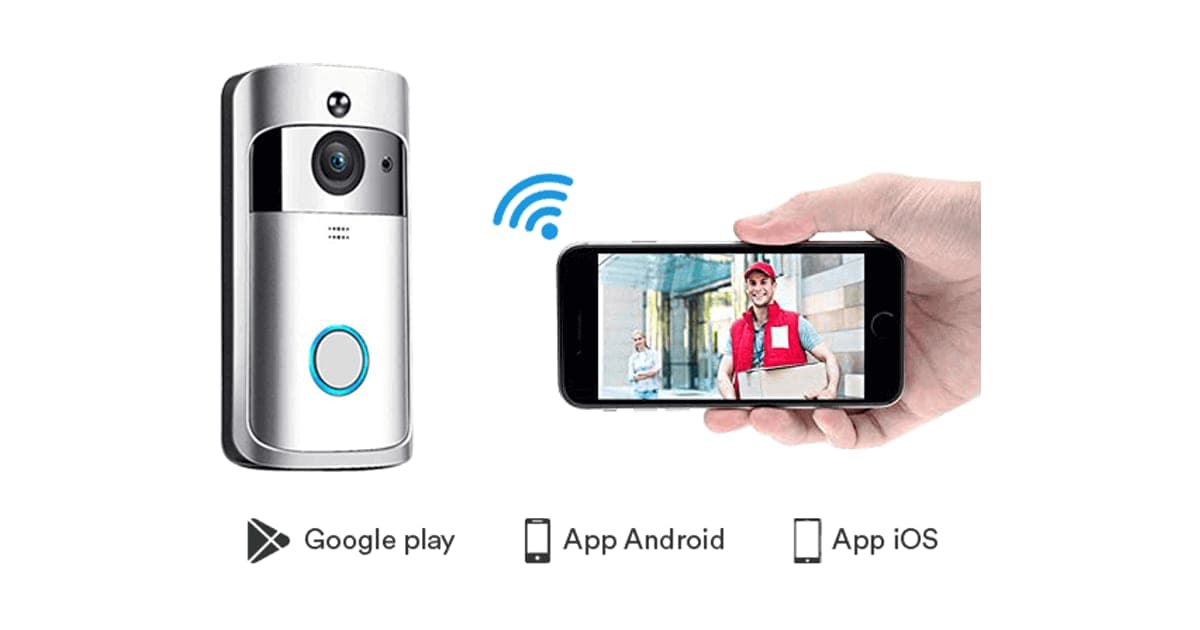
A covered porch light is the classic spot for a bulb camera. It can watch for deliveries and visitors. A dedicated video doorbell gives a better view of faces at the door and rings your phone when pressed; our video doorbell review covers one sold through a similar offer page.
Small businesses and garages
A bulb camera in a garage, shed or stock room can watch an area without new wiring. Make sure the Wi-Fi reaches, since outbuildings often have weak signals.
Holiday homes and second properties
A bulb camera can give a quick look at an empty holiday home, as one customer quoted on the page describes. Remember that the camera only works while the property has power and Wi-Fi, and that alerts depend on the app working well, which reviews suggest is not guaranteed.
Older relatives living alone
Families sometimes use cameras to check on older relatives. Discuss it openly, place cameras only in shared areas, and consider whether a simple check-in call or a medical alert device would suit them better. Privacy matters even when the intention is kind.
Shops and offices
Small shops sometimes use bulb cameras over tills or stockrooms. Businesses usually need signage telling people they are being recorded, and should check data protection rules. A business may also need stronger reliability than a consumer app provides.
Who should skip it
Skip Sight Bulb if you need reliable alerts and an app with strong reviews, because its App Store rating is poor. Skip it if the socket's light is your only light there. Skip it for exposed outdoor fixtures or very cold climates, since no weather rating is given. And skip it if you want the cheapest option or 2K video.
- Anyone who needs dependable alerts and a well-reviewed app
- People who need the light in that socket to keep working as a light
- Homes with exposed outdoor sockets or very cold winters
- Buyers who want the cheapest bulb camera or 2K video
How good is the Sight Bulb app?
Not good, on the evidence available. On 4 October 2026, the Sight Bulb app on the US App Store had an average rating of 2.7 out of 5 from 211 ratings, and its latest version dated from April 2024. Reports collected by review sites mention alerts that only arrive with the app open and event history limited to 24 hours. For a security camera, the app is most of the product.
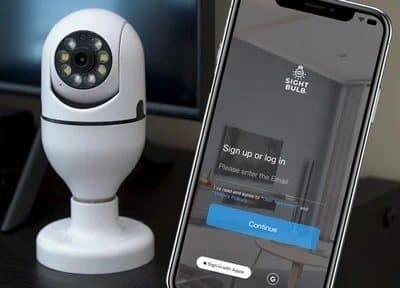
Why the app matters more than the camera
A camera can have sharp video, but if alerts arrive late or not at all, or you cannot find yesterday's recording, it fails at its main job. Phone apps also need regular updates to keep working with new phone software and to fix security issues. An app that has not been updated in over two years is a concern for a device that sits on your home network.
Who publishes the app
The App Store listed the app under Continuum Holdings, LLC, while the website's terms of sale name Trend Makers, Inc. as the seller. Different companies handling the app and the sales is common, but it means you should know who to contact for app problems.
What to do: read the most recent App Store and Google Play reviews before buying, and check whether the app has been updated since we looked.
Live view on mobile data
Watching live video away from home uses mobile data. A few minutes of HD streaming can use tens of megabytes. If you check often on a limited plan, lower the stream quality in the app if it offers that option.
Alerts
Owners of budget cameras often report that alerts are delayed, missing or arrive only when the app is open. If you rely on alerts, test them during the 30-day return window, with the app closed and your phone locked.
Event history
Some reviews of the app report that the event list only goes back 24 hours, even when the memory card has more. If you need to find footage from days ago, you may have to remove the card and read it on a computer.
Account and cloud details
The page says there are no monthly fees and recording is to a memory card, but the app still uses an account and online servers to send alerts and stream live video. The page does not say where those servers are, how long account data is kept, or whether video passes through them encrypted. Those details matter for a camera that may see inside your home.
What to expect from support
The return policy gives a phone number and an email address for customer care. App problems may need support from the app's publisher. Before buying, it is worth emailing a simple question, such as whether a memory card is included, to see how quickly and clearly you get a reply.
Privacy and security
The page says Sight Bulb "operates on a closed security system", without explaining what that means. It gives no information on encryption, where account data is stored or how firmware is updated. For any camera inside your home, use a strong, unique password on the account and keep it on a separate guest Wi-Fi network if your router allows.
What this means for you: treat Sight Bulb as a convenience camera, not a security system you stake your home on.
How much does Sight Bulb cost, and what do you get?
On 4 October 2026, one Sight Bulb cost $39.95, three cost $109.90, five cost $164.85 and eight cost $219.80, with free shipping on the multi-packs. There is no monthly fee, because clips save to a memory card. The page lists "retail" prices of $54.95 each, which we found no evidence anyone pays. Similar pan-tilt bulb cameras have sold for about $16, and the Wyze Bulb Cam for about $50.
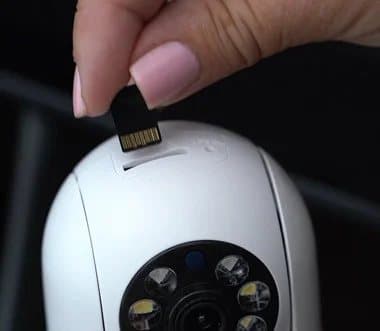
Inserting a memory card into Sight Bulb
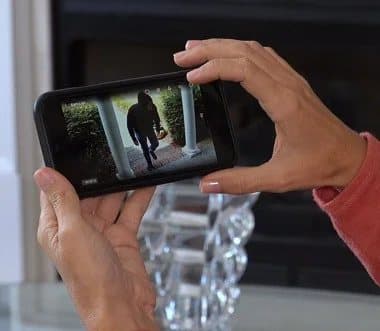
Watching a live view on a phone
Sight Bulb price and bundles
| Bundle | Price | Per camera |
|---|---|---|
| 1 Sight Bulb | $39.95 | $39.95 |
| 3 (buy 2, get 1 free) | $109.90 | About $36.63 |
| 5 (buy 3, get 2 free) | $164.85 | $32.97 |
| 8 (buy 4, get 4 free) | $219.80 | $27.48 |
The page labels the three-pack "most popular" and the eight-pack "best deal". The "buy 2, get 1 free" deal saves only about $3.30 per camera compared with buying one.
Is a memory card included?
The page does not say clearly. A customer review quoted on the page says theirs came with a card, and the app's store listing says each camera uses a 64 GB card. Ask support before ordering, so you are not left without storage.
What to do: if no card is included, buy a reputable high-endurance microSD card, which copes better with constant recording.
Shipping
Free shipping is listed for the three-, five- and eight-packs, and the page says free shipping applies to "qualifying offers only". The single camera's shipping charge is shown at checkout.
What similar cameras cost
Independent comparison tests of light bulb cameras that we read found budget pan-tilt models such as the Ali Vision, at about $16, performing well on image quality. Wyze's Bulb Cam, a branded model, records 2K video, works as an 800-lumen dimmable light and has been listed at about $50. Sight Bulb sits between them on price.
Cost over time
With no subscription, Sight Bulb's cost is the camera and a memory card. Many branded cameras charge $3 to $10 a month for cloud storage and smart alerts, which adds up over years. That is a genuine advantage of card-based cameras, as long as you accept the risk of losing the card with a stolen camera.
Multi-pack value
The eight-pack works out at $27.48 per camera, the lowest per-camera price. It only makes sense if you have eight suitable fittings and are comfortable relying on one app for all of them. Most households would be better off buying one camera, testing it within the return window, then deciding.
The "retail" price
The page compares its price with a "retail" price of $54.95 per camera. We found no retailer selling Sight Bulb at that price. Treat it as the seller's own reference price rather than a real saving.
Who sells it
The offer page is run by Trend Makers, Inc., according to its terms of sale, with an address at 1703 N 13th Street, Rogers, Arkansas 72756, and the email customercare@trendmakersinc.com. The page itself says "Sight Bulb is proudly based in Florida". The terms include a mandatory arbitration clause that you can opt out of by letter within 30 days of purchase.

Sight BulbScore 3.8/10
Best for: Renters and anyone who cannot drill or wire a camera
$39.95 at Trend Makers, Inc. · Price checked October 4, 2026
Check price at Trend Makers, Inc. (opens Trend Makers, Inc. in a new tab)We may earn a commission if you buy through our links.
Is Sight Bulb better than the Wyze Bulb Cam or a $16 bulb camera?
Not better than either for most people. The Wyze Bulb Cam costs about $10 more, records sharper 2K video, still works as a light and comes with a widely used app. Budget pan-tilt bulb cameras around $16 offer the same core features as Sight Bulb. Sight Bulb's case rests on a US seller with a 30-day guarantee and on its motorised pan and tilt, which Wyze's fixed-lens bulb lacks.
| Sight Bulb | Wyze Bulb Cam | Budget pan-tilt bulb cam | |
|---|---|---|---|
| Price seen | $39.95 | About $50 | About $15 to $16 |
| Video | 1080p | 2K | Varies, often 1080p to 3 MP |
| Pan and tilt | Yes | No (160° fixed view) | Yes |
| Works as a light | Not stated | Yes, 800 lumens | Varies |
| Storage | Memory card | Card and optional cloud | Memory card |
| App rating | 2.7 / 5 (211 ratings) | Large, established app | Varies widely |
Sight Bulb vs Wyze Bulb Cam
Wyze is one of the best-known budget smart home brands. Its Bulb Cam doubles as a dimmable light, so the fixture still lights your porch, and records 2K video with colour night vision. It does not pan or tilt, but its 160° view covers most porches. For a porch light, Wyze is the more complete product.
Sight Bulb vs budget bulb cameras
Generic pan-tilt bulb cameras sold online look very similar to Sight Bulb, with a white dome, LED ring and memory card slot. In one comparison test we read, one of the cheapest models ranked top for image quality. Buying from a large retailer also makes returns simpler than an RMA process with postage paid by you.
Sight Bulb vs a plug-in indoor camera
Plug-in indoor cameras from Wyze, Blink, Eufy and others cost $20 to $40 and use a wall socket instead of a light fitting. They do not need a light switch left on and often have better apps. A bulb camera wins only where a light fitting gives a better viewpoint than a wall socket.
Sight Bulb vs a video doorbell or smart light
For the front door, a doorbell camera shows faces at the right height. For outdoor security lighting, a smart light can deter visitors; our SmartLight review covers one option. And if you want sensors on doors and windows, our HomePolice24 review looks at an alarm kit.
Sight Bulb vs a floodlight camera
Floodlight cameras combine bright motion-activated lights with a camera, and wire into an outdoor light junction box. They are much brighter and usually have better apps, but cost more and need wiring or an electrician. For a driveway or back garden, a floodlight camera is the stronger security tool.
What the comparison shows
Light bulb cameras are a niche between plug-in indoor cameras and wired outdoor cameras. Sight Bulb's motorised view is useful in that niche, but its app and missing specifications weaken it against both cheaper generic models and better-supported brands.
When Sight Bulb makes sense
If you have a covered fixture where a light is not needed, want pan and tilt, and prefer a US seller with a 30-day guarantee over an unknown marketplace listing, Sight Bulb can do the job. Test the app thoroughly within the return window.
Sight BulbScore 3.8/10
Why people buy it: Screws into a standard light socket for power, with no wiring, batteries or drilling
$39.95 at Trend Makers, Inc. · Price checked October 4, 2026
Check price at Trend Makers, Inc. (opens Trend Makers, Inc. in a new tab)We may earn a commission if you buy through our links.
Is Sight Bulb legit, and what should you check before buying?
Sight Bulb is a real product sold by Trend Makers, Inc., which lists a US address, phone number and a 30-day money-back guarantee. The things to check are the app's poor ratings, whether a memory card is included, your socket and switch setup, and the return rules: an RMA number by phone or email, return postage paid by you, and a refund less processing and handling.
The return policy in full
According to the return policy, the 30-day guarantee starts when you receive your order. You call customer service at 973-406-4452 or email customercare@trendmakersinc.com for a return merchandise authorization number, then send the item to the Rogers, Arkansas, address. A replacement carries no extra fees, but a refund is of the purchase price "less processing and handling", and you pay return postage. The terms add that refunds take about ten business days after the return arrives.
What to do: test everything you care about in the first two weeks, so you have time to arrange a return.
Check your sockets and switches
The camera needs constant power, so the switch for that fitting must stay on. Some fittings are on timers, dimmers or motion sensors, which can cut power. Dimmer switches can damage electronics that are not designed for them. The camera's size may also not fit enclosed globes or small lanterns.
What to do: check the fitting is a standard E26 socket on a plain on-off switch, with room for a bulb about the size shown in the photos.
Check the fitting's position
A light fitting is placed to light a room, not always to watch it. Stand where the fitting is and look at what it can see. A ceiling fitting in the middle of a room gives a wide view; a wall lantern beside a door may only see the doormat.
Check who lives with you
Everyone in the home should know the camera is there and that the switch must stay on. Cameras in bedrooms and bathrooms are inappropriate and, in shared housing, may break the law.
Check your Wi-Fi
Budget cameras usually connect only to 2.4 GHz Wi-Fi, though the page does not say. Outdoor fittings and garages often have weak signals. Check signal strength with your phone at the spot before ordering.
Check the warranty
The page lists a 30-day money-back guarantee, and the terms state that products are provided "as is" without warranties, except where law requires. That means there may be little cover beyond 30 days. Check what support offers for a camera that fails after a few months.
Outdoor and cold use
The page says Sight Bulb works outdoors down to -10°F, but gives no IP rating for water and dust. Rain, snow and condensation can damage cameras without a rating. Use it only in fittings with a roof or cover.
"As seen on" badges
The page shows logos for Mid-day, Tech Bullion and OpenPR. These sites publish paid and press release content, so the logos do not mean independent coverage or endorsement.
Recording laws
Recording audio without consent is restricted in some US states. If the camera can hear neighbours, passers-by or visitors, check local rules and consider turning audio recording off.
Taxes and international orders
The page says the company ships internationally and that sockets outside the US may affect performance. Buyers outside the US may face import duties and longer delivery, and returns to Arkansas would cost more to post.
Arbitration clause
The terms of sale include a mandatory binding arbitration clause and a class action waiver. You can opt out by sending a letter to the company's legal department within 30 days of purchase. Most buyers never need it, but it limits your options if a dispute arises.
How to buy Sight Bulb the smart way
- Check the fitting is a standard socket on a plain switch, with good 2.4 GHz Wi-Fi.
- Read the latest Sight Bulb app reviews on the App Store and Google Play.
- Open the Sight Bulb order page (opens Trend Makers, Inc. in a new tab) and pick one camera first.
- Ask support whether a memory card is included.
- Test alerts, night view and playback within the first two weeks.
- Keep the box and note the support number in case you need an RMA.
How did we score Sight Bulb?
Sight Bulb scores 3.8 out of 10: claim accuracy 0.7, build durability 0.8, price competitiveness 0.8, usability 1.0 and owner satisfaction 0.5, each out of 2. The socket-powered design is genuinely convenient and avoids subscriptions, but the app is poorly rated and stale, key specifications are missing, the price is more than double similar cameras, and returns cost you postage plus processing.
What owners say
The Sight Bulb app averaged 2.7 out of 5 from 211 ratings on the US App Store on 4 October 2026. Trustpilot had no page for the store or the seller. Review roundups report complaints about app connection problems, alerts that need the app open and short event history, alongside praise for easy installation and clear daytime video. The page's own testimonials are not independent.
How the score breaks down
We use the five criteria on our how we test page, each out of 2.
| Criterion | Score | Why |
|---|---|---|
| Claim accuracy | 0.7 / 2 | "360°" is pan-tilt, "fits any socket" ignores switches and size, security claims vague |
| Build durability | 0.8 / 2 | Simple design, but no weather rating or materials detail |
| Price competitiveness | 0.8 / 2 | No subscription, but more than double similar bulb cameras |
| Usability | 1.0 / 2 | Very easy to install; app reports are poor |
| Owner satisfaction | 0.5 / 2 | App rated 2.7 / 5 from 211 ratings |
| Total | 3.8 / 10 |
What we did, and did not, do
Nobody on our team has used Sight Bulb. We read the offer page, return policy and terms of sale on 4 October 2026, checked the app's App Store record and Trustpilot, and read independent light bulb camera tests and listings for rivals. Our smart home hub lists the other smart home products we have reviewed.
How to use Sight Bulb for the best results
Fit Sight Bulb in a standard socket on a plain switch that stays on, close enough to your router for a strong 2.4 GHz signal, and set it up through the app before mounting it high. Insert a quality memory card, set motion zones and sensitivity to avoid false alerts, test alerts with the app closed, and point it away from windows at night. Check recordings weekly.
- Pick the spot. A ceiling, wall or covered porch fitting with a clear view.
- Check the signal. Use your phone to test Wi-Fi strength there first.
- Fit the memory card. Before screwing it in, if it is not pre-installed.
- Set up in the app. Create a strong, unique password.
- Tune motion settings. Lower sensitivity if trees or traffic trigger alerts.
- Test alerts. Lock your phone and walk past.
- Leave the switch on. Tape over it or tell the household.
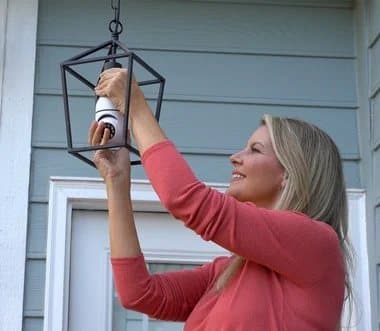
Setting up before mounting
Set the camera up on a table lamp or a low fitting first, so you can complete the app pairing easily and check the picture. Once it works, move it to the high fitting. Pairing a camera on a ladder is awkward and harder to troubleshoot.
Naming cameras
If you buy several, give each a clear name in the app, such as "Front porch" or "Kitchen". Clear names make alerts easier to understand at a glance.
Placement indoors
Mount it high in a corner fitting so it can see the whole room, and away from bright windows that can wash out the picture. Ceiling fittings give a good overhead view, though the image may need to be flipped in the app.
Placement outdoors
Use a covered porch or eave fitting, out of the rain. Angle it towards paths and doors rather than the street, so passing cars do not trigger constant alerts. At night, an outside light near the camera improves the picture, since infrared alone shows only shapes at a distance.
Night-time picture
Infrared night vision shows a grey image that reaches a limited distance. Light from a nearby porch lamp or street light helps the camera see further and in more detail. If the picture flickers between colour and black-and-white at dusk, the app may let you fix the mode.
Sound settings
If neighbours or traffic are noisy, turn down microphone sensitivity or turn off audio recording, both for privacy and to keep clips easier to review.
Avoiding false alerts
Plants, shadows, pets and headlights trigger motion detection. If the app offers activity zones or human detection, use them. Reduce sensitivity step by step until alerts are useful.
Power cuts and restarts
After a power cut, the camera should restart and reconnect when power returns, but some budget cameras lose their settings or need re-pairing. After any outage, open the app and check the camera is back online and recording.
Sharing clips
If something happens, save the clip to your phone straight away and back it up. Police and insurers usually want the original file with its date and time, so check the camera's clock is set correctly in the app.
Keeping the switch on
Someone in the household will eventually flick the switch off. Switch guards that clip over light switches cost very little. Without power, the camera records nothing.
Checking and saving footage
Check the event list regularly, and download any clip you might need before the card overwrites it. If the app only shows recent events, remove the card and read it on a computer.
Moving it later
Because it simply unscrews, you can move Sight Bulb to another fitting when needs change, such as from the porch to the nursery. Re-check Wi-Fi strength and motion settings each time you move it.
Updates and passwords
Check in the app for firmware updates, and change the default password if one was set. Do not share account details by text or email.
Cleaning the lens
Dust, insects and cobwebs on the lens blur the picture and confuse motion detection, especially outdoors. Turn the power off at the switch, let it cool, and wipe the lens gently with a microfibre cloth every few weeks.
Replacing the memory card
Constant recording wears out memory cards over time. If recordings start failing or the app reports card errors, format the card in the app or replace it with a high-endurance card designed for cameras.
Other questions about light bulb cameras
Do bulb cameras work with smart switches? Only if the smart switch keeps the socket powered. A smart bulb's dimming can cut power and confuse the camera.
Can I use two in one room? Yes, but each needs its own socket and Wi-Fi connection, and more cameras put more load on your network.
Do bulb cameras get hot? They use far less power than an old incandescent bulb, but enclosed fittings can trap heat. Leave space around the camera.
Will it work with Alexa or Google? The page does not mention voice assistant support.
More questions about Sight Bulb
Does Sight Bulb need a hub? No hub is mentioned. It connects straight to your Wi-Fi through the app.
Can several people watch the same camera? The page does not say whether the app supports shared access for family members. Ask support if that matters.
Does it work without internet? It should keep recording to the memory card if Wi-Fi drops, as most card-based cameras do, but you will not get alerts or live view until it reconnects. The page does not confirm this.
Can I mount it upside down? Ceiling fittings hold it upside down by design. Look in the app for an image-flip setting so the picture shows the right way up.
Sight BulbScore 3.8/10
Before you buy: Check the final price, shipping and return terms at checkout.
$39.95 at Trend Makers, Inc. · Price checked October 4, 2026
Check price at Trend Makers, Inc. (opens Trend Makers, Inc. in a new tab)We may earn a commission if you buy through our links.
Frequently asked questions
Does Sight Bulb have a monthly fee?
No subscription is required, according to the product page. Clips are recorded to a memory card inside the camera, and the app shows live video for free. The page does not mention optional cloud storage.
Does Sight Bulb work as a light bulb too?
The page describes it as a camera that screws into a light socket and does not say it also lights the room. The photos show LEDs around the lens, which support night vision. Assume you need another light if that fixture was your only lamp.
How much does Sight Bulb cost?
On 4 October 2026, one Sight Bulb cost $39.95, three cost $109.90, five cost $164.85 and eight cost $219.80. Shipping was free on the multi-packs. The page lists a 30-day money-back guarantee.
What app does Sight Bulb use?
It uses the Sight Bulb app. On the US App Store, the app was listed under Continuum Holdings, LLC, had an average of 2.7 out of 5 from 211 ratings, and was last updated in April 2024, when we checked on 4 October 2026.
Can Sight Bulb be used outside?
The page says it works indoors and outdoors down to -10°F, and shows it in a porch lantern. It gives no water or weather rating, so use it only in a covered fixture where rain cannot reach the camera.
Is Sight Bulb better than Wyze Bulb Cam?
The Wyze Bulb Cam records 2K video, works as an 800-lumen light and has been listed at about $50. Sight Bulb costs $39.95, records 1080p and pans and tilts. Wyze has a larger, better-supported app; Sight Bulb has motorised movement.
Is Sight Bulb legit?
Sight Bulb is a real product sold by Trend Makers, Inc., which lists an address in Rogers, Arkansas, and a 30-day guarantee. The concerns are the poorly rated app, the missing specifications, and returns that need an RMA number with postage and processing costs paid by you.
We may earn a commission if you buy through our links.
Prices accurate as of October 4, 2026. Check the seller's checkout for current pricing, promotions and terms.
What we checked: No hands-on use. Features, photos, bundle prices and guarantee from the Sight Bulb offer page our link opens on 2026-10-04, plus the site's return policy and terms of sale (Trend Makers, Inc.) the same day. The Sight Bulb app's App Store rating, seller and last update came from Apple's lookup service the same day. Trustpilot had no page for the store. Published light bulb camera comparison tests and Wyze Bulb Cam listings were read for comparison.

About the author
Alex Carter, Senior Tech Reviewer
Alex Carter is the senior tech reviewer at Top10Gadgets, covering the everyday gadgets, home and kitchen devices, smart home products and accessories most people actually buy. Alex judges a product the way a normal buyer…
- Everyday gadgets and accessories
- Smart home devices
- Home and kitchen gadgets
- Value for money
- Long-term reliability
Writing for Top10Gadgets since 2026Full profile