Smart Home / Security cameras
LiveGuard Pro Review: A Light Bulb Camera Where Night Vision Costs Extra
A fisheye 360° camera built into a light bulb that streams to an app. Easy to fit, but night vision is a $5 add-on and the app is not named.

By Alex Carter, Senior Tech Reviewer at Top10Gadgets
Updated 13 min readHow we test
Quick answer
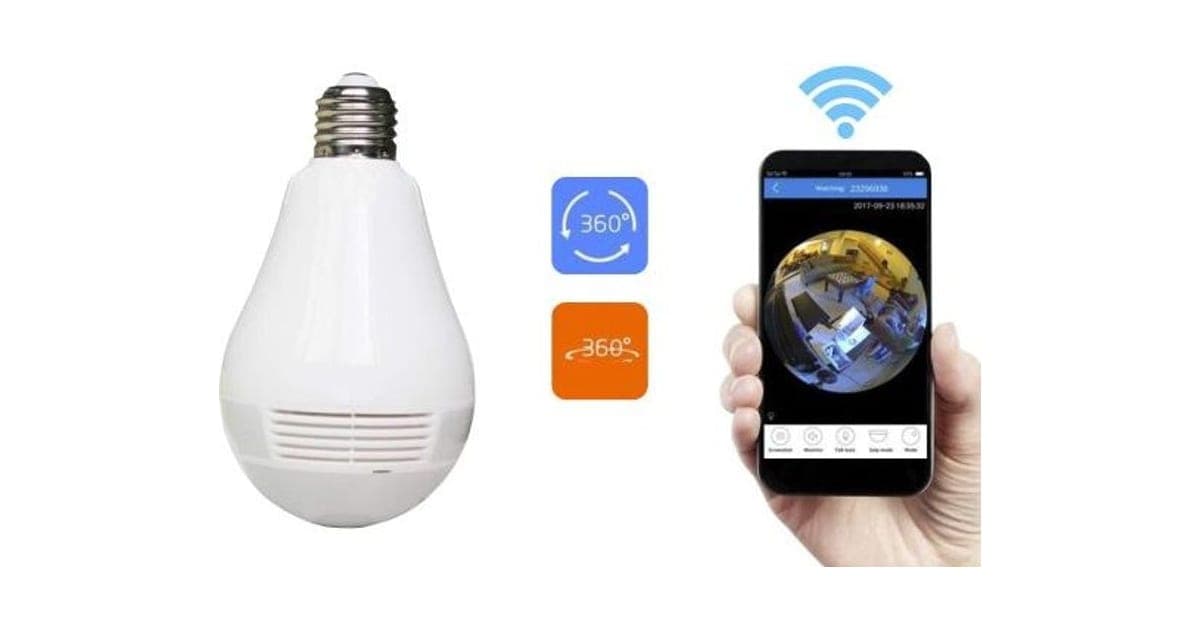
Only if you have an E27 socket, add night vision and can find out which app it uses. LiveGuard Pro is a 360° fisheye camera built into a light bulb that screws into a socket and streams to your phone, which makes it easy to fit without wiring.
Score 3.8/10$59.00 at G Com Pte Ltd
Check price at G Com Pte Ltd (opens G Com Pte Ltd in a new tab)We may earn a commission if you buy through our links.
- Best for
- Renters who want a camera without drilling or wiring
- Not for
- Anyone needing reliable night-time security without adding night vision
$59.00 at G Com Pte Ltd
Check price at G Com Pte Ltd (opens G Com Pte Ltd in a new tab)We may earn a commission if you buy through our links.
On this page · 14 sections
- 01Our verdict
- 02The short version
- 03Pros & cons
- 04How it works
- 05Who it's for
- 06Is LiveGuard Pro good enough for home security?
- 07What about privacy and the app?
- 08How much does LiveGuard Pro cost, and what do the add-ons add?
- 09Is LiveGuard Pro better than Wyze Bulb Cam or Sight Bulb?
- 10Is LiveGuard Pro legit, and what should you check before buying?
- 11How did we score LiveGuard Pro?
- 12How to use LiveGuard Pro for the best results
- 13What else do people ask about light bulb cameras?
- 14Frequently asked questions
Our verdict
Only if you have an E27 socket, add night vision and can find out which app it uses. LiveGuard Pro is a 360° fisheye camera built into a light bulb that screws into a socket and streams to your phone, which makes it easy to fit without wiring. But night vision costs $5 extra, the app is not named, the socket is the European E27 size, no resolution is given and recording needs a $14 card. Wyze's Bulb Cam launched at $49.98 with 2K video. LiveGuard Pro scores 3.8 out of 10, held back by missing basics.
The short version
- What it is: a Wi-Fi security camera shaped like a light bulb, with a fisheye lens and microSD recording.
- Price: $59 for one on 6 October 2026, with a five-pack for $149 flagged as the best seller.
- Best trait: powered by a light socket, so no wiring or batteries.
- Biggest drawback: night vision is an add-on, and the app and resolution are not stated.
- Our score: 3.8 out of 10.
Pros & cons
Light bulb cameras solve a real problem: getting power to a camera without wiring. The cons are about what this listing leaves out or charges extra for.
What we like
- Screws into a light socket, so no wiring or batteries
- Fisheye lens gives a wide 360° view of a room from the ceiling
- Records to a microSD card, with no monthly fee mentioned
- Live viewing through a phone app
- The seller names a registered company with an address, email and phone number
What we don't
- Night vision, essential for a security camera, is a $5 add-on
- The app is not named, so you cannot check its ratings, updates or privacy
- Uses an E27 socket, the European size; US light fittings are E26
- No resolution, frame rate or storage encryption stated
- A microSD card costs $14 extra, and the camera needs one to record
- Wyze's Bulb Cam, from a known brand, launched at $49.98 with 2K video
Sold by G Com Pte Ltd
LiveGuard Pro$59.00
How it works
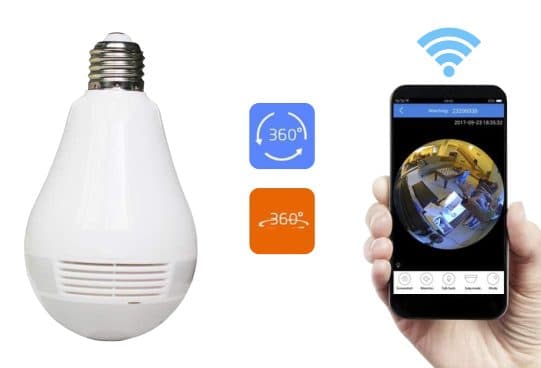
LiveGuard Pro looks like a large light bulb with a camera lens at the bottom. You screw it into a ceiling or lamp socket, which powers it continuously as long as the switch stays on. A fisheye lens captures a full circle view from above. Over Wi-Fi, a companion app shows the live image and lets you flatten the fisheye view into panoramas. Recording goes to a microSD card.
Screw it into a socket
Step 1: Turn off the power, screw the bulb camera into an E27 light socket and switch the light back on. The socket powers it constantly.
Connect the app
Step 2: Install the companion app, connect the camera to your Wi-Fi and view the fisheye image live on your phone.
Record to a card
Step 3: Insert a microSD card to record. The fisheye picture can be viewed as a circle or flattened into panoramic views in the app.
The page title lists "fish eye live monitor bulb camera, embedded bulb camera, live monitor 360° camera, direct stream live home monitor camera". The bullets promise instant monitoring, use for watching elders, children and pets and for security, microSD recording, live streaming via the included app, mains power and a standard E27 socket. It gives no resolution, frame rate, app name, motion detection detail or encryption.
Fisheye views
A fisheye lens sees the whole room from the ceiling, which suits overview monitoring. The edges are distorted, and detail such as faces is harder to make out than with a narrower lens.
Does it light the room?
The page does not say whether it also works as a light. Many bulb cameras do not, so the socket you use may no longer light the room.
The box
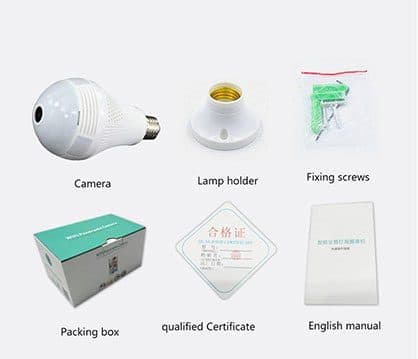
The lamp holder add-on image shows the camera, a lamp holder, fixing screws, a box, a quality certificate and an English manual.
Who it's for
LiveGuard Pro suits renters and anyone who wants a camera without drilling or wiring, and people who want to check on pets or a room while away. It suits buyers with E27 sockets, or who use the lamp holder add-on, and who will add night vision.
- Renters who want a camera without drilling or wiring
- People who want to check on pets or a room while away
- Buyers with E27 sockets or who will use the lamp holder add-on
Renters
A camera in a light socket needs no drilling. Check your tenancy rules and your landlord's view on cameras.
Pet owners
A ceiling view shows where pets are and what they are up to. Night vision matters if you check in the evening.
Checking on relatives
The page suggests monitoring elders and children. Always tell people they are on camera, and respect privacy.
Garages and storerooms
A socket in a garage or shed is a simple place for a camera, within Wi-Fi range.
Who should skip it
Skip LiveGuard Pro if you need night security without the add-on, have only E26 sockets, want a named app, or want 2K video from a known brand.
- Anyone needing reliable night-time security without adding night vision
- People in the US with E26 fittings, unless they confirm compatibility
- Anyone who wants a named app with a clear privacy policy
- People who want 2K video and motion zones from a known brand
Is LiveGuard Pro good enough for home security?
Only with the night vision add-on, and even then the missing specs make it hard to judge. The page gives no resolution, frame rate or motion detection details. Without night vision, a camera sees little after dark, when much home security matters. The fisheye lens covers a room but makes faces small and distorted at the edges.
Night vision is extra
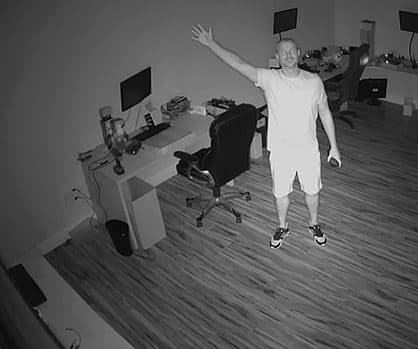
For $5, the night vision add-on promises infrared viewing. Its image shows a black and white view of a man waving in a home office. For a security camera, this should be standard.
What to do: add night vision if you buy it for security.
Resolution
"High definition" in the title is not a number. Wyze's Bulb Cam, for comparison, is sold as 2K.
Motion detection and alerts
The page does not mention motion detection or alerts. Without them, you have to watch live or scroll through recordings. Ask the seller.
Storage
Recording needs a microSD card, sold as a $14 add-on for 32GB. Without a card, you can only watch live.
E27 sockets
The page lists a standard E27 socket. E27 is common in Europe; most US fittings are E26. E27 bulbs often physically fit E26 sockets, but check the voltage rating on the product before installing.
What about privacy and the app?
The page does not name the app, so you cannot check its ratings, updates or privacy policy before buying. A camera in your home streams video over the internet through that app. Cheap cameras with poorly maintained apps can be a privacy risk. Use a strong password, update firmware and keep cameras out of private spaces.
Why the app matters
Our Sight Bulb review found a similar bulb camera whose app averaged 2.7 stars and had not been updated for a long time. An app's update history and privacy policy tell you a lot about the camera.
Securing a camera
Change the default password, use a strong unique one, put cameras on a separate guest network if your router allows, and turn off remote access if you do not need it.
Respecting others
Do not point cameras at neighbours' homes or into private spaces. Laws on recording audio and video vary, so check local rules.
How much does LiveGuard Pro cost, and what do the add-ons add?
On 6 October 2026, one LiveGuard Pro cost $59, with the five-pack at $149 flagged as the best seller. The checkout offered a lamp holder with mounting screws for $7, a 32GB microSD card for $14 and night vision for $5, plus a 3-year warranty for $9. With night vision and a card, one camera costs $78.
LiveGuard Pro price and bundles
| Package | Total | Per camera |
|---|---|---|
| 1 LiveGuard Pro | $59 | $59.00 |
| 2 LiveGuard Pro | $89 | $44.50 |
| 3 (buy 2, get 1 free) | $109 | $36.33 |
| 4 LiveGuard Pro | $129 | $32.25 |
| 5 (buy 3, get 2 free), best seller | $149 | $29.80 |
Prices are in US dollars as listed on 6 October 2026. Start with one camera to test the app. You can check today's packages on the LiveGuard Pro order page (opens G Com Pte Ltd in a new tab).
The lamp holder
For $7, a lamp holder and screws let you mount the camera anywhere with a cable. Useful if you have no suitable socket.
The microSD card
For $14, a 32GB card. You can buy a card separately, often for less. Choose one rated for continuous recording.
Warranty
The 3-year warranty costs $9.
The "regular price"
Add-ons are shown against crossed-out prices, with a countdown timer on the page. We found no evidence that LiveGuard Pro sells at a higher regular price. White fisheye bulb cameras of this design are sold widely.
Who sells it
The order page names G Com Pte Ltd at 137 Market Street in Singapore, with the email support@g63com.com and a phone number. The footer gives the country as Hong Kong. The page code says charges appear on your card statement as Matrixfze, written in capitals.

LiveGuard ProScore 3.8/10
Best for: Renters who want a camera without drilling or wiring
$59.00 at G Com Pte Ltd · Price checked October 6, 2026
Check price at G Com Pte Ltd (opens G Com Pte Ltd in a new tab)We may earn a commission if you buy through our links.
Is LiveGuard Pro better than Wyze Bulb Cam or Sight Bulb?
No. Wyze's Bulb Cam launched at $49.98 with 2K video, colour night vision and a US E26 base, from a known brand with a named app. Sight Bulb, which we reviewed, is a similar pan-tilt bulb camera. LiveGuard Pro's fisheye view is its one distinctive feature.
| Camera | Night vision | Socket | App | Price |
|---|---|---|---|---|
| LiveGuard Pro | $5 add-on | E27 | Not named | $59 |
| Wyze Bulb Cam | Colour, built in | E26 | Wyze app | $49.98 at launch |
| Sight Bulb | See our review | See our review | 2.7-star app in our review | $39.95 in our review |
| LiveGuard360 | Built in, per its page | E27 | Not named | $59 |
LiveGuard Pro vs Wyze Bulb Cam
9to5Google reported the Wyze Bulb Cam's launch at $49.98 with 2K video. A known brand with a named, updated app is the clearest case where a rival wins.
LiveGuard Pro vs Sight Bulb
Our Sight Bulb review covers a pan-tilt bulb camera with a weak app. LiveGuard Pro's fisheye avoids moving parts but gives a distorted view.
Other smart home devices
Our Video DoorBell review and HomePolice24 review cover other security gadgets from offer pages, and our SmartLight review a smart bulb. Browse our smart home reviews for more.
If you want a fisheye bulb camera for an E27 socket, you can see today's bundles on the LiveGuard Pro offer page (opens G Com Pte Ltd in a new tab).
LiveGuard ProScore 3.8/10
Why people buy it: Screws into a light socket, so no wiring or batteries
$59.00 at G Com Pte Ltd · Price checked October 6, 2026
Check price at G Com Pte Ltd (opens G Com Pte Ltd in a new tab)We may earn a commission if you buy through our links.
Is LiveGuard Pro legit, and what should you check before buying?
LiveGuard Pro is a real product from a named seller, and a camera should arrive if you order. Before buying, ask for the app name, resolution and US socket compatibility, add night vision, switch from the five-pack and plan for a microSD card.
Ask the key questions
What to do: email support@g63com.com and ask for the app's name, the resolution, motion alerts, voltage rating and whether it works in E26 sockets. Look up the app's ratings and privacy policy.
Check the selected bundle
The five-pack for $149 is flagged as the best seller in the page code. What to do: change the order to one camera.
Card statement name and memberships
The charge appears as Matrixfze. Pages on this checkout have also carried text for a "Gadget Discount Club" membership that is free for 30 days and then billed. What to do: read every checkbox and post-payment page.
Refunds and returns
The page code offers a 30-day guarantee for a full refund or replacement, less shipping and handling. The terms we recorded on 4 October 2026 focus on defective goods, which can be returned within two years once you have a returns number, with return postage at your cost.
How to buy LiveGuard Pro the smart way
- Ask for the app name, resolution and socket compatibility.
- Open the LiveGuard Pro order page (opens G Com Pte Ltd in a new tab) and select your country.
- Change the five-pack to one camera.
- Add night vision; buy a microSD card here or elsewhere.
- Note the card statement name, Matrixfze.
- Secure the app with a strong password on day one.
How did we score LiveGuard Pro?
LiveGuard Pro scores 3.8 out of 10: claim accuracy 0.6, build durability 0.9, price competitiveness 0.7, usability 1.1 and owner satisfaction 0.5, each out of 2. It is easy to fit and gives a whole-room view. The score falls on night vision sold separately, no app named, an E27 socket for US buyers, missing resolution and alerts, and a known-brand rival for less.
How the score breaks down
We use the five criteria on our how we test page, each out of 2.
| Criterion | Score | Why |
|---|---|---|
| Claim accuracy | 0.6 / 2 | "HD" with no figure; security use without night vision |
| Build durability | 0.9 / 2 | Simple bulb housing; no water rating for outdoor sockets |
| Price competitiveness | 0.7 / 2 | $59 plus add-ons, against a known brand at $49.98 |
| Usability | 1.1 / 2 | Screw-in fitting; app unknown |
| Owner satisfaction | 0.5 / 2 | No independent ratings for this listing |
| Total | 3.8 / 10 |
What owners say
We found no Trustpilot profile for the gadgetxaura.com store and no retailer reviews for LiveGuard Pro by that name. Owners of similar fisheye bulb cameras on large retail sites like the easy fitting and wide view, and complain about clunky apps, Wi-Fi drop-outs, distorted images and poor night pictures without infrared.
What we did, and did not, do
Nobody on our team has used LiveGuard Pro. We read the offer page our link opens and its page code on 6 October 2026, along with 9to5Google's report on the Wyze Bulb Cam and the pages that rank for LiveGuard Pro. The refund and returns terms are as we recorded them from the site's terms page on 4 October 2026.
How to use LiveGuard Pro for the best results
Fit it in a central ceiling socket within good Wi-Fi range, keep the switch on, insert a recording-grade microSD card, secure the app and point it only at your own space. Check the picture at night if you added night vision, and update the firmware when the app offers it.
- Turn off the power. Before screwing it in.
- Choose a central socket. For the widest fisheye view.
- Check Wi-Fi strength. Weak signal means drop-outs.
- Insert a microSD card. Recording-grade for long use.
- Secure the app. Strong password, updates on.
- Keep the switch on. Tape or label it so others do not turn it off.
- Respect privacy. Tell household members and guests.
If the picture drops
Move your router closer or add a Wi-Fi extender, and check the 2.4 GHz band is enabled, as many cheap cameras need it.
Night viewing
With night vision, infrared light may reflect off nearby surfaces. Angle it away from close walls.
Cleaning
Turn off the power and wipe the lens with a soft cloth.
LiveGuard ProScore 3.8/10
Before you buy: Check the final price, shipping and return terms at checkout.
$59.00 at G Com Pte Ltd · Price checked October 6, 2026
Check price at G Com Pte Ltd (opens G Com Pte Ltd in a new tab)We may earn a commission if you buy through our links.
What else do people ask about light bulb cameras?
Most questions are about whether they give light, whether they work outdoors and whether they record sound. Many do not light the room, most are not weatherproof, and audio features vary. Check each before buying.
Does it work as a light bulb too?
The page does not say. Assume it may not.
Can I use it outdoors?
The page gives no water rating. Use it indoors or under a fully covered porch.
Does it record sound?
The page does not mention audio. The sister product LiveGuard360 sells a voice recorder add-on.
What happens in a power cut?
It stops, because it is powered by the socket.
Frequently asked questions
Does LiveGuard Pro have night vision?
Not as standard. Night vision is a $5 add-on described as infrared for enhanced night viewing. A security camera without night vision sees little in the dark, so add it if you buy the camera for security.
Will LiveGuard Pro fit my light socket?
The page says it fits a standard E27 socket. E27 is the common European size; most US fittings are E26. E27 bulbs often screw into E26 sockets, but check the voltage rating and the fit before installing, and ask the seller about US use.
How much does LiveGuard Pro cost?
On 6 October 2026, the offer page listed one LiveGuard Pro for $59, two for $89, three (two plus one free) for $109, four for $129 and five (three plus two free) for $149, with the five-pack flagged as the best seller. A lamp holder cost $7, a 32GB card $14 and night vision $5.
Does LiveGuard Pro need a subscription?
The page mentions recording to a microSD card and live streaming in an app, with no subscription. It does not say whether cloud storage exists or what it costs. Recording needs a card, which is a $14 add-on.
Is a cheap Wi-Fi camera safe for privacy?
It depends on the app and the maker's security. The page does not name the app. Before installing any camera, check the app's privacy policy, use a strong password, update firmware and avoid pointing it at private areas such as bathrooms or neighbours' windows.
Is LiveGuard Pro better than Wyze Bulb Cam?
On published specs, no. Wyze's Bulb Cam launched at $49.98 with 2K video, colour night vision and an E26 base for US sockets, from a known brand with a named app. LiveGuard Pro costs $59 before night vision and a card.
Is LiveGuard Pro legit?
It is a real product sold by G Com Pte Ltd, which lists a Singapore address, email and phone number. The concerns are night vision sold separately, no app named, the E27 socket, missing specs and return postage at your cost.
We may earn a commission if you buy through our links.
Prices accurate as of October 6, 2026. Check the seller's checkout for current pricing, promotions and terms.
What we checked: No hands-on use. Claims, product title, feature bullets, photos, US dollar prices, bundles, add-ons and their images, warranty price, seller details and card statement name from the LiveGuard Pro offer page our link opens (gadgetxaura.com) and the data in the page's own code on 2026-10-06. The 30-day guarantee text was read in the same page code that day; the fuller refund and returns terms are as recorded from the site's terms page on 2026-10-04. 9to5Google's report on the Wyze Bulb Cam launch price and the top-ranking LiveGuard Pro pages were read on 2026-10-06.

About the author
Alex Carter, Senior Tech Reviewer
Alex Carter is the senior tech reviewer at Top10Gadgets, covering the everyday gadgets, home and kitchen devices, smart home products and accessories most people actually buy. Alex judges a product the way a normal buyer…
- Everyday gadgets and accessories
- Smart home devices
- Home and kitchen gadgets
- Value for money
- Long-term reliability
Writing for Top10Gadgets since 2026Full profile