Home Accessories / Decorative lighting
BrightTouch Max Review: Six Touch Hexagon Lights, and the Coloured Wall You Pay Extra For
Six magnetic hexagon wall lights you switch on with a touch. A fun decorative accent, but the coloured wall in the photo needs RGB add-ons, and there is no app or dimming.

By Alex Carter, Senior Tech Reviewer at Top10Gadgets
Updated 12 min readHow we test
Quick answer
Fun as a simple wall accent, but the photo sells a bigger, more colourful wall than $99 buys. BrightTouch Max is six hexagon lights that link magnetically and switch on with a touch, with a mains adapter included, and it makes a playful feature on a bedroom or gaming wall.

Score 4.0/10$99.00 at G Com Pte Ltd
Check price at G Com Pte Ltd (opens G Com Pte Ltd in a new tab)We may earn a commission if you buy through our links.
- Best for
- People who want a simple decorative wall accent without an app
- Not for
- Anyone expecting the colourful wall in the photo for $99
$99.00 at G Com Pte Ltd
Check price at G Com Pte Ltd (opens G Com Pte Ltd in a new tab)We may earn a commission if you buy through our links.
On this page · 14 sections
- 01Our verdict
- 02The short version
- 03Pros & cons
- 04How it works
- 05Who it's for
- 06What do you actually get for $99?
- 07How do you mount BrightTouch Max, and is it safe?
- 08How much does BrightTouch Max cost, and what do the add-ons add?
- 09Is BrightTouch Max better than Govee or Nanoleaf hexagon panels?
- 10Is BrightTouch Max legit, and what should you check before buying?
- 11How did we score BrightTouch Max?
- 12How to use BrightTouch Max for the best results
- 13What else do people ask about touch hexagon lights?
- 14Frequently asked questions
Our verdict
Fun as a simple wall accent, but the photo sells a bigger, more colourful wall than $99 buys. BrightTouch Max is six hexagon lights that link magnetically and switch on with a touch, with a mains adapter included, and it makes a playful feature on a bedroom or gaming wall. But the colourful display in the main photo needs RGB panels at $69 for five, three more white panels cost $49, and there is no app, dimming or brightness figure. BrightTouch Max scores 4.0 out of 10, held back by value and the gap between photo and product.
The short version
- What it is: six magnetic hexagon wall lights you turn on and off by touch, with a mains adapter.
- Price: $99 for one set on 6 October 2026, with five sets for $297 flagged as the best seller.
- Best trait: simple, tactile lighting with no app to fiddle with.
- Biggest drawback: the coloured wall in the photo costs much more than the base kit.
- Our score: 4.0 out of 10.
Pros & cons
Touch hexagon lights are a fun decor item. The cons are about what you actually get for $99 compared with what the photo shows, and the features rivals include.
What we like
- Touch any panel to switch it on or off, which is fun and simple
- Panels connect magnetically, so you can rearrange the shape
- Mains adapter included, so no batteries
- Makes a striking accent on a bedroom, gaming or office wall
- The seller names a registered company with an address, email and phone number
What we don't
- The colourful wall in the main photo needs extra RGB panels at $69 for five
- Six panels make a small shape; three more white panels cost $49
- No app, colour control, dimming or brightness figure on the page
- At $99 for six panels, it costs more than many similar touch hexagon kits
- Mounting method and wall damage are not explained
- Return postage to an overseas seller is yours to pay
Sold by G Com Pte Ltd
BrightTouch Max$99.00
How it works
BrightTouch Max is a set of six hexagon panels, each with LEDs behind a frosted cover and a touch sensor. Magnetic connectors on the edges link panels together and carry power, so one included DC adapter feeds the whole shape. Touch a panel to switch it on; touch it again to switch it off. Each panel works independently.

Arrange the panels
Step 1: Lay out the six hexagons in a shape you like. Magnetic connectors on the edges link each panel to the next.
Mount and plug in
Step 2: Fix the panels to the wall and plug the included DC power adapter into one panel. Power passes through the connections.
Touch to switch
Step 3: Touch a panel to turn it on or off. Each panel switches on its own, so you can light some and not others.
The page title lists "decorative turn on touch lights, hexagonal touch activated lights, decorative touch lights, composition touch lights, free shaping touch sensitive lights". The bullets promise six hexagonal pieces, touch on and off, strong magnetic attachment, easy, maintenance-free setup, an included universal DC adapter and safe use by anyone. It gives no brightness, colour, size, mounting method or cable length.
The photo versus the kit
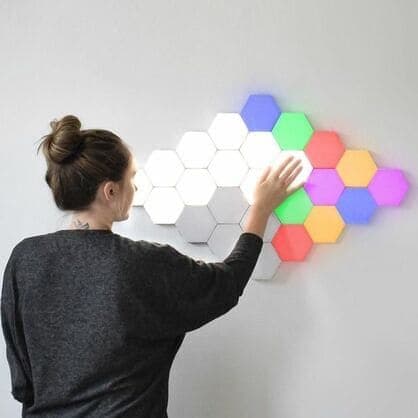
The main photo shows a woman touching a large cluster of around twenty panels, some white and some lit blue, green, red, orange and purple. The base kit is six panels. Coloured panels are sold separately.
Size
The page does not state panel size. Six hexagons make a modest shape, roughly the width of a small picture.
Who it's for
BrightTouch Max suits people who want a simple decorative wall accent without an app, teenagers and gamers who like touch lights, and anyone happy with a small six-panel shape. It does not suit buyers expecting the photo's colourful wall or app features.
- People who want a simple decorative wall accent without an app
- Teenagers and gamers who like a touch-activated light feature
- Buyers happy with a small six-panel shape
Bedrooms and dorms
A small cluster of touch lights makes a soft night light and a talking point.
Gaming setups
Hexagon panels are popular behind gaming desks. Coloured, app-controlled panels are more common there.
Children's rooms
Touch lights are easy for children to use. Check the panels do not get hot and keep the cable tidy.
Offices
A few panels add a soft accent behind a desk on video calls.
Who should skip it
Skip BrightTouch Max if you expect the colourful wall for $99, want app control or colour scenes, worry about wall marks, or compare on price per panel.
- Anyone expecting the colourful wall in the photo for $99
- People who want app control, colour scenes or music sync
- Renters worried about marks on walls, until mounting is clear
- Buyers comparing on price per panel
What do you actually get for $99?
Six panels, which are most likely white, and a power adapter. The page does not say the base set is coloured, and the checkout sells five RGB panels for $69 and three white panels for $49. The large multicoloured wall in the main photo would take several of those add-ons. With five RGB panels, eleven panels cost $168.
Building the wall in the photo
The photo shows roughly twenty panels. With the base six, three extra white sets and two RGB sets, you would pay several hundred dollars.
White panels
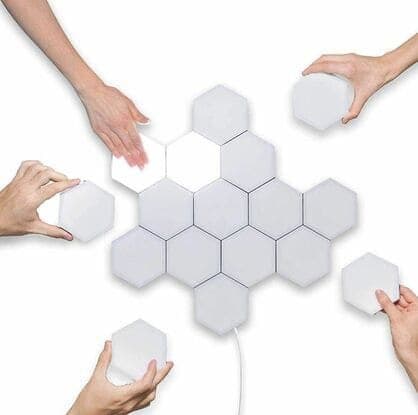
The $49 extra white set adds three panels, about $16 each. Its image shows hands arranging white panels.
RGB panels
The $69 RGB set adds five coloured panels, about $14 each. The page does not explain how colours are chosen without an app or remote; ask the seller.
Brightness
No lumen figure is given. These are accent lights, not room lights.
How do you mount BrightTouch Max, and is it safe?
The page does not explain mounting. Hexagon kits usually use adhesive pads or screws. Adhesive can lift paint when removed. The included DC adapter keeps voltage low at the panels, which is safer than mains wiring, and touch panels should stay cool.
Mounting
Ask the seller what fixings are included. Test adhesive on a hidden spot first. Screws are firmer but leave holes.
Cable
One adapter powers the set. Plan where the cable runs and where the nearest socket is.
Heat
LED panels run cool. If one gets hot, unplug it.
How much does BrightTouch Max cost, and what do the add-ons add?
On 6 October 2026, one BrightTouch Max set of six cost $99, with five sets at $297 flagged as the best seller. The checkout offered three extra white panels for $49, five extra RGB panels for $69, a car USB adapter for $4 and a 3-year warranty for $9. A set of six works out at about $16.50 a panel.
BrightTouch Max price and bundles
| Package | Total | Per set |
|---|---|---|
| 1 set (6 panels) | $99 | $99.00 |
| 2 sets | $159 | $79.50 |
| 3 sets (buy 2, get 1 free) | $197 | $65.67 |
| 4 sets | $249 | $62.25 |
| 5 sets (buy 3, get 2 free), best seller | $297 | $59.40 |
Prices are in US dollars as listed on 6 October 2026. Two sets give a twelve-panel shape. You can check today's packages on the BrightTouch Max order page (opens G Com Pte Ltd in a new tab).
Car adapter and warranty
The $4 car adapter is irrelevant to wall lights. The 3-year warranty costs $9.
The "regular price"
Add-ons are shown against crossed-out prices, with a countdown timer on the page. We found no evidence that BrightTouch Max sells at a higher regular price. Touch hexagon light kits like this are sold widely.
Who sells it
The order page names G Com Pte Ltd at 137 Market Street in Singapore, with the email support@g63com.com and a phone number. The footer gives the country as Hong Kong. The page code says charges appear on your card statement as panameedia.

BrightTouch MaxScore 4.0/10
Best for: People who want a simple decorative wall accent without an app
$99.00 at G Com Pte Ltd · Price checked October 6, 2026
Check price at G Com Pte Ltd (opens G Com Pte Ltd in a new tab)We may earn a commission if you buy through our links.
Is BrightTouch Max better than Govee or Nanoleaf hexagon panels?
For colour and control, smart hexagon panels from Govee or Nanoleaf are better; BrightTouch Max is simpler and more basic. PCWorld's review of the Govee Glide Hexa describes app-controlled colour panels with effects. Nanoleaf's Shapes add touch controls and smart home support at a higher price. BrightTouch Max is touch-only and app-free.
| Option | Colour | Control | Panels in base kit | Price |
|---|---|---|---|---|
| BrightTouch Max | White likely; RGB extra | Touch | 6 | $99 |
| Govee Glide Hexa | Colour | App | Varies by kit | Varies |
| Nanoleaf Shapes Hexagons | Colour | App, touch, smart home | 9 or more in starter kits | Higher |
BrightTouch Max vs Govee Glide Hexa
PCWorld's Govee Glide Hexa review covers colour panels with app control and effects. For a colourful wall, that is the clearest case where a rival wins.
BrightTouch Max vs Nanoleaf
Nanoleaf Shapes are premium panels with touch, app and smart home features. They cost more but do far more.
Other lighting and decor
Our GuideLight review covers a night light outlet cover that scored well, and our SmartLight review a smart bulb. Our Aroma Amplifier review and Bed Scrunchie review cover other home accessories. Browse our home accessory reviews for more.
If you want simple touch panels, you can see today's bundles on the BrightTouch Max offer page (opens G Com Pte Ltd in a new tab).
BrightTouch MaxScore 4.0/10
Why people buy it: Touch any panel to switch it on or off, which is fun and simple
$99.00 at G Com Pte Ltd · Price checked October 6, 2026
Check price at G Com Pte Ltd (opens G Com Pte Ltd in a new tab)We may earn a commission if you buy through our links.
Is BrightTouch Max legit, and what should you check before buying?
BrightTouch Max is a real product from a named seller, and a set of lights should arrive if you order. Before buying, ask whether the base panels are white, how RGB panels change colour, how they mount, and the panel size. Then choose the number of sets you really need.
Ask the key questions
What to do: email support@g63com.com and ask about the base colour, RGB control, mounting, panel size and brightness. Keep the reply.
Check the selected bundle
Five sets for $297 are flagged as the best seller in the page code. What to do: choose the number of sets you need.
Card statement name and memberships
The charge appears as panameedia. Pages on this checkout have also carried text for a "Gadget Discount Club" membership that is free for 30 days and then billed. What to do: read every checkbox and post-payment page.
Refunds and returns
The page code offers a 30-day guarantee for a full refund or replacement, less shipping and handling. The terms we recorded on 4 October 2026 focus on defective goods, which can be returned within two years once you have a returns number, with return postage at your cost.
How to buy BrightTouch Max the smart way
- Ask support about colours, mounting and size.
- Open the BrightTouch Max order page (opens G Com Pte Ltd in a new tab) and select your country.
- Choose the number of sets you need.
- Add RGB panels only if support explains how colours are chosen.
- Note the card statement name, panameedia.
- Plan the layout and cable route before mounting.
How did we score BrightTouch Max?
BrightTouch Max scores 4.0 out of 10: claim accuracy 0.6, build durability 0.9, price competitiveness 0.6, usability 1.4 and owner satisfaction 0.5, each out of 2. The touch panels are simple and fun. The score falls on a main photo showing far more than the base kit, coloured panels sold separately, no brightness or mounting details and a high price per panel.
How the score breaks down
We use the five criteria on our how we test page, each out of 2.
| Criterion | Score | Why |
|---|---|---|
| Claim accuracy | 0.6 / 2 | Photo shows a coloured wall the base kit does not include |
| Build durability | 0.9 / 2 | Plastic panels with magnetic links |
| Price competitiveness | 0.6 / 2 | About $16.50 a panel |
| Usability | 1.4 / 2 | Touch on and off; simple setup |
| Owner satisfaction | 0.5 / 2 | No independent ratings for this listing |
| Total | 4.0 / 10 |
What owners say
We found no Trustpilot profile for the gadgetxaura.com store and no retailer reviews for BrightTouch Max by that name. Owners of similar touch hexagon kits on large retail sites like the look and complain about adhesive that does not hold, panels that respond inconsistently to touch and connectors that lose contact.
What we did, and did not, do
Nobody on our team has used BrightTouch Max. We read the offer page our link opens and its page code on 6 October 2026, along with PCWorld's Govee Glide Hexa review and the pages that rank for BrightTouch Max. The refund and returns terms are as we recorded them from the site's terms page on 4 October 2026.
How to use BrightTouch Max for the best results
Plan the layout on the floor first, check every panel connects and lights, mount near a socket, and keep the cable tidy. Clean the wall where adhesive goes, press panels firmly, and avoid placing them where they are bumped often.
- Lay it out first. Try shapes on the floor.
- Test every panel. Before mounting.
- Clean the wall. Dust-free surfaces hold adhesive better.
- Mount the powered panel first. Near a socket.
- Add panels one at a time. Check each connection lights.
- Hide the cable. Use clips along skirting or furniture.
- Touch gently. No need to press hard.
If a panel will not light
Check the magnetic connection and reseat the panel. Try it in another position.
Removing them
Peel adhesive slowly, or warm it with a hair dryer on low to soften it.
BrightTouch MaxScore 4.0/10
Before you buy: Check the final price, shipping and return terms at checkout.
$99.00 at G Com Pte Ltd · Price checked October 6, 2026
Check price at G Com Pte Ltd (opens G Com Pte Ltd in a new tab)We may earn a commission if you buy through our links.
What else do people ask about touch hexagon lights?
Most questions are about colours, brightness and wall damage. Colours depend on buying RGB panels, brightness is for accent only, and adhesive can mark paint. Smart panels add apps and effects at a higher price.
Can I change colours?
Only with RGB panels, and the page does not say how. Ask the seller.
Do they use much electricity?
LED panels use little power. Turn them off when not in use.
Can I use them as a night light?
Yes, a single lit panel makes a soft night light.
Will they work with Alexa or Google?
The page mentions no smart home support.
Frequently asked questions
Are BrightTouch Max lights coloured?
The page does not say the base set is coloured. The checkout sells five RGB panels for $69 and three white panels for $49, which suggests the six base panels are white. The main photo shows a large wall with coloured panels, more than the base kit.
How do the touch lights work?
Each panel has a touch sensor. Touching it turns that panel on or off. Panels link magnetically, and one power adapter feeds the whole set through the connections.
How much does BrightTouch Max cost?
On 6 October 2026, the offer page listed one set of six for $99, two sets for $159, three (two plus one free) for $197, four for $249 and five (three plus two free) for $297, with five flagged as the best seller. Three extra white panels cost $49 and five RGB panels $69.
Is there an app?
The page mentions no app, remote, dimming or colour control. Smart hexagon panels such as Govee Glide Hexa and Nanoleaf Shapes use apps for colours and effects.
How do you mount them?
The page does not say. Kits like this usually use adhesive pads or screws. Ask the seller, and test adhesive on a hidden area if you are worried about paint.
Are they bright enough to light a room?
The page gives no brightness figure. Decorative hexagon panels are generally accent lighting, not main room lighting.
Is BrightTouch Max legit?
It is a real product sold by G Com Pte Ltd, which lists a Singapore address, email and phone number. The concerns are a photo showing more than the base kit, coloured panels sold separately, no brightness or mounting details and return postage at your cost.
We may earn a commission if you buy through our links.
Prices accurate as of October 6, 2026. Check the seller's checkout for current pricing, promotions and terms.
What we checked: No hands-on use. Claims, product title, feature bullets, photos, US dollar prices, bundles, add-ons and their images, warranty price, seller details and card statement name from the BrightTouch Max offer page our link opens (gadgetxaura.com) and the data in the page's own code on 2026-10-06. The 30-day guarantee text was read in the same page code that day; the fuller refund and returns terms are as recorded from the site's terms page on 2026-10-04. PCWorld's review of the Govee Glide Hexa light panels and the top-ranking BrightTouch Max pages were read on 2026-10-06.

About the author
Alex Carter, Senior Tech Reviewer
Alex Carter is the senior tech reviewer at Top10Gadgets, covering the everyday gadgets, home and kitchen devices, smart home products and accessories most people actually buy. Alex judges a product the way a normal buyer…
- Everyday gadgets and accessories
- Smart home devices
- Home and kitchen gadgets
- Value for money
- Long-term reliability
Writing for Top10Gadgets since 2026Full profile