Cellphone Accessories / Mobile game controllers
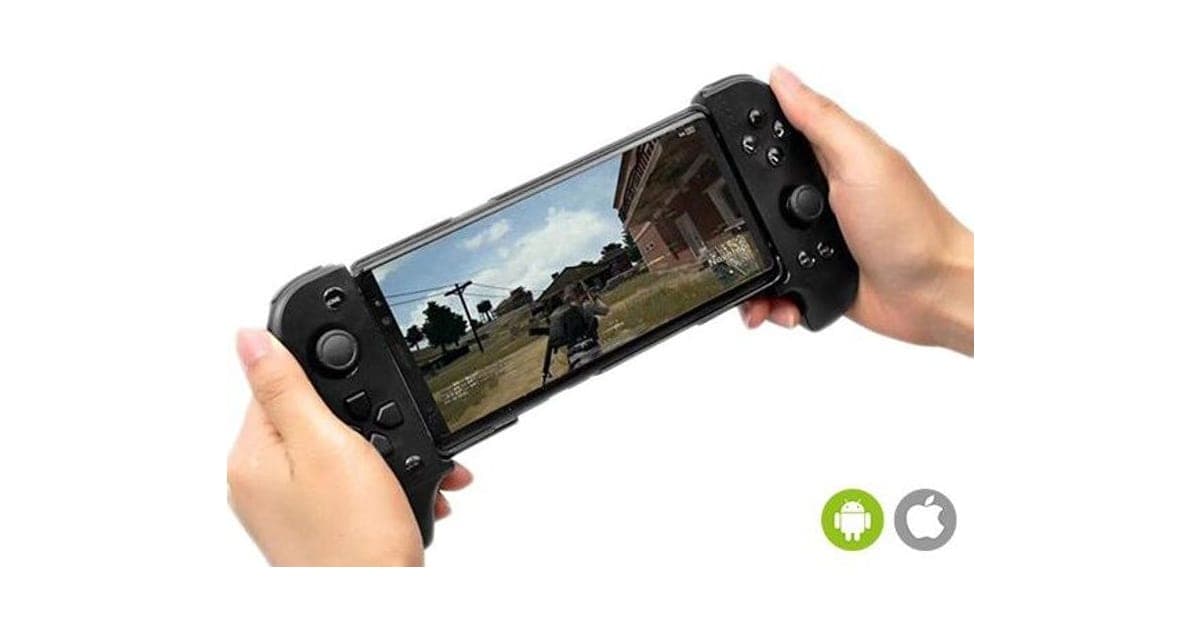
PlayX Pro Review: An $89 Stretch-Grip Bluetooth Gamepad That Turns a Phone Into a Handheld
A telescopic Bluetooth controller with two analog sticks that clamps around a phone. It can make mobile games easier to play, but support depends on each game, and the larger-phone fit costs extra.

By Ethan Walker, Hardware & Gadget Tester at Top10Gadgets
Updated 11 min readHow we test
Quick answer
It depends on what you play. PlayX Pro is a stretch-grip Bluetooth gamepad with two analog sticks that clamps around your phone, and for games that support controllers, especially racing and fighting games, real sticks and buttons beat thumbs on glass.
Score 3.3/10$89.00 at G Com Pte Ltd
Check price at G Com Pte Ltd (opens G Com Pte Ltd in a new tab)We may earn a commission if you buy through our links.
- Best for
- Android players of games with built-in controller support
- Not for
- iPhone owners whose favourite games do not list controller support
$89.00 at G Com Pte Ltd
Check price at G Com Pte Ltd (opens G Com Pte Ltd in a new tab)We may earn a commission if you buy through our links.
On this page · 13 sections
- 01Our verdict
- 02The short version
- 03Pros & cons
- 04How it works
- 05Who it's for
- 06Will PlayX Pro work with your phone and your games?
- 07How much does PlayX Pro cost, and which add-ons matter?
- 08Is PlayX Pro better than a branded mobile controller or a console pad you already own?
- 09Is PlayX Pro legit, and what should you check before buying?
- 10How did we score PlayX Pro?
- 11How to use PlayX Pro for smooth mobile gaming
- 12What else do people ask about phone game controllers?
- 13Frequently asked questions
Our verdict
It depends on what you play. PlayX Pro is a stretch-grip Bluetooth gamepad with two analog sticks that clamps around your phone, and for games that support controllers, especially racing and fighting games, real sticks and buttons beat thumbs on glass. But support varies game by game, many touch-only games need the page's unnamed mapping app, phones up to 6.7 inches need a $4 larger version, and $89 is the price of a branded mobile controller. PlayX Pro scores 3.3 out of 10, held back by compatibility uncertainty and price.
The short version
- What it is: a telescopic Bluetooth game controller that holds a phone between two grips.
- Price: $89 for one on 6 October 2026, with a five-pack for $267 flagged as the best seller.
- Best trait: console-style sticks and buttons for controller-ready games.
- Biggest drawback: support depends on each game and platform, and the page names no app.
- Our score: 3.3 out of 10.
Pros & cons
The pros reflect a familiar, workable design. The cons are about which games and phones it actually suits, and the price.
What we like
- Two analog sticks, a D-pad and face buttons in a console-style layout
- Telescopic clamp holds the phone between the grips
- Bluetooth, so it does not use the phone's charging port
- Works with Android and iOS, according to the page
- The seller names a registered company with an address, email and phone number
What we don't
- Controller support varies by game; many mobile games ignore gamepads without a mapping app
- Phones up to 6.7 inches need the $4 'Large Fit Version'
- The large-fit add-on photo shows a different, plug-in style controller
- No battery, latency, Bluetooth version or app name on the page
- At $89, it costs as much as branded mobile controllers
- Return postage to an overseas seller is yours to pay
Sold by G Com Pte Ltd
PlayX Pro$89.00
How it works
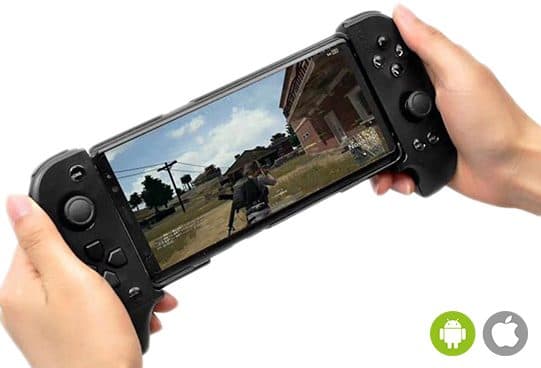
PlayX Pro is two controller grips joined by a spring-loaded telescopic bridge. You pull the grips apart, seat your phone between them and let go. It connects over Bluetooth as a game controller. Games with built-in controller support read the sticks and buttons directly. For touch-only games, a mapping app links each button to a spot on the screen, simulating taps.
Charge and pair
Step 1: Charge the controller, switch it on and pair it with your phone over Bluetooth.
Clamp the phone
Step 2: Pull the grips apart, seat the phone between them and let the spring hold it.
Play or map
Step 3: Games with controller support work directly; for others, the included app maps buttons to on-screen controls.
The page title calls it "Gaming Pads For Smartphone", "Analog Sticks Gaming Pads", "Professional Gaming Handles" and "Bluetooth Gaming Handles For Smartphone". The six bullets promise precise dual analog sticks, button mapping "via the included app", control of demanding games, suitability for fighting and racing games, an ergonomic grip and Android and iOS compatibility.
What the page leaves out
There is no Bluetooth version, latency, battery capacity, play time, charging port, phone size range for the standard model, or the name of the mapping app.
A common design
Stretch-grip Bluetooth controllers like this are sold widely under many names. The layout is proven; the details vary by maker.
Who it's for
PlayX Pro suits Android players whose games support controllers, people who find touch controls awkward in racing and fighting games, and cloud gamers who want a handheld feel. For other phone add-ons from this checkout, our SelfCam Pro review covers a telescopic selfie stick.
- Android players of games with built-in controller support
- People who find touch controls awkward for racing and fighting games
- Anyone wanting a console-style grip for cloud gaming on a phone
Controller-ready games
Many console ports and racing games recognise gamepads as soon as they connect.
Cloud gaming
Streaming services built for controllers suit a clamp-style pad.
Touch-control strugglers
Physical sticks can help if on-screen joysticks frustrate you, with mapping set up.
Who should skip it
Skip PlayX Pro if you use an iPhone and your games do not list controller support, if you play competitively and want latency figures, if your phone is larger than 6.7 inches, or if you are comparing value with branded mobile controllers.
- iPhone owners whose favourite games do not list controller support
- Competitive players who care about latency figures
- Owners of phones over 6.7 inches
- Buyers comparing value with branded mobile controllers
Will PlayX Pro work with your phone and your games?
Possibly, but check before you buy. Apple's support guide says iPhone and iPad can pair Bluetooth game controllers, while noting that support varies by controller and the app you use. Android generally recognises standard Bluetooth gamepads. Either way, the game decides: controller-ready games work directly, and touch-only games need the mapping app the page mentions but never names.
iPhone and iPad
Apple's guide to connecting a wireless game controller explains pairing and says support varies by controller and app. What to do: ask the seller whether PlayX Pro works on iOS without a mapping app, and check your games' controller support.
Android
Most Android phones accept Bluetooth gamepads. Game support still varies.
"Easily Map Any Button Via The Included App"
Mapping apps typically need screen-overlay or accessibility permissions to simulate taps. What this means for you: ask for the app's name and check its ratings and permissions before installing it.
"Take Control Of Most Demanding Games"
A controller cannot change how a phone runs a game. It changes how you control it.
How much does PlayX Pro cost, and which add-ons matter?
On 6 October 2026, one PlayX Pro cost $89, with the five-pack at $267 flagged as the best seller. The checkout offered a large-fit version for phones up to 6.7 inches for $4, cooling pads for $9, a USB car charger adapter for $4 and a 3-year warranty for $7. Many modern phones are 6.1 to 6.7 inches, so the large-fit version may be essential.
PlayX Pro price and bundles
| Package | Total | Per controller |
|---|---|---|
| 1 PlayX Pro | $89 | $89.00 |
| 2 PlayX Pro | $139 | $69.50 |
| 3 (buy 2, get 1 free) | $177 | $59.00 |
| 4 PlayX Pro | $219 | $54.75 |
| 5 (buy 3, get 2 free), best seller | $267 | $53.40 |
Prices are in US dollars as listed on 6 October 2026. You can check today's packages on the PlayX Pro order page (opens G Com Pte Ltd in a new tab).
Large Fit Version
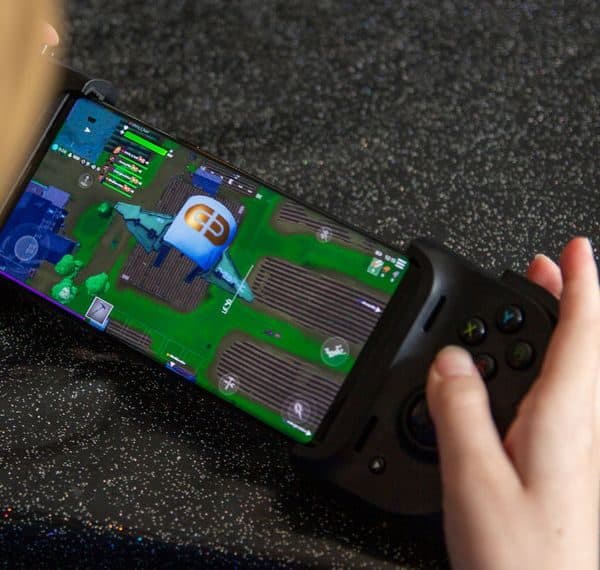
For $4, a version to "fit a large Smartphone up to 6.7 Inches". The image shows a compact grip of a different design attached directly to a phone, not the stretch-grip controller in the main photo. What to do: ask which design ships.
Cooling pads
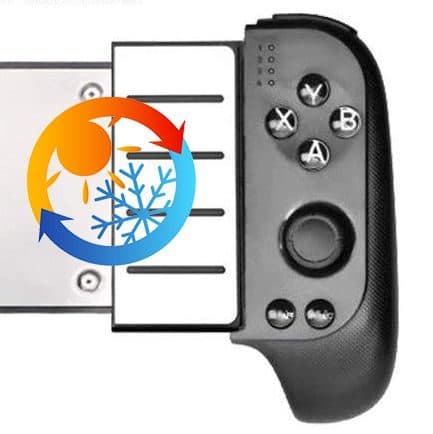
For $9, "heat dissipation pads". The image is a grip with a sun-and-snowflake icon over it. No material or figures are given.
Car adapter and warranty
A $4 USB car charger adapter. The 3-year warranty costs $7.
Who sells it
The order page names G Com Pte Ltd at 137 Market Street in Singapore, with the email support@g63com.com and a phone number. The footer gives the country as Hong Kong. The page code says charges appear on your card statement as drone720x.com.

PlayX ProScore 3.3/10
Best for: Android players of games with built-in controller support
$89.00 at G Com Pte Ltd · Price checked October 6, 2026
Check price at G Com Pte Ltd (opens G Com Pte Ltd in a new tab)We may earn a commission if you buy through our links.
Is PlayX Pro better than a branded mobile controller or a console pad you already own?
Probably not at $89. Branded mobile controllers that plug into the phone's port, from makers such as Backbone and Razer, are widely documented, with named apps and published compatibility. And if you already own an Xbox or PlayStation controller, it can pair with most phones; a cheap phone clip turns it into a handheld setup.
| Option | Connection | Named app and specs | Cost |
|---|---|---|---|
| PlayX Pro | Bluetooth | No | $89, plus $4 for large phones |
| Branded plug-in mobile controller | USB-C or Lightning | Yes | Varies |
| Console controller you own, plus a clip | Bluetooth | Yes | A clip only |
Choose PlayX Pro if
Your games support controllers on Android, and you want a stretch-grip design from this checkout's 30-day guarantee.
Choose your console controller if
You already own one. A phone clip is the cheapest route and the best-known compatibility. That is where a rival wins.
Other phone gadgets we have looked at
Our ZoomShot Pro review covers a zoom monocular with a phone clamp, and our BrightSelfie Pro review a clip-on ring light.
If PlayX Pro suits your games, you can see today's bundles on the PlayX Pro offer page (opens G Com Pte Ltd in a new tab).
PlayX ProScore 3.3/10
Why people buy it: Two analog sticks, a D-pad and face buttons in a console-style layout
$89.00 at G Com Pte Ltd · Price checked October 6, 2026
Check price at G Com Pte Ltd (opens G Com Pte Ltd in a new tab)We may earn a commission if you buy through our links.
Is PlayX Pro legit, and what should you check before buying?
PlayX Pro is a real controller from a named seller, and it should arrive if you order. Before buying, ask about iOS support, the app and phone sizes, switch from the five-pack and note the card statement name.
Ask the right questions
What to do: email support@g63com.com for the app name, iOS support without mapping, battery life and the standard model's maximum phone size. Keep the reply.
Check the selected bundle
The five-pack for $267 is flagged as the best seller in the page code. What to do: change the order to one controller.
Card statement name and memberships
The charge appears as drone720x.com. Pages on this checkout have also carried text for a "Gadget Discount Club" membership that is free for 30 days and then billed. What to do: read every checkbox and post-payment page.
Refunds and returns
The page code offers a 30-day guarantee for a full refund or replacement, less shipping and handling. The terms we recorded on 4 October 2026 focus on defective goods, which can be returned within two years once you have a returns number, with return postage at your cost.
How to buy PlayX Pro the smart way
- Check your games' controller support and ask support about iOS.
- Open the PlayX Pro order page (opens G Com Pte Ltd in a new tab) and select your country.
- Change the five-pack to one controller.
- Add the large-fit version if your phone is near 6.7 inches; skip the cooling pads and car adapter.
- Note the card statement name, drone720x.com.
How did we score PlayX Pro?
PlayX Pro scores 3.3 out of 10: claim accuracy 0.6, build durability 0.7, price competitiveness 0.3, usability 1.2 and owner satisfaction 0.5, each out of 2. The stretch-grip layout with two sticks works well for controller-ready games. The score falls on game-by-game support, an unnamed mapping app, a fit upgrade sold separately with a mismatched photo, and a branded-controller price.
How the score breaks down
We use the five criteria on our how we test page, each out of 2.
| Criterion | Score | Why |
|---|---|---|
| Claim accuracy | 0.6 / 2 | "Compatible" without game caveats |
| Build durability | 0.7 / 2 | Spring clamp; no specs |
| Price competitiveness | 0.3 / 2 | Branded-controller money |
| Usability | 1.2 / 2 | Good grip; mapping can be fiddly |
| Owner satisfaction | 0.5 / 2 | Mixed feedback on similar pads |
| Total | 3.3 / 10 |
What owners say
We found no Trustpilot profile for the gadgetxaura.com store and no retailer reviews for PlayX Pro by that name. Owners of similar stretch-grip Bluetooth controllers like the comfort and sticks in supported games, and complain about mapping apps, games that do not recognise them and phones that are too big for the clamp.
What we did, and did not, do
Nobody on our team has used PlayX Pro. We read the offer page our link opens and its page code on 6 October 2026, along with Apple's controller support guide and the pages that rank for PlayX Pro. The refund and returns terms are as we recorded them from the site's terms page on 4 October 2026.
How to use PlayX Pro for smooth mobile gaming
Charge it fully, pair it over Bluetooth, and start with games that list controller support before trying the mapping app. Seat the phone centrally so the clamp grips evenly, take any thick case off, and keep the controller charged between sessions.
- Full charge first. Battery life is not stated.
- Pair in Bluetooth settings. Then open the game.
- Start with controller-ready games. They need no setup.
- Remove thick cases. The clamp grips better.
- Centre the phone. Avoid pressing side buttons.
- Map carefully. Check the app's permissions first.
- Turn it off after play. Saves the battery.
Reducing lag
Keep the phone close, close background apps and turn on any game mode.
Heat
Long sessions warm phones. Take breaks rather than relying on pads.
PlayX ProScore 3.3/10
Before you buy: Check the final price, shipping and return terms at checkout.
$89.00 at G Com Pte Ltd · Price checked October 6, 2026
Check price at G Com Pte Ltd (opens G Com Pte Ltd in a new tab)We may earn a commission if you buy through our links.
What else do people ask about phone game controllers?
Most questions are about cloud gaming, charging while playing and tablets. Cloud services built for controllers suit it, Bluetooth leaves the charging port free, and tablets are too big for the clamp. Browse our phone accessory reviews for more.
Does it work with cloud gaming?
Controller-based cloud services generally recognise Bluetooth gamepads.
Can I charge my phone while playing?
Yes, Bluetooth leaves the port free, if the grips do not block it.
Will it fit a tablet?
No. It is for phones.
Does it work with PC?
Many Bluetooth gamepads pair with PCs too; the page does not say.
Frequently asked questions
How much does PlayX Pro cost?
On 6 October 2026, the offer page listed one PlayX Pro for $89, two for $139, three (two plus one free) for $177, four for $219 and five (three plus two free) for $267, with the five-pack flagged as the best seller. A large-fit version cost $4, cooling pads $9 and a 3-year warranty $7.
Does PlayX Pro work with iPhone?
The page says it works with iOS. Apple's support guide says iPhone can pair Bluetooth game controllers, but support varies by controller and the app you use. Check that your games list controller support and ask the seller whether it works without a mapping app on iOS.
Will PlayX Pro work with every game?
No. Games with native controller support recognise standard gamepads. Many mobile games only have touch controls, and for those the page's mapping app turns button presses into screen taps, which can be fiddly to set up.
What size phone fits PlayX Pro?
The standard version's size limit is not stated. The $4 'Large Fit Version' is described as fitting phones up to 6.7 inches. Measure your phone, including its case, and choose the larger version if you are close.
Do the cooling pads work?
The page offers 'heat dissipation pads' for $9 but gives no material or temperature figures. Passive pads behind a phone may help a little; a controller that holds the phone in open air already lets it shed heat.
Does it need charging?
Yes. It is a Bluetooth controller with its own battery, but the page gives no capacity, play time or charging time.
Is PlayX Pro legit?
It is a real product sold by G Com Pte Ltd, which lists a Singapore address, email and phone number. The concerns are game-by-game support, an unnamed mapping app, a fit upgrade sold separately, a mismatched add-on photo and return postage at your cost.
We may earn a commission if you buy through our links.
Prices accurate as of October 6, 2026. Check the seller's checkout for current pricing, promotions and terms.
What we checked: No hands-on use. Claims, product title, feature bullets, photos, US dollar prices, bundles, add-ons and their images, warranty price, seller details and card statement name from the PlayX Pro offer page our link opens (gadgetxaura.com) and the data in the page's own code on 2026-10-06. The 30-day guarantee text was read in the same page code that day; the fuller refund and returns terms are as recorded from the site's terms page on 2026-10-04. Apple's support guide to connecting wireless game controllers and the top-ranking PlayX Pro pages were read on 2026-10-06.

About the author
Ethan Walker, Hardware & Gadget Tester
Ethan Walker covers hardware for Top10Gadgets: audio, computing, phone accessories, chargers, tools, car gadgets and sports equipment. Ethan believes a product should be judged on what happens when people actually use it…
- Headphones and speakers
- Chargers and phone accessories
- Tools and emergency gear
- Car accessories
- Durability and real-world performance
Writing for Top10Gadgets since 2026Full profile