Cellphone Accessories / Screen cleaners
WaterBear Review: The Reusable Stick-On Screen and Lens Cleaning Patches, What They Do Well and Where the 'NASA' Marketing Overreaches
Washable cleaning patches with a gel back that stick to your phone or camera until you wipe a lens. A handy idea, but 'NASA technology' is oversold, and the brand's store charges less.

By Ethan Walker, Hardware & Gadget Tester at Top10Gadgets
Updated 27 min readHow we test
Quick answer
Yes, if you are forever wiping phone screens or camera lenses and want a cleaner that cannot get lost. WaterBears are small washable cleaning patches that stick to your devices, from a Utah camera-accessory company with a lifetime replacement warranty.
Score 5.6/10$17.95 at KUVRD
Check price at KUVRD (opens KUVRD in a new tab)We may earn a commission if you buy through our links.
- Best for
- Phone users who are always wiping smudges off screens and camera lenses
- Not for
- Anyone wanting to disinfect screens
$17.95 at KUVRD
Check price at KUVRD (opens KUVRD in a new tab)We may earn a commission if you buy through our links.
On this page · 12 sections
- 01Our verdict
- 02The short version
- 03Pros & cons
- 04How it works
- 05Who it's for
- 06Are WaterBear's claims true?
- 07How much do WaterBears cost, and what are the terms?
- 08Are WaterBears better than a microfibre cloth or a lens pen?
- 09Is WaterBear legit, and what should you check before buying?
- 10How did we score WaterBear?
- 11How to use WaterBears for the best results
- 12Frequently asked questions
Our verdict
Yes, if you are forever wiping phone screens or camera lenses and want a cleaner that cannot get lost. WaterBears are small washable cleaning patches that stick to your devices, from a Utah camera-accessory company with a lifetime replacement warranty. The idea is simple and useful. "NASA technology" and antimicrobial claims are oversold, and Kuvrd's own store lists patches from $12.99, below this page's $17.95 per pack. WaterBear scores 5.6 out of 10, held back by marketing claims and pricing.
The short version
- What it is: stick-on, washable microfibre-style patches for cleaning screens, lenses and glasses.
- Price: $17.95 for one pack on 4 October 2026, down to about $10 a pack in the eight-pack bundle.
- Best trait: a cleaner that lives on your phone or camera, always ready.
- Biggest drawback: inflated "NASA" and antimicrobial marketing, and cheaper prices at the brand's own store.
- Our score: 5.6 out of 10.
Pros & cons
The pros come from a simple, convenient design and a lifetime warranty. The cons are about marketing claims, warranty shipping fees and pricing compared with the brand store.
What we like
- Sticks to the back of a phone, camera or laptop, so a cleaner is always to hand
- Washable and reusable; rinsing restores the stickiness, according to the maker
- Works on screens, camera lenses and glasses
- Lifetime replacement warranty for defects
- Free US shipping on every bundle
What we don't
- 'NASA technology' and 'magnetically attracts grime' are marketing, not explained
- Antimicrobial claims are not backed by test data on the page
- The brand's own KUVRD store lists patches from $12.99
- Warranty replacements need you to pay $5 shipping in the US
- Returns only for unused or lightly used items in original packaging
Sold by KUVRD
WaterBear Screen Cleaners$17.95
How it works
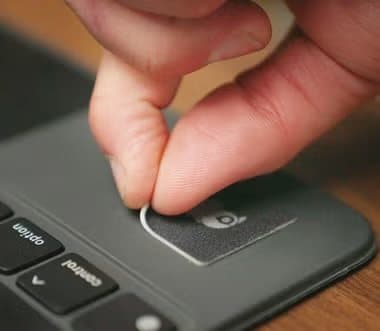
A WaterBear is a small square or rectangle of fine cleaning fabric bonded to a silicone gel back. You stick it to the back of a phone, a camera, a laptop or a glasses case. When a screen or lens is smudged, you peel it off, wipe, and stick it back. When the patch gets dirty or loses grip, you rinse it under water and let it air-dry.
The page describes the cleaning face as a NASA-inspired, nano-carbon blended material that attracts and traps grime, oils and smudges, with an antimicrobial infusion and a silicone adhesive that sticks and peels repeatedly without residue. Like the suction-cup tripod in our Tenikle review, it is a small add-on for people who take a lot of phone photos.
Stick it on
Step 1: Peel a WaterBear off its backing and press it onto the back of your phone, camera, laptop or glasses case.
Peel and wipe
Step 2: When a screen or lens gets smudged, peel the patch off and wipe the glass with the cleaning side.
Stick it back and rinse now and then
Step 3: Press it back in place. When it gets dirty or loses grip, rinse it under water, let it air-dry and it is ready again.
Who Kuvrd is
Kuvrd is a Utah company known for camera lens caps and accessories, which explains its interest in lens cleaning. The WaterBear page credits founder Cary Decker with developing the patches after being frustrated with bulky or messy cleaners.
Why phone lenses need cleaning
Phone cameras sit where fingers grip the phone, so their lenses pick up oils constantly. A smudge causes soft, hazy photos and halos around lights at night. Wiping before shooting is one of the simplest ways to improve phone photos.
The Kickstarter origin
The page says more than 6,000 people backed the Kickstarter campaign. Crowdfunding history gives some reassurance that the product was designed by a small team with real customers, rather than simply rebadged.
What is in a pack
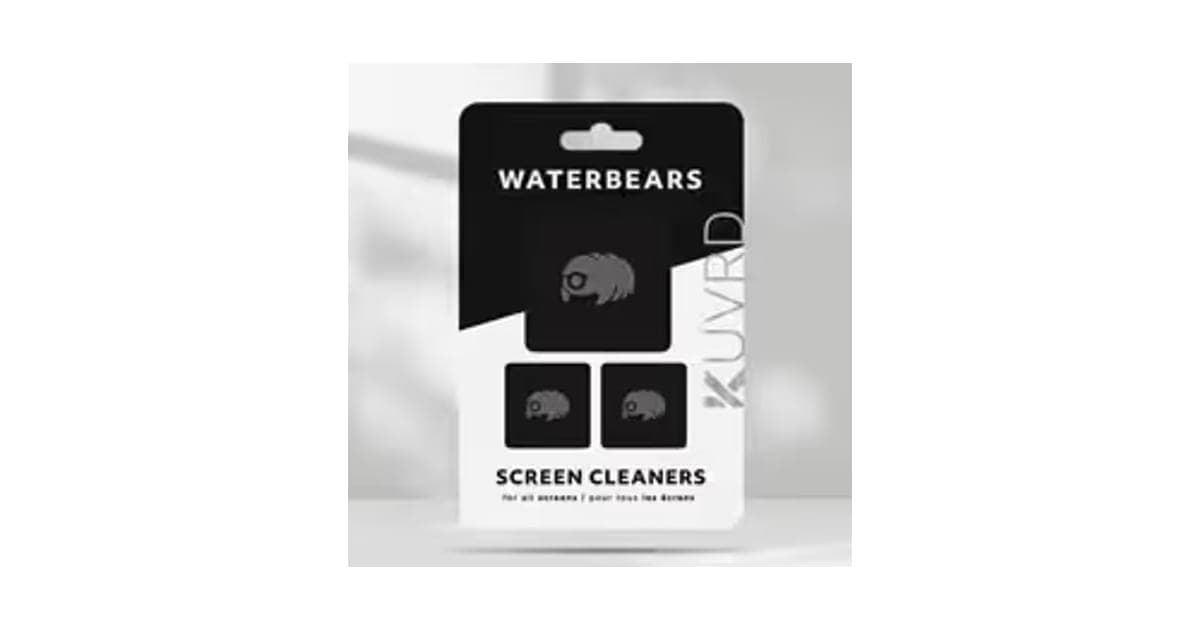
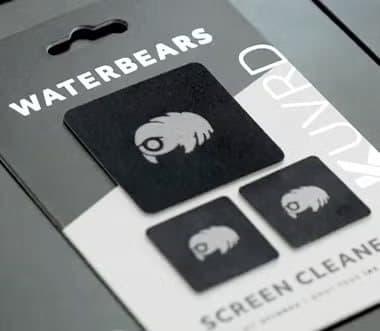
The packaging photo shows one larger and two smaller patches on a card. The page says smaller sizes suit phones, glasses and lenses, and larger ones suit laptops, tablets and monitors. The exact pack contents are not listed in text, so check at checkout.
Sizes
The page offers smaller patches for phones, glasses and lenses, and larger ones for laptops, iPads, monitors and TVs. The Kuvrd store also lists "pads" and a larger "PhatPack", which suggests several sizes in the range.
Design
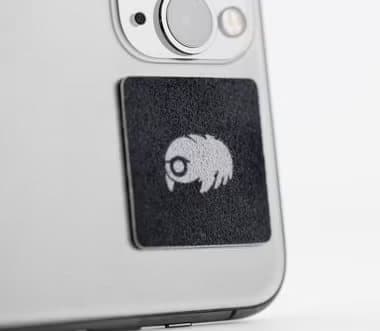
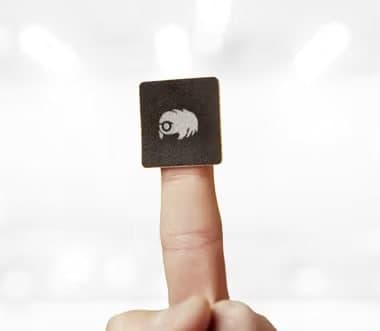
Each patch is black with a small bear logo, the photos show. On a black or dark phone, it is discreet; on a white or light phone, it stands out.
What the photos show
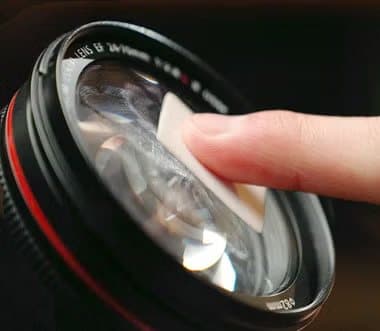
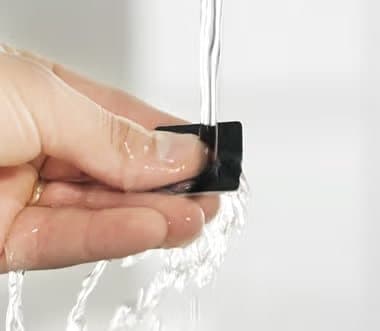
The page shows patches on the backs of phones and laptops, wiping camera lenses and phone screens, being rinsed under a tap, the retail pack and a family photo. They match the product description.
The cleaning face
Fine-fibre cleaning cloths work by lifting oils and dust into tiny gaps between fibres, without liquids. That is how microfibre lens cloths work. The page's "nano-carbon blend" is not explained further.
How well it cleans
Owners quoted on the page say it picks up a lot of grime on the first wipe and needs rinsing after heavy use. That matches how fine cleaning cloths behave: they load up with oil and work best when clean.
Customer feedback
Quotes on the page are positive, with one owner suggesting brighter colours and a friendlier bear design. Another says they have not needed to rinse for grip yet. Comments like these read as genuine, though the page selects which to show.
Comfort in the hand
A thin patch on the back of a phone is barely noticeable when holding it. Some people may feel the edges with their fingers at first; placing it near the camera bump keeps it out of the way.
Removing it for good
If you no longer want a patch on a device, peel it slowly from one corner. Silicone gel usually leaves no residue, according to the page. Any faint mark should wipe off with a dry cloth.
Compared with lens wipes
Single-use lens wipes contain cleaning fluid and clean heavy grime well, but create waste and cost more over time. A washable patch handles everyday smudges without waste.
The gel back
Silicone gel adhesives grip smooth surfaces and can be washed to restore tack, as with reusable gel phone mounts. They work best on smooth glass, metal and plastic, and less well on textured or fabric cases.
Where to stick it
The back of a phone, the side of a laptop palm rest, a camera body or the inside of a glasses case all work. Avoid spots where your fingers rest constantly, which collect oils and wear the patch faster.
Screen protectors and coatings
Phone screens and many protectors have an oil-repellent coating. Soft fabric is gentle on it. Harsh chemicals and abrasive cloths wear the coating faster, making smudges stick more.
Temperature and moisture
Gel adhesives can soften in heat and stiffen in cold. A patch on a phone left in a hot car may shift or pick up more lint. Keep it out of direct sun when possible.
Washing it
Rinsing removes the oils and dust that build up on the cleaning face and the gel. The page says the patch should air-dry before you stick it back on.
How long the stickiness lasts
Gel adhesives pick up lint and oils over time and lose grip. Rinsing removes that film and restores tack, as several customer quotes describe. Eventually, after many cycles, the gel may wear and need replacing.
Thickness
The patches are thin, so a phone with a patch on the back still fits most pockets and many cases. A patch on a phone in a tight case may be awkward; on the case back is easier.
Hygiene
Patches carried on phones pick up skin oils and bacteria like any surface. Rinsing regularly keeps them cleaner. Even with an antimicrobial treatment, they are not a substitute for washing your hands or disinfecting your phone.
Repeat use
The page says you can stick and peel repeatedly without losing stickiness. Customers describe rinsing to restore grip when it fades. Expect to rinse every few weeks with regular use.
Durability of the fabric
Fine cleaning fabrics last a long time with gentle washing. Rubbing them on rough surfaces, or using harsh soaps, can wear the fibres. Treat them like a good lens cloth.
What it does not do
It does not disinfect screens, remove scratches, or replace a lens pen's brush for grit. Wiping a gritty lens with any cloth risks fine scratches, so blow off grit first.
Who it's for
WaterBears suit phone users who constantly wipe smudges off screens and camera lenses, photographers and content creators who need clean lenses on the go, and glasses wearers who lose cloths. They do not suit people wanting to disinfect screens, those with textured or leather cases, or anyone happy with a microfibre cloth in a pocket.
- Phone users who are always wiping smudges off screens and camera lenses
- Photographers and content creators who need clean lenses on the go
- Glasses wearers who keep losing microfibre cloths
Why WaterBear appeals
Phone camera lenses pick up fingerprints constantly, which makes photos hazy. Most people wipe them on a shirt. A patch stuck to the phone gives a proper cleaning surface every time, and customer quotes describe exactly that habit.
Photographers and creators
A professional photographer quoted on the page keeps patches on camera lenses for quick cleans before sessions. A content creator keeps one on a phone for front and back cameras.
People who wear make-up or use lotion
Make-up, sunscreen and hand lotion leave oily smears on screens. A customer who uses lotion describes wiping her laptop and phone often. Oily films may need more passes or an occasional rinse of the patch.
Laptop users
People who use hand lotion or touch their laptop screens leave smudges. A patch stuck beside the keyboard, as the photos show, is handy for a quick wipe.
Tablet users
Tablets used for reading, recipes and video calls pick up fingerprints quickly. A larger patch on the case or cover gives a big enough area for the screen.
Smartwatch owners
Smartwatch screens and sensors get smudged too. A small patch on a phone can clean a watch face as well, as it is the same kind of glass.
Video callers
Laptop webcams are tiny and easy to smudge, making video calls look soft. A quick wipe with a patch before a meeting improves picture quality noticeably.
Glasses wearers
A small patch in a glasses case or on the back of a phone gives a cleaning surface without carrying a separate cloth.
Drivers and commuters
Phone screens used for navigation get smudged and hard to read in sunlight. A patch on the phone back lets you wipe the screen at a stop without searching for a cloth.
Parents
Children's fingers leave smudges on tablets and phones. A patch on the back of a family tablet makes cleaning quick.
Teachers and office workers
Shared screens in classrooms and offices get grubby. A larger patch stuck to a monitor bezel or desk gives everyone a quick way to wipe it.
Students
Students carry laptops, tablets and phones everywhere. A few patches spread across devices cost little and save hunting for a cloth before a presentation.
Gift buyers
Packs make cheap stocking fillers, and a customer describes receiving them as a gift before discovering how useful they are.
Drone and action camera users
Small action cameras and drone lenses pick up dust and fingerprints outdoors. A patch on the camera or controller case keeps a cleaner close at hand.
Outdoor and sports users
Cyclists, runners and hikers who use phones outdoors get sweat and sunscreen on screens. A patch on the phone back is handier than digging out a cloth, though wet patches clean less well.
Gamers and streamers
Monitors and webcams pick up dust and smudges. A large patch on the monitor stand and a small one by the webcam keep both clear for streams and calls.
Travellers
On trips, phones and cameras get more use and more smudges, and cleaning cloths get lost in bags. Patches stuck to each device solve that without extra packing.
Car owners
Car infotainment screens get smudged and are hard to clean while driving. A patch stuck near the screen, out of the airbag zones, lets you wipe it when parked.
Eyewear stores and opticians
Small cleaning patches could be a useful add-on for people collecting new glasses, but opticians often give microfibre cloths free. WaterBears would be a convenience upgrade, not a necessity.
Minimalists
People who dislike stickers or accessories on their devices may not want a patch visible on the back. A cloth kept in a bag avoids that.
Pilots and boaters
Instrument screens and sunglasses on boats and small aircraft collect salt spray and fingerprints. A patch stuck near the controls offers a quick wipe, though salt crystals should be rinsed off first to avoid scratching.
Older users
People who find small cloths fiddly may like a patch that stays in one place. Larger patches are easier to grip for anyone with stiff fingers.
Who should skip it
Skip WaterBears if you want to sanitise screens; use a screen-safe disinfectant wipe instead. Skip them if your phone case is textured or leather, where the gel may not hold. And skip them if a microfibre cloth already lives in your bag.
- Anyone wanting to disinfect screens
- People with textured or leather phone cases that patches may not grip
- Bargain hunters who are happy with an ordinary microfibre cloth
Are WaterBear's claims true?
The basic cleaning and reusable stickiness claims are plausible; the NASA, magnetic and antimicrobial claims are not supported on the page. Fine-fibre patches clean glass well and gel backs can be rinsed to restore tack. But no NASA programme or material is named, "magnetically attracts grime" has no scientific basis for fabric, and no antimicrobial test results are shown.
"Same technology as NASA"
The page says WaterBears use the same technology as NASA and a material used by NASA. It does not name the material or the NASA use. Many products cite NASA loosely. Without details, the claim cannot be checked.
"Space age cleaning power"
The page leans on space imagery, with a shuttle icon and "space age" wording. That does not tell you how it performs. Judge it as a small, reusable cleaning cloth with a sticky back.
Evidence that would help
Independent tests comparing WaterBears with ordinary microfibre cloths on smudge removal, and published antimicrobial test results, would make the claims checkable. The page offers neither.
The honest version
The honest pitch is simple: a small, reusable cleaning cloth with a sticky back so it is always on your device. That is useful enough without the space-age language.
Why NASA claims are common
Products often borrow NASA's name because many materials, from memory foam to scratch-resistant coatings, have links to space research. A vague link tells you little about how well a product cleans.
"Magnetically attracts and traps grime"
Fabric does not attract dirt magnetically. Microfibre can hold a slight static charge and lift dust, which may be what is meant, but "magnetically" is the wrong word.
What cleaning really removes
Dry fabric wiping removes fingerprints, smudges and dust well. It does not dissolve sticky residues like sugar or dried drinks, which need a slightly damp cloth or a screen cleaning spray.
"Antimicrobial infusion"
Some fabrics are treated with antimicrobial agents to slow bacterial growth on the cloth itself. The page shows no test data. Either way, the patch does not disinfect your screen.
What the patch is likely made of
The cleaning face looks like a fine, dense fabric similar to microfibre. Some lens cleaners use carbon-infused cloth for extra oil absorption. The page's "nano-carbon blend" may refer to something like that.
"Will never scratch"
Soft cleaning fabrics are safe on glass and lens coatings. Any cloth can drag grit across a surface and leave marks, so avoid wiping sandy or dusty lenses without blowing them off first.
"Sticks without leaving residue"
Silicone gel adhesives generally peel off cleanly from smooth surfaces. On some coated or matte finishes, they may leave a faint mark that wipes off. Test on an inconspicuous spot first.
"Bacteria-free screens"
The page says WaterBears keep screens free from bacteria. Wiping removes some grime but does not sanitise. The claim goes further than a dry cloth can.
"3-in-1 cleaning"
The page highlights cameras, screens and glasses. A soft cleaning fabric works on all three, so this claim is fair.
"Rated 5 stars with 450+ reviews" and "300,000+ units sold"
The page gives no source for the rating. Kuvrd's Trustpilot page showed 2.8 from only 3 reviews on 5 October 2026, too few to mean much either way. The Kickstarter backing of more than 6,000 people is plausible for a crowdfunded product.
"Designed in America"
The page says WaterBears are designed in Utah. It does not say where they are made. Designed and made are different claims.
"Lifetime warranty"
The warranty replaces defective patches for life, with a shipping fee. Normal wear, such as the gel losing grip after many uses, may not count as a defect. Ask Kuvrd how they treat worn patches.
Reading the reviews
The page shows customer quotes from photographers, content creators and families, all positive. The Kuvrd Trustpilot page has too few reviews to judge. A wider range of independent reviews would help.
"As seen on" logos
The page shows Fox, Gizmodo, NBC and PetaPixel logos. We did not find the specific coverage.
How much do WaterBears cost, and what are the terms?
On 4 October 2026, the offer page listed one pack for $17.95, three for $39.90, five for $59.85 and eight for $79.80, all with free US shipping. Kuvrd's own store listed a single patch at $12.99, a 4-pack at $34.99 and a family pack at $24.99 on 5 October 2026. The lifetime warranty replaces defective patches for $5 shipping in the US.
WaterBear offer prices
| Bundle | Price | Packs | Per pack |
|---|---|---|---|
| 1 pack | $17.95 | 1 | $17.95 |
| Buy 2, get 1 free | $39.90 | 3 | $13.30 |
| Buy 3, get 2 free (most popular) | $59.85 | 5 | $11.97 |
| Buy 4, get 4 free (best deal) | $79.80 | 8 | $9.98 |
Kuvrd store prices
The Kuvrd store, on 5 October 2026, listed patches at $12.99 single, $24.99 for two, $34.99 for four and $69.99 for ten, with pads and a three-in-one family pack at similar prices. Pack definitions differ between the store and the offer page, so compare the number and size of patches, not just the price.
Bundles explained
Bundles add free packs: buy two get one, buy three get two, buy four get four. Eight packs suits a family or several devices each. For one person with a phone and laptop, one or three packs are plenty.
Shipping
All bundles ship free in the US, according to the page. The FAQ says orders ship within 24 to 48 hours and arrive in three to five business days on average.
Warranty shipping
The warranty is lifetime, but each replacement costs $5 to ship in the US. For a pack costing $10 to $18, that fee is a significant share of the value.
Gift packs
The bundles are pitched as gifts. Small, cheap and practical, WaterBears suit stocking fillers and office secret-santa gifts.
Comparing like for like
When comparing prices, check the number of patches, their sizes, and whether a pack includes pads or larger patches. Store and offer page packs are named differently.
The return policy
Returns are accepted within 30 days of receiving the item if it is unused or lightly used and in its original packaging. You email contact@kuvrdcamera.com, print the conversation and include it in the parcel to Kuvrd in Orem, Utah. Items not in original condition receive store credit rather than a refund.
International orders
The warranty replacement fee rises to $10 for international orders. Free shipping on the offer page applies to US deliveries. Buyers abroad should check delivery costs and timing before ordering, and remember that return postage from overseas may cost more than the patches themselves.
Gift returns
Items marked as gifts and shipped directly to the recipient are refunded as a gift credit, according to the policy, rather than to the buyer's card.
Returns timing
The 30 days run from when you receive the item. Decide quickly whether you like them, and keep unused patches on their card.
Store credit for damaged returns
Returns not in original condition, damaged or missing parts receive store credit rather than a refund, according to the policy. That makes keeping packaging important.
Printing the conversation
The return process asks you to print your email conversation and include it in the parcel. That is unusual but simple. Keep a copy for yourself too.
The lifetime warranty
Defective patches are replaced for life. You email photos of the defect and pay $5 shipping in the US or $10 internationally for the replacement.
What to do: keep the original packaging for 30 days, and photograph any defects for warranty claims.
Is it good value?
At about $10 to $18 per pack, WaterBears cost more than a microfibre cloth but little in absolute terms. For people who would actually use them every day, the convenience is worth a few dollars.
Price per patch
If a pack holds three patches, as the photo suggests, the single pack works out at about $6 per patch, and the eight-pack bundle about $3.33. The Kuvrd store's single patch at $12.99 suggests store packs are defined differently, so compare carefully.
Contacting support
Returns and warranty claims go to contact@kuvrdcamera.com. Include your order number, photos of any defect and your shipping address.
Who sells it
Kuvrd LLC, a camera-accessory company in Orem, Utah. The page names founder Cary Decker and says the product began as a Kickstarter project.

WaterBear Screen CleanersScore 5.6/10
Best for: Phone users who are always wiping smudges off screens and camera lenses
$17.95 at KUVRD · Price checked October 4, 2026
Check price at KUVRD (opens KUVRD in a new tab)We may earn a commission if you buy through our links.
Are WaterBears better than a microfibre cloth or a lens pen?
For convenience, yes; for cleaning quality, they are about the same as a good microfibre cloth. A cloth costs less and cleans a large area, but gets lost or left at home. A lens pen has a brush for grit and a carbon tip for smudges, which is better for camera lenses. WaterBears win by always being on the device.
| WaterBear | Microfibre cloth | Lens pen | Screen wipes | |
|---|---|---|---|---|
| Always on device | Yes | No | No | No |
| Reusable | Yes, washable | Yes, washable | Tip wears out | No |
| Removes grit safely | No brush | No brush | Yes, brush | n/a |
| Disinfects | No | No | No | Some |
WaterBear vs a microfibre cloth
Cloths are cheap and come free with many glasses and phones. They clean as well, but people rarely carry them. If you would carry one, you may not need WaterBears.
Where WaterBear wins
It is always with you. For phone camera lenses, which get smudged constantly, that convenience matters more than any small difference in cleaning quality.
Where it loses
On price per square inch, a microfibre cloth wins. For gritty lenses, a lens pen's brush is safer.
WaterBear vs a lens pen
Photographers often use lens pens, with a retractable brush to remove dust before wiping with a carbon tip. For expensive camera lenses, the brush step matters. A WaterBear is a quick-wipe tool.
WaterBear vs anti-smudge coatings
Oleophobic screen coatings and some protectors reduce how much oil sticks to glass. They lower how often you need to wipe, but do not remove the need entirely.
Budget alternative
A pack of microfibre cloths cut into small squares and kept in a phone case pocket gives a similar result for very little money, without the sticky back.
WaterBear vs other stick-on cleaners
Stick-on screen cleaners from other brands exist, with similar gel backs and fabric faces. Compare size, number of patches, price and warranty. WaterBear's lifetime replacement is a point in its favour.
WaterBear vs a lens blower
A rubber air blower removes dust from camera lenses without touching them. Photographers use one first, then a cloth or patch for smudges.
WaterBear vs a phone case with a cloth
Some phone cases include a small pocket or built-in cloth. They do the same job if you are buying a new case anyway.
Choose WaterBear if
You want a cleaner permanently attached to your phone or camera, value a lifetime replacement warranty, and do not mind paying a little more than for a cloth. Choose a microfibre cloth if you will carry one anyway.
WaterBear vs screen cleaning kits
Spray-and-cloth kits handle heavy grime on TVs and monitors better, using a mild cleaning liquid. Keep one at home and patches on devices for daily wipes.
WaterBear vs a lens cap
Kuvrd also sells lens caps. For camera lenses, keeping the lens covered prevents most smudges in the first place, with a patch for the rest.
WaterBear vs your T-shirt
Many people wipe lenses on clothing. Cotton can carry dust and grit and leave lint. A proper cleaning cloth or patch is gentler and cleaner.
WaterBear vs screen wipes
Pre-moistened screen wipes remove heavy grime and some disinfect, but are single use. WaterBears are reusable and dry.
Other phone accessories we have reviewed
Our Snap-N-Charge review covers a stick-on phone battery, and our Statik State power bank review looks at a power bank with built-in cables.
WaterBear Screen CleanersScore 5.6/10
Why people buy it: Sticks to the back of a phone, camera or laptop, so a cleaner is always to hand
$17.95 at KUVRD · Price checked October 4, 2026
Check price at KUVRD (opens KUVRD in a new tab)We may earn a commission if you buy through our links.
Is WaterBear legit, and what should you check before buying?
Yes. WaterBear is a real product from Kuvrd, a Utah camera-accessory company with its own store and a Kickstarter history. Before buying, compare pack contents and prices with the Kuvrd store, check your phone case is smooth enough for the gel, and keep the packaging in case you return it.
Compare pack contents
What to do: check how many patches, and what sizes, each option includes before comparing prices between the offer page and the Kuvrd store.
Check your case
The gel sticks best to smooth surfaces. Textured silicone, leather and fabric cases may not hold it.
Do not rely on it to sanitise
Use screen-safe disinfectant wipes if you want to kill germs on your phone.
How to buy WaterBear the smart way
- Compare with the Kuvrd store, then open the WaterBear order page (opens KUVRD in a new tab).
- Pick a bundle based on how many devices you want to cover.
- Confirm the pack contents.
- Keep the packaging for 30 days.
- Photograph any defects for warranty claims.
How did we score WaterBear?
WaterBear scores 5.6 out of 10: claim accuracy 0.8, build durability 1.2, price competitiveness 1.2, usability 1.6 and owner satisfaction 0.8, each out of 2. It earns usability points for a simple, always-there cleaner that washes clean. Points come off for NASA, magnetic and antimicrobial claims without evidence, prices above the brand's own store for a single pack, and warranty shipping fees.
How the score breaks down
We use the five criteria on our how we test page, each out of 2.
| Criterion | Score | Why |
|---|---|---|
| Claim accuracy | 0.8 / 2 | Cleaning claims fair; NASA, magnetic, antimicrobial oversold |
| Build durability | 1.2 / 2 | Washable, reusable; lifetime warranty |
| Price competitiveness | 1.2 / 2 | Bundles reasonable; single pack dearer than store |
| Usability | 1.6 / 2 | Peel, wipe, stick back |
| Owner satisfaction | 0.8 / 2 | Positive quotes; tiny Trustpilot sample |
| Total | 5.6 / 10 |
What we did, and did not, do
Nobody on our team has used WaterBears. We read the offer page and return policy on 4 October 2026, and the Kuvrd store and Trustpilot on 5 October 2026. Our cellphone accessories hub lists other phone accessories we have reviewed, including the CordBrick review. For glasses rather than phone screens, our Peeps review covers a carbon lens cleaner.
How to use WaterBears for the best results
Stick a small patch on the back of your phone and camera, wipe lenses and screens gently in small circles, blow off any grit first, and rinse the patch when it looks dirty or loses grip. Let it air-dry fully before sticking it back, and keep spares on laptops and glasses cases.
- Clean the surface before sticking a patch on.
- Stick it where your fingers will not rub it constantly.
- Blow off grit before wiping lenses.
- Wipe gently in small circles.
- Stick it back straight away.
- Rinse it when dirty or less sticky.
- Air-dry fully before reusing.
Keep one in the car and one at your desk
Spreading patches across the places you use screens most, such as the car, desk and camera bag, means you never have to move one between devices. That is the main reason bundles make sense for heavy screen users who own several devices at once and use them every single day at home and at work.
Dry the patch fully
Sticking a damp patch back on a phone traps moisture against the device and reduces grip. Leave it on a clean, dry surface, cleaning side up, until it is completely dry, which usually takes an hour or so at room temperature.
Wipe in one direction for lenses
On camera lenses, start at the centre and move outward in a spiral, or wipe gently in one direction. That moves oil off the lens rather than spreading it around.
Swap positions
If a patch on the phone back keeps picking up pocket lint, move it inside the case, between the phone and case back, and take it out when needed.
Clean the device back first
Wipe the spot where the patch will go with a dry cloth before sticking it on. Dust and oil underneath weaken the grip.
Store spares
Keep spare patches on their original backing card, so the gel stays clean and they are easy to find when one wears out.
Lens coatings
Camera and glasses lenses have delicate coatings. Wipe lightly, without pressing hard, and never use household glass cleaner on them.
Glasses cleaning
For glasses, rinse lenses under water first if they are dusty or gritty, then dry and polish with the patch. That avoids scratching coatings.
Kids and patches
Small patches could be a choking risk for young children if peeled off devices. Keep spares out of reach.
Replace worn patches
If the cleaning face becomes frayed, stiff or permanently stained, or the gel no longer sticks after rinsing, it is time for a new patch. Warranty replacements cover defects.
Clean hands first
Wiping with oily fingers on the patch transfers oil back to the screen. Hold the patch by its edges and use the clean face.
Rinse with plain water
Use plain water to rinse patches. Soap can leave residue on the gel and reduce its grip, unless the maker says otherwise.
Phone cameras
Wipe the rear camera lenses before taking photos, especially in low light, where smudges cause haze and flare.
Wireless charging and MagSafe
A patch on the back of a phone may sit where a wireless charger or magnetic accessory goes. Place it to one side so it does not interfere.
Other questions about stick-on screen cleaners
Can I use them on TVs? Larger patches suit monitors and TVs, according to the page; wipe gently.
How long do they last? The page says they are long-lasting and washable; the warranty replaces defective ones.
Can I put them in the washing machine? The page says to rinse under water and air-dry.
WaterBear Screen CleanersScore 5.6/10
Before you buy: Check the final price, shipping and return terms at checkout.
$17.95 at KUVRD · Price checked October 4, 2026
Check price at KUVRD (opens KUVRD in a new tab)We may earn a commission if you buy through our links.
Frequently asked questions
Do WaterBears work?
They are small microfibre-style cleaning patches, which are effective at wiping smudges and fingerprints off glass. Their main advantage is convenience: they stay stuck to your device, so a cleaner is always there.
How much do WaterBears cost?
On 4 October 2026, the offer page listed one pack for $17.95, three for $39.90, five for $59.85 and eight for $79.80, all with free US shipping. KUVRD's own store listed single patches from $12.99 and a 4-pack at $34.99 on 5 October 2026.
Are WaterBears really NASA technology?
The page says the material is NASA-inspired and used by NASA, without naming the material or any NASA programme. Microfibre and similar fine-fibre cloths are widely used for optics; treat the NASA link as marketing.
Do WaterBears kill bacteria?
The page mentions an antimicrobial infusion that safeguards against bacteria growth on the patch, but shows no test data. A cleaning patch is not a disinfectant and will not sanitise your screen.
How do you clean a WaterBear?
Rinse it under water and let it air-dry before sticking it back. The maker says rinsing does not reduce the gel's stickiness or the patch's cleaning quality.
What is the WaterBear return policy?
Returns are accepted within 30 days of receipt for unused or lightly used items in original packaging. The lifetime warranty replaces defective patches, but you pay $5 shipping in the US or $10 internationally.
Who makes WaterBear?
KUVRD LLC of Orem, Utah, a camera accessory company. The page says founder Cary Decker launched WaterBears after a Kickstarter backed by more than 6,000 people.
We may earn a commission if you buy through our links.
Prices accurate as of October 4, 2026. Check the seller's checkout for current pricing, promotions and terms.
What we checked: No hands-on use. Claims, photos, prices and the return and warranty policy from the WaterBear offer page our link opens on 2026-10-04. The KUVRD store listings and Trustpilot were checked on 2026-10-05.

About the author
Ethan Walker, Hardware & Gadget Tester
Ethan Walker covers hardware for Top10Gadgets: audio, computing, phone accessories, chargers, tools, car gadgets and sports equipment. Ethan believes a product should be judged on what happens when people actually use it…
- Headphones and speakers
- Chargers and phone accessories
- Tools and emergency gear
- Car accessories
- Durability and real-world performance
Writing for Top10Gadgets since 2026Full profile