Smart Home / Universal remotes
RemoteX Pro Review: A $67 Air Mouse Remote That Looks Like the Wechip W1
A two-sided remote with a motion-controlled pointer and a mini keyboard, linked by a USB dongle. Handy for Android boxes and PCs, but 'compatible with any smart device' is not true.

By Alex Carter, Senior Tech Reviewer at Top10Gadgets
Updated 12 min readHow we test
Quick answer
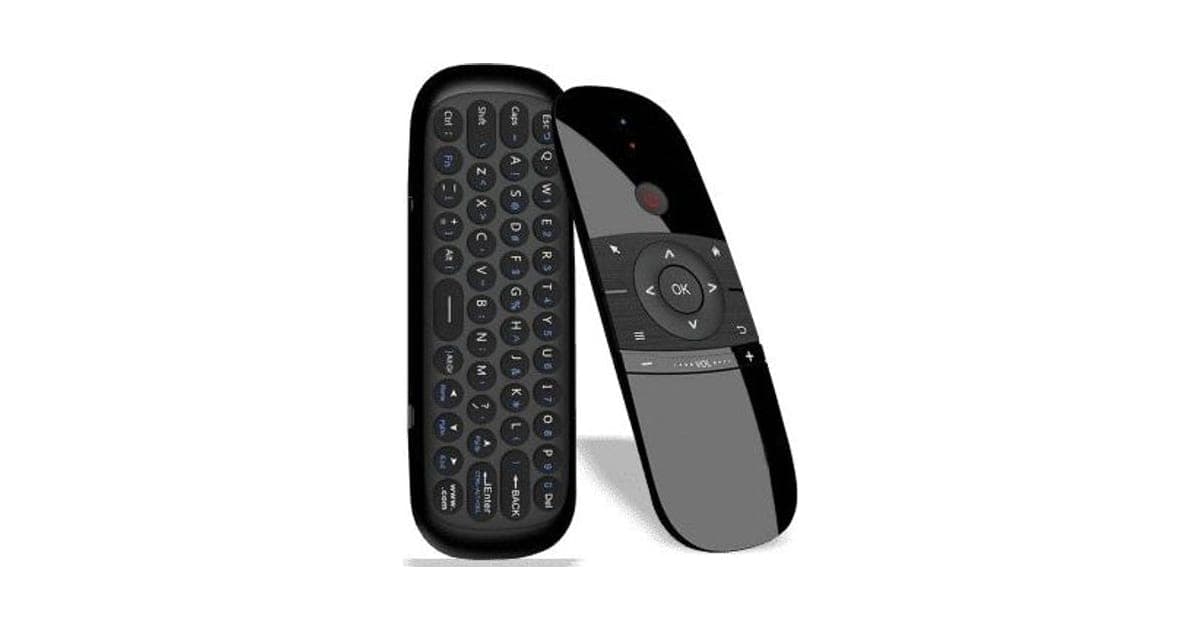
Useful for an Android box or a TV-connected PC, wrong for most smart TVs. RemoteX Pro is a two-sided remote, a motion-controlled pointer on one side and a mini keyboard on the other, that talks to a USB dongle.
Score 3.3/10$67.00 at G Com Pte Ltd
Check price at G Com Pte Ltd (opens G Com Pte Ltd in a new tab)We may earn a commission if you buy through our links.
- Best for
- Android TV box owners who find app navigation with a basic remote clumsy
- Not for
- Owners of Roku, Fire TV Stick, Apple TV or Chromecast with no spare USB port
$67.00 at G Com Pte Ltd
Check price at G Com Pte Ltd (opens G Com Pte Ltd in a new tab)We may earn a commission if you buy through our links.
On this page · 13 sections
- 01Our verdict
- 02The short version
- 03Pros & cons
- 04How it works
- 05Who it's for
- 06Does RemoteX Pro really work with any smart device?
- 07How much does RemoteX Pro cost, and are the add-ons needed?
- 08Is RemoteX Pro better than buying a Wechip W1 or using your TV's app?
- 09Is RemoteX Pro legit, and what should you check before buying?
- 10How did we score RemoteX Pro?
- 11How to use RemoteX Pro on an Android box or PC
- 12What else do people ask about air mouse remotes?
- 13Frequently asked questions
Our verdict
Useful for an Android box or a TV-connected PC, wrong for most smart TVs. RemoteX Pro is a two-sided remote, a motion-controlled pointer on one side and a mini keyboard on the other, that talks to a USB dongle. That makes browsers and apps much easier on devices with a USB port. But "compatible with any smart device" is not true: retail listings for the matching Wechip W1 say it does not work with most big-brand smart TVs, and the rechargeable battery and IR learning cost extra. RemoteX Pro scores 3.3 out of 10, held back by compatibility and price.
The short version
- What it is: an air mouse remote with a full-layout keyboard and a USB receiver, apparently the Wechip W1.
- Price: $67 for one on 6 October 2026, with a five-pack for $196 flagged as the best seller.
- Best trait: easy pointing and typing on Android boxes and PCs.
- Biggest drawback: limited smart TV compatibility, and a price several times the W1's.
- Our score: 3.3 out of 10.
Pros & cons
Air mouse remotes are genuinely handy on the right device. The pros reflect that. The cons are about compatibility, paid extras and price.
What we like
- Motion-controlled pointer makes browsers and apps on Android boxes and PCs easier to use
- A full mini keyboard on the back for searches and logins
- 2.4 GHz USB dongle means no pairing hassles on supported devices
- Auto sleep to save battery, per the offer page
- The seller names a registered company with an address, email and phone number
What we don't
- Needs a USB port: retail listings for the Wechip W1 say it is not compatible with most Samsung, Sony, LG, TCL and Roku smart TVs
- The rechargeable battery, shown with a USB cable in the box photo, is a $7 add-on
- IR learning to control a TV's power and volume is a $12 add-on
- 'Best gadget technology award for 2021' names no award
- At $67, it costs several times the Wechip W1 it resembles
- Return postage to an overseas seller is yours to pay
Sold by G Com Pte Ltd
RemoteX Pro$67.00
How it works
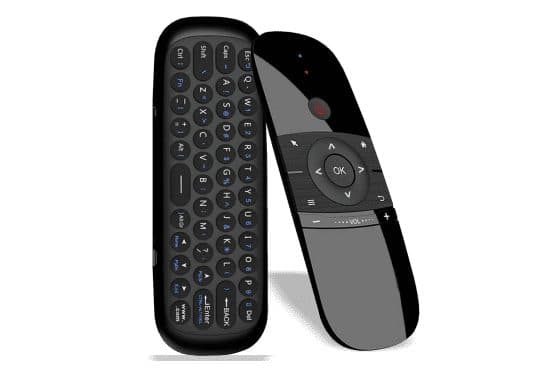
RemoteX Pro looks like a slim TV remote with a D-pad and power button on the front and a 45-key keyboard on the back. A motion sensor inside turns wrist movements into an on-screen pointer. It connects through a tiny 2.4 GHz USB dongle, which the device treats as a standard keyboard and mouse. That is why it needs a USB port and a device that accepts USB input.
Plug in the dongle
Step 1: Insert the small USB receiver into a free USB port on your Android box, PC, laptop or projector.
Point and click
Step 2: Wave the remote to move an on-screen pointer, and use the OK button to click and the arrows to navigate.
Flip it to type
Step 3: Turn the remote over to use the keyboard for searches, logins and messages.
The page title calls it an "all-in-one remote controller", a "full remote controller with keyboard", an "air mouse remote controller", a "smart TV remote controller", an "Android box remote controller" and a "universal remote controller". The six bullets promise compatibility "with any smart device", use with smart TVs, projectors, Android boxes and PCs, a full-layout keyboard, adjustable pointer speed, smart battery saving and a "best gadget technology award for 2021".
The Wechip W1
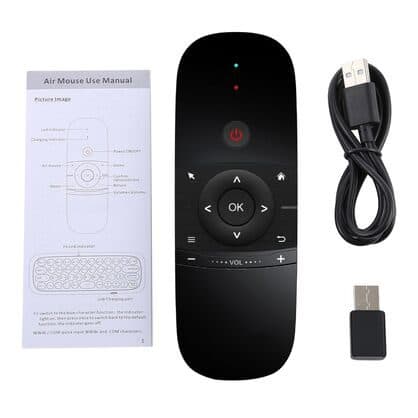
The remote, user manual, USB cable and dongle in the photos match the Wechip W1 air mouse, a widely sold model. We could not confirm who makes this one.
What the page leaves out
There is no list of tested devices, battery type, run time or explanation of the "universal" claim.
Who it's for
RemoteX Pro suits Android TV box owners, people running a PC or laptop on the TV, and projector users with a USB media player. It is not for Roku, Fire TV Stick, Apple TV or Chromecast owners without a spare USB port, or most big-brand smart TVs. Our TVShareMax review covers a screen-mirroring dongle from the same checkout.
- Android TV box owners who find app navigation with a basic remote clumsy
- People who run a PC or laptop on the TV and want a sofa mouse and keyboard
- Projector users with a USB-connected media player
Android TV box owners
Pointing and typing make browsers and app logins far less fiddly than a D-pad.
Home theatre PCs
A sofa keyboard and mouse in one is handy for a PC on the TV.
Projector setups
Media players with USB ports work well with air mice.
Who should skip it
Skip RemoteX Pro if your streaming device has no USB port, if you own most Samsung, Sony, LG or TCL smart TVs, or if you want one remote to replace every other remote.
- Owners of Roku, Fire TV Stick, Apple TV or Chromecast with no spare USB port
- Most Samsung, Sony, LG and TCL smart TV owners, per retail listings for the same remote
- Anyone wanting one remote to replace every other remote
Does RemoteX Pro really work with any smart device?
No. It needs a USB port that accepts keyboards and mice. A Newegg listing for the Wechip W1 states it is not compatible with most Samsung, Sony, LG, TCL and Roku smart TVs, and supports Android TV boxes, PCs and projectors. Streaming sticks without USB ports cannot use the dongle at all.
What the retail listing says
The Newegg listing for the Wechip W1 describes 2.4 GHz wireless with a USB receiver, a 45-key keyboard, a four-axis motion sensor and auto sleep, and lists the TV brands it does not support.
What this means for you: check your device has a USB port and accepts USB keyboards before ordering.
"Universal"
Universal remotes usually use infrared to control many TVs and boxes. RemoteX Pro's universal side depends on the $12 IR learning add-on, which copies buttons from an existing remote.
"Best gadget technology award for 2021"
No award body is named. Treat it as marketing.
Range
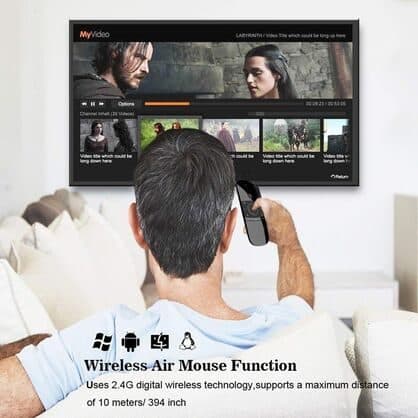
The add-on image claims 10 metres, typical for 2.4 GHz devices in open rooms.
How much does RemoteX Pro cost, and are the add-ons needed?
On 6 October 2026, one RemoteX Pro cost $67, with the five-pack at $196 flagged as the best seller. The checkout offered a rechargeable battery for $7, infrared learning for $12, a USB car adapter for $4 and a 3-year warranty for $9. The Wechip W1 has been listed for about $18 to $22 at large retailers.
RemoteX Pro price and bundles
| Package | Total | Per remote |
|---|---|---|
| 1 RemoteX Pro | $67 | $67.00 |
| 2 RemoteX Pro | $97 | $48.50 |
| 3 (buy 2, get 1 free) | $134 | $44.67 |
| 4 RemoteX Pro | $169 | $42.25 |
| 5 (buy 3, get 2 free), best seller | $196 | $39.20 |
Prices are in US dollars as listed on 6 October 2026. You can check today's packages on the RemoteX Pro order page (opens G Com Pte Ltd in a new tab).
Rechargeable battery
For $7, a battery so you "never worry anymore about disposable batteries". The image shows the remote with a manual, a USB charging cable and the dongle, which suggests charging is built in. Ask before adding it.
Infrared learning
For $12, "smart replication of your current remote" to assign TV functions such as power and volume. The image shows a man using the remote on a sofa with a 10-metre range claim.
Car adapter and warranty
A $4 USB car adapter has no use with a TV remote; skip it. The 3-year warranty costs $9.
Who sells it
The order page names G Com Pte Ltd at 137 Market Street in Singapore, with the email support@g63com.com and a phone number. The footer gives the country as Hong Kong. The page code says charges appear on your card statement as drone720x.com.

RemoteX ProScore 3.3/10
Best for: Android TV box owners who find app navigation with a basic remote clumsy
$67.00 at G Com Pte Ltd · Price checked October 6, 2026
Check price at G Com Pte Ltd (opens G Com Pte Ltd in a new tab)We may earn a commission if you buy through our links.
Is RemoteX Pro better than buying a Wechip W1 or using your TV's app?
No. If it is the Wechip W1, buying it under its own name costs a fraction of $67. For smart TVs, the manufacturer's phone app usually offers a keyboard and touchpad for free. Logitech's wireless keyboards with touchpads suit PCs on TVs better.
| Option | Works with smart TVs | Keyboard | Pointer | Price |
|---|---|---|---|---|
| RemoteX Pro | Limited | Yes | Air mouse | $67 |
| Wechip W1 | Limited | Yes | Air mouse | About $18 to $22 listed |
| TV maker's phone app | Yes, own brand | On phone | Touchpad | Free |
| Wireless keyboard with touchpad | PCs and boxes | Full size | Touchpad | Varies |
RemoteX Pro vs Wechip W1
Same design and features, much lower price. That is where a rival wins.
RemoteX Pro vs a TV app
Most smart TV and streaming apps include a phone keyboard, which works without any extra hardware.
Other smart home gadgets we have reviewed
Our HomeNETIX review covers a network product, our HomePolice24 review a home security camera, and our BrightTouch Max review a touch lamp.
If you have an Android box or PC on your TV, you can see today's bundles on the RemoteX Pro offer page (opens G Com Pte Ltd in a new tab).
RemoteX ProScore 3.3/10
Why people buy it: Motion-controlled pointer makes browsers and apps on Android boxes and PCs easier to use
$67.00 at G Com Pte Ltd · Price checked October 6, 2026
Check price at G Com Pte Ltd (opens G Com Pte Ltd in a new tab)We may earn a commission if you buy through our links.
Is RemoteX Pro legit, and what should you check before buying?
RemoteX Pro is a real product from a named seller, and a remote should arrive if you order. Before buying, check your device has a USB port that accepts keyboards, ask whether charging is built in, switch from the five-pack and note the card statement name.
Check compatibility
What to do: plug any USB keyboard or mouse into your TV or box. If it works, an air mouse likely will.
Ask about the battery
What to do: email support@g63com.com and ask whether the standard remote is rechargeable and what IR learning covers. Keep the reply.
Check the selected bundle
The five-pack for $196 is flagged as the best seller in the page code. What to do: change the order to one remote.
Card statement name and memberships
The charge appears as drone720x.com, a name unrelated to the product. Pages on this checkout have also carried text for a "Gadget Discount Club" membership that is free for 30 days and then billed. What to do: read every checkbox and post-payment page.
Refunds and returns
The page code offers a 30-day guarantee for a full refund or replacement, less shipping and handling. The terms we recorded on 4 October 2026 focus on defective goods, which can be returned within two years once you have a returns number, with return postage at your cost. An incompatible remote may not count as defective.
How to buy RemoteX Pro the smart way
- Test a USB keyboard on your device.
- Open the RemoteX Pro order page (opens G Com Pte Ltd in a new tab) and select your country.
- Change the five-pack to one remote.
- Add IR learning only if you want TV power and volume; skip the car adapter.
- Note the card statement name, drone720x.com.
How did we score RemoteX Pro?
RemoteX Pro scores 3.3 out of 10: claim accuracy 0.4, build durability 0.9, price competitiveness 0.3, usability 1.3 and owner satisfaction 0.4, each out of 2. The air mouse and keyboard work well on the right devices. The score falls on "compatible with any smart device" and "universal" claims, an unnamed award, battery and IR learning sold extra, and a price several times the Wechip W1's.
How the score breaks down
We use the five criteria on our how we test page, each out of 2.
| Criterion | Score | Why |
|---|---|---|
| Claim accuracy | 0.4 / 2 | "Any smart device" and award claims |
| Build durability | 0.9 / 2 | Simple plastic remote |
| Price competitiveness | 0.3 / 2 | Several times the W1 |
| Usability | 1.3 / 2 | Pointer and keyboard work well where supported |
| Owner satisfaction | 0.4 / 2 | No independent ratings for this listing |
| Total | 3.3 / 10 |
What owners say
We found no Trustpilot profile for the gadgetxaura.com store and no retailer reviews for RemoteX Pro by that name. Owners of similar W1-style air mice on large retail sites tend to like them on Android boxes and PCs, and complain that they do not work with their smart TV, the pointer drifts, keys are small and the dongle is easy to lose.
What we did, and did not, do
Nobody on our team has used RemoteX Pro. We read the offer page our link opens and its page code on 6 October 2026, along with Wechip W1 retail listings and the pages that rank for RemoteX Pro. The refund and returns terms are as we recorded them from the site's terms page on 4 October 2026.
How to use RemoteX Pro on an Android box or PC
Plug the dongle into a USB port, wait a few seconds, then wave the remote to wake the pointer and adjust its speed if it feels too fast on a big screen. Flip it over to type, keep the dongle in the remote's storage slot when not in use, and charge or replace batteries before they run flat.
- Plug in the dongle. Use a rear or side USB port.
- Wake the remote. Press any button.
- Set pointer speed. Slower for large TVs.
- Use OK to click. Back to return.
- Flip to type. Keyboard on the back.
- Store the dongle safely. It is tiny.
- Charge regularly. Or keep spare batteries.
If the pointer drifts
Leave the remote flat for a few seconds to recalibrate, or check the manual's reset steps.
If it will not connect
Try another USB port and keep the remote within a few metres while it pairs.
RemoteX ProScore 3.3/10
Before you buy: Check the final price, shipping and return terms at checkout.
$67.00 at G Com Pte Ltd · Price checked October 6, 2026
Check price at G Com Pte Ltd (opens G Com Pte Ltd in a new tab)We may earn a commission if you buy through our links.
What else do people ask about air mouse remotes?
Most questions are about voice search, gaming and Fire TV Sticks. Some air mice have microphones, they are poor for gaming, and Fire TV Sticks need an OTG adapter to accept USB devices. Browse our smart home reviews for other options.
Does it have voice search?
The page does not mention a microphone.
Is it good for gaming?
Not really. Motion pointers are imprecise for games.
Can I use it with a Fire TV Stick?
Only with a USB OTG adapter, and results vary.
Does it work with Windows and macOS?
Yes, as a USB keyboard and mouse, in most cases.
Frequently asked questions
Will RemoteX Pro work with my smart TV?
Probably not fully. It uses a USB receiver, so the device must have a USB port that accepts keyboards and mice. A Newegg listing for the matching Wechip W1 says it is not compatible with most Samsung, Sony, LG, TCL and Roku smart TVs. It suits Android boxes and PCs.
Is RemoteX Pro a Wechip W1?
It matches the Wechip W1 air mouse in design and the box contents shown. We cannot confirm the maker. The W1 has been listed for about $18 to $22 at large retailers.
How much does RemoteX Pro cost?
On 6 October 2026, the offer page listed one RemoteX Pro for $67, two for $97, three (two plus one free) for $134, four for $169 and five (three plus two free) for $196, with the five-pack flagged as the best seller. A rechargeable battery cost $7, IR learning $12 and a 3-year warranty $9.
Is the battery rechargeable?
The checkout sells a rechargeable battery as a $7 add-on, yet the box photo shows a USB charging cable. Ask the seller whether the standard remote is rechargeable or uses disposable batteries.
Can it turn my TV on and off?
Only with infrared learning, a $12 add-on that copies buttons from your TV remote. The USB dongle cannot control a TV's power by itself.
What is the range?
An add-on image claims up to 10 metres using 2.4 GHz wireless. Walls and other wireless devices can shorten it.
Is RemoteX Pro legit?
It is a real product sold by G Com Pte Ltd, which lists a Singapore address, email and phone number. The concerns are the 'any smart device' claim, battery and IR learning sold extra, an unnamed award, the price and return postage at your cost.
We may earn a commission if you buy through our links.
Prices accurate as of October 6, 2026. Check the seller's checkout for current pricing, promotions and terms.
What we checked: No hands-on use. Claims, product title, feature bullets, photos, US dollar prices, bundles, add-ons and their images, warranty price, seller details and card statement name from the RemoteX Pro offer page our link opens (gadgetxaura.com) and the data in the page's own code on 2026-10-06. The 30-day guarantee text was read in the same page code that day; the fuller refund and returns terms are as recorded from the site's terms page on 2026-10-04. Newegg's and Walmart's Wechip W1 listings and the top-ranking RemoteX Pro pages were read on 2026-10-06.

About the author
Alex Carter, Senior Tech Reviewer
Alex Carter is the senior tech reviewer at Top10Gadgets, covering the everyday gadgets, home and kitchen devices, smart home products and accessories most people actually buy. Alex judges a product the way a normal buyer…
- Everyday gadgets and accessories
- Smart home devices
- Home and kitchen gadgets
- Value for money
- Long-term reliability
Writing for Top10Gadgets since 2026Full profile